
CASpringAnimation的使用
CASpringAnimation的使用

效果
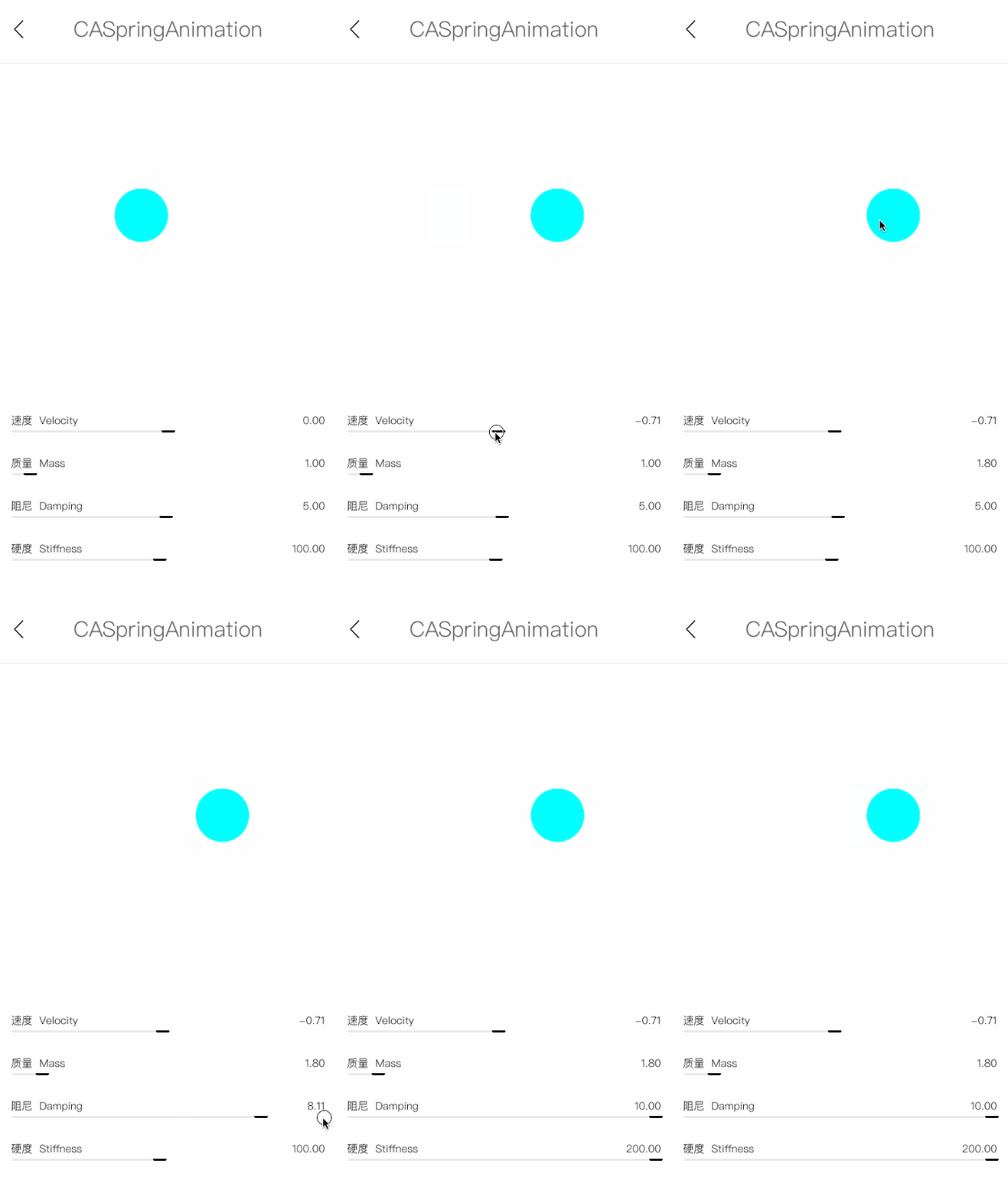
源码
https://github.com/YouXianMing/Animations
//

//  CASpringAnimationController.m

//  Animations

//

//  Created by YouXianMing on 16/1/19.

//  Copyright © 2016年 YouXianMing. All rights reserved.

//

#import "CASpringAnimationController.h"

#import "RangeValueView.h"

#import "WxHxD.h"

#import "UIView+SetRect.h"

@interface CASpringAnimationController ()

@property (nonatomic, strong) UIButton       *showView;

@property (nonatomic, strong) RangeValueView *stiffnessView;

@property (nonatomic, strong) RangeValueView *dampingView;

@property (nonatomic, strong) RangeValueView *massView;

@property (nonatomic, strong) RangeValueView *initialVelocityView;

@end

@implementation CASpringAnimationController

- (void)setup {

    [super setup];

    [self initRangeViews];

    [self initButton];

}

- (void)initButton {

    CGFloat gap = Height -  - * - ;

    CGFloat width                    = .f;

    self.showView                    = [[UIButton alloc] initWithFrame:CGRectMake(, , width, width)];

    self.showView.center             = CGPointMake(self.contentView.middleX,  + gap / .f);

    self.showView.backgroundColor    = [UIColor cyanColor];

    self.showView.layer.cornerRadius = width / .f;

    self.showView.x                  = Width / .f - ;

    [self.showView addTarget:self action:@selector(doAnimation) forControlEvents:UIControlEventTouchUpInside];

    [self.contentView addSubview:self.showView];

}

- (void)doAnimation {

    CASpringAnimation *springAnimation = [CASpringAnimation animationWithKeyPath:@"position.x"];

    springAnimation.stiffness          = self.stiffnessView.currentValue;

    springAnimation.mass               = self.massView.currentValue;

    springAnimation.damping            = self.dampingView.currentValue;

    springAnimation.initialVelocity    = self.initialVelocityView.currentValue;

    springAnimation.duration           = springAnimation.settlingDuration;

    springAnimation.fromValue    = @(Width / .f - );

    springAnimation.toValue      = @(Width / .f + );

    self.showView.layer.position = CGPointMake(Width / .f + , self.showView.layer.position.y);

    [self.showView.layer addAnimation:springAnimation forKey:nil];

}

- (void)initRangeViews {

    self.stiffnessView = [RangeValueView rangeValueViewWithFrame:CGRectMake(, Height - , Width - , )

                                                            name:@"硬度  Stiffness"

                                                        minValue:.f

                                                        maxValue:.f

                                                    defaultValue:.f];

    [self.contentView addSubview:self.stiffnessView];

    self.dampingView = [RangeValueView rangeValueViewWithFrame:CGRectMake(, Height -  - , Width - , )

                                                          name:@"阻尼  Damping"

                                                      minValue:0.1f

                                                      maxValue:.f

                                                  defaultValue:.f];

    [self.contentView addSubview:self.dampingView];

    self.massView = [RangeValueView rangeValueViewWithFrame:CGRectMake(, Height -  - *, Width - , )

                                                       name:@"质量  Mass"

                                                   minValue:0.1

                                                   maxValue:.f

                                               defaultValue:.f];

    [self.contentView addSubview:self.massView];

    self.initialVelocityView = [RangeValueView rangeValueViewWithFrame:CGRectMake(, Height -  - *, Width - , )

                                                                  name:@"速度  Velocity"

                                                              minValue:-.f

                                                              maxValue:.f

                                                          defaultValue:.f];

    [self.contentView addSubview:self.initialVelocityView];

}

@end
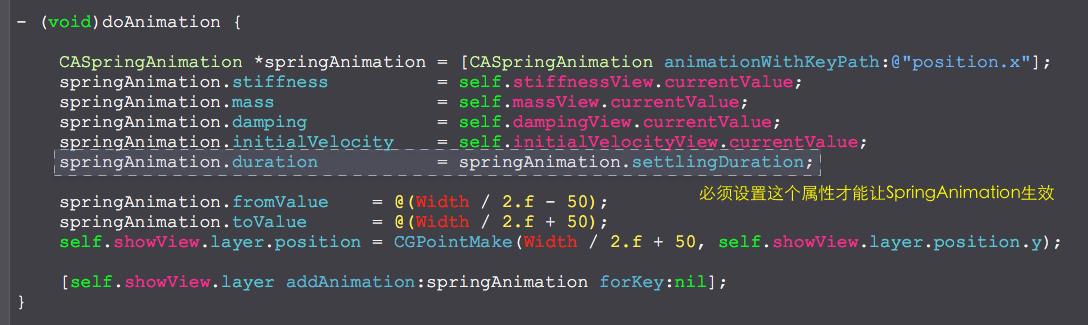
细节
CASpringAnimation的使用的更多相关文章
- CASpringAnimation
iOS9新出现的 /** Subclass for mass-spring animations. */ @interface CASpringAnimation : CABasicAnimation ...
- iOS9 CASpringAnimation 弹簧动画详解
http://blog.csdn.net/zhao18933/article/details/47110469 1. CASpringAnimation iOS9才引入的动画类,它继承于CABaseA ...
- iOS进阶_动画的多种实现方式
一.UIView动画 //UIView动画有开始beginAnimation,有结束commitAnimation //第一步:开始UIView动画 [UIView beginAnimat ...
- CoreAnimation方法汇总
使用CoreAnimation一般分为三个部分:1.创建执行动画的CALayer 2.创建动画 3.CALayer 添加Animation CoreAnimation是以锚点为基础. CoreAnim ...
- 【原】iOS学习44之动画
1. 简单动画 1> UIImageView GIF 动画 GIF图的原理是:获取图片,存储在图片数组中,按照图片数组的顺序将图片以一定的速度播放 UIImageView *showGifima ...
- CoreAnimation动画(CALayer动画)
#pragma mark - CABasicAnimation动画 - (IBAction)basicAnimation:(UIButton *)sender { // 1.创建动画对象 CABasi ...
- github上所有大于800 star OC框架
https://github.com/XCGit/awesome-objc-frameworks#awesome-objc-frameworks awesome-objc-frameworks ID ...
- UI进阶 动画
前言:所谓动画,即应用界面上展示的各种过渡效果,不过其实没有动画并不影响我们产品的功能实现 一.动画 1.动画可以达到的效果 传达状态 提高用户对直接操作的感知 帮助用户可视化操作的结果 2.使用动画 ...
- iOS开发——图形编程OC篇&粘性动画以及果冻效果
粘性动画以及果冻效果 在最近做个一个自定义PageControl——KYAnimatedPageControl中,我实现了CALayer的形变动画以及CALayer的弹性动画,效果先过目: 先做个提纲 ...
随机推荐
- 美团外卖商家获取订单-signToken取值
需要抓取美团历史订单,请联系QQ:858-048-581所需工具: findller chrome 获取外卖历史订单地址为: http://e.waimai.meituan.com/v2/order/ ...
- CCF CSP 201409-4 最优配餐
CCF计算机职业资格认证考试题解系列文章为meelo原创,请务必以链接形式注明本文地址 CCF CSP 201409-4 最优配餐 问题描述 栋栋最近开了一家餐饮连锁店,提供外卖服务.随着连锁店越来越 ...
- NPOI 读取单元格的格式
最近做项目需要导入一部分数据, 导入的数据的中, 有部分的百分比数据使用的是excel 的百分比, 有部分的数据使用的是字符串形式的格式,(数据来源于不同的人统计), 格式略微有点乱, 要求导入系统的 ...
- loadrunner录制时,设置能不记录所有的事件
loadrunner录制时,设置能不记录所有的事件 可以做如下两点设置: 1. 在record option下的recording选项卡下选择html advance,在script type下选择A ...
- flex布局防止被挤压 flex-shrink: 0
lex布局非常好用,但在开发过程中可能会碰到的一些坑 1.内容超出容器大致情况是:在一个设置了display:flex布局的大容器A中并排放置两个子容器,并且子容器设置flex:1,子容器中都有一个元 ...
- 维护直线的线段树:Bzoj1568,Bzoj3938(Uoj88)
有这样一类线段树,可以维护一些直线方程并对每个点求出最大值. 首先先看BZOJ1568,输入给你条直线的方程,你需要对于指定的位置求出最大的函数值. 看到数据范围nlog^2n可做,考虑用线段树去维护 ...
- 「HNOI2018」游戏
「HNOI2018」游戏 解题思路 首先没有锁上的门可以缩点缩掉,然后对于一扇锁上的门,如果钥匙在左边,那么右边就永远不可能到达左边,同理如果钥匙在右边,左边就永远不可能到达右边. 然后考虑一个暴力的 ...
- [UOJ424]count
虽然题目不难,但是这应该是我第一次在考场上成功拿到计数题的不算低的分数,值得记录 如果对序列处理出$i$后面第一个比它大的位置$r_i$,那么两个序列同构的条件就是$r_i$都相同,而$r_i$构成一 ...
- java设计模式(五)责任链模式
很多对象有每个对象对其下家的引用而连接起来形成一条链,请求在这条链上传递,直到链上某个对象决定处理此请求,应用场景如单位审批流程等. 要点:1)抽象处理者角色:定义处理请求接口及设定下家引用 2 ...
- bzoj 2406 二分+有源有汇上下界网络流可行流判定
弱爆了,典型的行列建模方式,居然想不到,题做少了,总结少了...... 二分答案mid s----------------------->i行-----------------------> ...