
yum安装MangoDB
1:操作系统信息

2:yum命令查看MongoDB的包信息
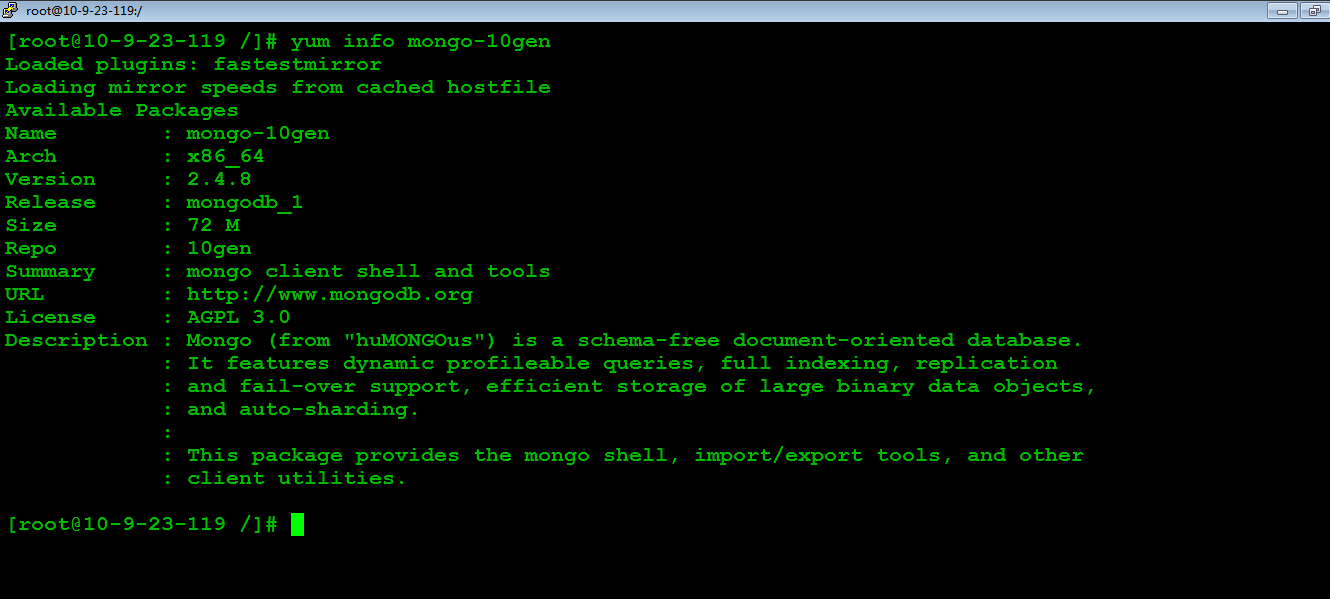
3:配置yum源
#vi /etc/yum.repos.d/10gen.repo

4:查看mongoDB的服务器包的信息

5:安装MongoDB的服务器端和客户端工具
#yum install mongo-10gen-server
#yum install mongo-10gen
卸载:
#yum -y remove mongo-10gen-server
6:启动MongoDB服务(以后有更新了,停掉mongodb,执行#yum update mongo-10gen mongo-10gen-server 即可)
#service mongod start

7:MongoDB配置文件

# mongo.conf

#where to log

logpath=/var/log/mongo/mongod.log

logappend=true

# fork and run in background

fork = true

#port =

dbpath=/var/lib/mongo

# location of pidfile

pidfilepath = /var/run/mongodb/mongod.pid

# Disables write-ahead journaling

# nojournal = true

# Enables periodic logging of CPU utilization and I/O wait

#cpu = true

# Turn on/off security.  Off is currently the default

#noauth = true

#auth = true

# Verbose logging output.

#verbose = true

# Inspect all client data for validity on receipt (useful for

# developing drivers)

#objcheck = true

# Enable db quota management

#quota = true

# Set oplogging level where n is

#   =off (default)

#   =W

#   =R

#   =both

#   =W+some reads

#diaglog =

# Ignore query hints

#nohints = true

# Disable the HTTP interface (Defaults to localhost:).

#nohttpinterface = true

# Turns off server-side scripting.  This will result in greatly limited

# functionality

#noscripting = true

# Turns off table scans.  Any query that would do a table scan fails.

#notablescan = true

# Disable data file preallocation.

#noprealloc = true

# Specify .ns file size for new databases.

# nssize = <size>

# Accout token for Mongo monitoring server.

#mms-token = <token>

# Server name for Mongo monitoring server.

#mms-name = <server-name>

# Ping interval for Mongo monitoring server.

#mms-interval = <seconds>

# Replication Options

# in replicated mongo databases, specify here whether this is a slave or master

#slave = true

#source = master.example.com

# Slave only: specify a single database to replicate

#only = master.example.com

# or

#master = true

#source = slave.example.com
yum安装MangoDB的更多相关文章
- yum安装php,php-fpm
1.检查当前安装的PHP包 yum list installed | grep php 如果有安装的PHP包,先删除他们 yum remove php.x86_64 php-cli.x86_64 ph ...
- Linux下yum安装MySQL
写这篇文章的原因是:在刚开始使用Linux操作系统时想要搭建LAMP环境,于是开始在Google和百度上各种寻找资料,碰到了不是很多的问题后,我决定写这篇文章总结一下在Linux下yum安装MySQL ...
- salt源码安装软件和yum安装软件
上面简单列出了源码安装的sls文件书写思路. 涉及到一些固定的思路:如, 1,拷贝 解压安装时候需要依赖tar.gz存在 如果已安装则无需再次安装. 2,启动脚本 加入chk时候需要文件存在,如果已添 ...
- CentOS 7.0 使用 yum 安装 MariaDB 与 MariaDB 的简单配置
1.安装MariaDB 安装命令 yum -y install mariadb mariadb-server 安装完成MariaDB,首先启动MariaDB,两条命令都可以 systemctl sta ...
- centos7下使用yum安装mysql
CentOS7的yum源中默认好像是没有mysql的.为了解决这个问题,我们要先下载mysql的repo源. 1. 下载mysql的repo源 wget http://repo.mysql.com/m ...
- 编译安装 varnish-4.1.2和yum 安装 varnish-4.0.3
vanish可以让用户自己选择缓存数据是存于内存还是硬盘,存于内存一般基于二八法则即常访问的数据是磁盘存储的总数据五分之一,因此内存也应该是硬盘文件大概五分之一.如果有多台vanish则,总内存满足即 ...
- Linux Yum 安装JDK
1.查看CentOS自带JDK是否已安装. 输入:yum list installed |grep java. 2.若有自带安装的JDK,如何卸载CentOS系统自带Java环境? 卸载JDK相关文件 ...
- CentOS下yum安装LAMP
1. 用yum安装Apache,Mysql,PHP. 1.1安装Apache yum install httpd httpd-devel 安装完成后,用/etc/init.d/httpd start ...
- centos 6.5 yum安装 mysql 5.6
1. 查看系统里面有没有mysql 的repo yum repolist all | grep mysql 2. 如果没有发现,则需要配置repo 注意,如果要使用5.7 或者其他任何版本,只能有 ...
随机推荐
- linux strace追踪mysql执行语句 (mysqld --debug)
转载请注明出处:使用strace追踪多个进程 http://www.ttlsa.com/html/1841.html http://blog.itpub.net/26250550/viewspace- ...
- .NET的堆和栈03,引用类型对象拷贝以及内存分配
在" .NET的堆和栈01,基本概念.值类型内存分配"中,了解了"堆"和"栈"的基本概念,以及值类型的内存分配.我们知道:当执行一个方法的时 ...
- Shimmer辉光动画效果
Shimmer辉光动画效果 效果 源码 https://github.com/facebook/Shimmer https://github.com/YouXianMing/Animations // ...
- Mac 卸载MySql的方法
sudo rm /usr/local/mysql sudo rm -rf /usr/local/mysql* sudo rm -rf /Library/StartupItems/MySQLCOM su ...
- Jersey 框架取到所有参数的方法
/** * 测试post取参数 * * @return */ @POST @Consumes("application/x-www-form-urlencoded") p ...
- [PHP] ubuntu 16.04系统下解决MySQL 5.7版本的root用户重置密码问题
reference to : http://www.cnblogs.com/roadofstudy/p/7446690.html 最近在ubuntu系统上安装了MySQL,但是安装时没有提示输入roo ...
- C++中对Mysql的操作函数可以参考以下blog中的内容
http://www.cnblogs.com/lovebread/archive/2009/11/24/1609936.html
- JS中应用正则表达式转换大小写
JS中应用正则表达式转换大小写,代码很简单,看代码: 以下首字母大写,其它字母小写 <script type="text/javascript"> function r ...
- 利用CSS、JavaScript及Ajax实现图片预加载的三大方法及优缺点分析
预加载图片是提高用户体验的一个很好方法.图片预先加载到浏览器中,访问者便可顺利地在你的网站上冲浪,并享受到极快的加载速度.这对图片画廊及图片占据很大比例的网站来说十分有利,它保证了图片快速.无缝地发布 ...
- Gson解析复杂Json数据
背景 json是一种数据格式,便于数据传输.存储.交换. gson是 ...