
macOS & pbcopy
macOS & pbcopy
copy from command line
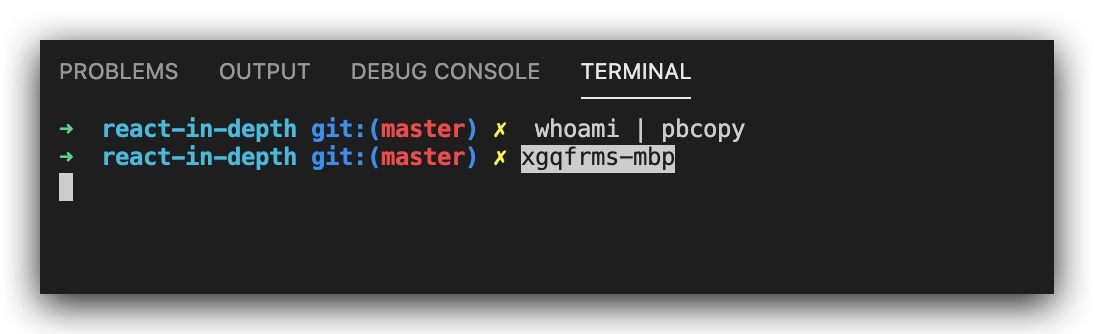
pbcopy
$ whoami | pbcopy

# xgqfrms-mbp

$ echo "hello, zsh!" | pbcopy

# hello, zsh!
wifi-password
$ brew install wifi-password
# To get the password for the WiFi you're currently logged onto:

$ wifi-password

# To get it for a specific SSID:

$ wifi-password <ssid>

# To put it straight in your clipboard for pasting elsewhere (OS X only):

$ wifi-password | pbcopy
https://github.com/rauchg/wifi-password/blob/master/wifi-password.sh
wifi-password.sh
#!/usr/bin/env sh

version="0.1.0"

# locate airport(1)

airport="/System/Library/PrivateFrameworks/Apple80211.framework/Versions/Current/Resources/airport"

#  if then fi

if [ ! -f $airport ]; then

  echo "ERROR: Can't find \`airport\` CLI program at \"$airport\"."

  exit 1

fi

# by default we are verbose (unless non-tty) 冗长的, if then else fi

if [ -t 1 ]; then

  verbose=1

else

  verbose=

fi

# usage info 输出格式化的用法文档, cat <<EOF multi lines text EOF

usage() {

  cat <<EOF

  Usage: wifi-password [options] [ssid]

  Options:

    -q, --quiet      Only output the password.

    -V, --version    Output version

    -h, --help       This message.

    --               End of options

EOF

}

# parse options 解析命令行的参数, ;; === break

while [[ "$1" =~ ^- && ! "$1" == "--" ]]; do

  case $1 in

    -V | --version )

      echo $version

      exit

      ;;

    -q | --quiet )

      verbose=

      ;;

    -h | --help )

      usage

      exit

      ;;

  esac

  shift

done

if [[ "$1" == "--" ]]; then shift; fi

# merge args for SSIDs with spaces

args="$@"

# check for user-provided ssid

if [ "" != "$args" ]; then

  ssid="$@"

else

  # get current ssid

  ssid="`$airport -I | awk '/ SSID/ {print substr($0, index($0, $2))}'`"

  if [ "$ssid" = "" ]; then

    echo "ERROR: Could not retrieve current SSID. Are you connected?" >&2

    exit 1

  fi

fi

# warn user about keychain dialog

if [ $verbose ]; then

  echo ""

  echo "\033[90m … getting password for \"$ssid\". \033[39m"

  echo "\033[90m … keychain prompt incoming. \033[39m"

fi

sleep 2

# source: http://blog.macromates.com/2006/keychain-access-from-shell/

pwd="`security find-generic-password -D 'AirPort network password' -ga \"$ssid\" 2>&1 >/dev/null`"

if [[ $pwd =~ "could" ]]; then

  echo "ERROR: Could not find SSID \"$ssid\"" >&2

  exit 1

fi

# clean up password

pwd=$(echo "$pwd" | sed -e "s/^.*\"\(.*\)\".*$/\1/")

if [ "" == "$pwd" ]; then

  echo "ERROR: Could not get password. Did you enter your Keychain credentials?" >&2

  exit 1

fi

# print

if [ $verbose ]; then

  echo "\033[96m ✓ \"$pwd\" \033[39m"

  echo ""

else

  echo $pwd

fi
refs
https://gist.github.com/xgqfrms/73ddeb86602c83e799caf05d6bf9a0eb
xgqfrms 2012-2020
www.cnblogs.com 发布文章使用:只允许注册用户才可以访问!
macOS & pbcopy的更多相关文章
- vim_action
读取文件,显示行号 nl -a.txt brace expansion 花括号扩展 echo a{A{1,2},B{3,4}}b mkdir {2009...2011}-0{1...9} {2009. ...
- gitlab 添加ssh秘钥
在创建新的ssh秘钥对之前,要先确认一下电脑中是否已经有了一对秘钥: Git Bash on Windows / GNU/Linux / macOS / PowerShell: cat ~/.ssh/ ...
- 笔者使用macOS的一些经验点滴记录1
(1) 输入法快捷键 ctrl+shift+p 拼音 ctrl+shift+W 五笔型 按CapsLock可以在英文与指定中文输入法间进行切换 (2) 定时关机 sudo shutdown -h ...
- TODO:macOS编译PHP7.1
TODO:macOS编译PHP7.1 本文主要介绍在macOS上编译PHP7.1,有兴趣的朋友可以去尝试一下. 1.下载PHP7.1源码,建议到PHP官网下载纯净到源码包php-7.1.0.tar.g ...
- TODO:macOS上ThinkPHP5和Semantic-UI集成
TODO:macOS上ThinkPHP5和Semantic-UI集成 1. 全局安装 (on OSX via homebrew)Composer 是 homebrew-php 项目的一部分 2. 把X ...
- CoreCRM 开发实录——Travis-CI 实现 .NET Core 程度在 macOS 上的构建和测试 [无水干货]
上一篇文章我提到:为了使用"国货",我把 Linux 上的构建和测试委托给了 DaoCloud,而 Travis-CI 不能放着不用啊.还好,这货支持 macOS 系统.所以就把 ...
- docker4dotnet #3 在macOS上使用Visual Studio Code和Docker开发asp.net core和mysql应用
.net猿遇到了小鲸鱼,觉得越来越兴奋.本来.net猿只是在透过家里那田子窗看外面的世界,但是看着海峡对岸的苹果园越来越茂盛,实在不想再去做一只宅猿了.于是,.net猿决定搭上小鲸鱼的渡轮到苹果园去看 ...
- ASP.NET Core 中文文档 第二章 指南(1)用 Visual Studio Code 在 macOS 上创建首个 ASP.NET Core 应用程序
原文:Your First ASP.NET Core Application on a Mac Using Visual Studio Code 作者:Daniel Roth.Steve Smith ...
- Swift 3 and OpenGL on Linux and macOS with GLFW
https://solarianprogrammer.com/2016/11/19/swift-opengl-linux-macos-glfw/ Swift 3 and OpenGL on Linux ...
随机推荐
- 当Vue可视化工具创建不了项目时的解决办法!
当Vue可视化工具创建不了项目时的解决办法! 当你尝试用可视化工具创建一个Vue的项目的时候,报错, 出现什么indexOf什么什么的错误! 我的解决办法是把可视化工具删除掉,重新下载! 如果你是 n ...
- cisco交换机路由器静态路由配置
一.切换模式 router>en //用户模式enable router#conf t //特权模式 ...
- (05)-Python3之--运算符操作
1.算数运算 num_a = 100 num_b = 5000 # 加法 + print(num_a + num_b) # 减法 - print(num_a - num_b) # 乘法 * print ...
- LR_添加系统资源监控失败
1.服务开启情况:RPC.Rmote Resgistry.Network DDE.Server.Workstation.Network connection以上服务是否已开启 2.是否开了防火墙,如有 ...
- jQuery 移入显示div,移出当前div,移入到另一个div还是显示。
jQuery 移入移出 操作div 1 <style type="text/css"> 2 .box{ 3 position: relative; 4 } 5 .box ...
- 自动化接口差异测试-diffy 回归测试 charles rewrite 请求
https://mp.weixin.qq.com/s/vIxbtQtRRqgYCrDy7XTcrA 自动化接口差异测试-diffy Boris 搜狗测试 2018-08-30 自动化接口差异测试- ...
- MIT 6.S081 Lab File System
前言 打开自己的blog一看,居然三个月没更新了...回想一下前几个月,开题 + 实验室杂活貌似也没占非常多的时间,还是自己太懈怠了吧,掉线城和文明6真的是时间刹手( 不过好消息是把15445的所有l ...
- JavaWeb——Servlet开发
什么是Servlet? Servlet运行的过程 Servlet的生命周期 生命周期的各个阶段 Servlet的配置 使用Web.xml配置 使用注解配置 Servlet相关接口 ServletCon ...
- Chrome标签整理
程序人生 设计素材类网站 关于生活 求职相关网站 Web前端 科技新闻相关网站 优秀资源内含丰富学习资料 项目实例视频资料等 面试简历相关 适合初学者自学的编程网站 国内优秀博客 由于平时经常浏览一些 ...
- Spring Boot:定时任务与图片压缩处理
一.定时任务 1.创建定时任务 2.@Scheduled 二.图片压缩处理 1.添加thumbnailator依赖 2.创建图片处理类 3.基本使用方法 一.定时任务 项目中可以采用定时任务进行一些操 ...