
filebeat输出结果到elasticsearch的多个索引
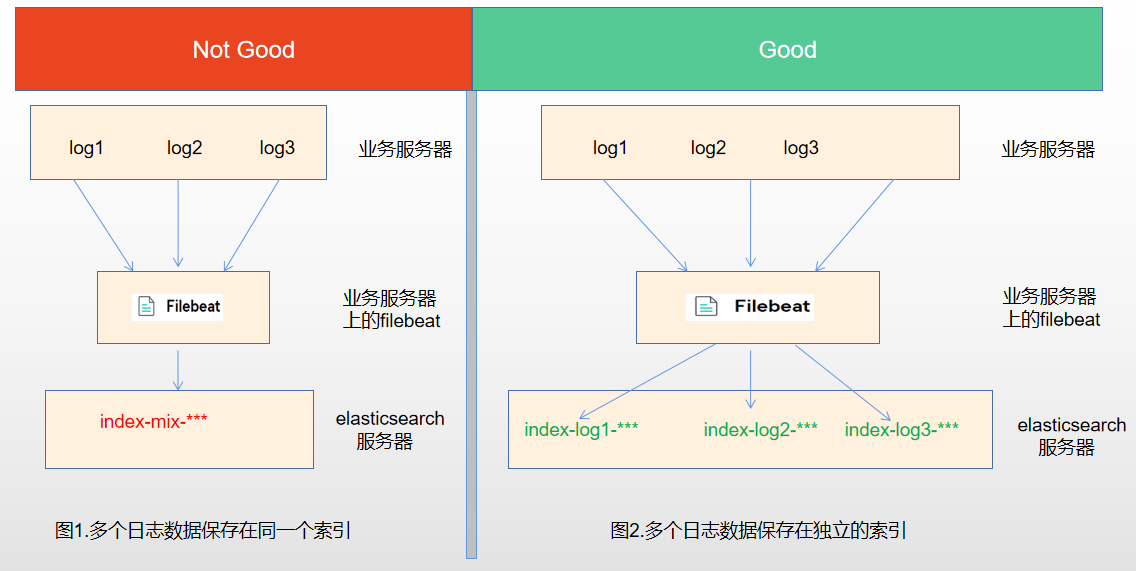
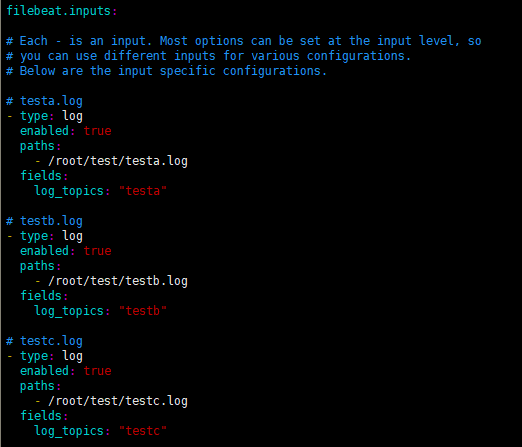
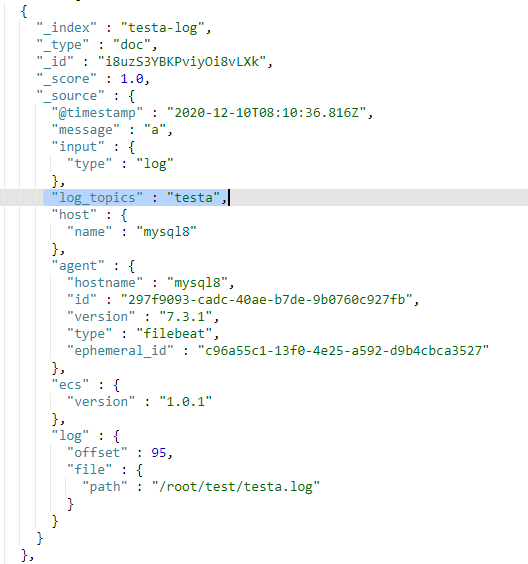
- 将同一台服务器上的日志收集到elasticsearch的同一个索引中,这种方式存在一个较大的问题,如果服务器上有多个业务在运行,产生了多个日志,那么将会被收集到elasticsearch的同一个索引中,如图1。
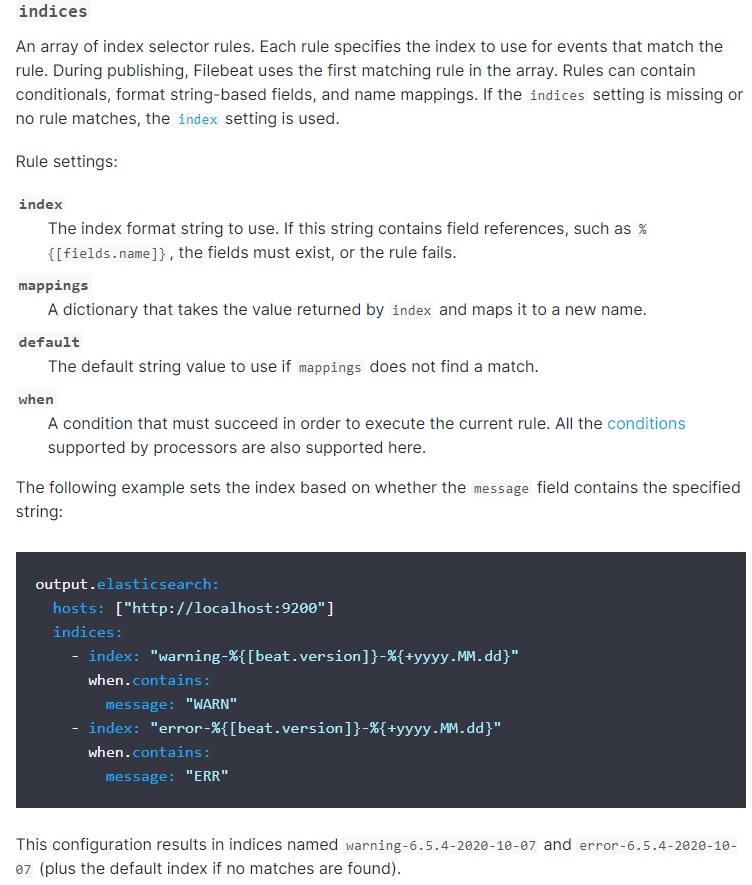
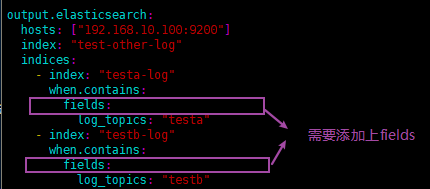
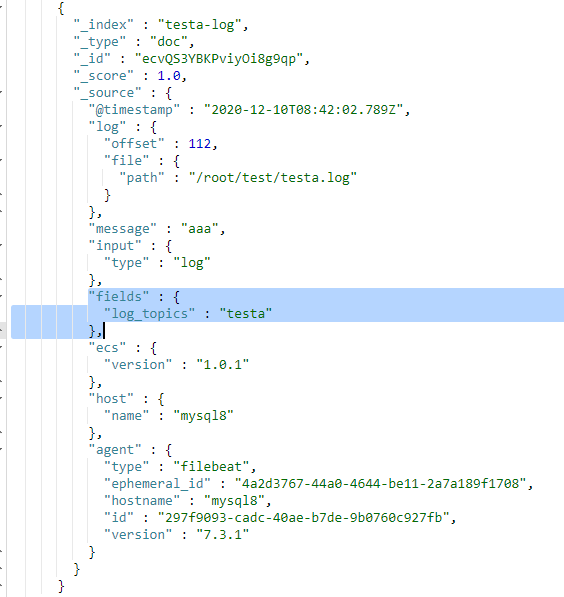
- 将同一台服务器上的日志收集到elasticsearch的不同索引中,每个索引都存放相关业务的日志,如图2。
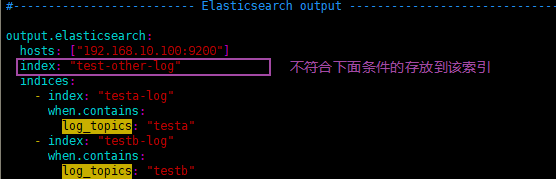
- testa.log日志的数据存放到testa-log索引中
- testb.log日志的数据存放到testb-log索引中
- 其它(非testa.log和testb.log)的日志数据存放到test-other-log索引中


###################### Filebeat Configuration Example #########################

# This file is an example configuration file highlighting only the most common

# options. The filebeat.reference.yml file from the same directory contains all the

# supported options with more comments. You can use it as a reference.

#

# You can find the full configuration reference here:

# https://www.elastic.co/guide/en/beats/filebeat/index.html

# For more available modules and options, please see the filebeat.reference.yml sample

# configuration file.

#=========================== Filebeat inputs =============================

filebeat.inputs:

# Each - is an input. Most options can be set at the input level, so

# you can use different inputs for various configurations.

# Below are the input specific configurations.

# testa.log

- type: log

  enabled: true

  paths:

    - /root/test/testa.log

  fields:

    log_topics: "testa"

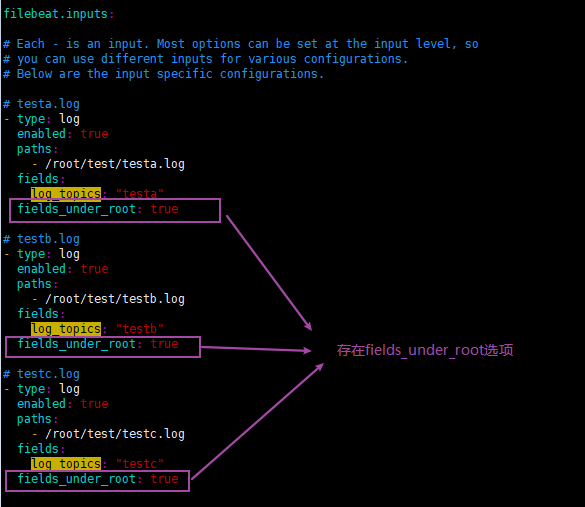
  fields_under_root: true

# testb.log

- type: log

  enabled: true

  paths:

    - /root/test/testb.log

  fields:

    log_topics: "testb"

  fields_under_root: true

# testc.log

- type: log

  enabled: true

  paths:

    - /root/test/testc.log

  fields:

    log_topics: "testc"

  fields_under_root: true

  # Exclude lines. A list of regular expressions to match. It drops the lines that are

  # matching any regular expression from the list.

  #exclude_lines: ['^DBG']

  # Include lines. A list of regular expressions to match. It exports the lines that are

  # matching any regular expression from the list.

  #include_lines: ['^ERR', '^WARN']

  # Exclude files. A list of regular expressions to match. Filebeat drops the files that

  # are matching any regular expression from the list. By default, no files are dropped.

  #exclude_files: ['.gz$']

  # Optional additional fields. These fields can be freely picked

  # to add additional information to the crawled log files for filtering

  #fields:

  #  level: debug

  #  review: 1

  ### Multiline options

  # Multiline can be used for log messages spanning multiple lines. This is common

  # for Java Stack Traces or C-Line Continuation

  # The regexp Pattern that has to be matched. The example pattern matches all lines starting with [

  #multiline.pattern: ^\[

  # Defines if the pattern set under pattern should be negated or not. Default is false.

  #multiline.negate: false

  # Match can be set to "after" or "before". It is used to define if lines should be append to a pattern

  # that was (not) matched before or after or as long as a pattern is not matched based on negate.

  # Note: After is the equivalent to previous and before is the equivalent to to next in Logstash

  #multiline.match: after

#============================= Filebeat modules ===============================

filebeat.config.modules:

  # Glob pattern for configuration loading

  path: ${path.config}/modules.d/*.yml

  # Set to true to enable config reloading

  reload.enabled: true

  # Period on which files under path should be checked for changes

  #reload.period: 10s

#==================== Elasticsearch template setting ==========================

setup.template.settings:

  index.number_of_shards: 1

  #index.codec: best_compression

  #_source.enabled: false

setup.template.name: "prod-file*"

setup.template.pattern: "prod-file*"

setup.ilm.enabled: false

#================================ General =====================================

# The name of the shipper that publishes the network data. It can be used to group

# all the transactions sent by a single shipper in the web interface.

#name:

# The tags of the shipper are included in their own field with each

# transaction published.

#tags: ["service-X", "web-tier"]

# Optional fields that you can specify to add additional information to the

# output.

#fields:

#  env: staging

#============================== Dashboards =====================================

# These settings control loading the sample dashboards to the Kibana index. Loading

# the dashboards is disabled by default and can be enabled either by setting the

# options here or by using the `setup` command.

#setup.dashboards.enabled: false

# The URL from where to download the dashboards archive. By default this URL

# has a value which is computed based on the Beat name and version. For released

# versions, this URL points to the dashboard archive on the artifacts.elastic.co

# website.

#setup.dashboards.url:

#============================== Kibana =====================================

# Starting with Beats version 6.0.0, the dashboards are loaded via the Kibana API.

# This requires a Kibana endpoint configuration.

setup.kibana:

  # Kibana Host

  # Scheme and port can be left out and will be set to the default (http and 5601)

  # In case you specify and additional path, the scheme is required: http://localhost:5601/path

  # IPv6 addresses should always be defined as: https://[2001:db8::1]:5601

  #host: "localhost:5601"

  # Kibana Space ID

  # ID of the Kibana Space into which the dashboards should be loaded. By default,

  # the Default Space will be used.

  #space.id:

#============================= Elastic Cloud ==================================

# These settings simplify using Filebeat with the Elastic Cloud (https://cloud.elastic.co/).

# The cloud.id setting overwrites the `output.elasticsearch.hosts` and

# `setup.kibana.host` options.

# You can find the `cloud.id` in the Elastic Cloud web UI.

#cloud.id:

# The cloud.auth setting overwrites the `output.elasticsearch.username` and

# `output.elasticsearch.password` settings. The format is `<user>:<pass>`.

#cloud.auth:

#================================ Outputs =====================================

# Configure what output to use when sending the data collected by the beat.

#-------------------------- Elasticsearch output ------------------------------

#output.elasticsearch:

#  hosts: ["192.168.10.30:9200"]

#  index: "testlog-666"

#output.elasticsearch:

#  hosts: ["192.168.10.30:9200"]

#  indices:

#    - index: "testa-log"

#      when.contains:

#        log_topics: "testa"

#    - index: "testb-log"

#      when.contains:

#        log_topics: "testb"

output.elasticsearch:

  hosts: ["192.168.10.100:9200"]

  index: "test-other-log"

  indices:

    - index: "testa-log"

      when.contains:

        log_topics: "testa"

    - index: "testb-log"

      when.contains:

        log_topics: "testb"

#----------------------------- Logstash output --------------------------------

#output.logstash:

  # The Logstash hosts

  #hosts: ["localhost:5044"]

  # Optional SSL. By default is off.

  # List of root certificates for HTTPS server verifications

  #ssl.certificate_authorities: ["/etc/pki/root/ca.pem"]

  # Certificate for SSL client authentication

  #ssl.certificate: "/etc/pki/client/cert.pem"

  # Client Certificate Key

  #ssl.key: "/etc/pki/client/cert.key"

#================================ Processors =====================================

# Configure processors to enhance or manipulate events generated by the beat.

#================================ Logging =====================================

# Sets log level. The default log level is info.

# Available log levels are: error, warning, info, debug

#logging.level: debug

# At debug level, you can selectively enable logging only for some components.

# To enable all selectors use ["*"]. Examples of other selectors are "beat",

# "publish", "service".

#logging.selectors: ["*"]

#============================== Xpack Monitoring ===============================

# filebeat can export internal metrics to a central Elasticsearch monitoring

# cluster.  This requires xpack monitoring to be enabled in Elasticsearch.  The

# reporting is disabled by default.

# Set to true to enable the monitoring reporter.

#monitoring.enabled: false

# Uncomment to send the metrics to Elasticsearch. Most settings from the

# Elasticsearch output are accepted here as well.

# Note that the settings should point to your Elasticsearch *monitoring* cluster.

# Any setting that is not set is automatically inherited from the Elasticsearch

# output configuration, so if you have the Elasticsearch output configured such

# that it is pointing to your Elasticsearch monitoring cluster, you can simply

# uncomment the following line.

#monitoring.elasticsearch:

#================================= Migration ==================================

# This allows to enable 6.7 migration aliases

#migration.6_to_7.enabled: true
###################### Filebeat Configuration Example #########################

# This file is an example configuration file highlighting only the most common

# options. The filebeat.reference.yml file from the same directory contains all the

# supported options with more comments. You can use it as a reference.

#

# You can find the full configuration reference here:

# https://www.elastic.co/guide/en/beats/filebeat/index.html

# For more available modules and options, please see the filebeat.reference.yml sample

# configuration file.

#=========================== Filebeat inputs =============================

filebeat.inputs:

# Each - is an input. Most options can be set at the input level, so

# you can use different inputs for various configurations.

# Below are the input specific configurations.

# testa.log

- type: log

  enabled: true

  paths:

    - /root/test/testa.log

  fields:

    log_topics: "testa"

# testb.log

- type: log

  enabled: true

  paths:

    - /root/test/testb.log

  fields:

    log_topics: "testb"

# testc.log

- type: log

  enabled: true

  paths:

    - /root/test/testc.log

  fields:

    log_topics: "testc"

  # Exclude lines. A list of regular expressions to match. It drops the lines that are

  # matching any regular expression from the list.

  #exclude_lines: ['^DBG']

  # Include lines. A list of regular expressions to match. It exports the lines that are

  # matching any regular expression from the list.

  #include_lines: ['^ERR', '^WARN']

  # Exclude files. A list of regular expressions to match. Filebeat drops the files that

  # are matching any regular expression from the list. By default, no files are dropped.

  #exclude_files: ['.gz$']

  # Optional additional fields. These fields can be freely picked

  # to add additional information to the crawled log files for filtering

  #fields:

  #  level: debug

  #  review: 1

  ### Multiline options

  # Multiline can be used for log messages spanning multiple lines. This is common

  # for Java Stack Traces or C-Line Continuation

  # The regexp Pattern that has to be matched. The example pattern matches all lines starting with [

  #multiline.pattern: ^\[

  # Defines if the pattern set under pattern should be negated or not. Default is false.

  #multiline.negate: false

  # Match can be set to "after" or "before". It is used to define if lines should be append to a pattern

  # that was (not) matched before or after or as long as a pattern is not matched based on negate.

  # Note: After is the equivalent to previous and before is the equivalent to to next in Logstash

  #multiline.match: after

#============================= Filebeat modules ===============================

filebeat.config.modules:

  # Glob pattern for configuration loading

  path: ${path.config}/modules.d/*.yml

  # Set to true to enable config reloading

  reload.enabled: true

  # Period on which files under path should be checked for changes

  #reload.period: 10s

#==================== Elasticsearch template setting ==========================

setup.template.settings:

  index.number_of_shards: 1

  #index.codec: best_compression

  #_source.enabled: false

setup.template.name: "prod-file*"

setup.template.pattern: "prod-file*"

setup.ilm.enabled: false

#================================ General =====================================

# The name of the shipper that publishes the network data. It can be used to group

# all the transactions sent by a single shipper in the web interface.

#name:

# The tags of the shipper are included in their own field with each

# transaction published.

#tags: ["service-X", "web-tier"]

# Optional fields that you can specify to add additional information to the

# output.

#fields:

#  env: staging

#============================== Dashboards =====================================

# These settings control loading the sample dashboards to the Kibana index. Loading

# the dashboards is disabled by default and can be enabled either by setting the

# options here or by using the `setup` command.

#setup.dashboards.enabled: false

# The URL from where to download the dashboards archive. By default this URL

# has a value which is computed based on the Beat name and version. For released

# versions, this URL points to the dashboard archive on the artifacts.elastic.co

# website.

#setup.dashboards.url:

#============================== Kibana =====================================

# Starting with Beats version 6.0.0, the dashboards are loaded via the Kibana API.

# This requires a Kibana endpoint configuration.

setup.kibana:

  # Kibana Host

  # Scheme and port can be left out and will be set to the default (http and 5601)

  # In case you specify and additional path, the scheme is required: http://localhost:5601/path

  # IPv6 addresses should always be defined as: https://[2001:db8::1]:5601

  #host: "localhost:5601"

  # Kibana Space ID

  # ID of the Kibana Space into which the dashboards should be loaded. By default,

  # the Default Space will be used.

  #space.id:

#============================= Elastic Cloud ==================================

# These settings simplify using Filebeat with the Elastic Cloud (https://cloud.elastic.co/).

# The cloud.id setting overwrites the `output.elasticsearch.hosts` and

# `setup.kibana.host` options.

# You can find the `cloud.id` in the Elastic Cloud web UI.

#cloud.id:

# The cloud.auth setting overwrites the `output.elasticsearch.username` and

# `output.elasticsearch.password` settings. The format is `<user>:<pass>`.

#cloud.auth:

#================================ Outputs =====================================

# Configure what output to use when sending the data collected by the beat.

#-------------------------- Elasticsearch output ------------------------------

#output.elasticsearch:

#  hosts: ["192.168.10.30:9200"]

#  index: "testlog-666"

#output.elasticsearch:

#  hosts: ["192.168.10.30:9200"]

#  indices:

#    - index: "testa-log"

#      when.contains:

#        log_topics: "testa"

#    - index: "testb-log"

#      when.contains:

#        log_topics: "testb"

output.elasticsearch:

  hosts: ["192.168.10.100:9200"]

  index: "test-other-log"

  indices:

    - index: "testa-log"

      when.contains:

        fields:

          log_topics: "testa"

    - index: "testb-log"

      when.contains:

        fields:

          log_topics: "testb"

#----------------------------- Logstash output --------------------------------

#output.logstash:

  # The Logstash hosts

  #hosts: ["localhost:5044"]

  # Optional SSL. By default is off.

  # List of root certificates for HTTPS server verifications

  #ssl.certificate_authorities: ["/etc/pki/root/ca.pem"]

  # Certificate for SSL client authentication

  #ssl.certificate: "/etc/pki/client/cert.pem"

  # Client Certificate Key

  #ssl.key: "/etc/pki/client/cert.key"

#================================ Processors =====================================

# Configure processors to enhance or manipulate events generated by the beat.

#================================ Logging =====================================

# Sets log level. The default log level is info.

# Available log levels are: error, warning, info, debug

#logging.level: debug

# At debug level, you can selectively enable logging only for some components.

# To enable all selectors use ["*"]. Examples of other selectors are "beat",

# "publish", "service".

#logging.selectors: ["*"]

#============================== Xpack Monitoring ===============================

# filebeat can export internal metrics to a central Elasticsearch monitoring

# cluster.  This requires xpack monitoring to be enabled in Elasticsearch.  The

# reporting is disabled by default.

# Set to true to enable the monitoring reporter.

#monitoring.enabled: false

# Uncomment to send the metrics to Elasticsearch. Most settings from the

# Elasticsearch output are accepted here as well.

# Note that the settings should point to your Elasticsearch *monitoring* cluster.

# Any setting that is not set is automatically inherited from the Elasticsearch

# output configuration, so if you have the Elasticsearch output configured such

# that it is pointing to your Elasticsearch monitoring cluster, you can simply

# uncomment the following line.

#monitoring.elasticsearch:

#================================= Migration ==================================

# This allows to enable 6.7 migration aliases

#migration.6_to_7.enabled: true
- 如果值为ture,那么fields存储在输出文档的顶级位置,如果与filebeat中字段冲突,自定义字段会覆盖其他字段
- 如果值为false或者未设置,那么fields存储在输出文档的子位置。
filebeat输出结果到elasticsearch的多个索引的更多相关文章
- 使用ElasticSearch赋能HBase二级索引 | 实践一年后总结
前言:还记得那是2018年的一个夏天,天气特别热,我一边擦汗一边听领导大刀阔斧的讲述自己未来的改革蓝图.会议开完了,核心思想就是:我们要搞一个数据大池子,要把公司能灌的数据都灌入这个大池子,然后让别人 ...
- 第三百六十二节,Python分布式爬虫打造搜索引擎Scrapy精讲—elasticsearch(搜索引擎)基本的索引和文档CRUD操作、增、删、改、查
第三百六十二节,Python分布式爬虫打造搜索引擎Scrapy精讲—elasticsearch(搜索引擎)基本的索引和文档CRUD操作.增.删.改.查 elasticsearch(搜索引擎)基本的索引 ...
- (转)ElasticSearch Java Api-检索索引库
上篇博客记录了如何用java调用api把数据写入索引,这次记录下如何搜索. 一.准备数据 String data1 = JsonUtil.model2Json(new Blog(1, "gi ...
- 四十一 Python分布式爬虫打造搜索引擎Scrapy精讲—elasticsearch(搜索引擎)基本的索引和文档CRUD操作、增、删、改、查
elasticsearch(搜索引擎)基本的索引和文档CRUD操作 也就是基本的索引和文档.增.删.改.查.操作 注意:以下操作都是在kibana里操作的 elasticsearch(搜索引擎)都是基 ...
- Elasticsearch之curl创建索引
前提,是 Elasticsearch之curl创建索引库 [hadoop@djt002 elasticsearch-2.4.3]$ curl -XPUT 'http://192.168.80.200: ...
- Elasticsearch之curl创建索引库
关于curl的介绍,请移步 Elasticsearch学习概念之curl 启动es,请移步 Elasticsearch的前后台运行与停止(tar包方式) Elasticsearch的前后台运行与停止( ...
- Elasticsearch之curl删除索引库
关于curl创建索引库的介绍,请移步 Elasticsearch之curl创建索引库 [hadoop@djt002 elasticsearch-2.4.3]$ curl -XPUT 'http://1 ...
- Elasticsearch之curl创建索引库和索引时注意事项
前提, Elasticsearch之curl创建索引库 Elasticsearch之curl创建索引 注意事项 1.索引库名称必须要全部小写,不能以下划线开头,也不能包含逗号 2.如果没有明确指定索引 ...
- Elasticsearch之cur查询索引
前提, Elasticsearch之curl创建索引库 Elasticsearch之curl创建索引 Elasticsearch之curl创建索引库和索引时注意事项 Elasticsearch之cur ...
随机推荐
- tcpdump详解(转)
tcpdump是Linux下强大的抓包工具,不仅可以分析数据包流向,还可以对数据包内容进行监听.通过分析数据包流向,可以了解一条连接是如何建立双向连接的.tcpdump允许用户(一般是root)拦截和 ...
- NO.A.0001——day01——Java概述/进制间的转换
一.什么是JAVA语言: JAVA语言是美国sun公司(Stanford University Network)在1995年推出的高级编程语言.所谓编程语言,是计算机的语言,人们可以使用 ...
- JXLS2.4导出Excel
1.添加依赖:http://mvnrepository.com/artifact/org.jxls <dependency> <groupId>org.jxls< ...
- 基础网络路由命令(tracert、route print 、netstat )
网络知识有限,平时自己积累,捣鼓自己电脑使用,如是一样菜鸟,请勿自行在服务器端使用. 快捷键Ctrl+C 结束跟踪 快捷键 ↑ 可以查询上次输入的命令 window+R组合键,输入C ...
- Canvas实现放大镜效果完整案例
本文主要记录 canvas 在图像.文字处理.离屏技术和放大镜特效的实现过程中使用到的API.先看下效果吧: 一张模糊的图片: 鼠标点击任意位置,产生放大效果: 哇塞~ 一个帅哥,哈哈哈哈~ 1.显示 ...
- Annotation注解初识
注解本质上就是一个接口,该接口默认继承Annotation接口 元注解 元注解的作用就是描述其他注解.Java1.5定义了4个标准的meta-annotation类型,它们被用来提供对其它 annot ...
- 我的开源经历:为了方便处理三方 HTTP 接口而写的 Java 框架
缘起 我以前公司需要在 Java 后台调用许多第三方 HTTP 接口,比如微信支付.友盟等等第三方平台. 公司内部还有很多服务是用世界最好语言写的,接口自然也只能通过 HTTP 接口来调用.于是日积月 ...
- 被 C# 的 ThreadStatic 标记的静态变量,都存放在哪里了?
一:背景 1. 讲故事 前几天公号里有一位朋友留言说,你windbg玩的溜,能帮我分析下被 ThreadStatic 修饰的变量到底存放在哪里吗?能不能帮我挖出来,其实这个问题问的挺深的,玩高级语言的 ...
- go-zero 如何扛住流量冲击(二)
本篇文章承接上一篇go-zero 如何扛住流量冲击(一). 上一篇介绍的是 go-zero 中滑动窗口限流,本篇介绍另外一个 tokenlimit ,令牌桶限流. 使用 const ( burst = ...
- ceph 集群快速部署
1.三台Centos7的主机 [root@ceph-1 ~]# cat /etc/redhat-release CentOS Linux release 7.2.1511 (Core) 2.主机 ...