
KVM虚拟化管理平台WebVirtMgr部署及使用
KVM虚拟化管理平台WebVirtMgr部署及使用
WebVirtMgr介绍
yum -y install https://dl.fedoraproject.org/pub/epel/7/x86_64/Packages/e/epel-release-7-12.noarch.rpm
yum -y install git python-pip libvirt-python libxml2-python python-websockify upervisor nginx novnc python-virtinst libvirt vm ridge-utils virt-manager qemu-kvm-tools virt-viewer virt-v2v tunctl unzip zip
cd /usr/local/src/

git clone git://github.com/retspen/webvirtmgr.git
cd webvirtmgr/

pip install -r requirements.txt
./manage.py syncdb    # 默认是python执行,如下报错,换用其他版本的python

You just installed Django's auth system, which means you don't have any superusers defined.

Would you like to create one now? (yes/no): yes

Username (leave blank to use 'root'): 用户

Email address: 邮箱

Password:密码

Password (again):密码

###==========================###

./manage.py collectstatic   #生成配置文件

WARNING:root:No local_settings file found.

You have requested to collect static files at the destination

location as specified in your settings.

This will overwrite existing files!

Are you sure you want to do this?

Type 'yes' to continue, or 'no' to cancel: yes

..........

..........

###==========================###

./manage.py createsuperuser   #添加管理员账号

WARNING:root:No local_settings file found.

Username: sun                      //这个是管理员账号,用上面的admin和这个管理员账号都可以登陆webvirtmgr的web界面管理平台

Email address: 1916989848@qq.com

Password:

Password (again):

Superuser created successfully.

###==========================###

/usr/bin/python2 manage.py createsuperuser   #添加管理员账号(同样使用python2版本执行,不要使用默认的python执行)
注意此处用默认的python执行上面命令,一般会报错,如下:
ImportError: No module named django.core.management
这个一般是由于python版本引起的,因为系统自带有好几个版本的python
[root@openstack webvirtmgr]# python //按Tab键自查找
python python2.6
python2 python2.6-config python-config
[root@openstack webvirtmgr]# python -V
Python 2.6.6
由此可看出,系统默认的Python版本是2.6.6
说明上面命令默认是python2.6执行的
既然使用python2.6执行上面的命令报错,那就换用其他版本python2执行(如果当前是python3.3.0,那么就将下面的/usr/bin/python2换成/usr/bin/python2.6)
cd ..

mkdir -pv /var/www

cp -Rv webvirtmgr /var/www/webvirtmg

chown -R nginx:nginx /var/www/webvirtmgr
su - nginx -s /bin/bash

ssh-keygen #产生公私钥

ssh-copy-id (kvm-ip) #由于这里webvirtmgr和kvm服务部署在同一台机器,所以这里本地信任。如果kvm部署在其他机器,那么这个是它的ip
[root@local]#vim /etc/nginx/conf.d/webvirtmgr.conf //添加下面内容到文件中

server {

listen 80;

server_name 10.3.134.35;

#access_log /var/log/nginx/webvirtmgr_access_log;

location /static/ {

root /var/www/webvirtmgr/webvirtmgr; # or /srv instead of /var

expires max;

}

location / {

proxy_pass http://127.0.0.1:8000;

proxy_set_header X-Real-IP $remote_addr;

proxy_set_header X-Forwarded-for $proxy_add_x_forwarded_for;

proxy_set_header Host $host:$server_port;

proxy_set_header X-Forwarded-Proto $remote_addr;

proxy_connect_timeout 600;

proxy_read_timeout 600;

proxy_send_timeout 600;

client_max_body_size 1024M; # Set higher depending on your needs

}

}
mv /etc/nginx/conf.d/default.conf /etc/nginx/conf.d/default.conf.bak
[root@openstack ops]# vim /etc/supervisord.conf //在文件末尾添加,注意将默认的python改为python2,因为上面只有用这个版本执行才不报错!

[program:webvirtmgr]

command=/usr/bin/python2 /var/www/webvirtmgr/manage.py run_gunicorn -c /var/www/webvirtmgr/conf/gunicorn.conf.py    #启动8000端口***如果报错无法启动,查看/var/www/wvirtmgr权限是否正常!!!

directory=/var/www/webvirtmgr

autostart=true

autorestart=true

logfile=/var/log/supervisor/webvirtmgr.log

log_stderr=true

user=nginx

[program:webvirtmgr-console]

command=/usr/bin/python2 /var/www/webvirtmgr/console/webvirtmgr-console    #启动6080端口(这是控制台vnc端口)

directory=/var/www/webvirtmgr

autostart=true

autorestart=true

stdout_logfile=/var/log/supervisor/webvirtmgr-console.log

redirect_stderr=true

user=nginx
[root@localhost ~]# netstat -lnpt

Active Internet connections (only servers)

Proto Recv-Q Send-Q Local Address               Foreign Address             State       PID/Program name

tcp        0      0 127.0.0.1:8000              0.0.0.0:*                   LISTEN      1698/python2

tcp        0      0 0.0.0.0:6080                0.0.0.0:*                   LISTEN      1697/python2

tcp        0      0 0.0.0.0:5900                0.0.0.0:*                   LISTEN      544/qemu-kvm

tcp        0      0 0.0.0.0:80                  0.0.0.0:*                   LISTEN      32518/nginx
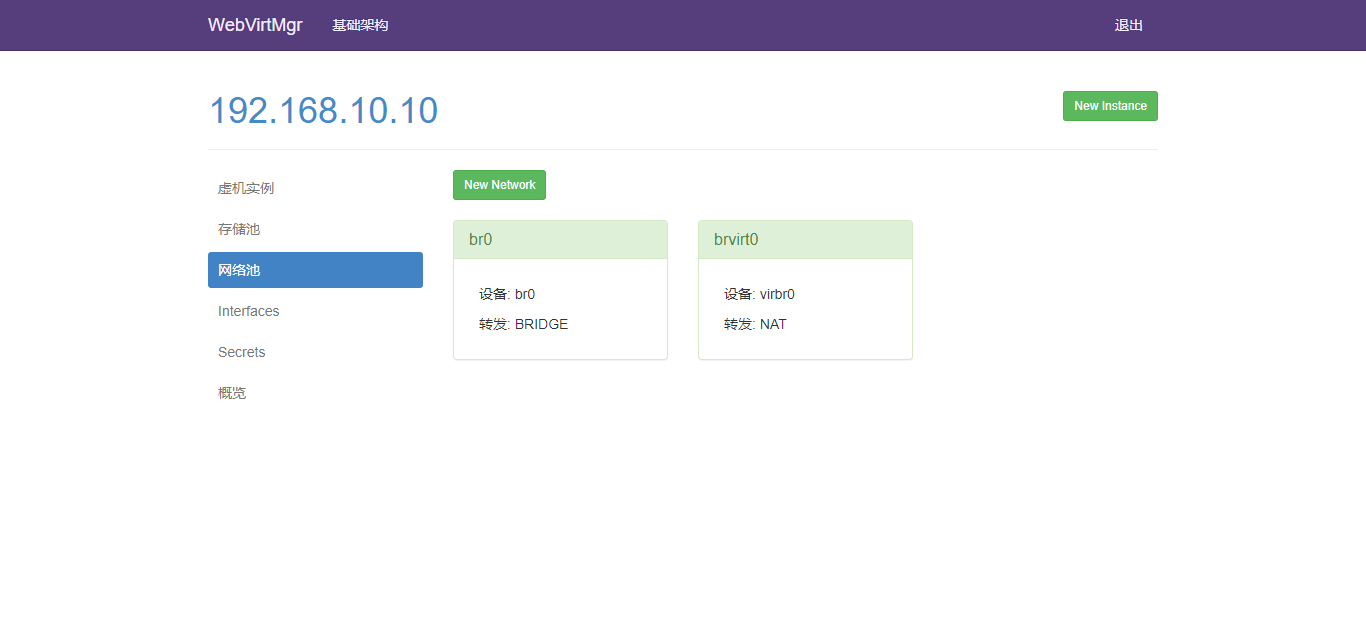
cp ifcfg-eth0 ifcfg-br0

[root@vfeelit network-scripts]# cat ifcfg-br0

TYPE=Bridge

NAME=br0

DEVICE=br0

ONBOOT=yes

BOOTPROTO=none

PEERDNS=yes

NM_CONTROLLED=no

IPADDR=192.168.10.10

NETMASK=255.255.255.0

GATEWAY=192.168.10.2

DNS1=223.5.5.5

DNS2=223.6.6.6

[root@vfeelit network-scripts]# cat ifcfg-eth0

TYPE=Ethernet

BRIDGE=br0

BOOTPROTO=none

PEERDNS="yes"

NAME="eth0"

DEVICE="eth0"

ONBOOT="yes"

NM_CONTROLLED="no"
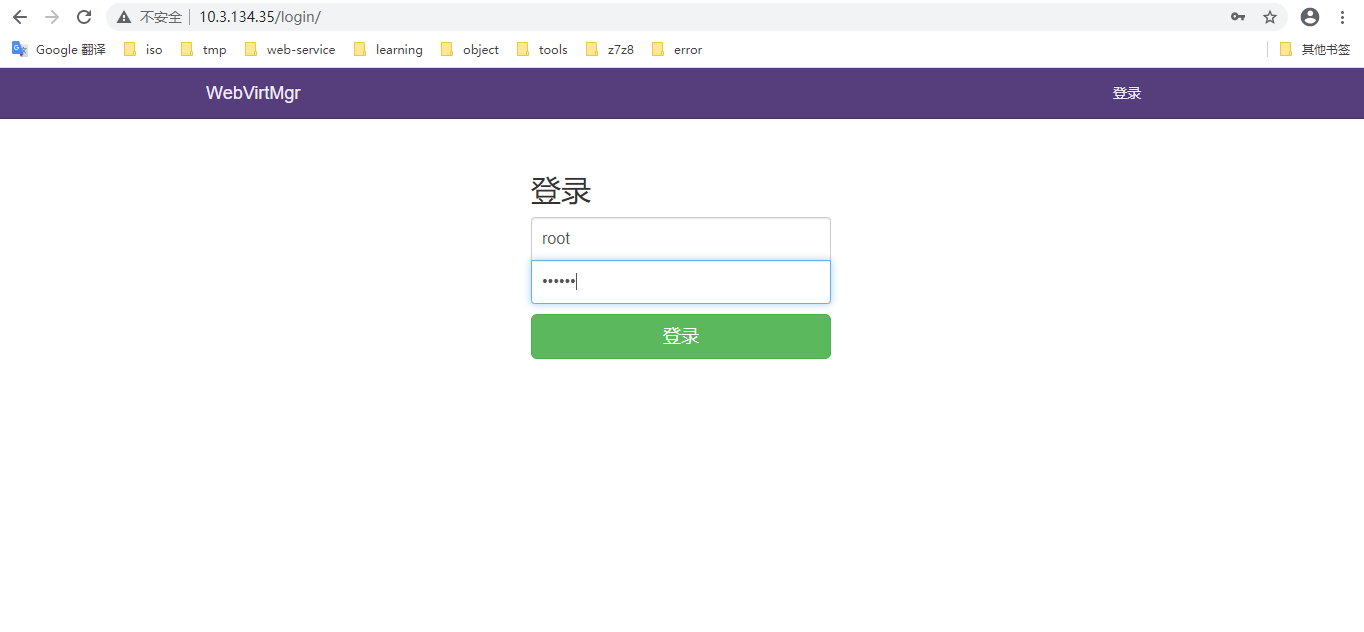
12 web访问
http://10.2.134.35/login/
这里用超级管理员登陆,只有超级管理员登陆后才能看到“基础构架”窗口
普通用户登陆后,只能看到“WebVirtMgr”一个窗口
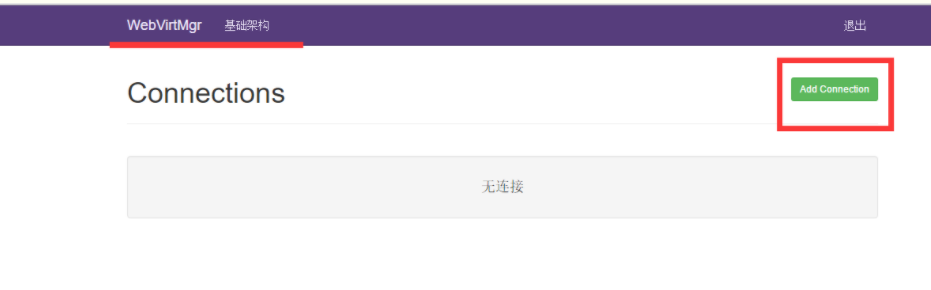
选择“SSH链接“,设置Label,IP,用户
注意:Label与IP要相同

以下为部分网友出现报错:
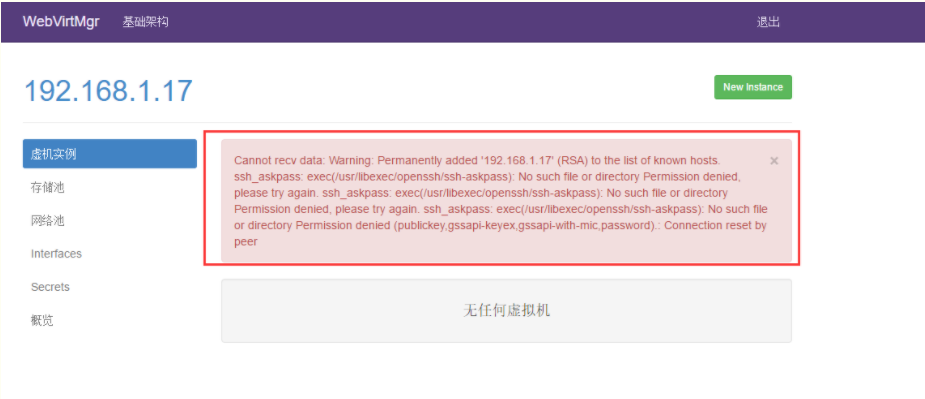
打开后,有报错!看来在上面使用ssh连接的配置环节有误所致!
解决措施:
1)在webvirtmgr服务器(服务端)上(这里kvm和WebVirtMgr部署在同一台机器上)创建nginx用户家目录(默认nginx服务安装时是没有nginx家目录的),生成nginx的公私钥
[root@openstack ops]# cd /home/
[root@openstack home]# mkdir nginx
[root@openstack home]# chown nginx.nginx nginx/
[root@openstack home]# chmod 700 nginx/ -R
[root@openstack home]# su - nginx -s /bin/bash
-bash-4.1$ ssh-keygen #期间输入yes后直接回车,回车
-bash-4.1$ touch ~/.ssh/config && echo -e "StrictHostKeyChecking=no\nUserKnownHostsFile=/dev/null" >> ~/.ssh/config
-bash-4.1$ chmod 0600 ~/.ssh/config
2)在kvm(客服端)服务器上(这里kvm和WebVirtMgr部署在同一台机器上)配置用户,这里默认采用root用户
---------------------------------------------------------------------------------------------------------------------
如果采用其他用户,比如webvirtmgr,操作如下:
[root@openstack ops]#useradd webvirtmgr
[root@openstack ops]#echo "123456" | passwd --stdin webvirtmgr
[root@openstack ops]#groupadd libvirt
[root@openstack ops]#usermod -G libvirt -a webvirtmgr
---------------------------------------------------------------------------------------------------------------------
3)在webvirtmgr服务器(服务端)上(这里kvm和WebVirtMgr部署在同一台机器上),将nginx用户的ssh-key上传到kvm服务器上(这里kvm和WebVirtMgr部署在同一台机器上)
[root@openstack ops]# su - nginx -s /bin/bash
-bash-4.1$ ssh-copy-id root@192.168.1.17
Warning: Permanently added '192.168.1.17' (RSA) to the list of known hosts.
root@192.168.1.17's password: #输入192.168.1.17即本机的root账号
Now try logging into the machine, with "ssh 'root@192.168.1.17'", and check in:
.ssh/authorized_keys
to make sure we haven't added extra keys that you weren't expecting.
---------------------------------------------------------------------------------------------------------------------
这里采用的是root用户,如果采用其他用户,比如上面假设的webvirtmgr用户,操作如下:
[root@openstack ops]#su - nginx -s /bin/bash
-bash-4.1$ssh-copy-id webvirtmgr@192.168.0.23
---------------------------------------------------------------------------------------------------------------------
4)在kvm(客服端)服务器上(这里kvm和WebVirtMgr部署在同一台机器上)配置 libvirt ssh授权
[root@openstack ops]# vim /etc/polkit-1/localauthority/50-local.d/50-libvirt-remote-access.pkla
[Remote libvirt SSH access]
Identity=unix-user:root #注意这里采用的是root用户
Action=org.libvirt.unix.manage
ResultAny=yes
ResultInactive=yes
ResultActive=yes
[root@openstack ops]# chown -R root.root /etc/polkit-1/localauthority/50-local.d/50-libvirt-remote-access.pkla
-------------------------------------------------------------------------------------------------------------------------------
这里采用的是root用户,如果采用其他用户,比如上面假设的webvirtmgr用户,操作如下:
[root@openstack ops]#vim /etc/polkit-1/localauthority/50-local.d/50-libvirt-remote-access.pkla
[Remote libvirt SSH access]
Identity=unix-user:webvirtmgr #这里就设定webvirtmgr用户
Action=org.libvirt.unix.manage
ResultAny=yes
ResultInactive=yes
ResultActive=yes
[root@openstack ops]#chown -R webvirtmgr.webvirtmgr /etc/polkit-1/localauthority/50-local.d/50-libvirt-remote-access.pkla
--------------------------------------------------------------------------------------------------------------------------------
5)重启 libvirtd 服务
/etc/init.d/libvirtd restart
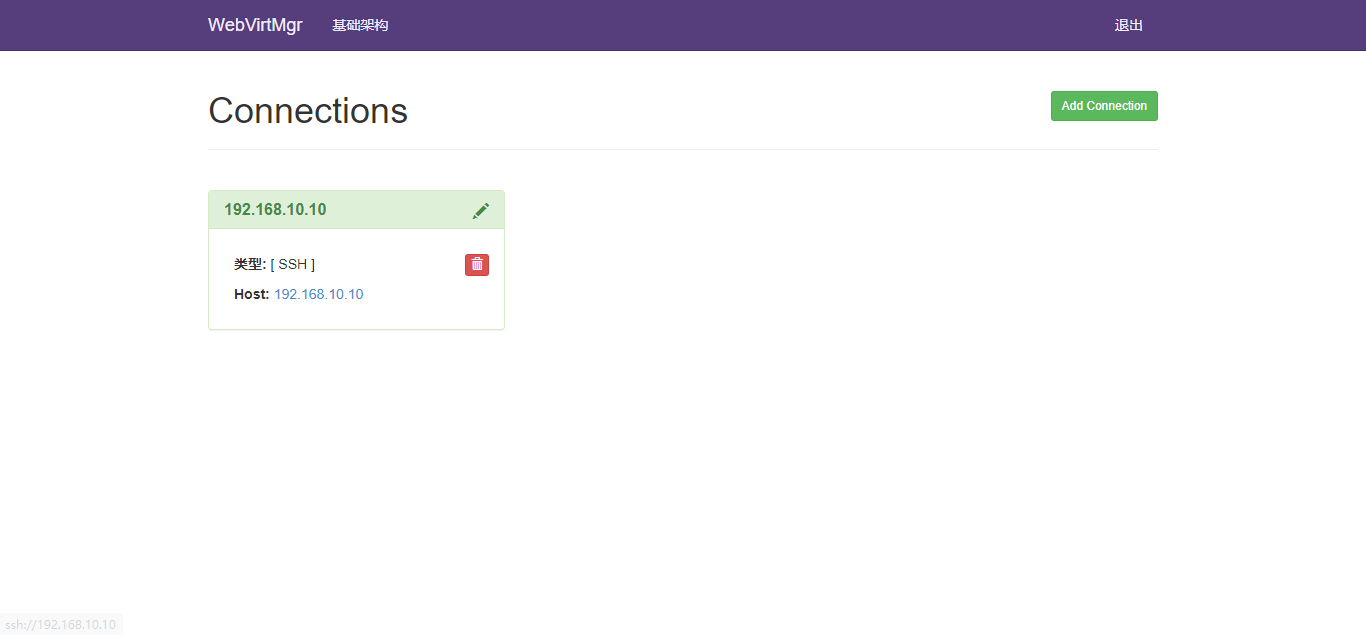
web创建虚拟机;
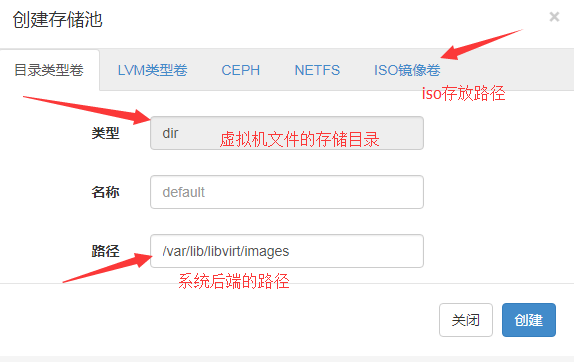
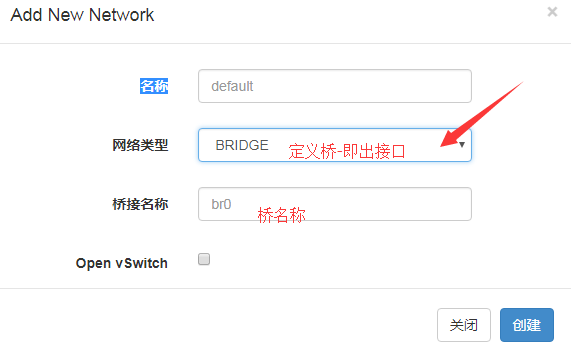
1:首先创建iso目录和虚拟机文件的存储目录
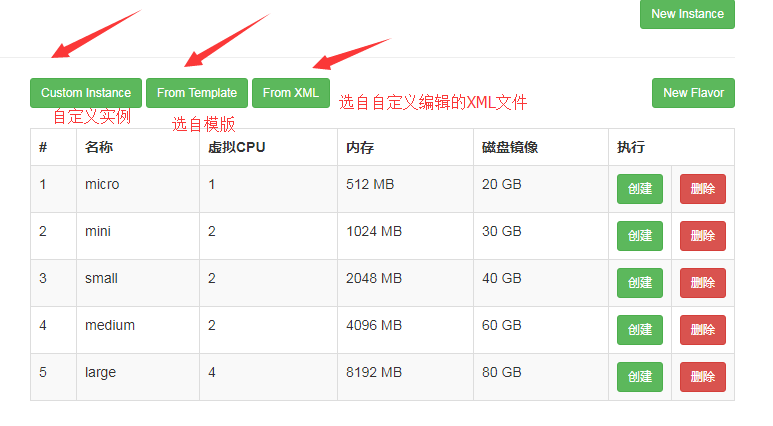
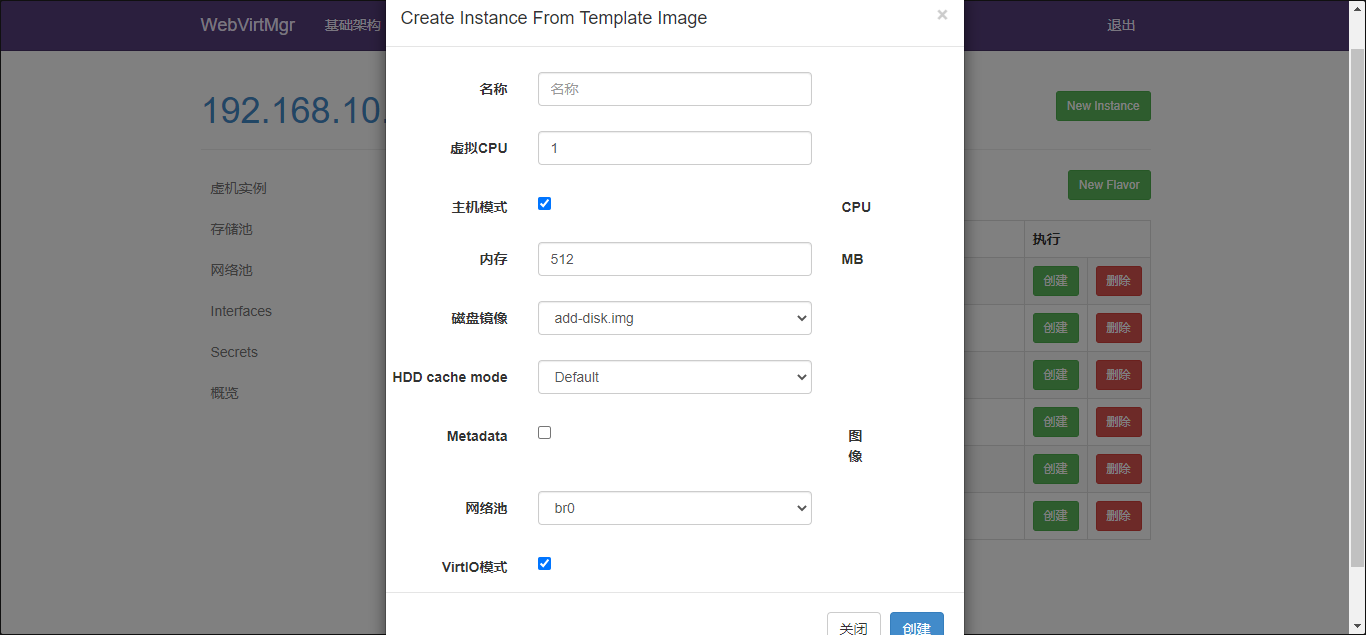
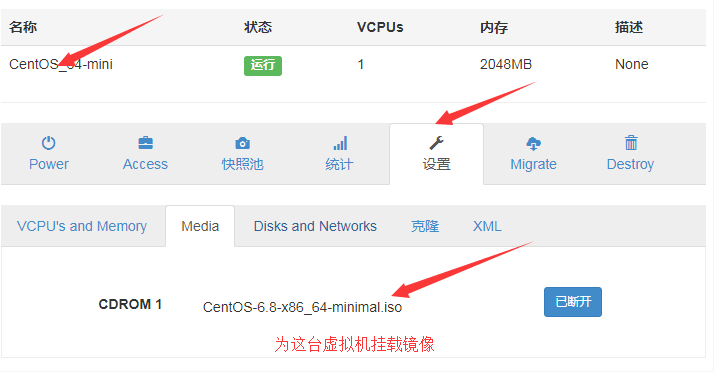
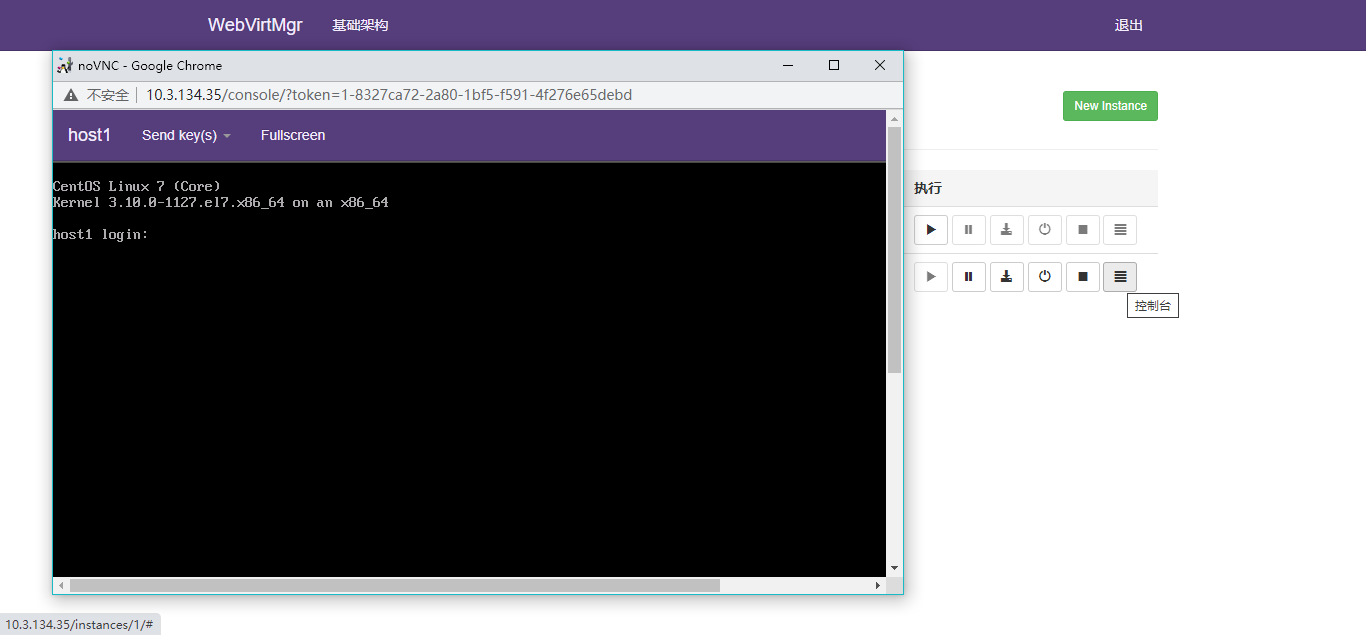
3:创建虚拟机
KVM虚拟化管理平台WebVirtMgr部署及使用的更多相关文章
- kvm虚拟化管理平台WebVirtMgr部署-完整记录(3)
继下面三篇文章完成了kvm虚拟化管理平台webvirtmgr环境的部署安装:kvm虚拟化管理平台WebVirtMgr部署-虚拟化环境安装-完整记录(0)kvm虚拟化管理平台WebVirtMgr部署-完 ...
- kvm虚拟化管理平台WebVirtMgr部署-完整记录(2)
继上一篇kvm虚拟化管理平台WebVirtMgr部署-完整记录(1),接下来说说WebVirtMgr的日常配置:添加宿主机,创建虚机,磁盘扩容,快照等具体操作记录如下: 一.配置宿主机1.登录WebV ...
- kvm虚拟化管理平台WebVirtMgr部署-完整记录(1)
公司机房有一台2U的服务器(64G内存,32核),由于近期新增业务比较多,测试机也要新增,服务器资源十分有限.所以打算在这台2U服务器上部署kvm虚拟化,虚出多台VM出来,以应对新的测试需求.当KVM ...
- centos7.2 kvm虚拟化管理平台WebVirtMgr部署
在服务器上部署kvm虚拟化,虚出多台VM出来,以应对新的测试需求.当KVM宿主机越来越多,需要对宿主机的状态进行调控,决定采用WebVirtMgr作为kvm虚拟化的web管理工具,图形化的WEB,让人 ...
- kvm虚拟化管理平台WebVirtMgr部署-完整记录(0)
打算部署kvm虚拟机环境,下面是虚拟化部署前的一些准备工作: 操作系统环境安装1)修改内核模式为兼容内核启动[root@ops ~]# uname -aLinux openstack 2.6.32-4 ...
- kvm虚拟化管理平台WebVirtMgr部署-完整记录(安装ubuntu虚拟机)-(5)
之前介绍了在webvirtmgr平台下创建centos,windows server 2008的虚拟机,今天说下创建ubuntu虚拟机的过程. (1)首先下载ubuntu16.04的iso镜像放到/u ...
- kvm虚拟化管理平台WebVirtMgr部署-完整记录(安装Windows虚拟机)-(4)
一.背景说明 在之前的篇章中,提到在webvirtmgr里安装linux系统的vm,下面说下安装windows系统虚拟机的操作记录: 由于KVM管理虚拟机的硬盘和网卡需要virtio驱动,linux ...
- 008-kvm虚拟化管理平台WebVirtMgr部署-完整记录(1)
公司机房有一台2U的服务器(64G内存,32核),由于近期新增业务比较多,测试机也要新增,服务器资源十分有限.所以打算在这台2U服务器上部署kvm虚拟化,虚出多台VM出来,以应对新的测试需求. 当KV ...
- [原创]KVM虚拟化管理平台的实现
KVM虚拟化管理平台的实现 源码链接:https://github.com/wsjhk/IaaS_admin.git 根据KVM虚拟化管理的要求,设计并实现网页操作管理KVM虚拟机.设计原理架构如下图 ...
随机推荐
- 趣图:普通人讲故事 VS 程序员讲故事
扩展阅读 趣图:我说自己菜 vs 大佬说自己菜 趣图:客户需求VS客户预算 趣图:在外行人眼中的程序员 如何处理前任程序员留下的代码 一个故事讲清楚NIO
- hadoop集群测试
master操作: [admin@master ~]$ start-all.sh [admin@master ~]$ jps [admin@master ~]$ hadoop fs -mkdir /i ...
- Devops实战(一)Docker的部署安装以及Docker-Compose的使用
Docker的部署安装以及Docker-Compose的使用 1.docker和docker-Compose简介 Docker是一组平台即服务(PaaS)产品,它们使用操作系统级虚拟化以称为容器的软件 ...
- TP 3.2 图片处理类
TP 3.2 图片处理类 <?php namespace Common\Common; class ImageEdit{ /** * [上传图片并生成缩略图] * @param [type] $ ...
- Python-信号量和线程池-semaphore ThreadPollExector
信号量 其实本质上是锁,Lock是单锁,信号量是指定多把锁,也就是说通过信号量指定多个数线程可以访问相同资源,一般情况下读操作可以有多个,但写操作同时只有一个 信号量模块 semaphore # 使用 ...
- mysql-8-subquery
#进阶8:子查询 /* 出现在其他语句中的select语句(嵌套) 分类: 按子查询出现的位置: SELECT 后面 FROM 后面 WHERE 或 HAVING 后面 EXISTS后面 */ USE ...
- pytorch和tensorflow的爱恨情仇之参数初始化
pytorch和tensorflow的爱恨情仇之基本数据类型 pytorch和tensorflow的爱恨情仇之张量 pytorch和tensorflow的爱恨情仇之定义可训练的参数 pytorch版本 ...
- Java知识系统回顾整理01基础04操作符02关系操作符
一.关系操作符 关系操作符:比较两个变量之间的关系 > 大于 >= 大于或等于 < 小于 <= 小于或等于 == 是否相等 != 是否不等 public class Hell ...
- STM32F103C8T6-CubeMx串口收发程序详细设计与测试(2)——程序规划、代码编写及测试
摘要:演示程序的功能:通过中断接收串口数据,在1750us时间内没有收到新的字节的话,将收到的数据原封不动地发送出去,以测试串口的完整收发流程.对使用到的函数进行了说明,阐述了各个函数的调用顺序和调用 ...
- Vue3实战系列:结合 Ant-Design-of-Vue 实践 Composition API
Vue 3 出来之后,很多人有如下想法,"又要学新东西啦"."我学不动了"等等. 但是事物总有它的两面性,前端知识更新的很快,利好勤奋好学的同学.计算机行业的迭 ...