
springboot+junit测试
参考视频:用Spring Boot编写RESTful API
参考链接:Spring Boot构建RESTful API与单元测试
参考链接:Junit自动单元测试以及测试覆盖率简单使用
一、junit断言
| 函数 | 作用 |
|---|---|
| TestCase.assertTrue | 判断条件是否为真 |
| TestCase.assertFalse | 判断条件是否为假 |
| TestCase.assertEquals(val1,val2) | 判断val1是否和val2相等 |
| TestCase.assertNotSame(val1,val2) | 判断val1是否和val2不相等 |
| Assert.assertArrayEquals(array1,array2) | 判断两个数组相等 |
| TestCase.fail(message) | 测试直接失败,抛出message信息 |
注意:
assertTrue(val1 == val2) 是判断val1和val2是否是同一个实例
assertEquals(val1, val2) 是判断val1和val2值是否相等
Assert中有许多方法被淘汰了,这里建议多用TestCase
二、测试模块
- 测试模块:我们需要写测试代码的模块
- 驱动模块:调用我们测试代码的模块
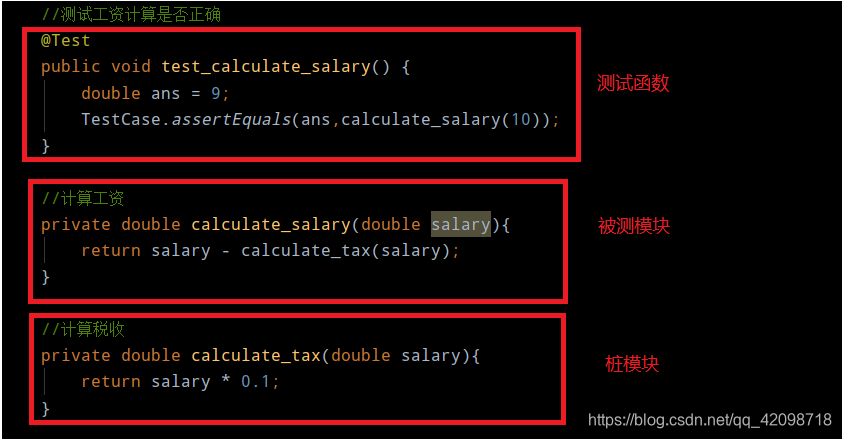
- 桩模块 :模拟被测试的模块所调用的模块,而不是软件产品的组成的部分,这个桩模块本身不执行任何功能仅在被调用时返回静态值来模拟被调用模块的行为
桩模块简单实例(税收计算较复杂,可以先模仿一下,作为桩模块,这样就可以不影响被测模块的测试):
三、使用Mockito作为桩模块
我们在maven中加入Mockito和junit的依赖
        <dependency>

            <groupId>junit</groupId>

            <artifactId>junit</artifactId>

            <scope>test</scope>

        </dependency>

        <dependency>

            <groupId>org.mockito</groupId>

            <artifactId>mockito-core</artifactId>

            <scope>test</scope>

        </dependency>
数据库访问层studentDao如下(还未实现方法):
import org.springframework.stereotype.Repository;

import whu.xsy.swagger_use.entity.student;

import java.util.List;

@Repository

public interface studentDao {

    //TODO 从数据库获取所有学生信息

    List<student> getAll();

}
service层如下(调用studentDao):
import org.springframework.beans.factory.annotation.Autowired;

import org.springframework.stereotype.Service;

import whu.xsy.swagger_use.dao.studentDao;

import whu.xsy.swagger_use.entity.student;

import java.util.List;

@Service

public class studentService {

    @Autowired

    studentDao studentDao;

    public List<student> getAll(){

        return studentDao.getAll();

    }

}
接下来开始设置桩模块并开始测试
此时数据库并没有数据,数据访问层dao也没写好,那么该如何测试service呢?
我们使用mockito在dao层调用特定方法时模拟返回数据,这样就可以不影响service层的测试,并且即使数据库发生变化(比如环境迁移),也不影响测试。
简而言之,就是mockito接管了dao层
import junit.framework.TestCase;

import org.junit.Test;

import org.junit.runner.RunWith;

import org.mockito.Mockito;

import org.springframework.beans.factory.annotation.Autowired;

import org.springframework.boot.test.context.SpringBootTest;

import org.springframework.boot.test.mock.mockito.MockBean;

import org.springframework.test.context.junit4.SpringJUnit4ClassRunner;

import whu.xsy.swagger_use.dao.studentDao;

import whu.xsy.swagger_use.entity.student;

import whu.xsy.swagger_use.service.studentService;

import java.util.ArrayList;

import java.util.List;

@SpringBootTest

@RunWith(SpringJUnit4ClassRunner.class)

public class SwaggerUseApplicationTests {

    @MockBean

    studentDao studentDao;

    @Autowired

    studentService studentService;

    @Test

    public void contextLoads(){} // 可用来检测springboot环境

    //测试studentService

    @Test

    public void testStudentService(){

        //模拟数据库中数据

        List<student> students= new ArrayList<>();

        students.add(new student(1,"xsy"));

        students.add(new student(2,"theory"));

        //由于 studentDao 的 getAll() 方法还没写好,所以使用 Mockito 做桩模块,模拟返回数据

        Mockito.when(studentDao.getAll()).thenReturn( students );

        //调用studentService.getAll()

        List<student> result = studentService.getAll();

        //断言

        TestCase.assertEquals(2,result.size());

        TestCase.assertEquals("xsy",result.get(0).getName());

    }

}
四、使用mockMvc测试web层
- 在test类上加上
@AutoConfigureMockMvc注解 - 自动注入
MockMvc mockMvc; - 对studentController中增删改查接口进行测试
import io.swagger.annotations.Api;

import io.swagger.annotations.ApiImplicitParam;

import io.swagger.annotations.ApiImplicitParams;

import io.swagger.annotations.ApiOperation;

import org.springframework.web.bind.annotation.*;

import whu.xsy.swagger_use.entity.student;

import java.util.ArrayList;

import java.util.List;

@RestController

@RequestMapping("/student")

@Api(value = "/student", tags = "学生模块") //标注在类上的

public class studentController {

    //模拟数据库

    private static List<student> students = new ArrayList<>();

    //初始化模拟数据库

    static{

        students.add(new student(1,"xsy"));

        students.add(new student(2,"theory"));

    }

    @GetMapping("")

    public List<student> getAll(){

        return students;

    }

    @PostMapping("")

    public boolean add(student student){

        return students.add(student);

    }

}
测试get方法(期望状态200,返回的json中含有xsy,打印返回的信息)
@SpringBootTest

@RunWith(SpringJUnit4ClassRunner.class)

@AutoConfigureMockMvc

public class SwaggerUseApplicationTests {

    @MockBean

    studentDao studentDao;

    @Autowired

    studentService studentService;

    @Autowired

    MockMvc mockMvc;

    @Before

    public void setUp() throws Exception {

        mockMvc = MockMvcBuilders.standaloneSetup(new studentController()).build();

    }

    @Test

    public void testStudentController() throws Exception {

        RequestBuilder request = null;

        //查询所有学生

        request = get("/student/");

        mockMvc.perform(request)

                .andExpect(status().isOk())

                .andDo(MockMvcResultHandlers.print())

                .andExpect(content().string(Matchers.containsString("xsy")));

    }

}
测试通过,并且打印的信息如下:
MockHttpServletRequest:

      HTTP Method = GET

      Request URI = /student/

       Parameters = {}

          Headers = []

             Body = <no character encoding set>

    Session Attrs = {}

Handler:

             Type = whu.xsy.swagger_use.controller.studentController

           Method = whu.xsy.swagger_use.controller.studentController#getAll()

Async:

    Async started = false

     Async result = null

Resolved Exception:

             Type = null

ModelAndView:

        View name = null

             View = null

            Model = null

FlashMap:

       Attributes = null

MockHttpServletResponse:

           Status = 200

    Error message = null

          Headers = [Content-Type:"application/json"]

     Content type = application/json

             Body = [{"id":1,"name":"xsy"},{"id":2,"name":"theory"}]

    Forwarded URL = null

   Redirected URL = null

          Cookies = []
测试post方法:
本实例中展现了MockMvc如何上传数据和获取返回结果
测试方法与get类似
        request = post("/student/")

                .param("id","3")

                .param("name","ys");

        String result = mockMvc.perform(request)

                .andExpect(status().isOk())

                .andReturn().getResponse().getContentAsString();

        TestCase.assertEquals("true",result);
五、批量测试和测试覆盖率
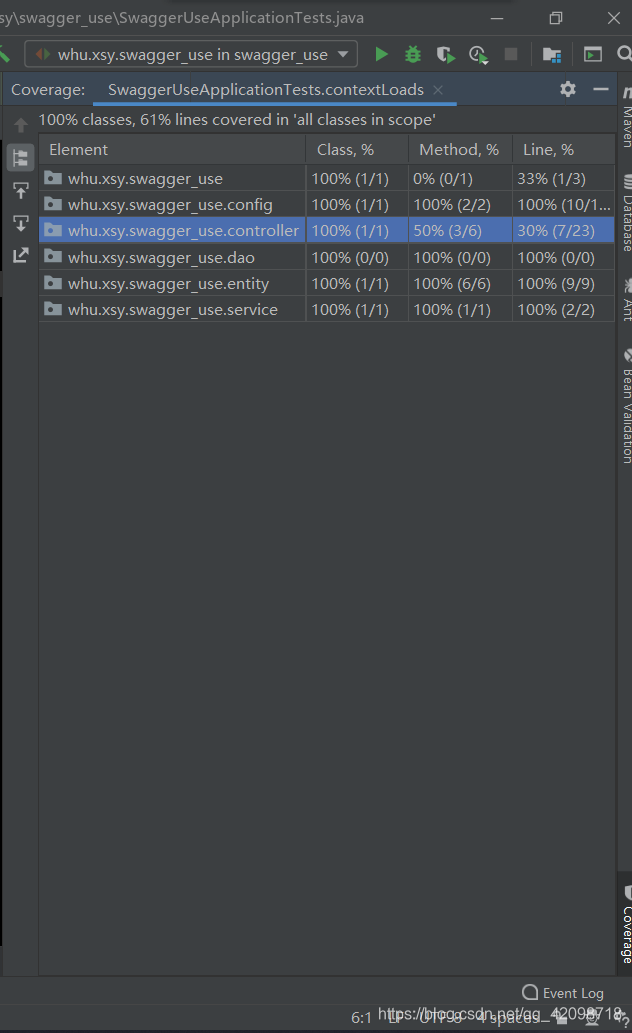
我们将service的测试和controller的测试分开:
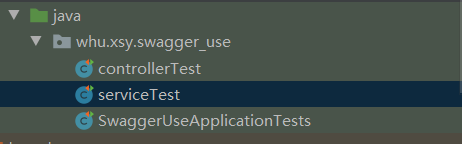
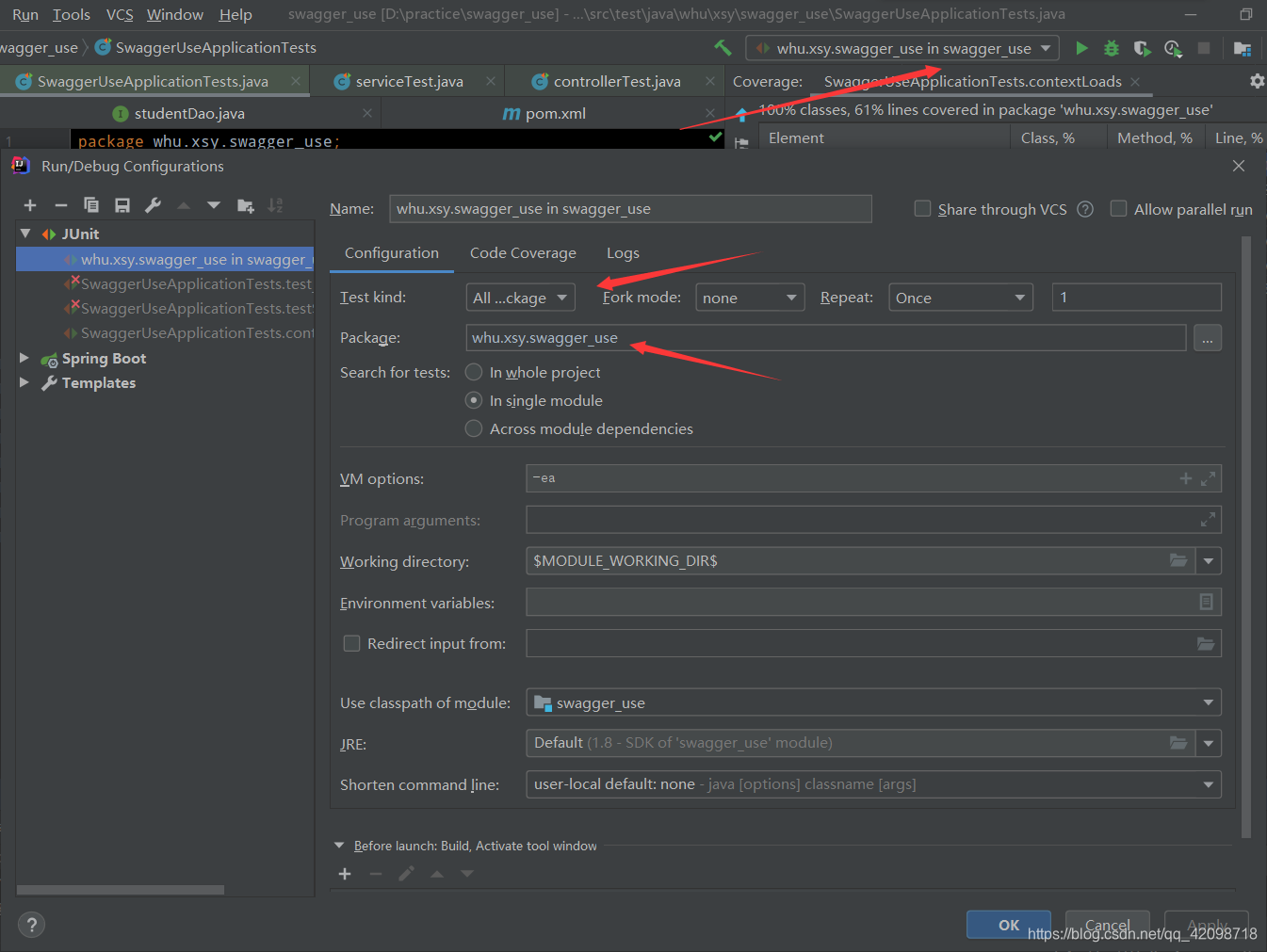
我们需要一次性运行所有的单元测试,则需要配置一次性运行whu.xsy.swagger_use中的所有test类(具体配置见Junit自动单元测试以及测试覆盖率简单使用)
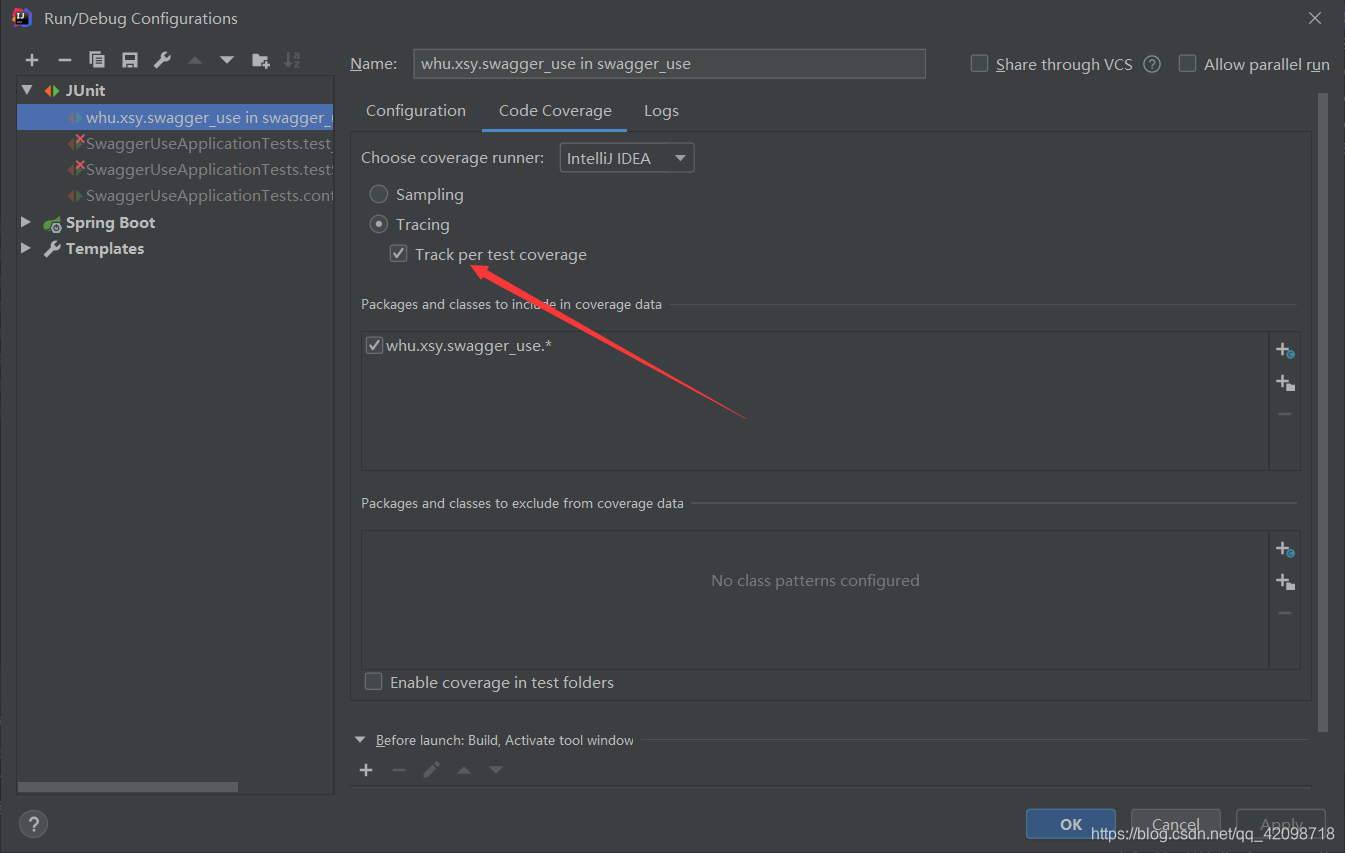
然后点击run with coverage

就可以运行所有的测试文件,并且可以看到覆盖率
springboot+junit测试的更多相关文章
- SpringBoot Junit测试Controller
原文链接:https://blog.csdn.net/xiaolyuh123/article/details/73281522 import java.util.List; import org.sp ...
- Springboot的日志管理&Springboot整合Junit测试&Springboot中AOP的使用
==============Springboot的日志管理============= springboot无需引入日志的包,springboot默认已经依赖了slf4j.logback.log4j等日 ...
- springboot集成junit测试与javamail测试遇到的问题
1.springboot如何集成junit测试? 导入junit的jar包 使用下面注解: @RunWith()关于这个的解释看下这两篇文章: http://www.imooc.com/qadetai ...
- springBoot中使用使用junit测试文件上传,以及文件下载接口编写
本篇文章将介绍如何使junit在springBoot中测试文件的上传,首先先阅读如何在springBoot中进行接口测试. 文件上传操作测试代码 import org.junit.Before; im ...
- SpringBoot系列三:SpringBoot基本概念(统一父 pom 管理、SpringBoot 代码测试、启动注解分析、配置访问路径、使用内置对象、项目打包发布)
声明:本文来源于MLDN培训视频的课堂笔记,写在这里只是为了方便查阅. 1.了解SpringBoot的基本概念 2.具体内容 在之前所建立的 SpringBoot 项目只是根据官方文档实现的一个基础程 ...
- 0005SpringBoot中用Junit测试实体类中绑定yml中的值
1.编写SpringBoot的引导类 package springboot_test.springboot_test; import org.springframework.boot.SpringAp ...
- 基于Springboot+Junit+Mockito做单元测试
前言 前面的两篇文章讨论过< 为什么要写单元测试,何时写,写多细 >和<单元测试规范>,这篇文章介绍如何使用Springboot+Junit+Mockito做单元测试,案例选取 ...
- 写Junit测试时用Autowired注入的类实例始终为空怎么解?
踩坑半天多,终于在网上寻觅到了解决方案,特此分享一下. 重要前提:src/main/java下的根包名必须和src/test/main的根包名完全一致,否则就会发生死活不能注入的情况,要继续进行下面的 ...
- 复利计算器(软件工程)及Junit测试———郭志豪
计算:1.本金为100万,利率或者投资回报率为3%,投资年限为30年,那么,30年后所获得的利息收入:按复利计算公式来计算就是:1,000,000×(1+3%)^30 客户提出: 2.如果按照单利计算 ...
随机推荐
- springboot + rabbitmq 做智能家居,我也没想到会这么简单
本文收录在个人博客:www.chengxy-nds.top,共享技术资源,共同进步 前一段有幸参与到一个智能家居项目的开发,由于之前都没有过这方面的开发经验,所以对智能硬件的开发模式和技术栈都颇为好奇 ...
- 【服务器】CentOs7系统使用宝塔面板搭建网站,有FTP配置(保姆式教程)
内容繁多,请耐心跟着流程走,在过程中遇到问题请在下面留言(我只是小白,请专业人士喷轻点). 这次用thinkphp5.1做演示,单纯的做演示,我打算下一篇文章用typecho(博客框架)演示. 前言 ...
- BERT的前世今生
Transformer Transformer来自论文: All Attention Is You Need 别人的总结资源: 谷歌官方AI博客: Transformer: A Novel Neura ...
- openstack迁移计算节点所有云主机
迁移计算节点所有云主机 -------高德置地 王锦雄 使用host-evacuate-live热迁移主机 查看主机目前的云主机情况 nova hypervisor-servers cloud1 ...
- Java 线程基础,从这篇开始
线程作为操作系统中最少调度单位,在当前系统的运行环境中,一般都拥有多核处理器,为了更好的充分利用 CPU,掌握其正确使用方式,能更高效的使程序运行.同时,在 Java 面试中,也是极其重要的一个模块. ...
- Spring 获取单例流程(二)
读完这篇文章你将会收获到 Spring 中 prototype 类型的 bean 如何做循环依赖检测 Spring 中 singleton 类型的 bean 如何做循环依赖检测 前言 继上一篇文章 S ...
- Java8 集合去重和排序
java 8 去重和排序 排序的方法 List<Integer> lists = Arrays.asList(1,1,2,3); // 升序 lists.sort(Comparator.c ...
- Yolo训练自定义目标检测
Yolo训练自定义目标检测 参考darknet:https://pjreddie.com/darknet/yolo/ 1. 下载darknet 在 https://github.com/pjreddi ...
- C#数据结构与算法系列(二十一):希尔排序算法(ShellSort)
1.介绍 希尔排序是希尔(Donald Shell)于1959年提出的一种排序算法.希尔排序也是一种插入排序,它是简单插入排序经过改进之后的一个更高效的版本,也称为缩小增量排序. 2.基本思想 希尔排 ...
- rem和px
做过一段时间的H5页面,但是对于rem与px的换算还是比较模糊,总是引用一段脚本,也没有深究过为什么,就稀里糊涂的用了,遇到一些细微的地方,总是不知道是什么原因导致的,我总是只要能完成效果就行,全然不 ...