
软件设计之基于Java的连连看小游戏(三)——所有功能的实现
新年快乐!
期末接二连三的考试实在太忙了忘记连连看没有更新完,今天想要学习生信时才发现。所以这次直接把连连看所有功能全部放上。
在传统的连连看的基础上,我增加了上传头像的功能,即可以自行上传图片作为游戏中要消除的图片,算是设计的一个亮点。
先把游戏截图放上。

(主界面)
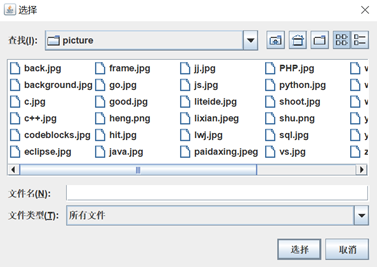
(点击上传头像后的对话框)
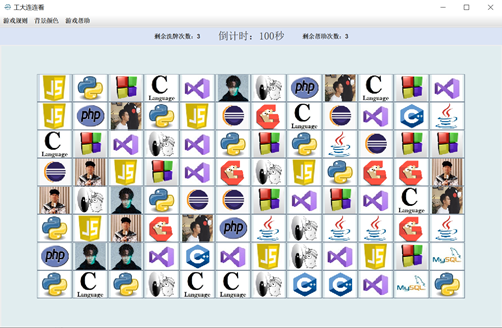
(游戏界面)


(菜单栏)

代码(最终版,在一、二的基础上做了改进):
Shown类包含三个界面,frame1为主界面,frame2为游戏界面,frame3为游戏规则。其中简单的事件处理以内部类的形式直接完成,消除及判断功能在Function类中实现,倒计时判断及时间提示功能在Time类中,游戏帮助功能在NewMap类中,包括游戏结束的判断及无解时自动洗牌功能的实现。
(1)Shown类:
 public class Shown extends Thread{

     static JFrame frame1=new JFrame("工大连连看");

     static JFrame frame2=new JFrame("工大连连看");

     static JFrame frame3=new JFrame("游戏规则");

     //8*12

     static JButton[][] imgbutton= new JButton[10][14];//第三维的0号元素储存button,第1号元素为rand值

     static ImageIcon[][] img=new ImageIcon[10][14];//用数组方便后面判断

     static ArrayList<String> logo=new ArrayList<String>(Arrays.asList("E:\\学习\\Sophomore\\软件设计\\picture\\c++.jpg","E:\\学习\\Sophomore\\软件设计\\picture\\c.jpg","E:\\学习\\Sophomore\\软件设计\\picture\\java.jpg","E:\\学习\\Sophomore\\软件设计\\picture\\eclipse.jpg","E:\\学习\\Sophomore\\软件设计\\picture\\go.jpg","E:\\学习\\Sophomore\\软件设计\\picture\\codeblocks.jpg","E:\\学习\\Sophomore\\软件设计\\picture\\js.jpg","E:\\学习\\Sophomore\\软件设计\\picture\\liteide.jpg","E:\\学习\\Sophomore\\软件设计\\picture\\PHP.jpg","E:\\学习\\Sophomore\\软件设计\\picture\\python.jpg","E:\\学习\\Sophomore\\软件设计\\picture\\sql.jpg","E:\\学习\\Sophomore\\软件设计\\picture\\vs.jpg"));

     static int pic_num=12;//所有的图片数量

     static int new_num=0;//已使用新地图次数

     public static int help_num=0;//已使用的帮助次数

     static void frame1(){

         frame1.setLocation(220, 75);//设置窗口出现的位置

         JButton pic=new JButton("上传头像");

         JButton begin_index=new JButton("开始冒险");

         JButton rul=new JButton("游戏规则");

         frame1.setDefaultCloseOperation(JFrame.EXIT_ON_CLOSE);

         //设置窗口图标

         Toolkit tool=frame1.getToolkit();

         Image image1=tool.getImage("E:\\学习\\Sophomore\\软件设计\\picture\\hit.jpg");

         frame1.setIconImage(image1);

         //添加按钮

         begin_index.setBackground(Color.yellow);pic.setBackground(Color.white);rul.setBackground(Color.white);//按钮颜色设置

         begin_index.setFont(new Font("Dialog",1,20));pic.setFont(new Font("Dialog",1,20));rul.setFont(new Font("Dialog",1,20));//文字大小设置

         pic.setFocusPainted(false);    begin_index.setFocusPainted(false);rul.setFocusPainted(false);//去除文字周围虚线框

         JPanel panel=new JPanel();

         panel.setBackground(null);//panel背景透明

         panel.setOpaque(false);

         panel.add(pic);

         panel.add(begin_index);

         panel.add(rul);

         pic.setBounds(200, 350, 120, 20);

         begin_index.setBounds(400, 350, 150, 40);

         rul.setBounds(600, 350, 120, 20);

         panel.setBounds(-20, 350, 800, 500);

         frame1.add(panel);

         //设置背景图片

         frame1.setLayout(null);//只有null才会显示图片

         ImageIcon img=new ImageIcon("E:\\学习\\Sophomore\\软件设计\\picture\\frame.jpg");

         JLabel imglabel=new JLabel(img);

         frame1.add(imglabel);

         imglabel.setBounds(0,0,800,450);

         //设置按钮

         begin_index.addActionListener(new ActionListener() {//注册事件监听器,点击button时执行方法frame2

             public void actionPerformed(ActionEvent event) {

                 frame2();

             }

         });

         pic.addActionListener(new ActionListener() {

             public void actionPerformed(ActionEvent event) {

                 JFileChooser jfc=new JFileChooser("C:\\");  //打开时的默认路径

                 jfc.setFileSelectionMode(JFileChooser.FILES_ONLY);  //只能打开文件

                 jfc.addChoosableFileFilter(new FileNameExtensionFilter("jpg","png"));//只能选择JPG或PNG

                 jfc.showDialog(jfc, "选择");

                 jfc.setMultiSelectionEnabled(false);//不能同时选择多个图片

                 File file=jfc.getSelectedFile();

                 if(file!=null)

                     pic_num++;

                 logo.add(file.getAbsolutePath());

                 }

         });

         rul.addActionListener(new ActionListener() {

             public void actionPerformed(ActionEvent event) {

                 frame3();

             }

         });

         frame1.setSize(810,490);

         frame1.setVisible(true);

     }

     static JPanel p;

     public static void frame2() {

         //获取当前时间

          Calendar now = Calendar.getInstance();

          int year=now.get(Calendar.YEAR);

          int month=now.get(Calendar.MONTH)+1;

          int date=now.get(Calendar.DATE);

          int hour=now.get(Calendar.HOUR);

          int min=now.get(Calendar.MINUTE)+2;//游戏时间为2分钟

          int second=now.get(Calendar.SECOND);

         frame1.setVisible(false);//frame1消失

         frame2.setLocation(100, 15);

         JPanel panel1=new JPanel();//gridlayout

         JPanel panel2=new JPanel();//borderlayout

         frame2.setDefaultCloseOperation(JFrame.EXIT_ON_CLOSE);

         JLabel jl=new JLabel("剩余洗牌次数:3");

         JLabel jl2=new JLabel("剩余帮助次数:3");

         //设置窗口图标

         Toolkit tool=frame1.getToolkit();

         Image image1=tool.getImage("E:\\学习\\Sophomore\\软件设计\\picture\\hit.jpg");

         frame2.setIconImage(image1);

         //布局

         GridLayout gridlayout=new GridLayout(10,14,0,0);

         panel1.setLayout(gridlayout);

         //borderlayout中添加gridlayout

         panel2.setLayout(new BorderLayout());

         frame2.add(panel2);

         panel2.add(panel1,BorderLayout.CENTER);

         //frame上为panel2(border),panel2的中间为panel1(grid)

         //菜单栏

         JMenuBar menuBar = new JMenuBar();

         frame2.setJMenuBar(menuBar);

         JMenu color=new JMenu("背景颜色");

         JMenu ruler= new JMenu("游戏规则");

         JMenu help=new JMenu("游戏帮助");

         //JMenu ex=new JMenu("");

         menuBar.add(ruler);

         menuBar.add(color);

         menuBar.add(help);

         JMenuItem moren = new JMenuItem("默认");

         JMenuItem red = new JMenuItem("红色");

         JMenuItem blue = new JMenuItem("蓝色");

         JMenuItem green = new JMenuItem("绿色");

         JMenuItem yellow = new JMenuItem("黄色");

         JMenuItem ru = new JMenuItem("游戏规则");

         JMenuItem nm = new JMenuItem("重新洗牌");

         JMenuItem find=new JMenuItem("查找帮助");

         help.add(find);

         help.add(nm);

         ruler.add(ru);

         color.add(red);

         color.add(blue);

         color.add(green);

         color.add(yellow);

         color.add(moren);//#e1edef

         find.addActionListener(new ActionListener() {

             @Override

             public void actionPerformed(ActionEvent e) {

                 if(help_num<3) {//使用次数小于等于三时可以新地图

                     help_num++;

                     jl2.setText("  剩余查找次数:"+(3-Shown.help_num)+"   ");

                     NewMap.help();

                 }else {

                      JOptionPane.showMessageDialog( null, "帮助查找次数已经用完了哦,靠人不如靠自己,加油!");

                 }

             }

         });

         nm.addActionListener(new ActionListener() {

             @Override

             public void actionPerformed(ActionEvent e) {

                 if(new_num<3) {//使用次数小于等于三时可以新地图

                     new_num++;

                     jl.setText("  剩余洗牌次数:"+(3-Shown.new_num)+"  ");

                     NewMap.newmap();

                 }else {

                      JOptionPane.showMessageDialog( null, "洗牌次数已经用完了哦,睁大眼睛继续找吧,fighting!");

                 }

             }

         });

         moren.addActionListener(new ActionListener() {

             @Override

             public void actionPerformed(ActionEvent e) {

                 for(int i=0;i<10;i++) {

                     for(int j=0;j<14;j++) {

                         imgbutton[i][j].setBackground(Color.decode("#e1edef"));

                     }

                 }

             }

         });

         red.addActionListener(new ActionListener() {

                 @Override

                 public void actionPerformed(ActionEvent e) {

                     for(int i=0;i<10;i++) {

                         for(int j=0;j<14;j++) {

                             imgbutton[i][j].setBackground(Color.red);

                         }

                     }

                 }

             });

         blue.addActionListener(new ActionListener() {

             @Override

             public void actionPerformed(ActionEvent e) {

                 for(int i=0;i<10;i++) {

                     for(int j=0;j<14;j++) {

                         imgbutton[i][j].setBackground(Color.blue);

                     }

                 }

             }

         });

         green.addActionListener(new ActionListener() {

             @Override

             public void actionPerformed(ActionEvent e) {

                 for(int i=0;i<10;i++) {

                     for(int j=0;j<14;j++) {

                         imgbutton[i][j].setBackground(Color.green);

                     }

                 }

             }

         });

         yellow.addActionListener(new ActionListener() {

             @Override

             public void actionPerformed(ActionEvent e) {

                 for(int i=0;i<10;i++) {

                     for(int j=0;j<14;j++) {

                         imgbutton[i][j].setBackground(Color.yellow);

                     }

                 }

             }

         });

         ru.addActionListener(new ActionListener() {

             @Override

             public void actionPerformed(ActionEvent e) {

                 frame3();

             }

         });

         //添加按钮及设置菜单背景

         JPanel panel_button=new JPanel();

         Time t=new Time();

         t.timer(year+"-0"+month+"-0"+date+" "+hour+":"+min+":"+second);//yyyy-MM-dd hh:mm:ss

         //t.timer("2020-01-02 "+hour+":"+min+":"+second);//yyyy-MM-dd HH:mm:ss

         panel_button.add(jl);

         panel_button.add(Time.jl0);

         panel_button.add(jl2);

         panel_button.setOpaque(true);

         panel_button.setBackground(Color.decode("#dbe4f5"));

         panel2.add(panel_button,BorderLayout.NORTH);

         //添加图形及游戏背景

         //10行14列的button按矩阵排列,周围button不可点击无img无边框

         int[] ran=new int[96];

         List list = new ArrayList();

         for(int m=0;m<48;m++) {

             Random r=new Random();

             int ra=r.nextInt(pic_num);

             ran[m]=ra;

             ran[m+48]=ra;

         }

          for(int p = 0;p < ran.length;p++){

              list.add(ran[p]);

              }

          Collections.shuffle(list);//list打乱顺序

          for(int i = 0; i < list.size();i++) {//乱序ran[]

              ran[i]=(int) list.get(i);

            }

         Border emptyBorder = BorderFactory.createEmptyBorder(0,0,0,0);

         for(int j=0;j<14;j++) {

             img[0][j]=null;//第0行的img为空

             img[9][j]=null;//9行的img为空

         }

         for (int i=0;i<10;i++) {

                 img[i][0]=null;

                 img[i][13]=null;//每一行第一个和最后一个图片为空

         }

         int r=0;

         for(int i=1;i<=8;i++) {

             for(int j=1;j<=12;j++) {

                 img[i][j]=new ImageIcon(logo.get(ran[r]));

                 img[i][j].setImage(img[i][j].getImage().getScaledInstance(60, 56,Image.SCALE_DEFAULT));

                 r++;

             }

         }

         for(int i=0;i<10;i++) {//0-9行

             for(int j=0;j<14;j++) {//0-13列

                 imgbutton[i][j]=new JButton(img[i][j]);

                 imgbutton[i][j].setOpaque(true);

                 imgbutton[i][j].setBackground(Color.decode("#e1edef"));

                 panel1.add(imgbutton[i][j]);//代表第i行第j列的图形

             }

         }

         for(int j=0;j<14;j++) {//周围button消除边框和点击功能

             imgbutton[0][j].setEnabled(false);

             imgbutton[9][j].setEnabled(false);

             imgbutton[0][j].setBorder(emptyBorder);

             imgbutton[9][j].setBorder(emptyBorder);

         }

         for(int i=1;i<9;i++) {

             imgbutton[i][0].setEnabled(false);

             imgbutton[i][13].setEnabled(false);

             imgbutton[i][0].setBorder(emptyBorder);

             imgbutton[i][13].setBorder(emptyBorder);

         }

         //添加事件监听器

         try{

             for(int i=1;i<9;i++) {

             for(int j=1;j<13;j++) {

                 final int m=i;

                 final int n=j;

                 imgbutton[i][j].addActionListener(new ActionListener() {

                     //如果此时栈为空,则入栈;如果栈不为空,则flag判断

                     public void actionPerformed(ActionEvent event) {

                         imgbutton[m][n].setBackground(Color.red);//点击时变色

                         if(Function.stack.empty()) {//如果此时栈为空,点击的button入栈

                             int[] arr= {m,n};//把点击的button的i j作为数组入栈

                             Function.stack.push(arr);//数组入栈

                         }else {

                             Function.flag(Function.stack,m,n);//执行flag()函数

                             imgbutton[m][n].setBackground(Color.decode("#e1edef"));

                             imgbutton[Function.num[0]][Function.num[1]].setBackground(Color.decode("#e1edef"));//尝试了很多种表示坐标的方法都执行都出错。只有用Num不报错

                             //当点击完成一对图形时恢复原色

                         }

                         //frame2.setVisible(false);//检测事件监听器

                     }

                 });

             }

          }

         }catch(Exception e) {

             System.err.print(e);

         }

         frame2.setSize(1000,650);

         frame2.setVisible(true);

     }

     static void frame3() {//游戏规则

         //frame1.setVisible(false);//frame1消失

         frame3.setDefaultCloseOperation(JFrame.EXIT_ON_CLOSE);

         //设置窗口图标

         Toolkit tool=frame3.getToolkit();

         Image image1=tool.getImage("E:\\学习\\Sophomore\\软件设计\\picture\\hit.jpg");

         frame3.setIconImage(image1);

         frame3.setLayout(new BorderLayout());

         frame3.setLocation(250, 75);//设置窗口出现的位置

         JButton begin_index=new JButton("继续游戏");

         begin_index.setFocusPainted(false);

         frame3.setBackground(Color.decode("#e1edef"));

         //文字

         JPanel center =new JPanel();

         ImageIcon img=new ImageIcon("E:\\学习\\Sophomore\\软件设计\\picture\\wenzi.jpg");

         img.setImage(img.getImage().getScaledInstance(790, 350,Image.SCALE_DEFAULT));

         JLabel imglabel=new JLabel(img);

         center.add(imglabel);

         frame3.add(center,BorderLayout.CENTER);

         //设置开始按钮

         JPanel south=new JPanel();

         south.setBackground(Color.decode("#ffc6c6"));

         center.setBackground(Color.decode("#ffc6c6"));

         south.add(begin_index);

         frame3.add(south,BorderLayout.SOUTH);

         begin_index.setBounds(0,0,50,20);//大小设置

         begin_index.setBackground(Color.white);//按钮颜色设置

         begin_index.setFont(new Font("Dialog",1,20));//文字大小设置

         begin_index.addActionListener(new ActionListener() {//注册事件监听器,点击button时执行方法frame2

             public void actionPerformed(ActionEvent event) {

                 frame3.setVisible(false);

             }

         });

         frame3.setSize(800,490);

         frame3.setVisible(true);

     }

     static Shown shown1=new Shown();

     public static void main(String[] args) {

         shown1.frame1();

     }

 }
Shown
(2)Function类:
 public class Function {

     public static int num[]=new int[2];

     public static Stack<int[]> stack=new Stack<int[]>(); //点击的button的序号入栈

     //private Graphics2D g;

     //建立一个数字矩阵表示棋盘,1表示可行,0表示不可行

     static int[][] chess=new int[10][14];

     //当栈内不为空时执行flag函数

     //先判断是否一致,若一致则road判断路径是否符合要求,再执行link()连线

     //ij 为栈内已经存在的button的坐标,m,n为刚刚点击的button的坐标

     //使用for循环寻找两个img的

     public static void flag(Stack<int[]> stack,int m,int n) {

         num=stack.peek();//peek栈顶元素(未取出)

         int i=num[0];int j=num[1];

         //初始化矩阵

         for(int x=0;x<14;x++) {

             chess[0][x]=1;

             chess[9][x]=1;

         }

         for(int y=1;y<9;y++) {

             chess[y][0]=1;

             chess[y][13]=1;

         }

         for(int[] a:chess) {

             for(int b:a)

                 b=0;

         }

         if(i==m&&j==n) {//如果重复点击同一个图片则清空栈,重新开始一对

             stack.clear();

             Shown.imgbutton[m][n].setBackground(Color.decode("#e1edef"));

         }else {

             if((Shown.img[i][j].getDescription()==Shown.img[m][n].getDescription())&&road(m,n,i,j)) {//尝试了很多个函数

                 //如果两个图片相同且路径满足要求

                 chess[i][j]=1;

                 chess[m][n]=1;//矩阵中相关元素改为1

                 NewMap.over();//游戏结束对话框

                 //NewMap.test();

                 //把button上的图片改为空白

                 ImageIcon img=new ImageIcon("E:\\学习\\Sophomore\\软件设计\\picture\\good.jpg");

                 img.setImage(img.getImage().getScaledInstance(70, 70,Image.SCALE_DEFAULT));

                 Shown.imgbutton[m][n].setIcon(img);

                 Shown.imgbutton[i][j].setIcon(img);

                 Border emptyBorder = BorderFactory.createEmptyBorder(0,0,0,0);

                 Shown.imgbutton[m][n].setBorder(emptyBorder);

                 Shown.imgbutton[i][j].setBorder(emptyBorder);

                 stack.clear();//完成后清空栈

             }else {

                 stack.clear();//如果不相等则出栈,重新开始一组比较

             }

         }

     }

     static boolean road0(int x1,int y1,int x2,int y2) {//没有拐点

         //相邻时

         if((Math.abs(x1-x2)==1&&y1==y2)||(Math.abs(y2-y1)==1&&x1==x2)) {

             return true;

         }

         if((y1==y2)) {//当在同一列且不相邻时

             int temp=0;

             for(int i=(x1>x2?x2:x1)+1;i<(x1>x2?x1:x2);i++) {

                 if(chess[i][y1]==1) {

                     temp++;

                 }else {

                     break;

                 }

             }

             if(temp==(x1>x2?x1:x2)-(x1>x2?x2:x1)-1) {

                 return true;

             }

         }

         if((x1==x2)) {//当在同一行且不相邻时

             int temp=0;

             for(int i=(y1>y2?y2:y1)+1;i<(y1>y2?y1:y2);i++) {

                 if(chess[x1][i]==1) {

                     temp++;

                 }else {

                     break;

                 }

             }

             if(temp==(y1>y2?y1:y2)-(y1>y2?y2:y1)-1) {

                 return true;

             }

         }

         return false;

     }

    // static int point1_x;

    // static int point1_y;//一个拐点时的拐点坐标

     static boolean road1(int x1,int y1,int x2,int y2) {

         //一个拐点

         //一个拐点时为矩形的两个对角

         if(chess[x1][y2]==1) {

         if(road0(x1,y2,x1,y1)&&road0(x1,y2,x2,y2)) {

             return true;

         }}

         if(chess[x2][y1]==1) {

         if(road0(x2,y1,x1,y1)&&road0(x2,y1,x2,y2)) {//(x2,y1)为拐点

             return true;

         }}

         return false;

     }

    // static int point2_x1;

    // static int point2_y1;

    // static int point2_x2;

    // static int point2_y2;

     static boolean road2(int x1,int y1,int x2,int y2) {//两个拐点时

         //当在同一行且同一列且在外侧时

         if((x1==x2)&&(x1==1||x1==8)){

             return true;

         }

         if((y1==y2)&&(y1==1||y1==12)) {//同一列且在外侧

             return true;

         }

         //不同行同列

         for(int i=0;i<14;i++) {

             if(chess[x1][i]==1) {

             if(road0(x1,i,x1,y1)&&road1(x1,i,x2,y2)) {

                 return true;

             }}

         }

         for(int i=0;i<10;i++) {

             if(chess[i][y1]==1) {

             if(road0(i,y1,x1,y1)&&road1(i,y1,x2,y2)) {

                 return true;

             }}

         }

         return false;

     }

     static boolean road(int x1,int y1,int x2,int y2) {//判断路径是否正确,正确的话传给flag执行

         //有一个成立则返回true

         return (road0(x1,y1,x2,y2)||road2(x1,y1,x2,y2)||road2(x1,y1,x2,y2));

     }

 }
Function
(3)Time类:
 public class Time {

     JFrame frame;

     public static JLabel jl0;

     ScheduledThreadPoolExecutor scheduled;//周期执行线程池

      Date String2Date(String dateStr) {

         SimpleDateFormat simpleDateFormat = new SimpleDateFormat("yyyy-MM-dd HH:mm:ss");

         try {

             Date date = simpleDateFormat.parse(dateStr);

             return date;

         } catch (ParseException e) {

             jl0.setText("时间格式传入错误" + dateStr);

             throw new IllegalArgumentException("时间格式传入错误" + dateStr);

         }

      }

     public void timer(String dateStr) {

         //System.out.println(String2Date(dateStr));

         Date end = String2Date(dateStr);

         scheduled.scheduleAtFixedRate(new Runnable() {

             @Override

             public void run() {

                 long time = (end.getTime() -1 - System.currentTimeMillis()) / 1000;

                 if (time <= 0) {

                     //System.out.println(dateStr);

                     JOptionPane.showMessageDialog( null, "阿偶,超时啦。游戏结束!");

                     System.exit(0);

                     return;

                 }

                 long hour = time / 3600;

                 long minute = (time - hour * 3600) / 60;

                 long seconds = time - hour * 3600 - minute * 60;

                 long djs=minute*60+seconds;

                 StringBuilder stringBuilder = new StringBuilder();

                 stringBuilder.append("   倒计时:").append(djs).append("秒").append("   ");

                 jl0.setText(stringBuilder.toString());

                 //System.out.println(time);

             }

         }, 0, 1, TimeUnit.SECONDS);

     }

     public Time() {

         scheduled = new ScheduledThreadPoolExecutor(2);

         init();

     }

     void init() {

         jl0 = new JLabel();

         Font font = new Font("宋体", Font.PLAIN, 20);//创建1个字体实例

         jl0.setFont(font);//设置JLabel的字体

     }

 }

 /*

 int n=JOptionPane.showConfirmDialog(null, "阿偶,时间到了。再来一局吧!", "游戏结束", JOptionPane.YES_NO_OPTION);

 if(n==0) {//是

      //Shown.frame2.setDefaultCloseOperation(JFrame.DISPOSE_ON_CLOSE);

     //Shown.shown1=null;

      //Shown.frame2.setDefaultCloseOperation(JFrame.EXIT_ON_CLOSE);//退出程序

     //System.exit(0);

     Shown.shown1=null;

         Shown.frame2.setDefaultCloseOperation(JFrame.DISPOSE_ON_CLOSE);

         Shown shown=new Shown();

     shown.frame1();

 }

 if(n==1) {//否

      System.exit(0);

      Shown.frame2.setDefaultCloseOperation(JFrame.EXIT_ON_CLOSE);//退出程序

      Shown.frame2.setDefaultCloseOperation(JFrame.DISPOSE_ON_CLOSE);

 }*/
Time
(4)NewMap类:
 public class NewMap {

     static void newmap() {//newmap

         int exit=0;

         for(int i=0;i<10;i++) {//剩余数量

             for(int j=0;j<14;j++) {

                 if(Function.chess[i][j]==0)

                     exit++;

             }

         }

         int[] ran=new int[96];//数组储存图片代码

         List list = new ArrayList();//乱序

         for(int m=0;m<exit/2;m++) {//在数组中成对出现

             Random r=new Random();

             int ra=r.nextInt(Shown.pic_num);

             ran[m]=ra;

             ran[m+exit/2]=ra;

         }

          for(int p = 0;p < exit;p++){

              list.add(ran[p]);

              }

          Collections.shuffle(list);//list打乱顺序

          for(int i = 0; i < list.size();i++) {//得到乱序ran[]

              ran[i]=(int) list.get(i);

            }

          int n=0;

          for(int i=0;i<10;i++) {//重新布局

                 for(int j=0;j<14;j++) {

                     if(Function.chess[i][j]==0) {//如果还有图片

                         Shown.img[i][j]=new ImageIcon(Shown.logo.get(ran[n]));

                         Shown.img[i][j].setImage(Shown.img[i][j].getImage().getScaledInstance(60, 56,Image.SCALE_DEFAULT));

                         Shown.imgbutton[i][j].setIcon(Shown.img[i][j]);

                         n++;

                     }

                 }

          }

     }

     static boolean test() {//检测有没有解,无解的话重新开始

         int temp=0;

         int num=0;

         for(int i=2;i<11;i++) {

             for(int j=2;j<9;j++) {

                 if(Function.chess[i][j]==0) {//不是空

                     for(int m=2;m<11;m++) {

                         for(int n=2;n<9;n++) {

                             if(Function.road(m,n,i,j)) {//检测是否有解

                                 break;

                             }

                         }

                     }

                 }else {

                 temp++;//无解

                 }

             }

         }

         for(int i=2;i<13;i++) {

             for(int j=2;j<9;j++) {

                 if(Function.chess[i][j]==0) {

                     num++;

                 }

             }

         }

         if(num==temp) {//全部无解

             NewMap.newmap();

             return false;

         }

         return true;

     }

     static void over() {//检测游戏是否结束

         int temp=0;

         for(int i=0;i<14;i++) {

             for(int j=0;j<10;j++) {

                 if(Function.chess[j][i]==1)

                     temp++;

             }

         }

         if(temp==140) {//所有button都没有图片的时候

             JOptionPane.showMessageDialog( null, "Wow,不愧是你!恭喜胜利通关,休息一下眼睛吧!");

             Shown.frame2.setVisible(false);

         }

     }

     static void help() {//help

         tag:for(int i=1;i<9;i++) {

         for(int j=1;j<13;j++) {

                 if(Function.chess[i][j]==0) {//如果还没有被消掉

                     for(int m=1;m<9;m++) {

                     for(int n=1;n<13;n++) {

                         if(Function.chess[m][n]==0&&Function.road(i,j,m,n)&&(i!=m||j!=n)&&Shown.img[i][j].getDescription()==Shown.img[m][n].getDescription()) {

                             Shown.imgbutton[i][j].setBackground(Color.green);

                             Shown.imgbutton[m][n].setBackground(Color.green);

                             break tag;//找到解后直接跳出所有循环

                         }

                     }

                 }

             }

         }

     }

  }

 }
NewMap
软件设计之基于Java的连连看小游戏(三)——所有功能的实现的更多相关文章
- 软件设计之基于Java的连连看小游戏(一)——开题及游戏首页的制作
原本计划紧张忙碌的考试月在图书馆和实验室度过,结果突如其来为期两周的软件设计把课余时间几乎捆绑在了机房.软设没有太多知识上的要求,只要成品简洁美观.实用准确即可.考虑了很久决定要用Java swing ...
- 软件设计之基于Java的连连看小游戏(二)——游戏基础界面的制作及事件的添加
上次完成到游戏首页的制作,今天完成了游戏基础界面的制作以及事件的简单添加.由于功能尚未完全实现,因此游戏界面的菜单列表只是简单地添加了一下,其余菜单列表以及倒计时等在后续的制作中逐一完善. 1.首先在 ...
- 基于jQuery的2048小游戏设计(网页版)
上周模仿一个2048小游戏,总结一下自己在编写代码的时候遇到的一些坑. 游戏规则:省略,我想大部分人都玩过,不写了 源码地址:https://github.com/xinhua6/2048game.g ...
- iOS开发实战-基于SpriteKit的FlappyBird小游戏
写在前面 最近一直在忙自己的维P恩的事情 公司项目也是一团乱 于是...随手找了个游戏项目改了改就上线了,就当充数了. SpriteKit简介 SpriteKit是iOS 7之后苹果推出的2D游戏框架 ...
- java猜数字小游戏
/* * * 猜数字小游戏 * * 先由系统生成一个2-100之间的随机数字, * * 然后捕获用户从控制台中输入的数字是否与系统生成的随机数字相同, * * 如果相同则统计用户所猜的次数,并给出相应 ...
- Java打飞机小游戏(附完整源码)
写在前面 技术源于分享,所以今天抽空把自己之前用java做过的小游戏整理贴出来给大家参考学习.java确实不适合写桌面应用,这里只是通过这个游戏让大家理解oop面向对象编程的过程,纯属娱乐.代码写的很 ...
- 基于Java的开源3D游戏引擎jMonkeyEngine
jMonkeyEngine简介 jMonkeyEngine是一款纯Java语言编写的游戏引擎,继承了Java应用跨平台的特性,而且是开放源代码的,遵循BSD开源协议,BSD开源协议用一句简单的话概括就 ...
- cocos creator 小游戏区域截图功能实现
截图是游戏中非常常见的一个功能,在cocos中可以通过摄像机和 RenderTexture 可以快速实现一个截图功能,具体API可参考:https://docs.cocos.com/creator/m ...
- 从零开始开发一款H5小游戏(三) 攻守阵营,赋予粒子新的生命
本系列文章对应游戏代码已开源 Sinuous game. 每个游戏都会包含场景和角色.要实现一个游戏角色,就要清楚角色在场景中的位置,以及它的运动规律,并能通过数学表达式表现出来. 场景坐标 canv ...
随机推荐
- 07.swoole学习笔记--tcp客户端
<?php //创建tcp客户端 $client=new swoole_client(SWOOLE_SOCK_TCP); //连接服务器 $client->connect(,) or di ...
- 洛谷P2089 烤鸡
标签:暴力,枚举 题目背景 猪猪 Hanke 得到了一只鸡. 题目描述 猪猪 Hanke 特别喜欢吃烤鸡(本是同畜牲,相煎何太急!)Hanke 吃鸡很特别,为什么特别呢?因为他有 10 种配料(芥末. ...
- 文献阅读报告 - Social BiGAT + Cycle GAN
原文文献 Social BiGAT : Kosaraju V, Sadeghian A, Martín-Martín R, et al. Social-BiGAT: Multimodal Trajec ...
- Spark Scheduler 模块(上)
在阅读 Spark 源代码的过程中,发现单步调试并不能很好的帮助理解程序.这样的多线程的分布式系统,更好的阅读源代码的方式是依据模块,分别理解. 在包 org.apache.spark 下面有很多 ...
- YOKOGAWA ProSafe-RS 通道测试 CENTUMVP
20180927 我并没有调试这个项目 仅仅是听同事讲解了 横河ProSafe-RS通道测试 然后做了笔记 软件安装并不在本记录中 ProSafe-RS版本 CENTUMVP版本 ProSafe-RS ...
- C# 绘制矩形方框读写内存类 cs1.6人物透视例子
封装的有问题 其中方框可能在别的方向可能 会显示不出来建议不要下载了 抽时间我会用纯c#写一个例子的 其中绘制方框文字和直线调用的外部dll采用DX11(不吃CUP)绘制我封装成了DLL命名为 S ...
- ApplicationListener监听使用ContextRefreshedEvent事件类型会触发多次
@Componentpublic class TestApplicationListener implements ApplicationListener<ContextRefreshedEve ...
- 吴裕雄--天生自然java开发常用类库学习笔记:LinkedList类
import java.util.LinkedList ; public class LinkedListDemo01{ public static void main(String args[]){ ...
- NO6 alias-unalias命令,递归创建目录,如何取消覆盖提示
·如果需要更新补丁则执行:·yum update·yum install lrzsz telnet tree nmap nc -y·alias #查看系统现有的别名. 一.设置别名eg: ...
- 【剑指Offer】面试题32 - I. 从上到下打印二叉树
题目 从上到下打印出二叉树的每个节点,同一层的节点按照从左到右的顺序打印. 例如: 给定二叉树: [3,9,20,null,null,15,7], 3 / \ 9 20 / \ 15 7 返回: [3 ...