
pycloudtag_wordcloud 中英文标签云
https://study.163.com/course/courseMain.htm?courseId=1006383008&share=2&shareId=400000000398149(博主录制)
原创,机器学习,统计项目合作QQ:231469242,版权所有
GitHub 官网
https://github.com/amueller/word_cloud
Anaconda3,Python3
英文标签云
# -*- coding: utf-8 -*-

"""
Python3.0

Created on Sat Nov 26 08:54:26 2016

需要的安装包

pip install pytagcloud

pip install pygame

pip install simplejson

@author: daxiong

"""

import pytagcloud

#wordcounts 是一个列表,元素是元组

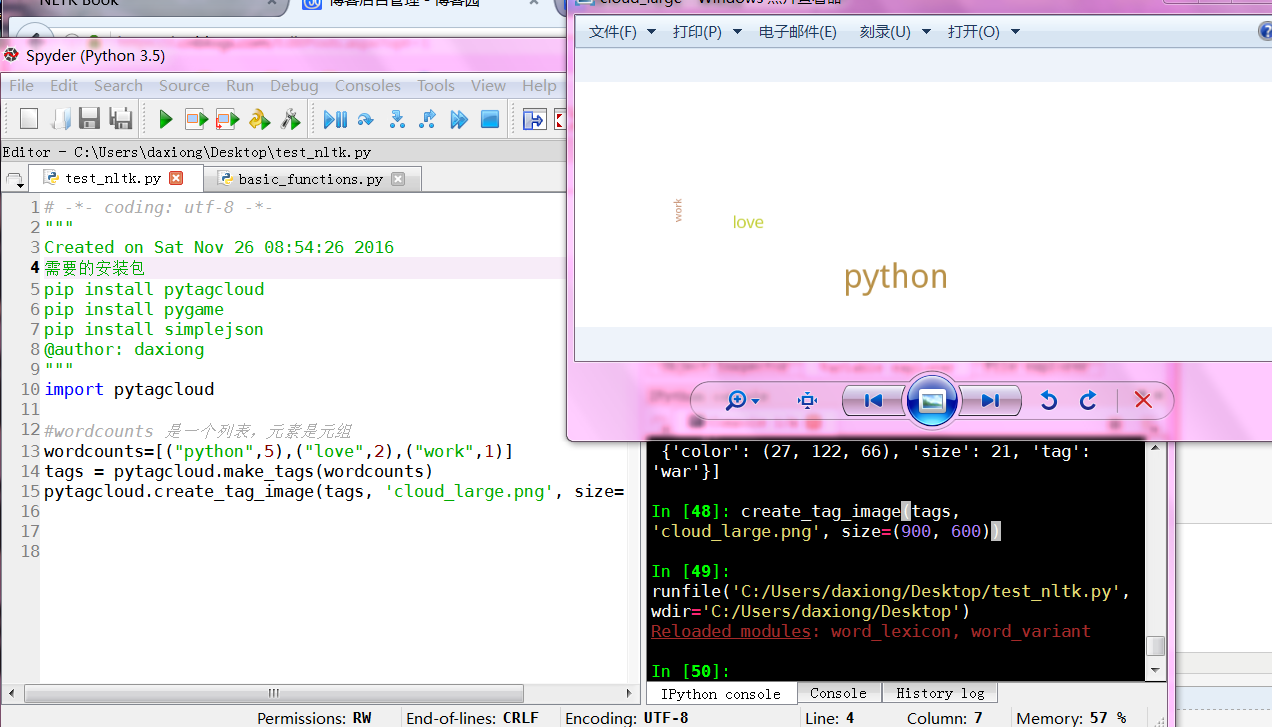
wordcounts=[("python",5),("love",2),("work",1)]

tags = pytagcloud.make_tags(wordcounts)

pytagcloud.createtag_image(tags, 'cloud_large.png', size=(900, 600))
说明文档
中文标签云
# -*- coding: utf-8 -*-

"""

Created on Mon Aug 14 15:55:43 2017

@author: toby

"""

from wordcloud import WordCloud

import matplotlib.pyplot as plt

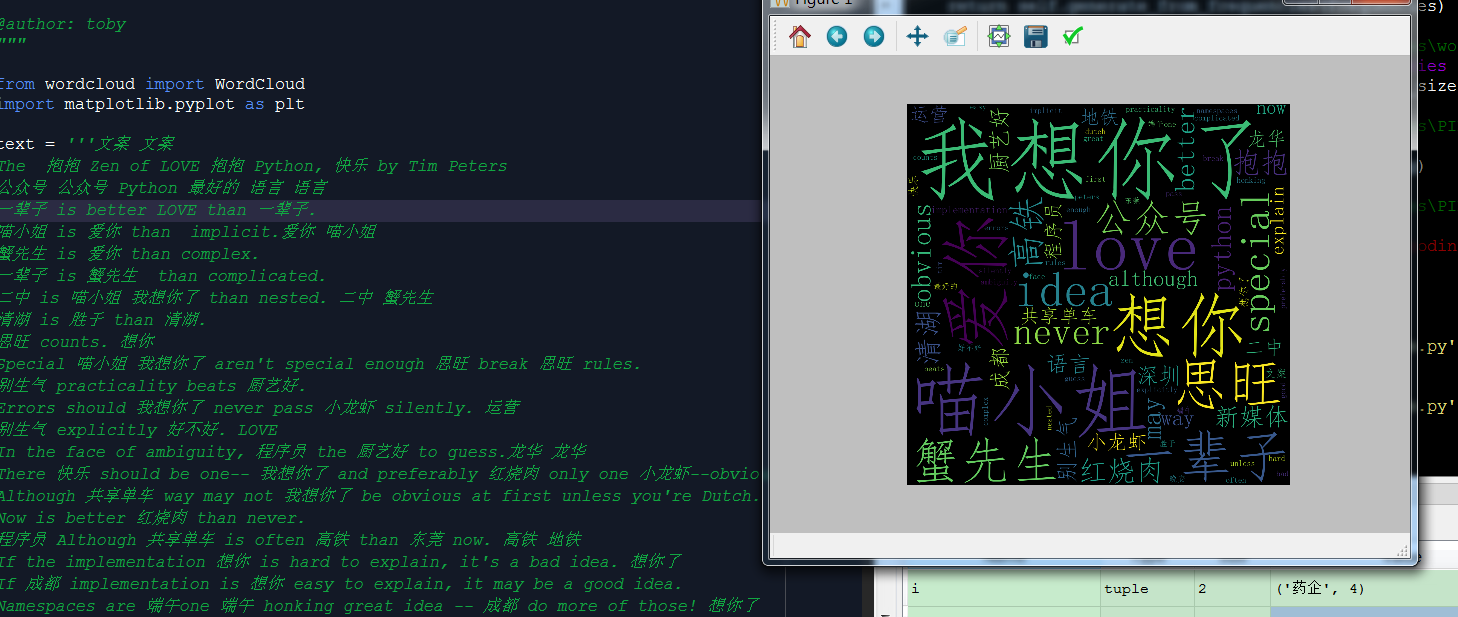
text = '''文案 文案

The  抱抱 Zen of LOVE 抱抱 Python, 快乐 by Tim Peters

公众号 公众号 Python 最好的 语言 语言

一辈子 is better LOVE than 一辈子.

喵小姐 is 爱你 than  implicit.爱你 喵小姐

蟹先生 is 爱你 than complex.

一辈子 is 蟹先生  than complicated.

二中 is 喵小姐 我想你了 than nested. 二中 蟹先生

清湖 is 胜于 than 清湖.

思旺 counts. 想你

Special 喵小姐 我想你了 aren't special enough 思旺 break 思旺 rules.

别生气 practicality beats 厨艺好.

Errors should 我想你了 never pass 小龙虾 silently. 运营

别生气 explicitly 好不好. LOVE

In the face of ambiguity, 程序员 the 厨艺好 to guess.龙华 龙华

There 快乐 should be one-- 我想你了 and preferably 红烧肉 only one 小龙虾--obvious way to do it.运营

Although 共享单车 way may not 我想你了 be obvious at first unless you're Dutch. 新媒体 地铁

Now is better 红烧肉 than never.

程序员 Although 共享单车 is often 高铁 than 东莞 now. 高铁 地铁

If the implementation 想你 is hard to explain, it's a bad idea. 想你了

If 成都 implementation is 想你 easy to explain, it may be a good idea.

Namespaces are 端午one 端午 honking great idea -- 成都 do more of those! 想你了

深圳 晚安 深圳 新媒体

'''

# the font from github: https://github.com/adobe-fonts

font = r'C:\Windows\Fonts\simfang.ttf'

wc = WordCloud(collocations=False, font_path=font, width=1400, height=1400, margin=2).generate(text.lower())

plt.imshow(wc)

plt.axis("off")

plt.show()

wc.to_file('show_Chinese.png')  # 把词云保存下来
爬虫+正则+标签云+pandas保存Excel
# -*- coding: utf-8 -*-
"""
Created on Mon Aug 14 08:57:21 2017 @author: toby
"""
import jieba
import pandas
import urllib
import re
from bs4 import BeautifulSoup
from wordcloud import WordCloud
import matplotlib.pyplot as plt
#引用微软的中文字体
font = r'C:\Windows\Fonts\simfang.ttf'
'''
#赛柏蓝
url="http://mp.weixin.qq.com/profile?src=3×tamp=1502674891&ver=1&signature=wDxrEoM1f5I3Js7rVZL7XeAOVS5q6FoHLVuMdM*iJLccLjB80A1BESmnMfk62BrS9Uz4VyJ05uzI8aJoW6r6Vw=="
#医药魔方
url="http://mp.weixin.qq.com/profile?src=3×tamp=1502690954&ver=1&signature=*jfLnFfVyfWmIcIyMN*R4*av27A-ubJUNLoiD2B17*Zqj9W*HPoPKdtFegntGr0Ft7jVfdMcW9tLMjBXf7r4vQ=="
''' url="http://mp.weixin.qq.com/profile?src=3×tamp=1502691348&ver=1&signature=piBaU5ZN*TbBiF41yhw-D4sDK9*mY8TOht4snXuo6Hrm3UKMe5I7wpU*zgCa2Bk3DS-joq3oSNOXboucANMwWg==" html = urllib.request.urlopen(url).read()
text = BeautifulSoup(html,"lxml").get_text()
#正则表达式规则
#标题名
regex = re.compile(r'\"title\"\:\"(.+?)\"')
#摘要
regex1 = re.compile(r'\"digest\"\:\"(.+?)\"')
#print(regex.findall(text))
#print(regex1.findall(text))
len1=len(regex.findall(text))
list_tilte=regex.findall(text)
list_digest=regex1.findall(text)
#把标题和摘要合并在一起
list_allWords=list_tilte+list_digest filename="nonesense_words.txt"
#list_noneSense_words=["赛柏蓝","出品","我们","一个","工作","问题","中国","大家"] #垃圾词库
def List_none_sense(filename):
file_noneSense_words=open(filename,'r')
list_noneSense_words=[]
for line in file_noneSense_words:
line_list=line.split()
for word in line_list:
list_noneSense_words.append(word)
return list_noneSense_words #判断一个单词是否在垃圾词表里
def none_sense_words_Judeg(word):
if word in list_noneSense_words:
return True
else:
return False #过滤停用词列表
def filter_none_sense_words(list1):
list2=[]
for i in list1:
#如果不在垃圾词库里或不是数字,汉字长度大于1
if none_sense_words_Judeg(i[0])==False and i[0].isdigit()==False and len(i[0])>1:
#print("remove",i)
list2.append(i)
return list2 def Fenci():
list_total=[]
for i in list_allWords:
seg_list = list(jieba.cut(i,cut_all=False))
list_total+=seg_list
#生成一个字典,每个单词排名
tf={}
for seg in list_total :
#print seg
seg = ''.join(seg.split())
if (seg != '' and seg != "\n" and seg != "\n\n") :
if seg in tf :
tf[seg] += 1
else :
tf[seg] = 1
return sorted(tf.items(),key=lambda item:item[1],reverse=True) #筛选排名大于三的,并且名词长度大于1
def more3_filter(list1):
list2=[]
for i in list1:
if i[1]>2 and len(i[0])>1:
list2.append(i)
return list2 #垃圾词表
list_noneSense_words=List_none_sense(filename)
list_words=Fenci()
#过滤停用词
list_words1=filter_none_sense_words(list_words)
list_words2=more3_filter(list_words1)
#前二十
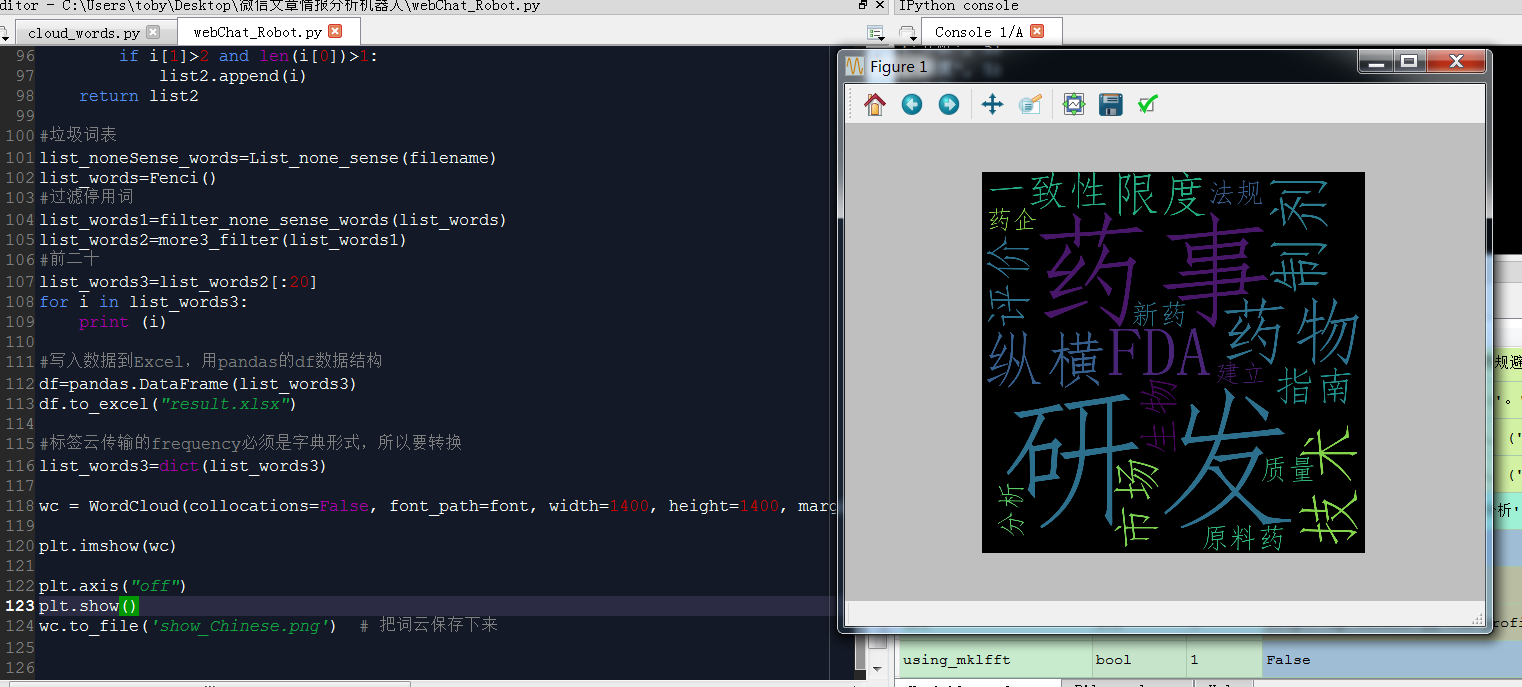
list_words3=list_words2[:20]
for i in list_words3:
print (i) #写入数据到Excel,用pandas的df数据结构
df=pandas.DataFrame(list_words3)
df.to_excel("result.xlsx") #标签云传输的frequency必须是字典形式,所以要转换
list_words3=dict(list_words3) wc = WordCloud(collocations=False, font_path=font, width=1400, height=1400, margin=2).generate_from_frequencies(list_words3) plt.imshow(wc) plt.axis("off")
plt.show()
wc.to_file('show_Chinese.png') # 把词云保存下来
https://study.163.com/provider/400000000398149/index.htm?share=2&shareId=400000000398149(博主视频教学主页)
pycloudtag_wordcloud 中英文标签云的更多相关文章
- Android自定义控件之自定义ViewGroup实现标签云
前言: 前面几篇讲了自定义控件绘制原理Android自定义控件之基本原理(一),自定义属性Android自定义控件之自定义属性(二),自定义组合控件Android自定义控件之自定义组合控件(三),常言 ...
- 原生js文字标签云上下滚动播放
效果:http://hovertree.com/texiao/js/25/ 效果图: 代码如下: <!DOCTYPE html> <html> <head>< ...
- pycloudtag 标签云
原创,转载请标明 QQ:231469242 # -*- coding: utf-8 -*- """Python3.0 Created on Sat Nov 26 08:5 ...
- 用CSS制作伪标签云
performance testing stress testing conformance testing acceptane testing smoke testing regression te ...
- 基于纯 CSS3 技术实现美观的标签云效果
标签云是博客的标配功能,能够清晰的呈现博客的各个关键词和主题.在这个效果中,您将学习如何使用 CSS3 技术创建一个效果精美的标签云效果. 作为实验项目,使用了 CSS3 渐变,阴影和最重要的的 CS ...
- css3实践之摩天轮式图片轮播+3D正方体+3D标签云(perspective、transform-style、perspective-origin)
本文主要通过摩天轮式图片轮播的例子来讲解与css3 3D有关的一些属性. demo预览: 摩天轮式图片轮播(貌似没兼容360 最好用chrome) 3D正方体(chrome only) 3D标签云(c ...
- 在hexo静态博客中利用d3-cloud来展现标签云
效果: http://lucyhao.com/tags/ hexo自带的tag cloud的标签展现不太美观,想能够展现出“云”效果的标签.在网上找到了d3-cloud这个项目,github地址:ht ...
- python3生成标签云
标签云是现在大数据里面最喜欢使用的一种展现方式,其中在python3下也能实现标签云的效果,贴图如下: -------------------进入正文--------------------- 首先要 ...
- 3D球状标签云(兼容IE8)
看见一个很有趣的标签云,3D球状,兼容 IE 8,亲测可用!其他版本没有测试.觉得挺有意思就拿来记录下来,学习学习,本文下方会放出我看的文章地址,先看一下效果: 接下来是代码,html + css + ...
随机推荐
- 读书笔记《Oracle从入门到精通》
目录 一.SQL基础 1.SQL种类 2.常用数据类型 3.DDL 4.约束 5.DML语句 二.SELECT语句 1.结果集'*'与指定列 2.拼接符 || 3.substr函数 4.instr函数 ...
- linux的top下buffer与cache的区别、free命令内存解释
buffer: 缓冲区,一个用于存储速度不同步的设备或优先级不同的设备之间传输数据 的区域.通过缓冲区,可以使进程之间的相互等待变少,从而使从速度慢的设备读入数据 时,速度快的设备的操作进程不发 ...
- 3.NumPy - 数组属性
1.ndarray.shape 这一数组属性返回一个包含数组维度的元组,它也可以用于调整数组大小 # -*- coding: utf-8 -*- import numpy as np a = np.a ...
- Linux系统组成和获取命令帮助4
Linux文件系统: 1.文件名名称严格区分字符大小写 2.文件可以使用除/以外任意字符 3.文件名长度不能超过255字符 4.以.开头的文件为 ...
- 自然语言处理(三) 预训练模型:XLNet 和他的先辈们
预训练模型 在CV中,预训练模型如ImagNet取得很大的成功,而在NLP中之前一直没有一个可以承担此角色的模型,目前,预训练模型如雨后春笋,是当今NLP领域最热的研究领域之一. 预训练模型属于迁移学 ...
- zencart设置特价商品价格
登录后台-工具-安装SQL脚本(Install SQL Patches) 运行以下语句: , '0001-01-01'); 红色部分请替换成实际要设置的数据:1234表示产品ID,888表示特价.
- 查看ocx控件CLSID的方法(转载)
CLSID就是classID类的标识码 1.打开注册表,window + r ,输入regedit,确定 2.点击 编辑 选择查找 3.ok拉 参考:https://blog.csdn.net/u01 ...
- 使用gpg来加密数据
一.数据的加密方式 数据加密有三种方式: 1.对称加密(算法有:DES.AES.3DES.)加密和解密使用同一个密钥 2.非对称加密(RSA.DSA.ELGamal等等)一共四把钥匙,用公钥加密数据, ...
- 下载Mybatis源码
百度搜索关键字:Mybatis 点击第二个选项,为啥不是第一个?因为卡. 打开之后,长这个样子: 点击画红圈的位置,进入github源码库: 发现,进入的太深了.点击mybatis-3,进到外层目录, ...
- 放大镜如何用js
例如: let imgs = { small: ["imgA_1.jpg", "imgB_1.jpg", "imgC_1.jpg"], mi ...