
Failed to start MariaDB database server. (已解决) 之前配过主从
[root@linux-node1 /var/log/mariadb]# systemctl status mariadb.service
● mariadb.service - MariaDB database server
Loaded: loaded (/usr/lib/systemd/system/mariadb.service; disabled; vendor preset: disabled)
Active: failed (Result: exit-code) since Mon 2019-11-04 01:33:15 EST; 18s ago
Process: 109775 ExecStartPost=/usr/libexec/mariadb-wait-ready $MAINPID (code=exited, status=1/FAILURE)
Process: 109774 ExecStart=/usr/bin/mysqld_safe --basedir=/usr (code=exited, status=0/SUCCESS)
Process: 109740 ExecStartPre=/usr/libexec/mariadb-prepare-db-dir %n (code=exited, status=0/SUCCESS)
Main PID: 109774 (code=exited, status=0/SUCCESS)
Nov 04 01:33:09 linux-node1.example.com systemd[1]: Starting MariaDB database server...
Nov 04 01:33:09 linux-node1.example.com mariadb-prepare-db-dir[109740]: Database MariaDB is probabl...
Nov 04 01:33:09 linux-node1.example.com mysqld_safe[109774]: 191104 01:33:09 mysqld_safe Logging ...'.
Nov 04 01:33:09 linux-node1.example.com mysqld_safe[109774]: 191104 01:33:09 mysqld_safe Starting...ql
Nov 04 01:33:15 linux-node1.example.com systemd[1]: mariadb.service: control process exited, code...=1
Nov 04 01:33:15 linux-node1.example.com systemd[1]: Failed to start MariaDB database server.
Nov 04 01:33:15 linux-node1.example.com systemd[1]: Unit mariadb.service entered failed state.
Nov 04 01:33:15 linux-node1.example.com systemd[1]: mariadb.service failed.
Hint: Some lines were ellipsized, use -l to show in full.
解决方法:
由于之前配置过主从模式
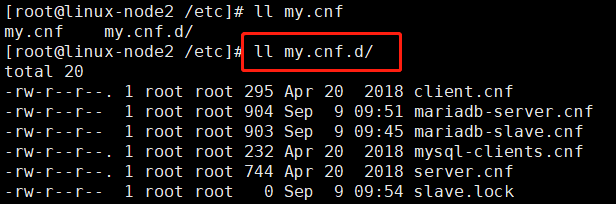
删除掉主从的配置文件,重新起来了
不能删除 my.cnf.d文件夹,这样也会启动不起来

[root@linux-node2 /etc/my.cnf.d]# systemctl restart mariadb
[root@linux-node2 /etc/my.cnf.d]#
Failed to start MariaDB database server. (已解决) 之前配过主从的更多相关文章
- jeecg启动报错“com.mysql.jdbc.exceptions.jdbc4.MySQLNonTransientConnectionException: Could not create connection to database server.”的解决办法
在运行"maven build"-->"tomcat:run"之后,报如下错误: com.mysql.jdbc.exceptions.jdbc4.MySQ ...
- Oracle Database Server 'TNS Listener'远程数据投毒漏洞(CVE-2012-1675)解决
环境:Windows 2008 R2 + Oracle 10.2.0.3 应用最新bundle patch后,扫描依然报出漏洞 Oracle Database Server 'TNS Listener ...
- pycharm2019连接mysql错误08801 ------Connection to django1@localhost failed. [08001] Could not create connection to database server. Attempted reconnect 3 times. Giving up.
Error:Connection to django1@localhost failed. [08001] Could not create connection to database server ...
- The server time zone value '�й���ʱ��' is unrecognized or represents more than one time zone错误的解决办法【已解决】
---恢复内容开始--- The server time zone value '�й���ʱ��' is unrecognized or represents more than one time ...
- centos7安装MariaDB以及Failed to start mariadb.service: Unit not found的错误解决
centos7下yum安装MariaDB CentOS 7下mysql下替换成MariaDB了.MariaDB数据库管理系统是MySQL的一个分支,主要由开源社区在维护,采用GPL授权 许可 Mari ...
- 【已解决】Android ADT中增大AVD内存后无法启动:emulator failed to allocate memory 8
[问题] 折腾: [已解决]Android ADT中增大AVD内存后无法启动:emulator failed to allocate memory 8 过程中,增大对应AVD的内存为2G后,结果无法启 ...
- 报错解决——Failed to load resource: the server responded with a status of 404 (Not Found) favicon.ico文件找不到
Django项目开发完成后在本地运行没问题,但在推到服务器上后出现报错Failed to load resource: the server responded with a status of 40 ...
- 【已解决】Android ADT中增大AVD内存后无法启动:emulator failed to allocate memory
[已解决]Android ADT中增大AVD内存后无法启动:emulator failed to allocate memory 结论是: 当前有个bug: 默认是通过 hw.ramSize=1024 ...
- adb -a server nodaemon,设备一直显示 offline,而 adb devices 一直显示 device【已解决】
1. adb -a server nodaemon 一直显示 offline 2. adb devices 一直显示 device 谷歌 和 度娘了一圈,未寻得解决办法 # 解决方法 问题已解决,使用 ...
随机推荐
- 一个包含python和java环境的dockerfile
现在一个项目中遇到python调用java的jar包的环境.为了方便发布,编写了这个dockerfile,作为基础镜像. #this docker file is used to build runt ...
- Git初始化配置以及配置github
1,配置用户名和邮箱(这里是我github中配置的用户名和邮箱),执行下面命令后,在C:\Users\yaosq盘下会出现一个全局文件.gitconfig. git config --global u ...
- 计算机网络(TCP/IP)
概述:网络协议通常分不同的层次进行开发,每一层分别不同的通信功能.TCP/IP通常分为4层协议系统. 1.链路层,有时也称为数据链路层或者网络接口层,通常包括操作系统中的设备驱动程序和计算机中对应的网 ...
- S03_CH03_AXI_DMA_OV7725摄像头采集系统
S03_CH03_AXI_DMA_OV7725摄像头采集系统 3.1概述 本课程讲解如何搭建基于DMA的图形系统,方案原理如下. 摄像头采样图像数据后通过DMA送入到DDR,在PS部分产生DMA接收中 ...
- Spring Boot:上传文件大小超限制如何捕获 MaxUploadSizeExceededException 异常
Spring Boot 默认上传文件大小限制是 1MB,默认单次请求大小是 10MB,超出大小会跑出 MaxUploadSizeExceededException 异常 spring.servlet. ...
- MyBatis 源码篇-日志模块1
在 Java 开发中常用的日志框架有 Log4j.Log4j2.Apache Common Log.java.util.logging.slf4j 等,这些日志框架对外提供的接口各不相同.本章详细描述 ...
- MyBatis 示例-主键回填
测试类:com.yjw.demo.PrimaryKeyTest 自增长列 数据库表的主键为自增长列,在写业务代码的时候,经常需要在表中新增一条数据后,能获得这条数据的主键 ID,MyBatis 提供了 ...
- [Vue]子组件与父组件之间传值
1.父组件与子组件传值props 1.1定义父组件,父组件传递 inputText这个数值给子组件: //父组件 //引入的add-widget组件 //使用 v-bind 的缩写语法通常更简单: & ...
- TCP面向字节流和UDP面向报文的区别
TCP面向字节流 打个比方比喻TCP,你家里有个蓄水池,你可以里面倒水,蓄水池上有个龙头,你可以通过龙头将水池里的水放出来,然后用各种各样的容器装(杯子.矿泉水瓶.锅碗瓢盆)接水. 上面的例子中,往水 ...
- 前端 vue/react 或者 js 导入/导出 xlsx/xls (带样式)表格的功能
第一种导出表格的功能: yarn add xlsx script-loader file-saver xlsx-style 效果展示 xlsx-style的bug修复:node_module/xlsx ...