
TensorFlow使用记录 (六): 优化器
0. tf.train.Optimizer
tensorflow 里提供了丰富的优化器,这些优化器都继承与 Optimizer 这个类。class Optimizer 有一些方法,这里简单介绍下:
0.1. minimize
minimize(

    loss,

    global_step=None,

    var_list=None,

    gate_gradients=GATE_OP,

    aggregation_method=None,

    colocate_gradients_with_ops=False,

    name=None,

    grad_loss=None

)
- loss: A Tensor containing the value to minimize.
- global_step: Optional Variable to increment by one after the variables have been updated.
- var_list: Optional list or tuple of Variable objects to update to minimize loss. Defaults to the list of variables collected in the graph under the key GraphKeys.TRAINABLE_VARIABLES.
- gate_gradients: How to gate the computation of gradients. Can be GATE_NONE, GATE_OP, orGATE_GRAPH.
- aggregation_method: Specifies the method used to combine gradient terms. Valid values are defined in the class AggregationMethod.
- colocate_gradients_with_ops: If True, try colocating gradients with the corresponding op.
- name: Optional name for the returned operation.
- grad_loss: Optional. A Tensor holding the gradient computed for loss.
compute_gradients(

    loss,

    var_list=None,

    gate_gradients=GATE_OP,

    aggregation_method=None,

    colocate_gradients_with_ops=False,

    grad_loss=None

)
这是优化 minimize() 的第一步,计算梯度,返回 (gradient, variable) 列表。
0.3. apply_gradients
apply_gradients(

    grads_and_vars,

    global_step=None,

    name=None

)
这是优化 minimize() 的第二步,返回一个执行梯度更新的 ops。
TensorFlow使用记录 (八): 梯度修剪 就用到了这两个函数。
1. tf.train.GradientDescentOptimizer
__init__(

    learning_rate,

    use_locking=False,

    name='GradientDescent'

)
\begin{equation}
\label{a}
\theta \gets \theta - \eta \nabla_{\theta}J(\theta)
\end{equation}
标准的梯度下降法优化器。
Recall that Gradient Descent simply updates the weights $\theta$ by directly subtracting the gradient of the cost function $J(\theta)$ with regards to the weights ($\nabla_{\theta}J(\theta)$) multiplied by the learning rate $\eta$. It does not care about what the earlier gradients were. If the local gradient is tiny, it goes very slowly.
2. tf.train.MomentumOptimizer
__init__(

    learning_rate,

    momentum,

    use_locking=False,

    name='Momentum',

    use_nesterov=False

)
Momentum optimization cares a great deal about what previous gradients were: at each iteration, it adds the local gradient to the momentum vector m (multiplied by the learning rate $\eta$), and it updates the weights by simply subtracting this momentum vector.
\begin{equation}
\label{b}
\begin{split}
& \mathbf{m} \gets \beta \mathbf{m} + \eta \nabla_{\theta}J(\theta) \\
& \theta \gets \theta - \mathbf{m}
\end{split}
\end{equation}
调用方式:
optimizer = tf.train.MomentumOptimizer(learning_rate=learning_rate, momentum=0.9)
除了标准的 MomentumOptimizer 外,还有一个变体 Nesterov Accelerated Gradient:
The idea of Nesterov Momentum optimization, or Nesterov Accelerated Gradient (NAG), is to measure the gradient of the cost function not at the local position but slightly ahead in the direction of the momentum.
\begin{equation}
\label{c}
\begin{split}
& \mathbf{m} \gets \beta \mathbf{m} + \eta \nabla_{\theta}J(\theta + \beta \mathbf{m}) \\
& \theta \gets \theta - \mathbf{m}
\end{split}
\end{equation}
调用方式:
optimizer = tf.train.MomentumOptimizer(learning_rate=learning_rate, momentum=0.9, use_nesterov=True)
3. tf.train.AdagradOptimizer
__init__(

    learning_rate,

    initial_accumulator_value=0.1,

    use_locking=False,

    name='Adagrad'

)
\begin{equation}
\label{d}
\begin{split}
& \mathbf{s} \gets \mathbf{s} + \nabla_{\theta}J(\theta) \otimes \nabla_{\theta}J(\theta) \\
& \theta \gets \theta - \eta \nabla_{\theta}J(\theta) \oslash \sqrt{\mathbf{s} + \epsilon}
\end{split}
\end{equation}
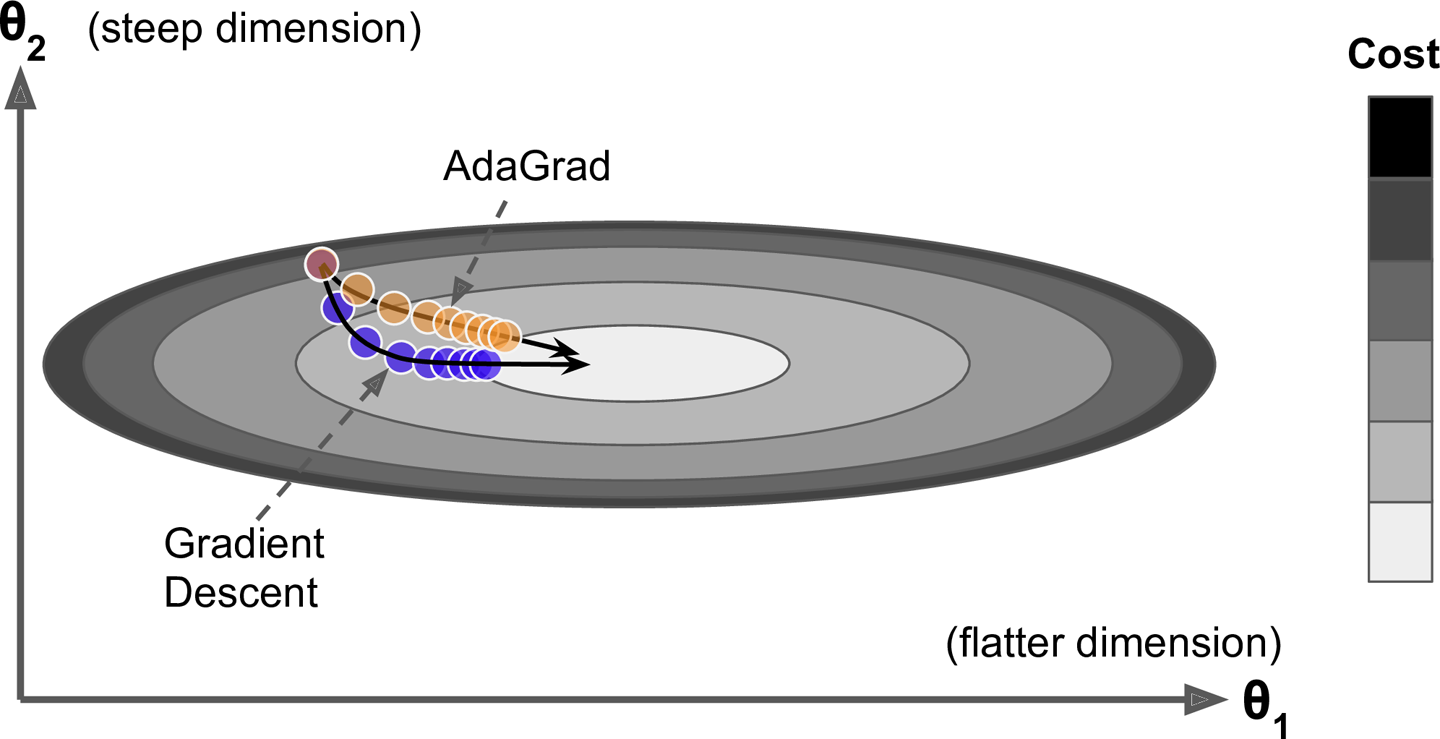
The first step accumulates the square of the gradients into the vector $\mathbf{s}$ (the $\otimes$ symbol represents the element-wise multiplication). This vectorized form is equivalent to computing $s_i \gets s_i + (\partial / \partial \theta_i J(\theta))^2$ for each element $s_i$ of the vector $\mathbf{s}$; in other words, each $s_i$ accumulates the squares of the partial derivative of the cost function with regards to parameter $\theta_i$. If the cost function is steep along the ith dimension, then $s_i$ will get larger and larger at each iteration.
The second step is almost identical to Gradient Descent, but with one big difference: the gradient vector is scaled down by a factor of $\sqrt{\mathbf{s} + \epsilon}$ (the $\oslash$ symbol represents the element-wise division, and $\epsilon$ is a smoothing term to avoid division by zero, typically set to $10^{-10}$). This vectorized form is equivalent to computing $θ_i \gets θ_i − \eta \partial / \partial θ_i J(θ) / \sqrt{\mathbf{s_i} + \epsilon}$ for all parameters $\theta_i$ (simultaneously).
In short, this algorithm decays the learning rate, but it does so faster for steep dimensions than for dimensions with gentler slopes. This is called an adaptive learning rate. It helps point the resulting updates more directly toward the global optimum. One additional benefit is that it requires much less tuning of the learning rate hyperparameter $\eta$.
调用方式:
optimizer = tf.train.AdagradOptimizer(learning_rate=learning_rate)
不推荐使用:
AdaGrad often performs well for simple quadratic problems, but unfortunately it often stops too early when training neural networks. The learning rate gets scaled down so much that the algorithm ends up stopping entirely before reaching the global optimum. So even though TensorFlow has an AdagradOptimizer, you should not use it to train deep neural networks (it may be efficient for simpler tasks such as Linear Regression, though).
4. tf.train.RMSPropOptimizer
__init__(

    learning_rate,

    decay=0.9,

    momentum=0.0,

    epsilon=1e-10,

    use_locking=False,

    centered=False,

    name='RMSProp'

)
Although AdaGrad slows down a bit too fast and ends up never converging to the global optimum, the RMSProp algorithm14 fixes this by accumulating only the gradients from the most recent iterations (as opposed to all the gradients since the beginning of training). It does so by using exponential decay in the first step.
\begin{equation}
\label{e}
\begin{split}
& \mathbf{s} \gets \beta \mathbf{s} + (1 - \beta) \nabla_{\theta}J(\theta) \otimes \nabla_{\theta}J(\theta) \\
& \theta \gets \theta - \eta \nabla_{\theta}J(\theta) \oslash \sqrt{\mathbf{s} + \epsilon}
\end{split}
\end{equation}
The decay rate $\beta$ is typically set to 0.9. Yes, it is once again a new hyperparameter, but this default value often works well, so you may not need to tune it at all.
调用方式:
optimizer = tf.train.RMSPropOptimizer(learning_rate=learning_rate,

                                      momentum=0.9, decay=0.9, epsilon=1e-10)
Except on very simple problems, this optimizer almost always performs much better than AdaGrad. It also generally performs better than Momentum optimization and Nesterov Accelerated Gradients. In fact, it was the preferred optimization algorithm of many researchers until Adam optimization came around.
5. tf.train.AdamOptimizer
__init__(

    learning_rate=0.001,

    beta1=0.9,

    beta2=0.999,

    epsilon=1e-08,

    use_locking=False,

    name='Adam'

)
Adam, which stands for adaptive moment estimation, combines the ideas of Momentum optimization and RMSProp: just like Momentum optimization it keeps track of an exponentially decaying average of past gradients, and just like RMSProp it keeps track of an exponentially decaying average of past squared gradients
\begin{equation}
\label{f}
\begin{split}
& \mathbf{m} \gets \beta_1 \mathbf{m} + (1 - \beta_1) \nabla_{\theta}J(\theta) \\
& \mathbf{s} \gets \beta_2 \mathbf{s} + (1 - \beta_2) \nabla_{\theta}J(\theta) \otimes \nabla_{\theta}J(\theta) \\
& \mathbf{m} \gets \frac{\mathbf{m}}{1 - \beta_1^t} \\
& \mathbf{s} \gets \frac{\mathbf{s}}{1 - \beta_2^t} \\
& \theta \gets \theta - \eta \mathbf{m} \oslash \sqrt{\mathbf{s} + \epsilon}
\end{split}
\end{equation}
$t$ is time step. The momentum decay hyperparameter $\beta_1$ is typically initialized to 0.9, while the scaling decay hyperparameter $\beta_2$ is often initialized to 0.999. As earlier, the smoothing term $\epsilon$ is usually initialized to a tiny number such as $10^{–8}$
调用方式:
optimizer = tf.train.AdamOptimizer(learning_rate=learning_rate)
6. tf.train.FtrlOptimizer
__init__(

    learning_rate,

    learning_rate_power=-0.5,

    initial_accumulator_value=0.1,

    l1_regularization_strength=0.0,

    l2_regularization_strength=0.0,

    use_locking=False,

    name='Ftrl',

    accum_name=None,

    linear_name=None,

    l2_shrinkage_regularization_strength=0.0

)
See this paper. This version has support for both online L2 (the L2 penalty given in the paper above) and shrinkage-type L2 (which is the addition of an L2 penalty to the loss function).
TensorFlow使用记录 (六): 优化器的更多相关文章
- tensorflow的几种优化器
最近自己用CNN跑了下MINIST,准确率很低(迭代过程中),跑了几个epoch,我就直接stop了,感觉哪有问题,随即排查了下,同时查阅了网上其他人的blog,并没有发现什么问题 之后copy了一篇 ...
- tensorflow API _ 4 (优化器配置)
"""Configures the optimizer used for training. Args: learning_rate: A scalar or `Tens ...
- Tensorflow 中的优化器解析
Tensorflow:1.6.0 优化器(reference:https://blog.csdn.net/weixin_40170902/article/details/80092628) I: t ...
- TensorFlow从0到1之TensorFlow优化器(13)
高中数学学过,函数在一阶导数为零的地方达到其最大值和最小值.梯度下降算法基于相同的原理,即调整系数(权重和偏置)使损失函数的梯度下降. 在回归中,使用梯度下降来优化损失函数并获得系数.本节将介绍如何使 ...
- TensorFlow优化器及用法
TensorFlow优化器及用法 函数在一阶导数为零的地方达到其最大值和最小值.梯度下降算法基于相同的原理,即调整系数(权重和偏置)使损失函数的梯度下降. 在回归中,使用梯度下降来优化损失函数并获得系 ...
- Tensorflow 2.0 深度学习实战 —— 详细介绍损失函数、优化器、激活函数、多层感知机的实现原理
前言 AI 人工智能包含了机器学习与深度学习,在前几篇文章曾经介绍过机器学习的基础知识,包括了监督学习和无监督学习,有兴趣的朋友可以阅读< Python 机器学习实战 >.而深度学习开始只 ...
- DNN网络(三)python下用Tensorflow实现DNN网络以及Adagrad优化器
摘自: https://www.kaggle.com/zoupet/neural-network-model-for-house-prices-tensorflow 一.实现功能简介: 本文摘自Kag ...
- tensorflow优化器-【老鱼学tensorflow】
tensorflow中的优化器主要是各种求解方程的方法,我们知道求解非线性方程有各种方法,比如二分法.牛顿法.割线法等,类似的,tensorflow中的优化器也只是在求解方程时的各种方法. 比较常用的 ...
- 莫烦大大TensorFlow学习笔记(8)----优化器
一.TensorFlow中的优化器 tf.train.GradientDescentOptimizer:梯度下降算法 tf.train.AdadeltaOptimizer tf.train.Adagr ...
随机推荐
- hdu 6025(女生赛)
典型的用空间换取时间的思想 关键要理解多个数怎么算最小公倍数 用一个前缀 一个后缀 然后枚举去掉的点就可以了 #include <iostream> #include <cstdio ...
- nnginx配置代理服务器
因为有些服务有ip白名单的限制,部署多节点后ip很容易就不够用了,所以可以将这些服务部署到其中的一些机器上, 并且部署代理服务器,然后其余机器以代理的方式访问服务.开始是以tinyproxy作为代理服 ...
- 序列化和反序列化在浏览器和 Web 服务器之间传递的数据、加密解密
js中数组不能传递到后台,需进行json序列化: var data = new Array(); data.push({para1:name,para2:answer}); string data = ...
- Bootstrap3基础教程 02 网格布局
Bootstrap 提供了一套响应式.移动设备优先的流式网格系统,随着屏幕或视口(viewport)尺寸的增加,系统会自动分为最多列. 网页设计中的网格布局作用:组织内容,让网站易于浏览,并降低用户端 ...
- 解决EntityFramework与System.ComponentModel.DataAnnotations命名冲突
比如,定义entity时指定一个外键, [ForeignKey("CustomerID")] public Customer Customer { get; set; } 编译时报 ...
- springcloud(十二)-springcloud-config统一管理微服务配置
1.为什么要统一管理微服务配置 对于传统的单体应用,常使用配置文件管理所有配置.例如一个SpringBoot开发的单体应用,可将配置内容放在application.yml文件中.如果需要切换环境,可设 ...
- 云端js动态效果
效果图: <!DOCTYPE html PUBLIC "-//W3C//DTD XHTML 1.0 Transitional//EN" "http://www.w3 ...
- app欢迎页问题
今天替换app中的图片,打包成apk后,欢迎页的图片怎么替换都还是旧的,尝试多次以后,确定以及肯定是替换成功了的,而且替换的也都对,只好清理了一下项目,重新build,最后再打包,结果成功了!真是坑! ...
- YII2中controller中的behaviors中的behavior内部是如何被使用的?
1. behaviors方法的调用: 在祖先对象components中有一个ensureBehaviors方法,代码如下: /** * Makes sure that the behaviors de ...
- ubuntu 共享WIFI并分享主机的代理服务
背景是这样的: 公司内的主机访问外网需要通过一个HTTP代理服务器,主机ubuntu共享wifi给手机使用的时候需要在手机上配置一个代理才能访问互联网. 我觉得这样比较麻烦,所以想在主机上直接把共享w ...