
Jenkins automate workflow
Now we will build an automate flow from code compiling to product delivery.
The essential tools using here are:
- GitHub (or other VCS)
- Jenkins
- Docker
- A web app for demo (use Ruby here)
1. Project
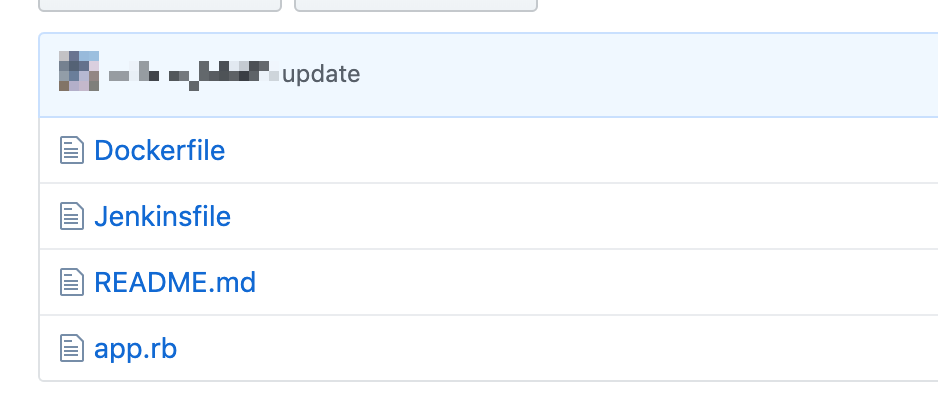
这个项目基本只有三个文件,分别是 Dockerfile 用于打包镜像,Jenkinsfile 用于Jenkins 执行自动测试、编译等构建工作,还有 app.rb 是一个 web 项目,用来模拟真实环境中的 web 开发项目,下面我将介绍具体步骤。
2. Create GitHub webhooks
我们首先需要创建这个 Git 项目,并 push 到 GitHub 上,在项目的设置界面添加 Webhooks
通过 Webhook 可以在你向 github 仓库推送代码时,通过 HTTP 请求向任意的 web server 发送通知信息,在这里我们用它来通知 Jenkins。
这里的 Payload URL 就是接受请求的 Jenkins 地址,但这个地址稍微有些复杂,你会在下一节中看到这个 URL 的具体格式。
3. Config the jenkins
我们使用 Docker 容器技术来搭建一个 Jenkins 服务,通过 docker 安装 Jenkins 非常容易,如果你使用 mac 或者 linux,只需要一条命令:
docker run \

  -u root \

  --rm \

  -d \

  -p 8080:8080 \

  -p 50000:50000 \

  -v jenkins-data:/var/jenkins_home \

  -v /var/run/docker.sock:/var/run/docker.sock \

  jenkinsci/blueocean
如果你在安装 Jenkins 遇到了问题,你可以查看 Jenkins 官方文档 https://jenkins.io/doc/book/installing/
在浏览器中打开 http://localhost:8080/ ,在完成初始化安装后可以看到主界面如下图:
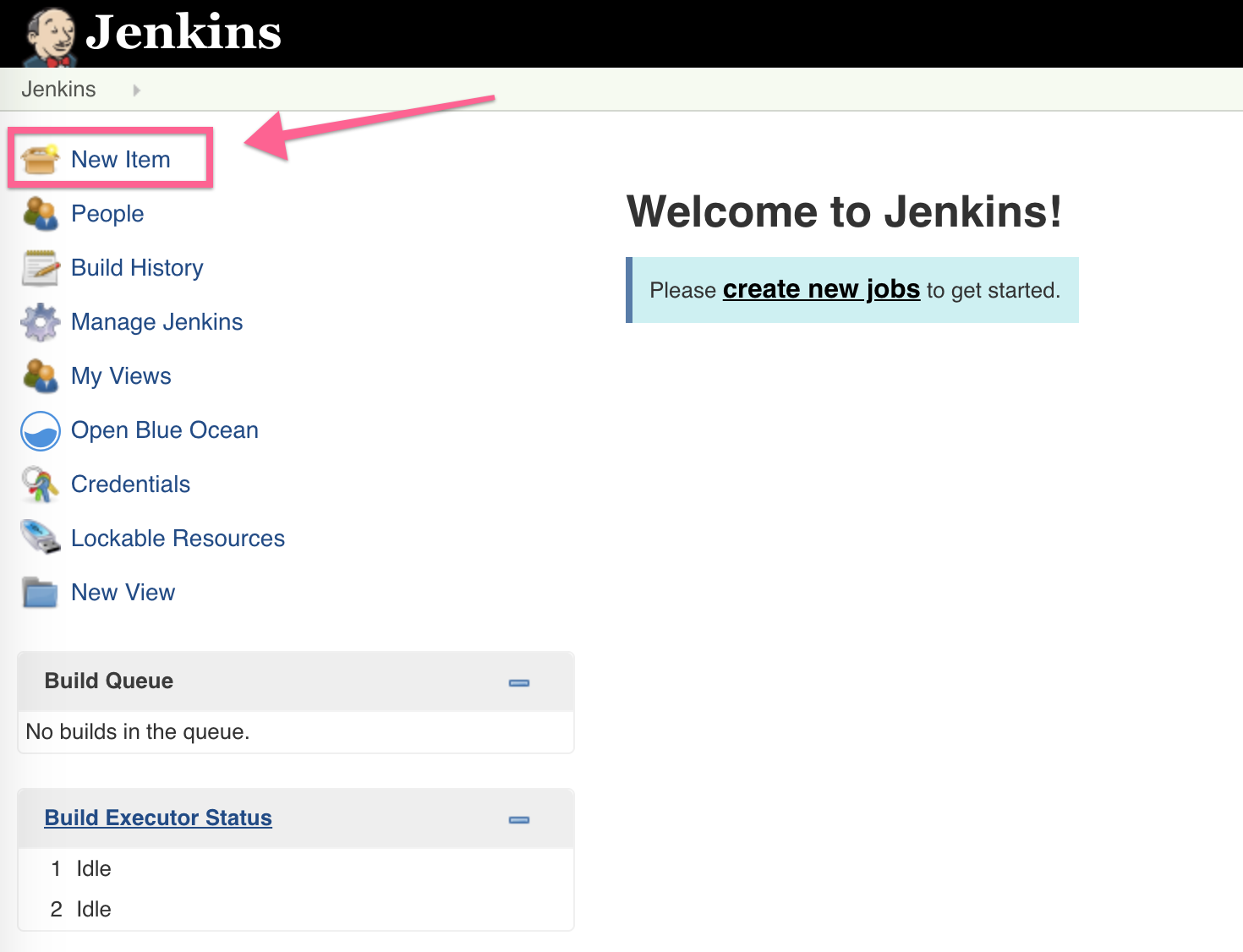
通过左边的 New Item 按钮创建你的第一个 Jenkins 项目吧!
在配置页面有很多不同类型可供选择,在这里我们选择 Pipline 按下面的 OK 进入下一步。
在项目的配置页面,我们首先设定通过外部脚本(trigger builds remotely)触发 Jenkins 的 pipline 脚本。Authentication token 可以随便填入一串随机字符串,输入框下面的注释就是上面 GitHub webhook 需要用到的 URL。
具体来说, GitHub webhook 中的 payload URL 应该是这样的格式:http://<jenkins_username>:<jenkins_api_token>@<jenkins_server:port>/job/<jenkins_item_name>/build?token=<authentication_token>
<jenkins_api_token> 需要你在 user 的 configure 界面自行创建,如下图所示:
Jenkins pipline 是一种领域特定语言, 我们用它来自动创建 docker 镜像,pipline 也可以被放进项目中,通过 Git 进行版本控制,所以在这里我们从 GitHub 上拉取 pipline 脚本。这里的 Script Path 就是 pipline 脚本的名字,如果路径错误 Jenkins 是无法找到正确的脚本的。
我使用的 pipline 脚本比较简单,只是执行一些 shell 语句,
其中区分成 build 和 post 两个阶段:
pipeline {

    agent any

    stages {

        stage('build') {

            steps {

                sh 'rm -rf just_test/'

                sh 'git clone --depth=1 https://github.com/xxx/just_test'

                sh 'cd just_test'

                sh "docker build -t just_test/v${env.BUILD_ID} . "

            }

        }

        stage('post') {

            steps {

                sh 'docker stop $(docker ps -a -q --filter="name=justtest")'

                sh "docker run -p 4567:4567 --rm --name=justtest -d just_test/v${env.BUILD_ID}"

            }

        }

    }

}
简单解释一下这个 pipline 脚本,在 Jenkins 创建的工作目录中,克隆 github 项目,进入项目目录,调用 docker build 打包新的 docker 镜像,docker build 会调用项目中的 Dockerfile 来创建 docker 镜像。然后是停止旧的 App 容器,并将刚才打包好的镜像启动。
4. Dockerfile
使用 Dockerfile 来打包镜像,代码如下:
# Use an official Ruby runtime as a parent image

FROM ruby

# Set the working directory to /app

WORKDIR /usr/src/app

# 将当前目录拷贝至 docker container 中的当前目录

COPY . .

# 运行 sh 命令(安装 ruby 软件包)

RUN gem install sinatra

EXPOSE 4567

# 启动 ruby 服务器

CMD ["ruby", "app.rb"]
Jenkins automate workflow的更多相关文章
- Using git-flow to automate your git branching workflow
Using git-flow to automate your git branching workflow Vincent Driessen’s branching model is a git b ...
- [tmux] Automate your workflow using tmux scripts
Do you have a standard workflow that involves setting up a specific tmux layout, or running certain ...
- 构建Docker+Jenkins持续集成环境
docker和Jenkins不是什么新东西了,两者结合也不是什么稀奇的事情,也已经有很多Jenkins和docker相结合的文章,此文仅为自己的一点心得实践,如有不对的地方,欢迎大家纠正. 先贴上大致 ...
- Jenkins iOS – Git, xcodebuild, TestFlight
Introduction with Jenkins iOS If you are new to continuous integration for mobile platforms then you ...
- Front end workflow
标签:请叫我红领巾 记一哈记一哈 ^_^ 推荐个不错的群 自己刚开始折腾的时候也是无处下手,渺茫啊.然而我是有一个很好的前端群(真的很棒,欢迎加入:[375042952]),关注群里的每一次讨论,每一 ...
- 解决jenkins构建job报错“NoClassDefFoundError” in jenkins/scm/RunWithSCM问题
现象 使用Jenkins 2.8,当我运行一个简单的Jenkins工作时,构建一个job获取源代码,出现下面的错误 FATAL: jenkins/scm/RunWithSCM java.lang.No ...
- Jenkins Pipeline高级用法-ShareLibrary
1.Github配置 1.1 上传jenkinsfile到github https://github.com/zeyangli/ShareLibrary-jenkins.git 2.Jenkins配置 ...
- [EXP]Jenkins 2.150.2 - Remote Command Execution (Metasploit)
## # This module requires Metasploit: https://metasploit.com/download # Current source: https://gith ...
- Jenkins之使用Pyinstaller构建Python应用程序
目录 1. 极简概述 2. Jenkins配置 2.1 安装JDK 2.2 安装Jenkins 3. 安装Docker 4. 使用PyInstaller构建Python应用程序 4.1 Fork 一个 ...
随机推荐
- vue-cli 3.0 端口变5位数
问题原因 : portfinder1.0.22版本导致vue-cli-service servey启动后,服务端口变成了随机端口的问题 解决办法: 删了目录 下的node-modules 然后 执 ...
- javascript Ajax 学习
前言:这是笔者学习之后自己的理解与整理.如果有错误或者疑问的地方,请大家指正,我会持续更新! AJAX是asynchronousjavascript and XML的简写,就是异步的javascrip ...
- Golang安装和配置
Golang安装和配置 Linux Golang 下载源码,解压. # /home/superpika为你的主目录 mkdir /home/superpika/go mkdir /home/super ...
- 读取经纬度坐标并存储为字典格式,即key为ID,value为轨迹点
示例数据: #格式为txt文本 ID,L,B 001,116.5154,45.1154 001,116.5160,45.1153 ... 002,xxx,xxx ... 目标:建立轨迹数据结构,即di ...
- 什么是HTTPS协议
一 HTTPS协议一直是web开发,无论前后端都不可或缺的重要知识点,然而由于历史原因,这个协议和知识点枯燥而繁多,如果看书和文字十分难懂苦涩.但又不得不掌握,怎么办呢? 正好,从朋友小灰那里得到一片 ...
- 节日营销!这样搞-App运营日常
节日送礼需求日益增长,当儿女们有了购买需求的时候,商家如何突出重围,成为孝子们的首选?如何做好节日营销?几个经验分享一下: 1.抓住节日特色 结合节日风格特色,营造节日气氛,如母亲节这种节日,主要体现 ...
- mysql建表常用命令
MySQL是一个关系型数据库管理系统,由瑞典MySQL AB 公司开发,目前属于 Oracle 旗下产品.MySQL 是最流行的关系型数据库管理系统之一,在 WEB 应用方面,MySQL是最好的 RD ...
- H5之拖拽
步骤: 1.为将要拖拽的元素设置允许拖拽,并赋予dragstart事件将其id转换成数据保存: 2.为容器添加dragover属性添加事件阻止浏览器默认事件,允许元素放置,并赋予drop事件进行元素的 ...
- ArcCatalog连接数据库报错
ArcCatalog连接数据库报错: Failed to connect to database. Cannot connect to database because the database cl ...
- 理解JVM之java内存模型
java虚拟机规范中试图定义一种java内存模型(JMM)来屏蔽掉各种硬件和操作系统内存访问差异,以实现让java程序在各种平台都能打到一致的内存访问效果.所以java内存模型的主要目标是定义程序中各 ...