
编译-LAMP基于fastcgi
前言
最近没更新新篇幅了,今天就来点干活,过多的也不说了下面着手干!干!干!
准备环境
centos7.5
apr-1.6.3.tar.gz
apr-util-1.6.1.tar.gz
httpd-2.4.34.tar.bz2
php-7.1.18.tar.bz2
mariadb-10.2.16-linux-x86_64.tar.gz
wordpress-4.9.4-zh_CN.tar.gz
编译HTTP
1、安装包组以及相关包
yum groupinstall "development tools"

yum install pcre-devel openssl-devel expat-devel
2、创建用户与解压
useradd  -r -s /sbin/nologin apache

tar xf httpd-2.4.34.tar.bz2

tar xf apr-1.6.3.tar.gz

tar xf apr-util-1.6.1.tar.gz
3、移动apr目录
mv apr-1.6.3 httpd-2.4.34/srclib/apr

mv apr-util-1.6.1 httpd-2.4.34/srclib/apr-util
4、源码编译
cd httpd-2.4.34/

./configure --prefix=/app/httpd24 \

--enable-so \

--enable-ssl \

--enable-cgi \

--enable-rewrite \

--with-zlib \

--with-pcre \

--enable-modules=most \

--enable-mpms-shared=all \

--with-mpm=prefork \

--with-included-apr

make && make install
5、设置环境变量
echo 'PATH=/app/httpd24/bin:$PATH' > /etc/profile.d/lamp.sh
6、编辑配置文件
vim /app/httpd24/conf/httpd.conf

user apache

group apache

取消下面注释

LoadModule proxy_module modules/mod_proxy.so

LoadModule proxy_fcgi_module modules/mod_proxy_fcgi.so

在下面行添加index.php

IfModule dir_module>

    DirectoryIndex index.php index.html

</IfModule>

添加子配置文件

Include conf/extra/php.conf
7、编辑子配置文件
vim  /app/httpd24/conf/extra/php.conf

添加以下内容

AddType application/x-httpd-php .php

AddType application/x-httpd-php-source .phps

ProxyRequests Off

ProxyPassMatch ^/(.*\.php)$ fcgi://127.0.0.1:9000/app/httpd24/htdocs/$1
8、启动服务
apachectl
二进制安装MYSQL
1、在前几篇里有提到详细的安装过程,这里就直接干活代码
useradd -r -s /sbin/nologin mysql

tar xvf mariadb-10.2.16-linux-x86_64.tar.gz  -C /usr/local/

cd /usr/local/

ln -s mariadb-10.2.16-linux-x86_64/ mysql

chown -R mysql.mysql mysql/

mkdir /app/mysql

chown mysql.mysql /app/mysql

cd /usr/local/mysql/

scripts/mysql_install_db  --datadir=/app/mysql --user=mysql

mkdir /etc/mysql/

cp support-files/my-huge.cnf  /etc/mysql/my.cnf

vim /etc/mysql/my.cnf

datadir=/app/mysql

cp support-files/mysql.server  /etc/init.d/mysqld

chkconfig --add mysqld

chkconfig --list

service mysqld start

vim /etc/profile.d/lamp.sh

PATH=/app/httpd24/bin:/usr/local/mysql/bin:$PATH

mysql -e "create database wpdb;grant all on wpdb.* to wpuser@'localhost' identified by 'centos'"
备注:这里可以跑下mysql安全脚本,做下安全巩固--请看https://www.cnblogs.com/xsuid/p/9368389.html
PHP编译安装
1、安装包与解压
yum install libxml2-devel bzip2-devel libmcrypt-devel

tar xvf php-7.1.18.tar.bz2
2、源码编译
cd php-7.1.18/

./configure --prefix=/app/php \

--enable-mysqlnd \

--with-mysqli=mysqlnd \

--with-openssl \

--with-pdo-mysql=mysqlnd \

--enable-mbstring \

--with-freetype-dir \

--with-jpeg-dir \

--with-png-dir \

--with-zlib \

--with-libxml-dir=/usr \

--enable-xml \

--enable-sockets \

--enable-fpm \

--with-config-file-path=/etc \

--with-config-file-scan-dir=/etc/php.d \

--enable-maintainer-zts \

--disable-fileinfo

make -j 4 && make install
3、环境变量
vim  /etc/profile.d/lamp.sh

PATH=/app/php/bin:/app/httpd24/bin:/usr/local/mysql/bin:$PATH
4、php设置
cp php.ini-production /etc/php.ini

cp sapi/fpm/init.d.php-fpm /etc/init.d/php-fpm

PHP配置文件

chmod +x /etc/init.d/php-fpm

chkconfig --add php-fpm

chkconfig php-fpm on

启动程序

cd /app/php/etc

cp php-fpm.conf.default php-fpm.conf

cp php-fpm.d/www.conf.default php-fpm.d/www.conf

php fastcgi配置文件,根据情况来更改



5、启动服务
service php-fpm start
安装wordpress
tar xvf wordpress-4.9.4-zh_CN.tar.gz
cp -a wordpress/* /app/httpd24/htdocs/
cd /app/httpd24/htdocs/

mv wp-config-sample.php wp-config.php

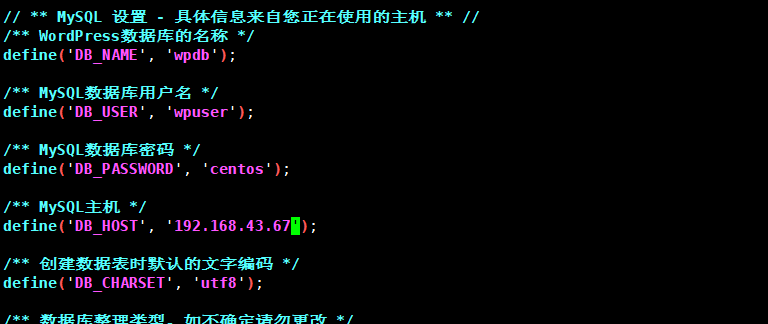
vim wp-config.php
根据上面mysql创建信息更改
附加虚拟主机的实现
编辑文件

vim /etc/httpd/conf.d/vhosts.conf

DirectoryIndex  index.php

<VirtualHost *:80>

ServerName www.pma.com

DocumentRoot /var/www/html/

ProxyRequests Off

ProxyPassMatch ^/(.*\.php)$ fcgi://127.0.0.1:9000/var/www/html/pma/$1

<Directory "/var/www/html">

Require all granted

</Directory>

</VirtualHost>

<VirtualHost *:80>

ServerName www.wordpress.com

DocumentRoot /var/www/html/

ProxyRequests Off

ProxyPassMatch ^/(.*\.php)$ fcgi://127.0.0.1:9000/var/www/html/wordpress/$1

<Directory "/var/www/html">

Require all granted

</Directory>

</VirtualHost>

<VirtualHost *:80>

ServerName www.forum.com

DocumentRoot /var/www/html/

ProxyRequests Off

ProxyPassMatch ^/(.*\.php)$ fcgi://127.0.0.1:9000/var/www/html/forum/$1

<Directory "/var/www/html">

Require all granted

</Directory>

</VirtualHost>
结语:后续更精彩
编译-LAMP基于fastcgi的更多相关文章
- 编译安装基于 fastcgi 模式的多虚拟主机的wordpress和discuz的LAMP架构
目录 实现CentOS 7 编译安装基于 fastcgi 模式的多虚拟主机的wordpress和discuz的LAMP架构 准备环境: 准备软件版本: 主机名修改用以区分 数据库服务器 实现数据库二进 ...
- CentOS6编译LAMP基于FPM模式的应用wordpress
CentOS6编译LAMP基于FPM模式的应用wordpress 引言:其实我们可以直接使用yum安装LAMP(Linux+Apache[httpd]+Mysql+PHP),比手动编译安装LAMP要简 ...
- 编译安装基于fastcgi模式的多虚拟主机的wordpress和discuz的LAMP架构
一.环境准备 两台主机: httpd+php(fastcgi模式) mariadb 服务器 软件版本: mariadb-10.2.40-linux-x86_64.tar.gz apr-1.7.0.ta ...
- 生产环境LAMP搭建 - 基于 fastcgi
生产环境LAMP搭建 - 基于 fastcgi 由于在module模式,php只是已http的模块形式存在,无形中加重了http的服务负载,通常在企业架构中,使用fastcgi的模式,将所有的服务都设 ...
- Httpd服务进阶知识-基于FASTCGI实现的LAMP架构
Httpd服务进阶知识-基于FASTCGI实现的LAMP架构 作者:尹正杰 版权声明:原创作品,谢绝转载!否则将追究法律责任. 一.httpd+php结合的方式 module: php fastcgi ...
- 编译LAMP部署动态网站环境
LAMP动态网站部署架构是由一套 Linux+Apache+MySQL+PHP 组成的动态网站系统解决方案. 以下配置环境为:Linux=RHEL7 --> Apache=2.4.33 --&g ...
- 源代码编译lamp环境
没有办法用 rpm查询一个源代码包是否安装 因为 并不是用rpm安装的 可以先吧 selinux 给禁用掉 iptables -F 把防火墙规则全部删除 首先确保 gcc gcc-c++ ma ...
- 编译安装基于nginx与lua的高性能web平台-openresty
1.首先编译安装nginx(不多说) 2.开始安装openresty cd /usr/local/src wget https://openresty.org/download/openresty-1 ...
- qemu模拟器下编译运行基于riscv指令集的Linux操作系统
基本原理: 在物理服务器Ubuntu14.04上安装qemu模拟器,模拟器中运行基于riscv指令集编译的linux镜像文件. 用到的工具包括: riscv-qemu(模拟器,可以模拟运行risc ...
随机推荐
- 2016 CCPC-Final
A.The Third Cup is Free #include <bits/stdc++.h> using namespace std; typedef long long ll; in ...
- 福昕阅读器把pdf某一页保存出来
第一步: 第二步: 第三步: 第四步:点击保存即可
- linux 02 基础命令
linux 02 基础命令 1.alias 别名 pyvip@Vip:~/demo$ alias lh="ls -lh" #将ls -lh的功能赋给lh(lh原来并没有意义)这个赋 ...
- Serilog 是 ASP.NET Core 的一个插件,可以简化日志记录
[翻译] ASP.NET Core 利用 Docker.ElasticSearch.Kibana 来记录日志 原文: Logging with ElasticSearch, Kibana, ASP.N ...
- 微软官方NET Core 2.0
NET Core 2.0 微软官方发布的.NET Core 2.0相关的博客: Announcing .NET Standard 2.0 Announcing .NET Core 2.0 F# and ...
- spark-2.2.0-bin-hadoop2.6和spark-1.6.1-bin-hadoop2.6发行包自带案例全面详解(java、python、r和scala)之Basic包下的JavaPageRank.java(图文详解)
不多说,直接上干货! spark-1.6.1-bin-hadoop2.6里Basic包下的JavaPageRank.java /* * Licensed to the Apache Software ...
- CSS属性、伪类选择器,CSS3选择器
CSS1时IE6是部分支持,伟大的IE6!CSS2时IE6部分支持,伟大的IE6依旧是部分支持!CCS3盛行CSS4也已经提上日程的现在,IE6完全不支持.IE6你该走了,我们会永远记住你的功绩的!I ...
- Code First 2
在codefirst一中也说了Mapping是实体与数据库的纽带,model通过Mapping映射到数据库,我们可以从数据库的角度来分析?首先是映射到数据库,这个是必须的.数据库里面一般包括表.列.约 ...
- CoreDataDemo
// User.h // CoreDataDemo // // Created by gaokunpeng on 15/2/4. // Copyright (c) 2015年 qianfeng. Al ...
- Unity3d中3D Text对模型的穿透显示
昨晚,好友在电话里问我在Unity3d中使用3D Text,不想让其穿透模型显示,即想让场景中的3D Text与模型有正确的遮挡关系,怎么解? 今早谷歌上查了查,明白了原因,因为3D Text的默认材 ...