
Code First 2
在codefirst一中也说了Mapping是实体与数据库的纽带,model通过Mapping映射到数据库,我们可以从数据库的角度来分析?首先是映射到数据库,这个是必须的。数据库里面一般包括表、列、约束、主外键、级联操作、实体关系(E-R图)、存储过程、视图、锁、事务、数据库结构更新等。在接下来的日子里,通过数据库的这些名词,来学习C#是如何实现或者调用它们来通过代码操作数据库。
在code first一中主要是学习了对数据库的映射,今天主要是学习表的映射。一个model映射一个表,多个modle映射一个表,一个model映射多个表,子类映射表。
一、表名的映射
学习model与表的映射肯定要知道表名的映射,可以通过using System.ComponentModel.DataAnnotations.Schema;命名空间下的[Table("TestStudent")]特性来约定表名的映射。
二、一个model映射一个表
这个就不用多说,一般情况都是一个model映射一个表,在code first一中也有Student类映射到Student表。
三、子类映射表
面向对象的三大特征之一就是继承,model中也会有继承实体,那子类如何映射到表中呢?
首先定义了一个Person类,一个继承Person的Student类。

using System;

using System.Collections.Generic;

using System.ComponentModel.DataAnnotations;

using System.ComponentModel.DataAnnotations.Schema;

using System.Linq;

using System.Text;

using System.Threading.Tasks;

namespace EFCodeFirstModels

{

    public enum SexType { Male, Female }

    public class Person

    {

        [Key]

        public string PersonId { get; set; }

        //姓名

        public string Name { get; set; }

        //性别

        public SexType Sex { get; set; }

        //年龄

        public int Age { get; set; }

        public Person(string personId, string name, SexType sex, int age)

        {

            PersonId = personId;

            Name = name;

            Sex = sex;

            Age = age;

        }

    }

}
using System;

using System.Collections.Generic;

using System.ComponentModel.DataAnnotations;

using System.ComponentModel.DataAnnotations.Schema;

using System.Linq;

using System.Text;

using System.Threading.Tasks;

namespace EFCodeFirstModels

{

    public class Student : Person

    {

        public string StuId { get; set; }

        public string Major { get; set; }

        public string School { get; set; }

        public Student(string stuId, string major, string school, string personId, string name, SexType sex, int age) : base(personId, name, sex, age)

        {

            this.StuId = stuId;

            this.Major = major;

            this.School = major;

            this.PersonId = personId;

            this.Name = name;

            this.Sex = sex;

            this.Age = age;

        }

    }

}
数据库上下文还是一默认的
using System;

using System.Collections.Generic;

using System.Linq;

using System.Text;

using System.Threading.Tasks;

using System.Data.Entity;

using EFCodeFirstModels;

using System.Configuration;

namespace EFCodeFirstDataAccess

{

    public class EFCodeFirstDbContext:DbContext

    {

        public EFCodeFirstDbContext() : base("MyStrConn")

        {

        }

        public DbSet<Person> Persons { get; set; }

    }

}
在Main中增加一个Person对象,一个Student对象。
using System;

using System.Collections.Generic;

using System.Linq;

using System.Text;

using System.Threading.Tasks;

using EFCodeFirstModels;

using EFCodeFirstDataAccess;

namespace EFCodeFirstDemo

{

    class Program

    {

        static void Main(string[] args)

        {

            //using能及时释放资源,例如数据库连接异常,可以即使将上下文释放

            using (var db=new EFCodeFirstDbContext())

            {

                Person person = new Person("1001", "张三", SexType.Female, 26);

                db.Persons.Add(person);

                Student stu = new Student("001", "软件工程", "蓝翔", "1000", "CYW", SexType.Female, 25);

                db.Persons.Add(stu);

                db.SaveChanges();

                Console.WriteLine("Success");

            }

            Console.ReadLine();

        }

    }

}
运行之后可以看到数据库生成了一个People表,多了一列:Discriminator,用来区别子类和父类对象
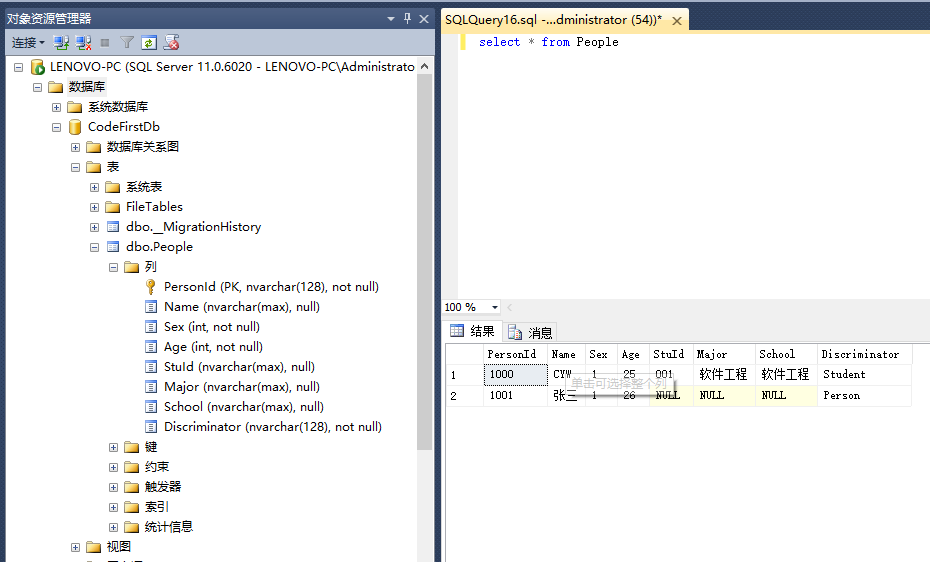
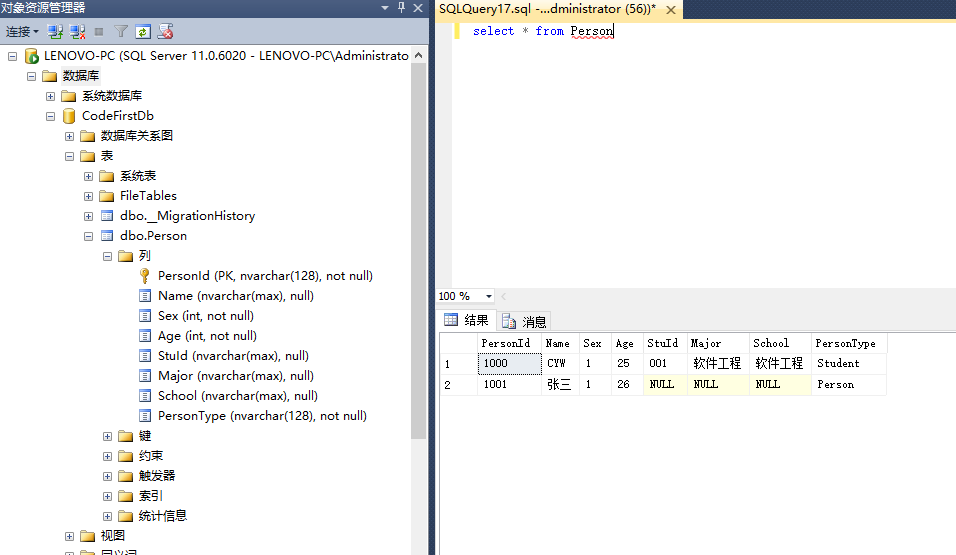
如果你想改名Discriminator列名,可以使用Fluent API来设置,需要在数据库上下文中重写OnModelCreating()方法。
public class EFCodeFirstDbContext:DbContext

    {

        public EFCodeFirstDbContext() : base("MyStrConn")

        {

        }

        public DbSet<Person> Persons { get; set; }

        protected override void OnModelCreating(DbModelBuilder modelBuilder)

        {

            modelBuilder.Entity<Person>().Map(m =>

            {

                m.ToTable("Person");

                m.Requires("PersonType").HasValue("Person");

            }).Map<Student>(m =>

            {

                m.Requires("PersonType").HasValue("Student");

            });

        }

    }
如果Person只有一个派生类,那我们可以使用布尔值来区别
            modelBuilder.Entity<Person>().Map(m =>

            {

                m.ToTable("Person");

                m.Requires("IsStudent").HasValue(false);

            }).Map<Student>(m =>

            {

                m.Requires("IsStudent").HasValue(true);

            });
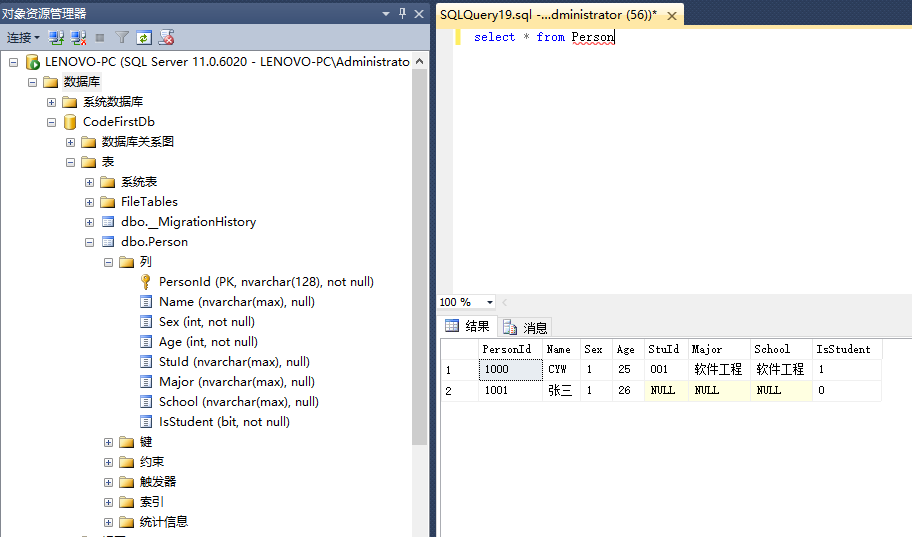
上面是两个Model生成一个表,基类和派生类都映射到同一张表中,通过使用鉴别列来识别是否为子类型。这是Code First默认规则使用的表映射方法TPH(Table Per Hierarchy)。其实还有两种映射方法。一种是TPT,一种是TPC.
TPT:Table Per Type,TPH将所有层次的类都放在了一个表里,而TPT在一个单独的表中储存来自基类的属性,在派生类定义的附加属性储存在另一个表里,并使用外键与主表相连接。这种方式只需指定子类表名。
[Table("Student")]
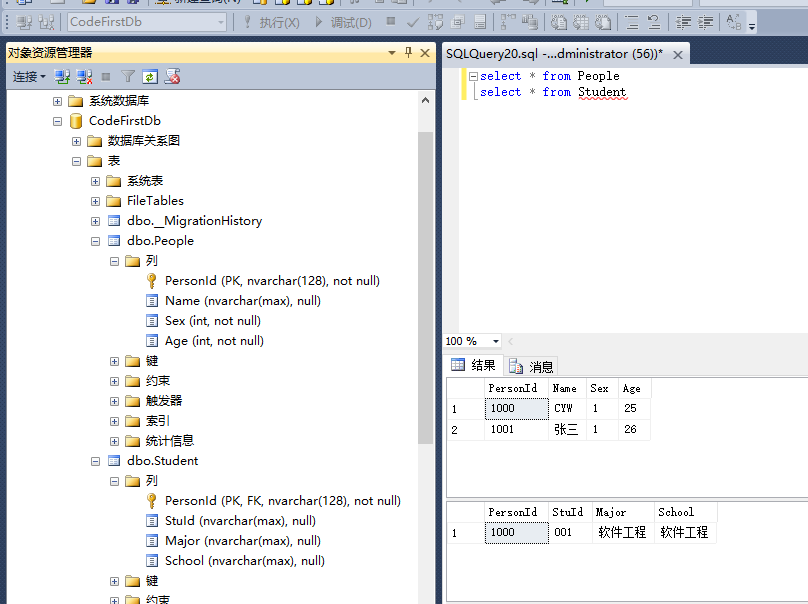
TPC:Table Per Concrete Type,基类与派生类都映射在不同的表中,不同的是派生类中还包括了基类的字段。TPC只能用Fluent API来配置
            modelBuilder.Entity<Person>().Map(m =>

            {

                m.ToTable("Person");

            }).Map<Student>(m =>

            {

                m.ToTable("Student");

                m.MapInheritedProperties();

            });

四、多个Model映射一个表
上面虽然是两个类Person、Student映射到一个表中,但主键都在基类上定义的,映射一个表还比较容易。如果是两个没有继承关系的Model如何映射到同一张表呢?这个我们在上面Person类Student类的基础上增加了一个IDCard类,主要是表示身份证类。假设Person的PersonId就是IDCard的PersonId。两个Model映射一个表,那两个Molde肯定是一对一的关系,映射的表名相同,主键名和类型也要相同,这些是必须的。同时还要指明两个类的外键,只指明一个都不行。
using System;

using System.Collections.Generic;

using System.Linq;

using System.Text;

using System.Threading.Tasks;

using System.ComponentModel.DataAnnotations;

using System.ComponentModel.DataAnnotations.Schema;

namespace EFCodeFirstModels

{

    [Table("Person")]

    public class IDCard

    {

        //身份证号

        [Key,ForeignKey("People")]

        public string PersonId { get; set; }

        //法定出生日期

        public DateTime BirthDate { get; set; }

        public Person People { get; set; }

        public IDCard(string personId, DateTime birstDate)

        {

            PersonId = personId;

            BirthDate = birstDate;

        }

    }

}
using System;

using System.Collections.Generic;

using System.ComponentModel.DataAnnotations;

using System.ComponentModel.DataAnnotations.Schema;

using System.Linq;

using System.Text;

using System.Threading.Tasks;

namespace EFCodeFirstModels

{

    public enum SexType { Male, Female }

    [Table("Person")]

    public class Person

    {

        [Key, ForeignKey("Card")]

        public string PersonId { get; set; }

        //姓名

        public string Name { get; set; }

        //性别

        public SexType Sex { get; set; }

        //年龄

        public int Age { get; set; }

        public IDCard Card { get; set; }

        public Person(string personId, string name, SexType sex, int age, IDCard card)

        {

            PersonId = personId;

            Name = name;

            Sex = sex;

            Age = age;

            Card = card;

        }

    }

}
using System;

using System.Collections.Generic;

using System.ComponentModel.DataAnnotations;

using System.ComponentModel.DataAnnotations.Schema;

using System.Linq;

using System.Text;

using System.Threading.Tasks;

namespace EFCodeFirstModels

{

    public class Student : Person

    {

        public string StuId { get; set; }

        public string Major { get; set; }

        public string School { get; set; }

        public Student(string stuId, string major, string school, string personId, string name, SexType sex, int age, IDCard card) : base(personId, name, sex, age, card)

        {

            this.StuId = stuId;

            this.Major = major;

            this.School = major;

            this.PersonId = personId;

            this.Name = name;

            this.Sex = sex;

            this.Age = age;

            this.Card = card;

        }

    }

}
在Mian中先添加一个Person来看下运行结果。
            //using能及时释放资源,例如数据库连接异常,可以即使将上下文释放

            using (var db=new EFCodeFirstDbContext())

            {

                IDCard card = new IDCard("1000", DateTime.Now);

                Person person = new Person("1001", "张三", SexType.Female, 26, card);

                db.Persons.Add(person);

                db.SaveChanges();

                Console.WriteLine("Success");

            }

            Console.ReadLine();

        }
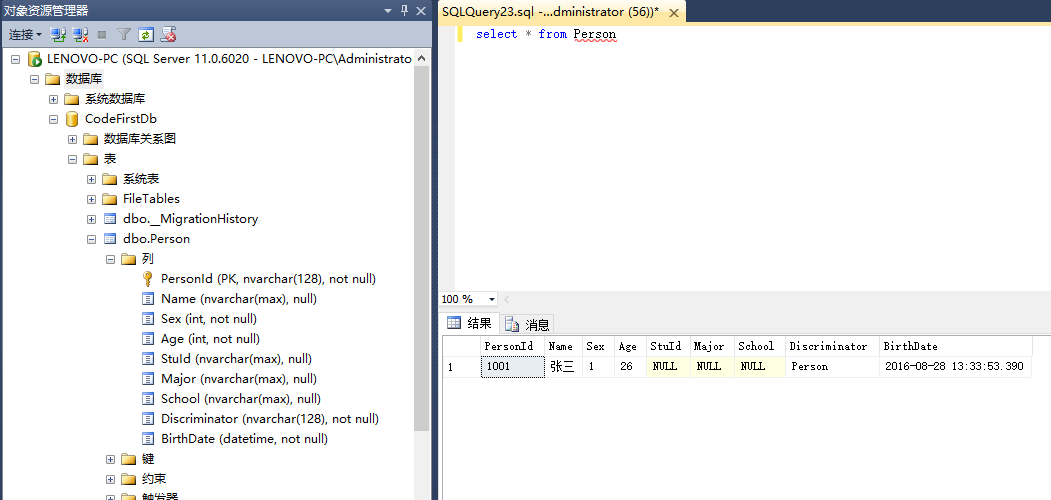
从上面的截图看到Person表中也有Student的属性,感觉真是不可思议,amazing.
我们添加一个Person一个Student来看下效果
        static void Main(string[] args)

        {

            //using能及时释放资源,例如数据库连接异常,可以即使将上下文释放

            using (var db=new EFCodeFirstDbContext())

            {

                IDCard card = new IDCard("1000", DateTime.Now);

                Person person = new Person("1001", "张三", SexType.Female, 26, card);

                db.Persons.Add(person);

                IDCard card2 = new IDCard("1000", DateTime.Now);

                Student stu = new Student("001", "挖掘机", "蓝翔", "1000", "赵铁蛋", SexType.Male, 25, card2);

                db.Persons.Add(stu);

                db.SaveChanges();

                Console.WriteLine("Success");

            }

            Console.ReadLine();

        }
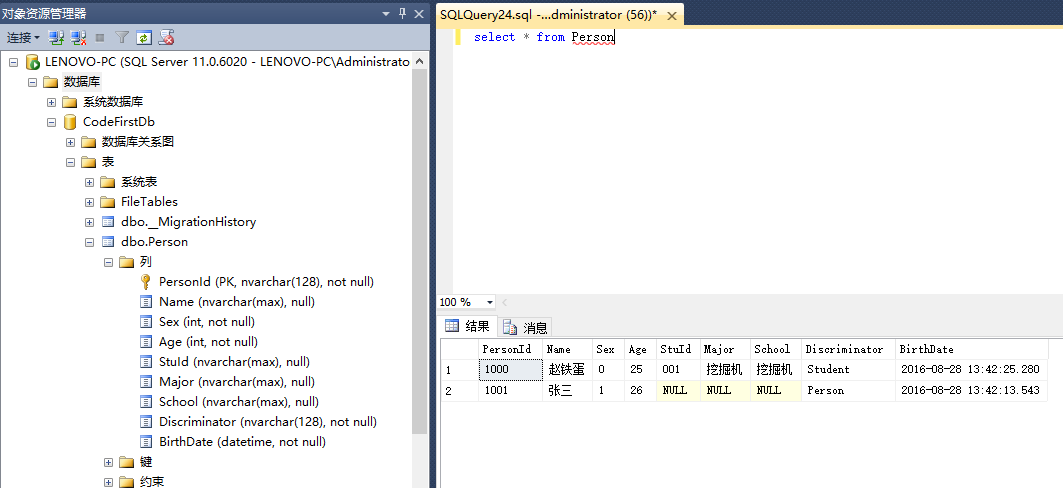
IDCard和Person生成了同一表,我们可以像上面的Fluent API来改变Discriminator列名。也可以使用TPT的方式生成两个表,只需在Student类上指明映射的表名。
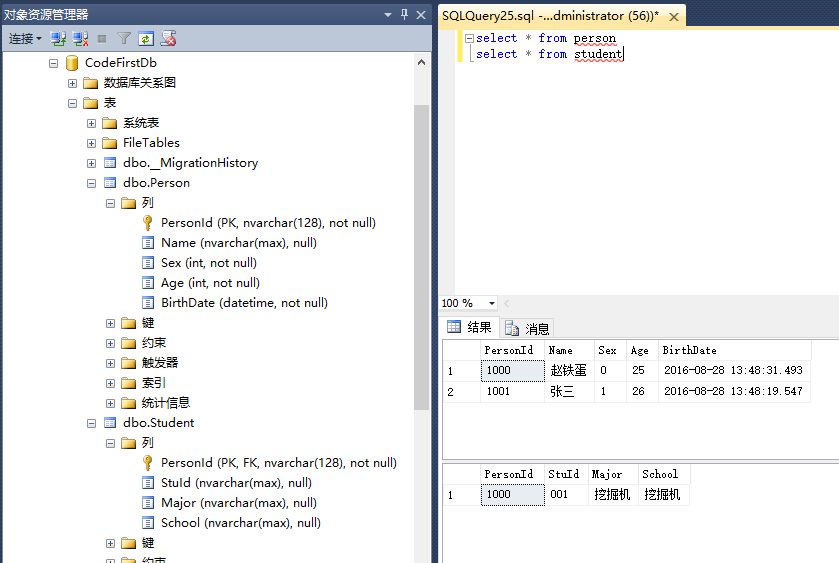
但是TPC就不行了。就会报错,这可能也是只新增Person的时候Student中的属性也会自动添加上的原因吧。
五、一个Model映射多个表
一个Model映射多个表和上面多个Model映射一个表正好反过来,还用上面Student和Person举例。
            modelBuilder.Entity<Student>().Map(m=> {

                m.ToTable("Person");

                m.Properties(p => p.PersonId);

                m.Properties(p=>p.Name);

                m.Properties(p=>p.Age);

                m.Properties(p => p.Sex);

                }).Map(m=> {

                    m.ToTable("Student");

                    m.Properties(p => p.PersonId);

                    m.Properties(p=>p.StuId);

                    m.Properties(p => p.Major);

                    m.Properties(p => p.School);

                });
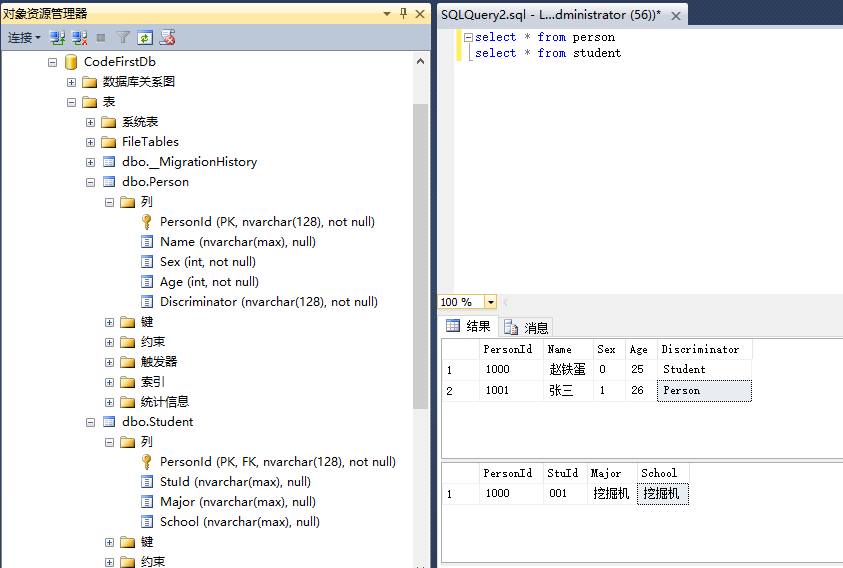
上面将一个Student类映射给两个表一个Student一个person.
            //using能及时释放资源,例如数据库连接异常,可以即使将上下文释放

            using (var db=new EFCodeFirstDbContext())

            {

                Person person = new Person("1001", "张三", SexType.Female, 26);

                db.Persons.Add(person);

                Student stu = new Student("001", "挖掘机", "蓝翔", "1000", "赵铁蛋", SexType.Male, 25);

                db.Persons.Add(stu);

                db.SaveChanges();

                Console.WriteLine("Success");

            }
我们上面添加了一个Person类对象,一个Student类对象,这是Student对象会添加到两个表中。
作者:社会主义接班人
出处:http://www.cnblogs.com/5ishare/ 引用 社会主义接班人 的文章 做笔记。
作者:社会主义接班人
出处:http://www.cnblogs.com/5ishare/ 引用 社会主义接班人 的文章 做笔记。
Code First 2的更多相关文章
- Visual Studio Code 代理设置
Visual Studio Code (简称 VS Code)是由微软研发的一款免费.开源的跨平台文本(代码)编辑器,在十多年的编程经历中,我使用过非常多的的代码编辑器(包括 IDE),例如 Fron ...
- 我们是怎么做Code Review的
前几天看了<Code Review 程序员的寄望与哀伤>,想到我们团队开展Code Review也有2年了,结果还算比较满意,有些经验应该可以和大家一起分享.探讨.我们为什么要推行Code ...
- Code Review 程序员的寄望与哀伤
一个程序员,他写完了代码,在测试环境通过了测试,然后他把它发布到了线上生产环境,但很快就发现在生产环境上出了问题,有潜在的 bug. 事后分析,是生产环境的一些微妙差异,使得这种 bug 场景在线下测 ...
- 从Script到Code Blocks、Code Behind到MVC、MVP、MVVM
刚过去的周五(3-14)例行地主持了技术会议,主题正好是<UI层的设计模式——从Script.Code Behind到MVC.MVP.MVVM>,是前一天晚上才定的,中午花了半小时准备了下 ...
- 在Visual Studio Code中配置GO开发环境
一.GO语言安装 详情查看:GO语言下载.安装.配置 二.GoLang插件介绍 对于Visual Studio Code开发工具,有一款优秀的GoLang插件,它的主页为:https://github ...
- 代码的坏味道(14)——重复代码(Duplicate Code)
坏味道--重复代码(Duplicate Code) 重复代码堪称为代码坏味道之首.消除重复代码总是有利无害的. 特征 两个代码片段看上去几乎一样. 问题原因 重复代码通常发生在多个程序员同时在同一程序 ...
- http status code
属于转载 http status code:200:成功,服务器已成功处理了请求,通常这表示服务器提供了请求的网页 404:未找到,服务器未找到 201-206都表示服务器成功处理了请求的状态代码,说 ...
- Visual Studio Code——Angular2 Hello World 之 2.0
最近看到一篇用Visual Studio Code开发Angular2的文章,也是一篇入门教程,地址为:使用Visual Studio Code開發Angular 2專案.这里按部就班的做了一遍,感觉 ...
- WebStorm 2016 最新版激活(activation code方式)
WebStorm 2016 最新版激活(activation code方式) WebStorm activation code WebStorm 最新版本激活方式: 今天下载最新版本的WebStorm ...
- docker4dotnet #3 在macOS上使用Visual Studio Code和Docker开发asp.net core和mysql应用
.net猿遇到了小鲸鱼,觉得越来越兴奋.本来.net猿只是在透过家里那田子窗看外面的世界,但是看着海峡对岸的苹果园越来越茂盛,实在不想再去做一只宅猿了.于是,.net猿决定搭上小鲸鱼的渡轮到苹果园去看 ...
随机推荐
- 1066 Bash 游戏
传送门 1066 Bash游戏 基准时间限制:1 秒 空间限制:131072 KB 分值: 0 难度:基础题 有一堆石子共有N个.A B两个人轮流拿,A先拿.每次最少拿1颗,最多拿K颗,拿到最后1 ...
- 【Lintcode】070.Binary Tree Level Order Traversal II
题目: Given a binary tree, return the bottom-up level order traversal of its nodes' values. (ie, from ...
- 【Lintcode】099.Reorder List
题目: Given a singly linked list L: L0 → L1 → … → Ln-1 → Ln reorder it to: L0 → Ln → L1 → Ln-1 → L2 → ...
- bzoj 3376 [Usaco2004 Open]Cube Stacking 方块游戏——带偏移量的并查集
题目:https://www.lydsy.com/JudgeOnline/problem.php?id=3376 带偏移量的并查集. #include<iostream> #include ...
- 洛谷 1131 [ZJOI2007]时态同步——树形dp
题目:https://www.luogu.org/problemnew/show/P1131 因为越高,调节一个影响到的越多,所以底下只要把子树间的差异消除了就行了,与其他部分的差异由更高的边调节. ...
- 百度地图API的第一次接触
因为项目的需求,第一次接触了百度API. 第一步:引用百度地图API的脚本 如果在局域网环境中,要把地图文件和js文件都要下载下来 <script type="text/javascr ...
- 2012年浙大:Hello World for U
题目描述: Given any string of N (>=5) characters, you are asked to form the characters into the shape ...
- Hbase之三:Hbase Shell使用入门
HBase 为用户提供了一个非常方便的使用方式, 我们称之为“HBase Shell”.HBase Shell 提供了大多数的 HBase 命令, 通过 HBase Shell 用户可以方便地创建.删 ...
- ubuntu在recovery模式下更改用户密码
http://www.jb51.net/os/Ubuntu/164636.html 1, restart 2, Hold down shift key / press and hold 3, sele ...
- Crypto Challenge Set 1解题报告
1.Convert hex to base64 题意:给出一个hex编码过的字符串,将它进行base64加密 解题关键:直接利用base64库函数实现 import base64 str1=" ...