
C# 关于爬取网站数据遇到csrf-token的分析与解决
需求
某航空公司物流单信息查询,是一个post请求。通过后台模拟POST HTTP请求发现无法获取页面数据,通过查看航空公司网站后,发现网站使用避免CSRF攻击机制,直接发挥40X错误。
关于CSRF
读者自行百度
网站HTTP请求分析
Headers

Form Data

在head里包含了cookie 与 x-csrf-token formdata 里包含了_csrf (与head里的值是一样的).


这里通过查看该网站的JS源代码发现_csrf 来自于网页的head标签里
猜测cookie与 x-csrf-token是有一定的有效期,并且他们共同作用来防御CSRF攻击。
解决方案
1,首先请求一下该航空公司的网站,获取cookie与_csrf
2,然后C# 模拟http分别在head和formdata里加入如上参数,发起请求
代码
 public class CSRFToken

    {

        string cookie;//用于请求的站点的cookie

        List<string> csrfs;//用于请求站点的token的key 以及 value

        public CSRFToken(string url)

        {

            //校验传输安全

            if (!string.IsNullOrWhiteSpace(url))

            {

                try

                {

                    //设置请求的头信息.获取url的host

                    var _http = new HttpHelper(url);

                    string cookie;

                    string html = _http.CreateGetHttpResponseForPC(out cookie);

                    this.cookie = cookie;

                    string headRegex = @"<meta name=""_csrf.*"" content="".*""/>";

                    MatchCollection matches = Regex.Matches(html, headRegex);

                    Regex re = new Regex("(?<=content=\").*?(?=\")", RegexOptions.None);

                    csrfs = new List<string>();

                    foreach (Match math in matches)

                    {

                        MatchCollection mc = re.Matches(math.Value);

                        foreach (Match ma in mc)

                        {

                            csrfs.Add(ma.Value);

                        }

                    }

                }

                catch (Exception e)

                {

                }

            }

        }

        public String getCookie()

        {

            return cookie;

        }

        public void setCookie(String cookie)

        {

            this.cookie = cookie;

        }

        public List<string> getCsrf_token()

        {

            return csrfs;

        }

    }
httpHelper
  public string CreatePostHttpResponse(IDictionary<string, string> headers, IDictionary<string, string> parameters)

        {

            HttpWebRequest request = null;

            //HTTPSQ请求

            UTF8Encoding encoding = new System.Text.UTF8Encoding();

            ServicePointManager.ServerCertificateValidationCallback = new RemoteCertificateValidationCallback(CheckValidationResult);

            request = WebRequest.Create(_baseIPAddress) as HttpWebRequest;

            request.ProtocolVersion = HttpVersion.Version10;

            ServicePointManager.SecurityProtocol = SecurityProtocolType.Tls12 | SecurityProtocolType.Tls11;

            request.Method = "POST";

            request.ContentType = "application/x-www-form-urlencoded";

            // request.ContentType = "application/json";

            request.UserAgent = DefaultUserAgent;

            //request.Headers.Add("X-CSRF-TOKEN", "bc0cc533-60cc-484a-952d-0b4c1a95672c");

            //request.Referer = "https://www.asianacargo.com/tracking/viewTraceAirWaybill.do";

            //request.Headers.Add("Origin", "https://www.asianacargo.com");

            //request.Headers.Add("Cookie", "JSESSIONID=HP21d2Dq5FoSlG4Fyw4slWwHb0-Sl1CG6jGtj7HE41e5f4aN_R1p!-435435446!117330181");

            //request.Host = "www.asianacargo.com";

            if (!(headers == null || headers.Count == ))

            {

                foreach (string key in headers.Keys)

                {

                    request.Headers.Add(key, headers[key]);

                }

            }

            //如果需要POST数据

            if (!(parameters == null || parameters.Count == ))

            {

                StringBuilder buffer = new StringBuilder();

                int i = ;

                foreach (string key in parameters.Keys)

                {

                    if (i > )

                    {

                        buffer.AppendFormat("&{0}={1}", key, parameters[key]);

                    }

                    else

                    {

                        buffer.AppendFormat("{0}={1}", key, parameters[key]);

                    }

                    i++;

                }

                byte[] data = encoding.GetBytes(buffer.ToString());

                using (Stream stream = request.GetRequestStream())

                {

                    stream.Write(data, , data.Length);

                }

            }

            HttpWebResponse response;

            try

            {

                //获得响应流

                response = (HttpWebResponse)request.GetResponse();

                Stream s = response.GetResponseStream();

                StreamReader readStream = new StreamReader(s, Encoding.UTF8);

                string SourceCode = readStream.ReadToEnd();

                response.Close();

                readStream.Close();

                return SourceCode;

            }

            catch (WebException ex)

            {

                response = ex.Response as HttpWebResponse; return null;

            }

        }

   public string CreateGetHttpResponse(out string cookie)

        {

            HttpWebRequest request = null;

            //HTTPSQ请求

            UTF8Encoding encoding = new System.Text.UTF8Encoding();

            ServicePointManager.ServerCertificateValidationCallback = new RemoteCertificateValidationCallback(CheckValidationResult);

            request = WebRequest.Create(_baseIPAddress) as HttpWebRequest;

            request.ProtocolVersion = HttpVersion.Version10;

            ServicePointManager.SecurityProtocol = SecurityProtocolType.Tls12 | SecurityProtocolType.Tls11;

            request.Method = "GET";

            request.ContentType = "application/x-www-form-urlencoded";

            request.UserAgent = DefaultUserAgent;

            HttpWebResponse response;

            try

            {

                //获得响应流

                response = (HttpWebResponse)request.GetResponse();

                cookie = response.Headers["Set-Cookie"];

                Stream s = response.GetResponseStream();

                StreamReader readStream = new StreamReader(s, Encoding.UTF8);

                string SourceCode = readStream.ReadToEnd();

                response.Close();

                readStream.Close();

                return SourceCode;

            }

            catch (WebException ex)

            {

                response = ex.Response as HttpWebResponse;

                cookie = "";

                return null;

            }

        }
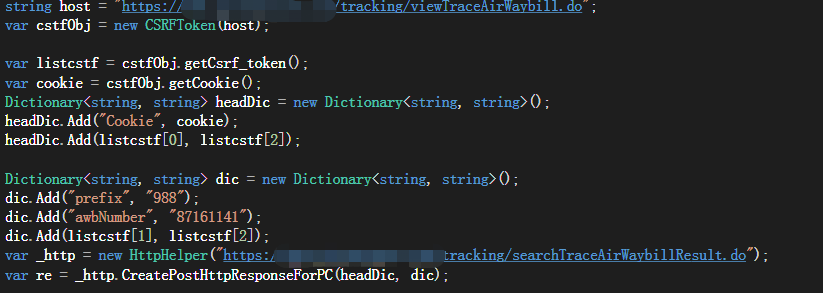
爬取程序
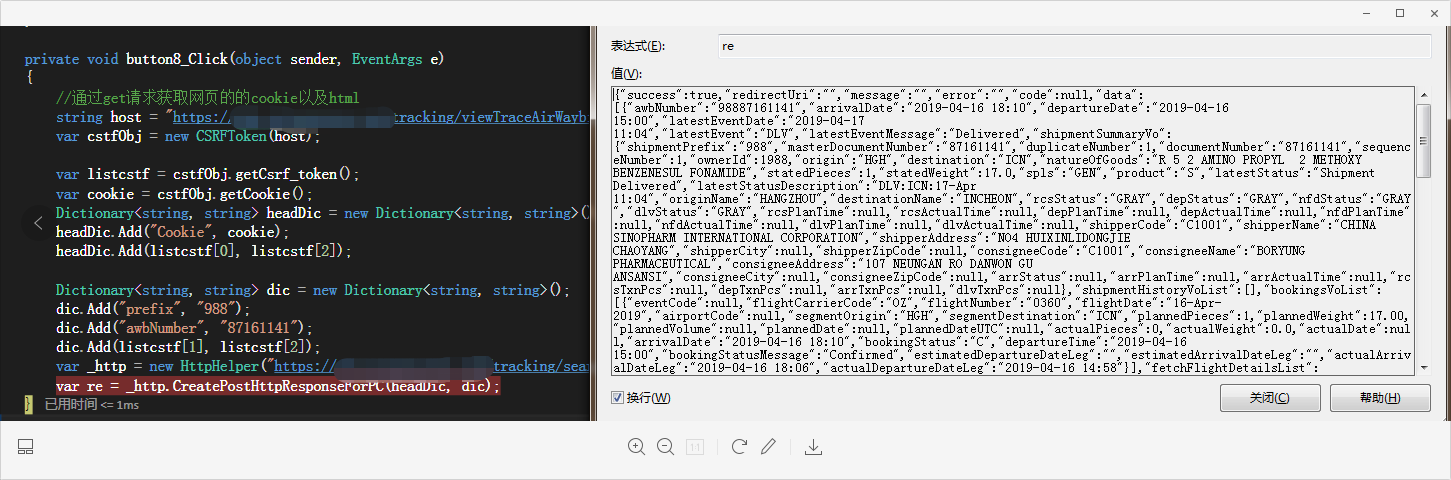
爬取结果
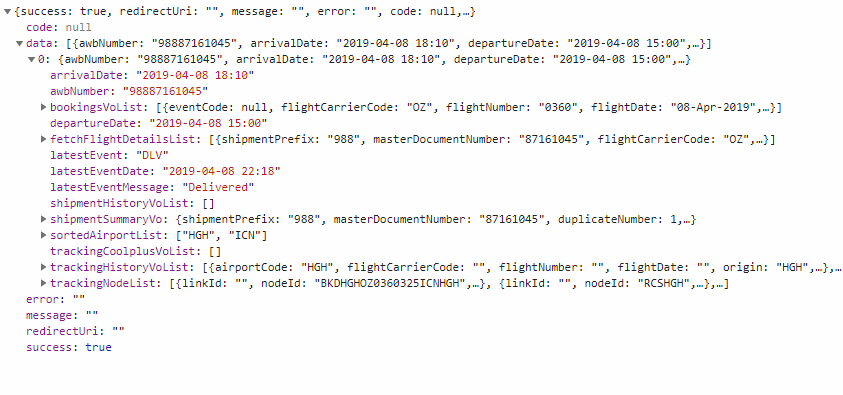
浏览器结果
注意事项与结论
1,不同的网站,获取cstf的方式不一样,无论怎么做,只要信息传到前台我们都可以有相应的方法来获取。
2,请求时候的http验证可能不一样,测试的某航空公司物流信息的时候,http请求的安全协议是tis12。
ServicePointManager.SecurityProtocol = SecurityProtocolType.Tls12 | SecurityProtocolType.Tls11; 还有其他参数比如UserAgent后台可能也会验证
3,基于如上航空公司,发现它的cookie和cstf_token一定时间内不会改变,那么当实际爬取的时候可以考虑缓存cookie以及cstf_token,只有当请求失败的时候,才重新获取
C# 关于爬取网站数据遇到csrf-token的分析与解决的更多相关文章
- 利用linux curl爬取网站数据
看到一个看球网站的以下截图红色框数据,想爬取下来,通常爬取网站数据一般都会从java或者python爬取,但本人这两个都不会,只会shell脚本,于是硬着头皮试一下用shell爬取,方法很笨重,但旨在 ...
- python爬取网站数据
开学前接了一个任务,内容是从网上爬取特定属性的数据.正好之前学了python,练练手. 编码问题 因为涉及到中文,所以必然地涉及到了编码的问题,这一次借这个机会算是彻底搞清楚了. 问题要从文字的编码讲 ...
- 利用phpspider爬取网站数据
本文实例原址:PHPspider爬虫10分钟快速教程 在我们的工作中可能会涉及到要到其它网站去进行数据爬取的情况,我们这里使用phpspider这个插件来进行功能实现. 1.首先,我们需要php环境, ...
- python爬取网站数据保存使用的方法
这篇文章主要介绍了使用Python从网上爬取特定属性数据保存的方法,其中解决了编码问题和如何使用正则匹配数据的方法,详情看下文 编码问题因为涉及到中文,所以必然地涉及到了编码的问题,这一次借这 ...
- 手把手教你用Node.js爬虫爬取网站数据
个人网站 https://iiter.cn 程序员导航站 开业啦,欢迎各位观众姥爷赏脸参观,如有意见或建议希望能够不吝赐教! 开始之前请先确保自己安装了Node.js环境,还没有安装的的童鞋请自行百度 ...
- 3.15学习总结(Python爬取网站数据并存入数据库)
在官网上下载了Python和PyCharm,并在网上简单的学习了爬虫的相关知识. 结对开发的第一阶段要求: 网上爬取最新疫情数据,并存入到MySql数据库中 在可视化显示数据详细信息 项目代码: im ...
- Node爬取网站数据
npm安装cheerio和axios npm isntall cheerio npm install axios 利用cheerio抓取对应网站中的标签根据链接使用axios获取对应页面数据 cons ...
- 使用node.js如何爬取网站数据
数据库又不会弄,只能扒扒别人的数据了. 搭建环境: (1).创建一个文件夹,进入并初始化一个package.json文件. npm init -y (2).安装相关依赖: npm install ...
- Python 爬取网站数据
一.使用request库实现批量下载HTML 二.使用BeautifulSoup库实现html解析 官网:https://beautifulsoup.readthedocs.io/zh_CN/v4.4 ...
随机推荐
- 微信小程序之圆形进度条(自定义组件)
思路 使用2个canvas 一个是背景圆环,一个是彩色圆环. 使用setInterval 让彩色圆环逐步绘制. 在看我的文章前,必须先看 ,下面转的文章,因为本文是在它们基础上修改的. 它们的缺点为: ...
- el-table的type="selection"的使用
场景:el-table,type="selection"时,重新请求后,设置列表更新前的已勾选项 踩坑:在翻页或者changPageSize之后,table的data会更新,之前勾 ...
- vue使用install函数把组件做成插件方便全局调用
在vue项目中,我们可以自定义组件,像element-ui一样使用Vue.use()方法来使用,具体实现方法: 1.首先新建一个Cmponent.vue文件 // Cmponent.vue <t ...
- Qt编写控件属性设计器8-网络采集
一.前言 上一篇文章已经打通了数据源之一的串口采集,这次要说的是网络采集,网络通信目前用的最多的是三种,TCP/UDP/HTTP,其中tcp通信又包括了客户端服务端两种,tcp通信才用了多次握手机制不 ...
- C#如何控制panel加载的字窗体中控件的位置随着显示器分辨率大小而改变
System.Windows.Forms.Screen screen=Screen.PrimaryScreen; System.Drawing.Rectangle rct=screen ...
- kubenetes创建一个pod应用
Pod是可以创建和管理Kubernetes计算的最小可部署单元.一个Pod代表着集群中运行的一个进程.每个pod都有一个唯一的ip. 一个pod类似一个豌豆荚,包含一个或多个容器(通常是docker) ...
- Oracle ORA-00984: column not allowed here
ORA-00984错误: 列在此处不允许当数据以char的形式存在时,应加单引号,则插入数据库就不会出现类似错误.
- (八)UML之状态图
一.概念 状态图(Statechart Diagram)主要用于描述一个对象在其生存期间的动态行为,表现为一个对象所经历的状态序列,引起状态转移的事件(Event),以及因状态转移而伴随的动作(Act ...
- redis配置用户认证密码
1,下载安装 Download, extract and compile Redis with: $ wget http://download.redis.io/releases/redis-3.2. ...
- Java使用JDBC连接数据库逐条插入数据、批量插入数据、以及通过SQL语句批量导入数据的效率对比
测试用的示例java代码: package com.zifeiy.test.normal; import java.io.File; import java.io.FileOutputStream; ...