
filter打包区分环境
项目目录结构:
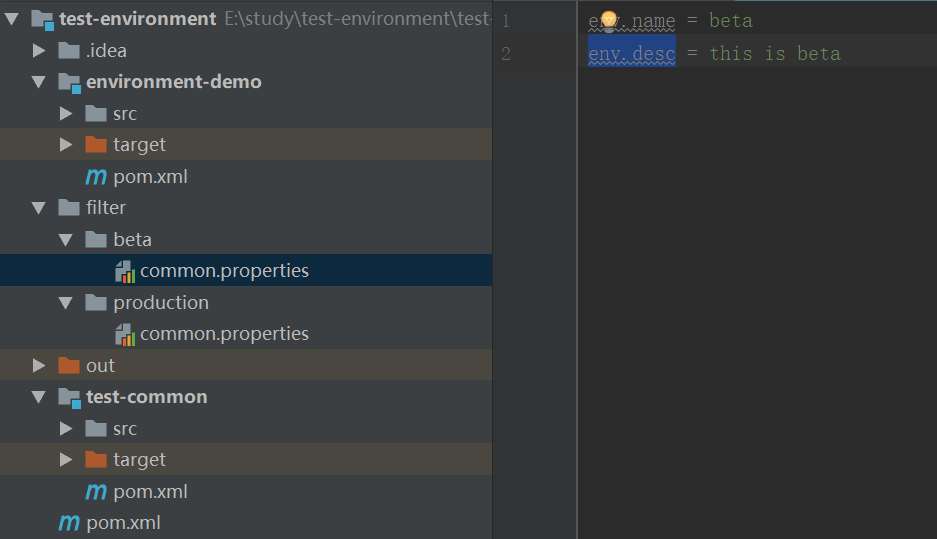
父pom:
<?xml version="1.0" encoding="UTF-8"?>

<project xmlns="http://maven.apache.org/POM/4.0.0"

         xmlns:xsi="http://www.w3.org/2001/XMLSchema-instance"

         xsi:schemaLocation="http://maven.apache.org/POM/4.0.0 http://maven.apache.org/xsd/maven-4.0.0.xsd">

    <modelVersion>4.0.0</modelVersion>

    <groupId>com.test.env</groupId>

    <artifactId>test-environment</artifactId>

    <packaging>pom</packaging>

    <version>1.0-SNAPSHOT</version>

    <modules>

        <module>test-common</module>

        <module>environment-demo</module>

    </modules>

</project>
common pom:
<?xml version="1.0" encoding="UTF-8"?>

<project xmlns="http://maven.apache.org/POM/4.0.0"

         xmlns:xsi="http://www.w3.org/2001/XMLSchema-instance"

         xsi:schemaLocation="http://maven.apache.org/POM/4.0.0 http://maven.apache.org/xsd/maven-4.0.0.xsd">

    <parent>

        <artifactId>test-environment</artifactId>

        <groupId>com.test.env</groupId>

        <version>1.0-SNAPSHOT</version>

    </parent>

    <modelVersion>4.0.0</modelVersion>

    <artifactId>test-common</artifactId>

    <version>1.0-SNAPSHOT</version>

    <name>test-common</name>

</project>
demo pom,filter区分环境:
<?xml version="1.0" encoding="UTF-8"?>

<project xmlns="http://maven.apache.org/POM/4.0.0"

         xmlns:xsi="http://www.w3.org/2001/XMLSchema-instance"

         xsi:schemaLocation="http://maven.apache.org/POM/4.0.0 http://maven.apache.org/xsd/maven-4.0.0.xsd">

    <parent>

        <artifactId>test-environment</artifactId>

        <groupId>com.test.env</groupId>

        <version>1.0-SNAPSHOT</version>

    </parent>

    <modelVersion>4.0.0</modelVersion>

    <properties>

        <java.version>1.8</java.version>

        <project.version>1.0.0-RELEASE</project.version>

        <project.build.sourceEncoding>UTF-8</project.build.sourceEncoding>

        <maven.compiler.source>1.8</maven.compiler.source>

        <maven.compiler.target>1.8</maven.compiler.target>

        <springboot.version>1.5.20.RELEASE</springboot.version>

    </properties>

    <artifactId>environment-demo</artifactId>

    <dependencies>

        <dependency>

            <groupId>org.springframework.boot</groupId>

            <artifactId>spring-boot-starter-web</artifactId>

            <version>${springboot.version}</version>

        </dependency>

        <dependency>

            <groupId>com.test.env</groupId>

            <artifactId>test-common</artifactId>

            <version>1.0-SNAPSHOT</version>

        </dependency>

    </dependencies>

    <build>

        <finalName>environment-demo</finalName>

        <filters>

            <filter>../filter/${env}/common.properties</filter>

        </filters>

        <resources>

            <resource>

                <directory>src/main/resources</directory>

                <filtering>true</filtering>

            </resource>

        </resources>

        <plugins>

            <plugin>

                <groupId>org.apache.maven.plugins</groupId>

                <artifactId>maven-deploy-plugin</artifactId>

                <version>2.8.2</version>

                <configuration>

                    <skip>true</skip>

                </configuration>

            </plugin>

            <plugin>

                <groupId>org.apache.maven.plugins</groupId>

                <artifactId>maven-war-plugin</artifactId>

                <configuration>

                    <failOnMissingWebXml>false</failOnMissingWebXml>

                </configuration>

            </plugin>

        </plugins>

    </build>

    <profiles>

        <profile>

            <id>development</id>

            <properties>

                <env>dev</env>

                <build.level>compile</build.level>

            </properties>

            <activation>

                <activeByDefault>true</activeByDefault>

            </activation>

        </profile>

        <profile>

            <id>beta</id>

            <properties>

                <env>beta</env>

                <build.level>provided</build.level>

            </properties>

        </profile>

        <profile>

            <id>production</id>

            <properties>

                <env>production</env>

                <build.level>provided</build.level>

            </properties>

        </profile>

    </profiles>

</project>
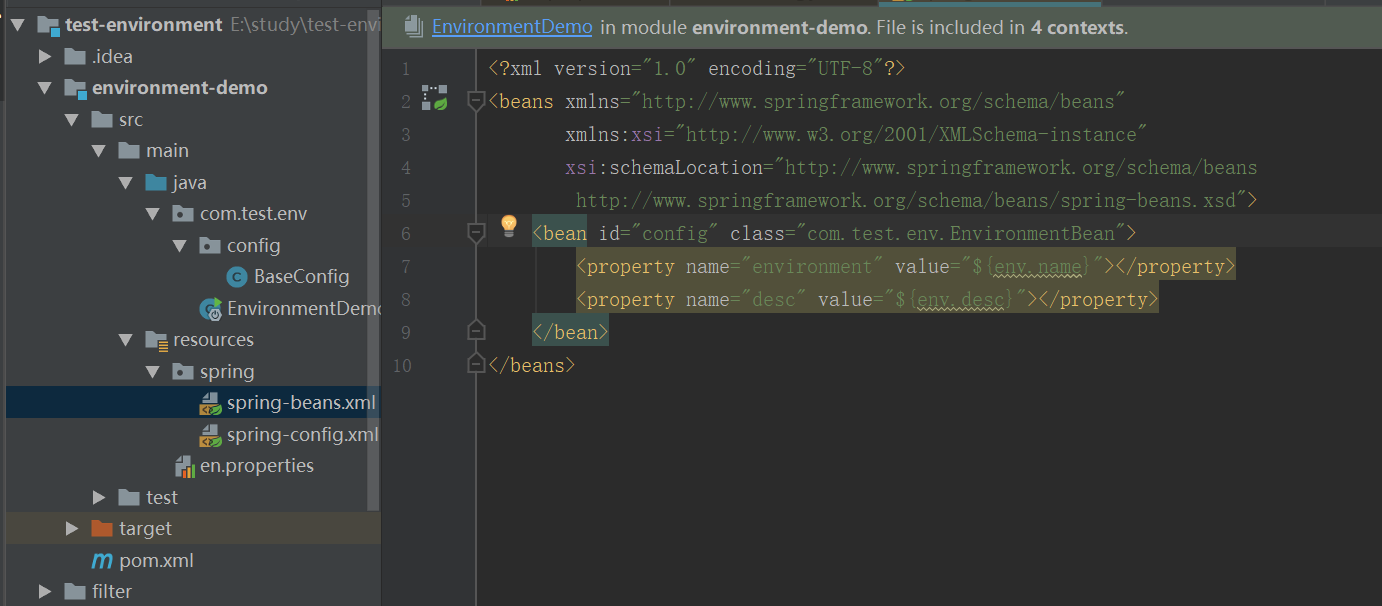
spring-beans.xml:EnvironmentBean在common中
spring-confog.xml
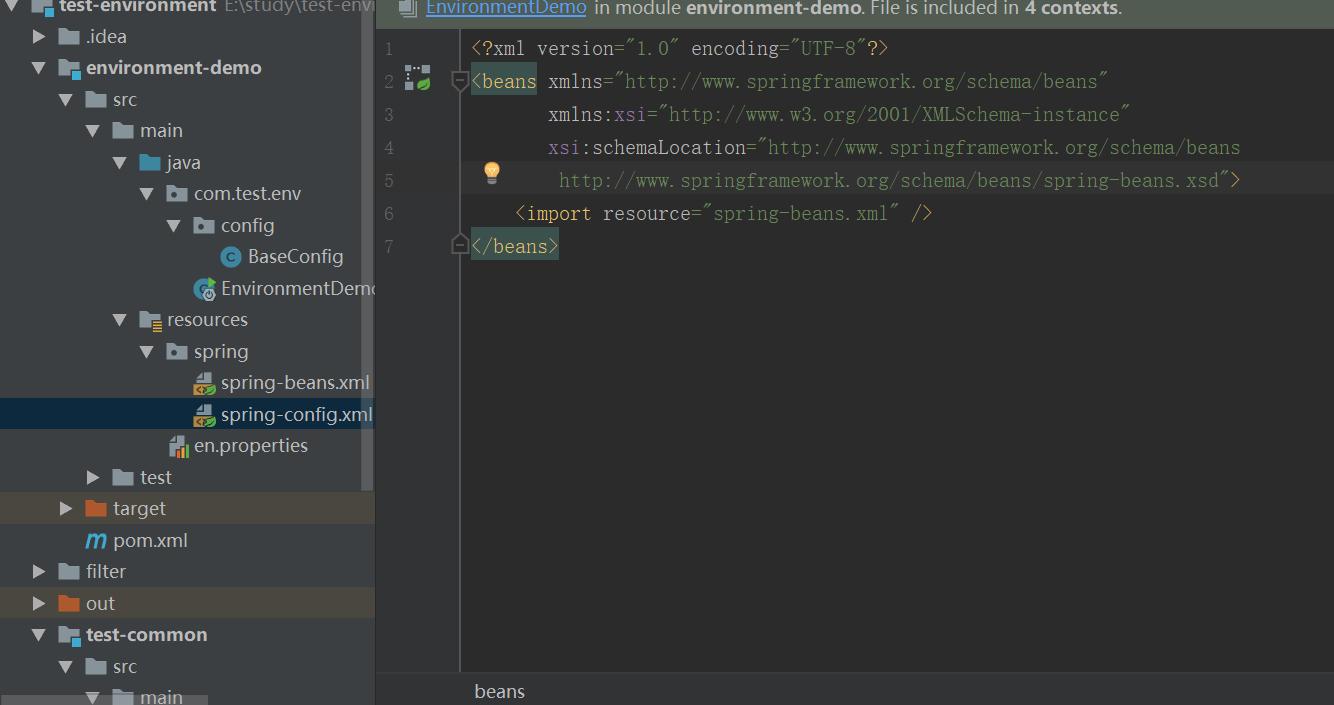
springboot 通过BaseConfig导入spring配置
@SpringBootConfiguration

@ImportResource("classpath:spring/spring-config.xml")//多个bean的配置文件

public class BaseConfig {

}
springboot:
@SpringBootApplication

public class EnvironmentDemo implements CommandLineRunner{

    @Autowired

    EnvironmentBean config;

    @Override

    public void run(String... args) throws Exception {

        System.out.println("config:"+config);

    }

    public static void main(String[] args) {

        SpringApplication.run(EnvironmentDemo.class);

    }

}
在demo 目录下区分打包beta,production环境:mvn clean package -P beta/production
spring-beans.xml 中env.name/desc的值会被替换为相应环境的值。
注意:如果是第一次打包可能会遇到Could not find artifact XXX,这是因为需要父工程打包到本地仓库,整个大项目一期build install就顺利通过,之后再子项目打包。
filter打包区分环境的更多相关文章
- webpack学习笔记--区分环境
为什么需要区分环境 在开发网页的时候,一般都会有多套运行环境,例如: 在开发过程中方便开发调试的环境. 发布到线上给用户使用的运行环境. 这两套不同的环境虽然都是由同一套源代码编译而来,但是代码内容却 ...
- maven部署项目流程(区分环境)
java项目区分环境打包部署到Linux 本文以一个简单的HelloWorld的项目为例,从pom.xml配置到打jar包,最后在linux上运行并验证来对maven部署的这套流程进行简单介绍. 为方 ...
- 通过maven profile 打包指定环境配置
背景 最近换了个新公司接手了一个老项目,然后比较坑的是这个公司的项目都没有没有做多环境打包配置,每次发布一个环境都要手动的去修改配置文件.今天正好有空就来配置下. 解决这个问题的方式有很多,我这里挑选 ...
- vue分别打包测试环境和正式环境
vue打包时使用不同的环境变量 需求 同一个项目通过打包使用不同的环境变量,目前的环境有三个: 一.本地------开发环境 二.线上------测试环境 三.线上------正式环境 我们都知道vu ...
- springboot打包不同环境配置与shell脚本部署
本篇和大家分享的是springboot打包并结合shell脚本命令部署,重点在分享一个shell程序启动工具,希望能便利工作: profiles指定不同环境的配置 maven-assembly-plu ...
- maven 打包不同环境
支持不同环境打包 1 pom添加如下配置: 1)添加指定打包id 区分各个环境 <profiles> <profile> <id>dev</id> &l ...
- 用 maven filter 管理不同环境的配置文件
使用 maven profile 一个项目可以部署在不同的环境当中,maven 的 profile 针对不同的环境指定各自的编译方法.在 pom.xml 的 profile 中,可以根据不同的环境定制 ...
- ionic2使用cordova打包的环境搭建
1.安装node.js(不用说了) 2.安装JDK(java的开发基础类库) 3.安装SDK(安卓开发集成包) 4.gradle( JAVA界的Weboack ,支撑app的编译,打包的流程) 5.安 ...
- spring-boot 速成(5) profile区分环境
maven中的profile概念,在spring-boot中一样适合,只要约定以下几个规则即可: 一.不同环境的配置文件以"application-环境名.yml"命名 举个粟子: ...
随机推荐
- PAT甲级:1124 Raffle for Weibo Followers (20分)
PAT甲级:1124 Raffle for Weibo Followers (20分) 题干 John got a full mark on PAT. He was so happy that he ...
- Markdown 样式美化大全
Markdown 样式大全 目录 Markdown 样式大全 1. 键盘 2. 路径 3. 彩色字体背景 4. 折叠 5. 锚点链接 原生锚点1 原生锚点2 Hello Hello 6. 待办列表 7 ...
- P5591 小猪佩奇学数学
P5591 小猪佩奇学数学 知识点 二项式定理 \[(x+1)^n=\sum_{i=0}^n\binom nix^i \] 单位根反演 \[[n\mid k]=\frac 1n\sum_{i=0}^{ ...
- Error:Connection activation failed: No suitable device found for this connection 问题最新解决方案
虽然网上有很多关于这个问题的解决方案,但是我还是决定自己再次重复写一下这个解决的方案,重在更新知识和了解VMware workstation 15新功能. 在使用VMware workstation克 ...
- Html模板引擎Handlerbars使用demo
1.自定义demo <html> <head> <script src="./handlebars-v4.0.12.js"></scrip ...
- Spring Cloud 从入门到精通(一)Nacos 服务中心初探
什么是Nacos? Nacos是阿里巴巴开源的项目,是一个更易于帮助构建云原生应用的动态服务发现.配置管理和服务管理平台.英文全称 Dynamic Naming and Configuration ...
- 实时 + 高清 + 超压缩,阿里云视频云发布业内首款 VVC 编码器 Ali266
基于新一代国际视频编解码标准 H.266/VVC,阿里云视频云近日发布了实时高清编码器 Ali266,有力推动 H.266/VVC 标准应用的落地,真正开启 H.266/VVC 的商用之路,并强力赋能 ...
- 深入刨析tomcat 之---第8篇 how tomcat works 第11章 11.9应用程序,自定义Filter,及注册
writed by 张艳涛, 标签:全网独一份, 自定义一个Filter 起因:在学习深入刨析tomcat的学习中,第11章,说了调用过滤链的原理,但没有给出实例来,自己经过分析,给出来了一个Filt ...
- 如何临时发布部署Cocos小游戏到Linux服务器,让别人能在微信打开
两个星期前,我们发布了第一个小游戏教程: 教程:制作一个小游戏送给喜欢的TA(不会编程也能学会哦) 上周有好几位小伙伴在b站催更,呃,作为小透明,收到催更信息后还是很激动的!竟然有同学在看我们的小教程 ...
- openssl查看证书命令
openssl x509部分命令打印出证书的内容:openssl x509 -in cert.pem -noout -text打印出证书的系列号openssl x509 -in cert.pem -n ...