
prometheus、node_exporter设置开机自启动
方法一、写入rc.local
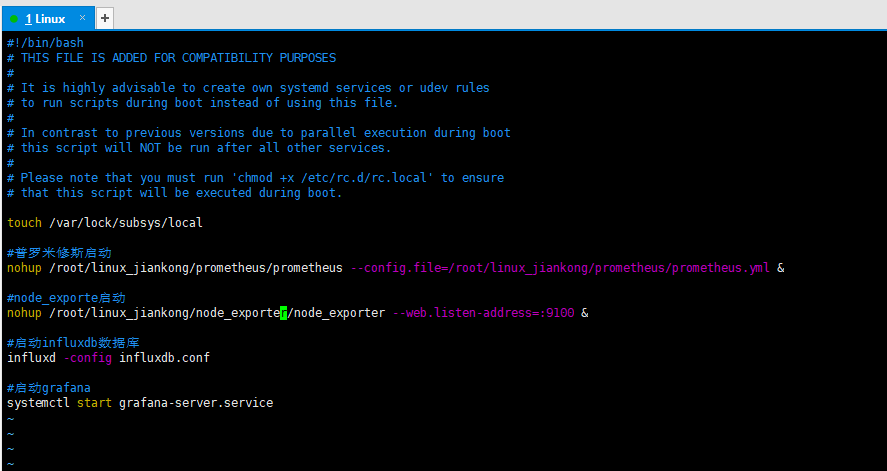
在/etc/rc.local文件中编辑需要执行的脚本或者命令,我个人习惯用这个,因人而异,有的项目可能需要热加载配置文件,用服务会更好
#普罗米修斯启动,需要后面接config配置文件路径选项

nohup /root/linux_jiankong/prometheus/prometheus --config.file=/root/linux_jiankong/prometheus/prometheus.yml &

#node_exporte启动

nohup /root/linux_jiankong/node_exporter/node_exporter --web.listen-address=:9100 &

#启动influxdb数据库

influxd -config influxdb.conf

#启动grafana

systemctl start grafana-server.service
方法二、设置为服务,使用systemctl来管理
prometheus
- 创建node_exporter组和用户,用于运行node_exporter和prometheus(也可以不创建,不影响的)
- 创建一个node_exporter.service文件
- 启动,并配置开机启动
创建Prometheus组和用户(非必须步骤)
sudo groupadd -r prometheus

sudo useradd -r -g prometheus -s /sbin/nologin -M -c "prometheus Daemons" prometheus
创建services服务文件
如果没创建prometheus组合用户,则Service的User就不用写
cat > /etc/systemd/system/prometheus.service <<EOF

[Unit]

Description=prometheus

After=network.target

[Service]

Type=simple

User=prometheus

ExecStart=自己本地路径/prometheus --config.file=/自己本地路径/prometheus.yml --storage.tsdb.path=自己本地路径声明的data目录/data

Restart=on-failure

[Install]

WantedBy=multi-user.target

EOF
启动Prometheus,将服务设置为开机自启动
systemctl daemon-reload

systemctl start prometheus.service

systemctl status prometheus.service

systemctl enable prometheus.service
node_exporter
换种方式啊,其实一样的
vim /etc/systemd/system/node_exporter.service

[Unit]

Description=node_exporter Monitoring System

Documentation=node_exporter Monitoring System

[Service]

ExecStart=自己本地路径/node_exporter --web.listen-address=:9100

[Install]

WantedBy=multi-user.target

#设置开机自启

systemctl daemon-reload

systemctl start node_exporter.service

systemctl status node_exporter.service

systemctl enable node_exporter.service
prometheus、node_exporter设置开机自启动的更多相关文章
- Fedora 16设置开机自启动程序与Ubuntu的区别
Ubuntu设置开机自启动脚本的方法是:修改/etc/init.d/rc.local这个文件,添加需要启动的程序即可,相关函数如下: void SetSysAutoBoot() { ] = {}; ; ...
- linux_设置开机自启动程序脚本
设置开机自启动
- Linux服务器,服务管理--systemctl命令详解,设置开机自启动
Linux服务器,服务管理--systemctl命令详解,设置开机自启动 syetemclt就是service和chkconfig这两个命令的整合,在CentOS 7就开始被使用了. 摘要: syst ...
- CentOS 6下 Oracle11gR2 设置开机自启动
[1] 更改/etc/oratab # This file is used by ORACLE utilities. It is created by root.sh # and updated by ...
- Ubuntu14.04设置开机自启动脚本
方法一.编辑rc.loacl脚本 Ubuntu开机之后会执行/etc/rc.local文件中的脚本,所以我们可以直接在/etc/rc.local中添加启动脚本.在 exit 0 前面添加好脚本代码, ...
- 设置开机自启动VirtualBox虚拟机系统
如果常用VirtualBox虚拟机系统的话,设置个随开机启动也是很方便的.不需要打开VirtualBox窗口,直接就是系统启动了. 又继续上网搜索学习了.(设置开机自启动VirtualBox虚拟机系统 ...
- CentOS7设置开机自启动命令大全
任务 旧指令 新指令 使某服务自动启动 chkconfig --level 3 httpd on systemctl enable httpd.service 使某服务不自 ...
- ntp服务设置开机自启动失败
设置了ntpd开机自启动,重启服务器ntpd没有自启动 1.需要禁掉chronyd.service: systemctl disable chronyd.service 2.手动启动ntpd: sys ...
- CentOS7设置开机自启动方式
方式一: # 在/etc/rc.d/rc.local文件中追加启动命令,该文件追加后,会随着机器自动后,自动运行文件中的命令 # vim /etc/rc.d/rc.local # 权限问题:在cent ...
随机推荐
- CTF--[BJDCTF2020]Cookie is so stable 1(SSTI)
从hint.php可以找到提示,要求观察cookies 打开flag.php可以看到需要输入用户名,多次试验后发现输入的用户名会以cookies的方式储存 使用dirsearch扫描没有发现什么有用的 ...
- sqli-labs 16-20
less 16: 和less 15基本一致,只是对参数进行了 ") 的包裹,注意闭合语句使用延时注入即可. 下面给一个payload示例: uname=admin")and if( ...
- 记一次Orika使用不当导致的内存溢出
hprof 文件分析 2021-08-24,订单中心的一个项目出现了 OOM 异常,使用 MemoryAnalyzer 打开 dump 出来的 hprof 文件,可以看到 91.27% 的内存被一个超 ...
- 基于Python的决策树分类器与剪枝
作者|Angel Das 编译|VK 来源|Towards Data Science 介绍 决策树分类器是一种有监督的学习模型,在我们关心可解释性时非常有用. 决策树通过基于每个层次的多个问题做出决策 ...
- 黑马JVM教程——自学笔记(一)
一.引言 1.1.什么是JVM 定义: Java Virtual Machine - java的运行环境(java二进制字节码的运行环境) 好处: 一次编写,导出运行 自动内存管理,垃圾回收功能 数组 ...
- Data-truncation--Incorrect-string-value
修改表中,format_content 字段的字符集为utf8mb4 alter table 表名 modify column format_content longtext character se ...
- .net core2.1 迁移.net core 3.1
1.解决方案->属性-->目标框架 .net core3.1 2.删除旧的Nuget包添加新的NuGet包 3.修改Startup.cs 修改ConfigureServices 修改Con ...
- CentOS7 yum方式安装MySQL5.7 + 远程连接
1 下载并安装MySQL官方的 Yum Repository [root@localhost ~]# wget -i -c http://dev.mysql.com/get/mysql57-commu ...
- new[]/delete[]与new/delete区别
new[]/delete[]与new/delete完全不同-动态对象数组创建通过new[] 完成-动态对象数组的销毁通过delete[]完成-new[]/delete[]能够被重载,进而改变内存管理方 ...
- Python的dict
dict把key和value关联起来,可以通过 key来查找 value. 花括号 {} 表示这是一个dict,然后按照 key: value, 写出来即可.最后一个 key: value 的逗号可以 ...