
Android学习之多点触摸并不神秘
最近研究了一下多点触摸,写了个利用多点触摸来控制图片大小和单点触摸控制图片移动的程序,和大家分享分享。
Android中监听触摸事件是onTouchEvent方法,它的参数为MotionEvent,下面列举MotionEvent的一些常用的方法:
getPointerCount() 获得触屏的点数。
getX() 获得触屏的X坐标值
getY() 获得触屏的Y坐标值
getAction() 获得触屏的动作
ACTION_DOWN:按下的动作开始,比如用手指按屏幕。
ACTION_UP:按下的动作完成,比如手指停止按屏幕,离开屏幕。
ACTION_MOVE:在动作开始和完成之间的移动,比如手指在屏幕上滑动。
还介绍下程序中用到的ImageView,ImageView.setFrame()的四个参数指的是left,top,right,bottom如图:
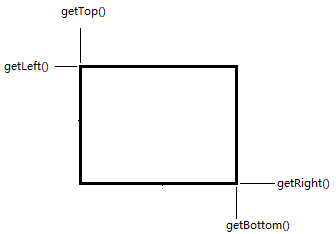
left和top指的就是ImageView左上角的坐标x和y,right,bottom指的就是ImageView的右下角的坐标x和y了。
接下来看程序,程序中有详细的介绍:
- package com.practice.imageviewpic;
- import android.app.Activity;
- import android.content.Context;
- import android.graphics.*;
- import android.graphics.drawable.BitmapDrawable;
- import android.os.Bundle;
- import android.view.MotionEvent;
- import android.widget.ImageView;
- import android.widget.ImageView.ScaleType;
- public class ImageViewPic extends Activity {
- /*
- * 利用多点触控来控制ImageView中图像的放大与缩小
- * 手指控制图片移动
- */
- private MyImageView imageView;
- private Bitmap bitmap;
- //两点触屏后之间的长度
- private float beforeLenght;
- private float afterLenght;
- //单点移动的前后坐标值
- private float afterX,afterY;
- private float beforeX,beforeY;
- /** Called when the activity is first created. */
- @Override
- public void onCreate(Bundle savedInstanceState) {
- super.onCreate(savedInstanceState);
- findView();
- setContentView(imageView);
- config();
- }
- private void findView() {
- imageView = new MyImageView(this);
- //获得图片
- bitmap = ((BitmapDrawable)getResources().getDrawable(R.drawable.xing)).getBitmap();
- }
- private void config() {
- //设置imageView的显示图片
- imageView.setImageBitmap(bitmap);
- //设置图片填充ImageView
- imageView.setScaleType(ScaleType.FIT_XY);
- }
- //创建一个自己的ImageView类
- class MyImageView extends ImageView {
- private float scale = 0.1f;
- public MyImageView(Context context) {
- super(context);
- }
- //用来设置ImageView的位置
- private void setLocation(int x,int y) {
- this.setFrame(this.getLeft()+x, this.getTop()+y, this.getRight()+x, this.getBottom()+y);
- }
- /*
- * 用来放大缩小ImageView
- * 因为图片是填充ImageView的,所以也就有放大缩小图片的效果
- * flag为0是放大图片,为1是小于图片
- */
- private void setScale(float temp,int flag) {
- if(flag==0) {
- this.setFrame(this.getLeft()-(int)(temp*this.getWidth()),
- this.getTop()-(int)(temp*this.getHeight()),
- this.getRight()+(int)(temp*this.getWidth()),
- this.getBottom()+(int)(temp*this.getHeight()));
- }else {
- this.setFrame(this.getLeft()+(int)(temp*this.getWidth()),
- this.getTop()+(int)(temp*this.getHeight()),
- this.getRight()-(int)(temp*this.getWidth()),
- this.getBottom()-(int)(temp*this.getHeight()));
- }
- }
- //绘制边框
- @Override
- protected void onDraw(Canvas canvas) {
- super.onDraw(canvas);
- Rect rec=canvas.getClipBounds();
- rec.bottom--;
- rec.right--;
- Paint paint=new Paint();
- paint.setColor(Color.RED);
- paint.setStyle(Paint.Style.STROKE);
- canvas.drawRect(rec, paint);
- }
- /* 让图片跟随手指触屏的位置移动
- * beforeX、Y是用来保存前一位置的坐标
- * afterX、Y是用来保存当前位置的坐标
- * 它们的差值就是ImageView各坐标的增加或减少值
- */
- public void moveWithFinger(MotionEvent event) {
- switch(event.getAction()) {
- case MotionEvent.ACTION_DOWN:
- beforeX = event.getX();
- beforeY = event.getY();
- break;
- case MotionEvent.ACTION_MOVE:
- afterX = event.getX();
- afterY = event.getY();
- this.setLocation((int)(afterX-beforeX),(int)(afterY-beforeY));
- beforeX = afterX;
- beforeY = afterY;
- break;
- case MotionEvent.ACTION_UP:
- break;
- }
- }
- /*
- * 通过多点触屏放大或缩小图像
- * beforeLenght用来保存前一时间两点之间的距离
- * afterLenght用来保存当前时间两点之间的距离
- */
- public void scaleWithFinger(MotionEvent event) {
- float moveX = event.getX(1) - event.getX(0);
- float moveY = event.getY(1) - event.getY(0);
- switch(event.getAction()) {
- case MotionEvent.ACTION_DOWN:
- beforeLenght = (float) Math.sqrt( (moveX*moveX) + (moveY*moveY) );
- break;
- case MotionEvent.ACTION_MOVE:
- //得到两个点之间的长度
- afterLenght = (float) Math.sqrt( (moveX*moveX) + (moveY*moveY) );
- float gapLenght = afterLenght - beforeLenght;
- if(gapLenght == 0) {
- break;
- }
- //如果当前时间两点距离大于前一时间两点距离,则传0,否则传1
- if(gapLenght>0) {
- this.setScale(scale,0);
- }else {
- this.setScale(scale,1);
- }
- beforeLenght = afterLenght;
- break;
- }
- }
- }
- //这里来监听屏幕触控时间
- @Override
- public boolean onTouchEvent(MotionEvent event) {
- /*
- * 判定用户是否触摸到了图片
- * 如果是单点触摸则调用控制图片移动的方法
- * 如果是2点触控则调用控制图片大小的方法
- */
- if(event.getY() > imageView.getTop() && event.getY() < imageView.getBottom()
- && event.getX() > imageView.getLeft() && event.getX() < imageView.getRight()) {
- if(event.getPointerCount() == 2) {
- imageView.scaleWithFinger(event);
- }else if(event.getPointerCount() == 1) {
- imageView.moveWithFinger(event);
- }
- }
- return true;
- }
- }
源程序的下载地址为:http://download.csdn.net/source/3281618
Android学习之多点触摸并不神秘的更多相关文章
- Android事件处理之多点触摸与手势识别
一.Muilti-touch 双指缩放的实现探索: 首先要实现OnTouchListener接口,然后重写方法: public boolean onTouch(View v, MotionEvent ...
- Linux Android 多点触摸协议 原文出自【比特网】,转载请保留原文链接:http://soft.chinabyte.com/os/71/12306571.shtml
为了使用功能强大的多点触控设备,就需要一种方案去上报用户层所需的详细的手指触摸数据.这个文档所描述的多点触控协议可以让内核驱动程序向用户层上报任意多指的数据信息. 使用说明 单点触摸信息是以ABS承载 ...
- Linux与Android 多点触摸协议【转】
本文转载自:http://blog.csdn.net/xubin341719/article/details/7833277 一.Linux与Android 多点触摸协议 为了使用功能强大的多点触控设 ...
- Android学习笔记_38_图片的拖动、缩放功能和多点触摸
一.基础知识: 引用 理论上 Android可以处理 多达256 个手指的触摸,大概只有章鱼哥能享受这种技术带来的便利.就编程人员来说,编写多点触摸和单点触摸的方式几乎一模一样.其奥秘在于Motion ...
- 毫无保留开源我写的:IOS Android Ipad 多点触摸通用js 库
毫无保留开源我写的:IOS Android Ipad 多点触摸通用js 库 在线演示地址: http://m.yunxunmi.com/ 支持 IOS Android Ipad 等不同操作系统的手持或 ...
- Android 中多点触摸协议
http://blog.csdn.net/zuosifengli/article/details/7398661 Android 中多点触摸协议: 参考: http://www.kernel.org/ ...
- Android 手势滑动,多点触摸放大缩小图片
效果展示: 基本思路: <1>首先写一个图片控制类ImageControl,实现对图片控制的的基本操作,我们的图片控制类ImageControl是继承自ImageView自定义的视图: & ...
- Linux/Android多点触摸协议
链接点击打开链接 关于Linux多点触摸协议大家可以参考kernel中的文档:https://www.kernel.org/doc/Documentation/input/multi-touch-pr ...
- Android多点触摸放大缩小图片
1.Activity package com.fit.touchimage; import android.app.Activity; import android.graphics.Bitmap; ...
随机推荐
- MySQL数据库备份与恢复方法(转)
来源于:http://www.jb51.net/article/25686.htm 网站数据对我们对站长来说都是最宝贵的,我们平时应该养成良好的备份数据的习惯. 常有新手问我该怎么备份数据库, ...
- String在JAVA里是固定长度的吗?为什么可用“+”连接
所谓长度固定不是你理解的意思而是说String类中存储的char[]是final的,不能修改,你对String的操作实际上是产生了一个新的String,对于某一个String来说,长度就是固定的了 S ...
- VM下Linux网卡丢失(pcnet32 device eth0 does not seem to be ...)解决方案
系统启动日志:Bringing up interface eth0: pcnet32 device eth0 does not seepresent, delaying initialization. ...
- 监听UITabBarItem来拦截是否要跳转
情景是这样的: 我需要在用户点击"我的"的时候, 判断是否已经登录, 如果没有, 就不进入该界面, 而是跳转到用户登录界面, 所以这里我需要进行UITabBarItem点击事件的拦 ...
- HDU 4611 - Balls Rearrangement(2013MUTC2-1001)(数学,区间压缩)
以前好像是在UVa上貌似做过类似的,mod的剩余,今天比赛的时候受baofeng指点,完成了此道题 此题题意:求sum(|i%A-i%B|)(0<i<N-1) A.B的循环节不同时,会有重 ...
- linux笔记2.21
命令dmesg显示本次内核启动信息 init是系统运行的第一个进程 Linux运行级别: 0 关机 1 单用户模式 2 不带网络的多用户模式 3 命令行多用户模式 4 未使用 5 ...
- centOS上安装redis
1.安装tcl支持 yum install tcl 2.安装redis我们以最新的2.8.9为例 $ wget http://download.redis.io/releases/redis-2.8. ...
- C# 中显示实现接口
接口的实现分为显示实现和隐式实现 用显示实现接口的目的就是为了,当一个类中实现多个具有相同方法的接口时,能够区分开来 在调用的时候,必须用接口调用. class Program { static vo ...
- shell如何生成rpm包仓库列表文件的对比结果
基本步骤: 1.切换至仓库目录RPM_LIST_DIR1和RPM_LIST_DIR2 2.ls列出仓库的rpm包文件并分别重定向至输出文件rpm_list_file1和rpm_list_file2 3 ...
- js中将函数传递给另一个函数的解析(非常容易理解)
$(document).ready(function(){ //JS中关于把函数作为函数的参数来传递的问题的小总结//第一,最简单的形式无参函数,直接形式函数的函数名放到括号中,再在执行部分这个函数即 ...