
flutter Radio单选框
单选框,允许用户从一组中选择一个选项。
import 'package:flutter/material.dart';

class RadioDemo extends StatefulWidget {

  @override

  _RadioDemoState createState() => _RadioDemoState();

}

class _RadioDemoState extends State<RadioDemo> {

  int _radioGroupA = 0;

  void _handleRadioValueChanged(int value) {

    setState(() {

      _radioGroupA = value;

    });

  }

  @override

  Widget build(BuildContext context) {

    return Scaffold(

      appBar: AppBar(

        title: Text('RadioDemo'),

        elevation: 0.0,

      ),

      body: Container(

        padding: EdgeInsets.all(16.0),

        child: Column(

          mainAxisAlignment: MainAxisAlignment.center,

          children: <Widget>[

            Text('RadioGroupValue: $_radioGroupA'),

            SizedBox(height: 32.0),

            RadioListTile(

              value: 0,

              groupValue: _radioGroupA,

              onChanged: _handleRadioValueChanged,

              title: Text('Options A'),

              subtitle: Text('Description'),

              secondary: Icon(Icons.filter_1),

              selected: _radioGroupA == 0,

            ),

            RadioListTile(

              value: 1,

              groupValue: _radioGroupA,

              onChanged: _handleRadioValueChanged,

              title: Text('Options B'),

              subtitle: Text('Description'),

              secondary: Icon(Icons.filter_2),

              selected: _radioGroupA == 1,

            ),

            Row(

              mainAxisAlignment: MainAxisAlignment.center,

              children: <Widget>[

                // Radio(

                //   value: 0,

                //   groupValue: _radioGroupA,

                //   onChanged: _handleRadioValueChanged,

                //   activeColor: Colors.black,

                // ),

                // Radio(

                //   value: 1,

                //   groupValue: _radioGroupA,

                //   onChanged: _handleRadioValueChanged,

                //   activeColor: Colors.black,

                // ),

              ],

            ),

          ],

        ),

      )

    );

  }

}
文档:https://api.flutter.dev/flutter/material/Radio-class.html
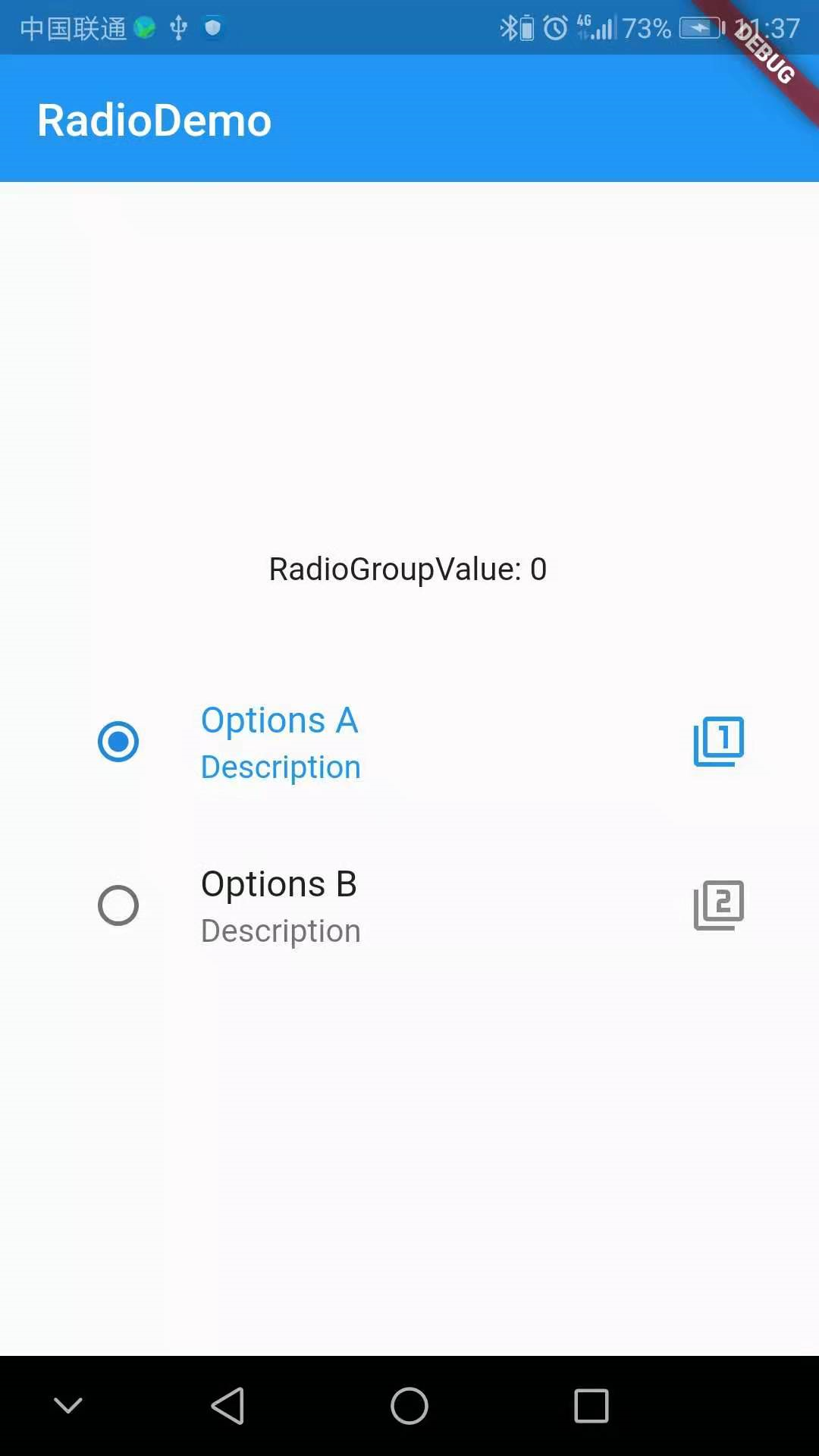
效果:
flutter Radio单选框的更多相关文章
- TagHelper+Layui封装组件之Radio单选框
TagHelper+Layui封装组件之Radio单选框 标签名称:cl-radio 标签属性: asp-for:绑定的字段,必须指定 asp-items:绑定单选项 类型为:IEnumerable& ...
- 前端 HTML form表单标签 input标签 type属性 radio 单选框
<input type="radio"> 单选框 适用于 选择性别按钮网页等 <!DOCTYPE html> <html lang="en& ...
- 纯css3简单实用的checkbox复选框和radio单选框
昨天为大家分享了一款很炫的checkbox复选框和radio单选框,今天再给大家带来一款简单实用的checkbox复选框和radio单选框.界面清淅.舒服.先给大家来张效果图: 在线预览 源码下载 ...
- 纯css3实现的超炫checkbox复选框和radio单选框
之前为大家分享了好多css3实现的按钮.今天要为大家分享的是纯css3实现的checkbox复选框和radio单选框,效果超级炫.先让我们看看图吧! 在线预览 源码下载 这个实例完全由css3实现 ...
- elementUI 学习入门之 radio 单选框
Radio 单选框 基础用法 选项默认可见,选项不宜过多,选项过多建议使用 select 选择器 使用 Radio 组件,需要设置 v-model 绑定变量,选中意味着变量的值为相应 Radio l ...
- layui 获取radio单选框选中的值
Layui 获取 radio的值,layui判断radio选中的单选值 layui form 表单获取radio选中的值 首先准备两个radio <input type="radio& ...
- selenium死活定位不到元素以及radio单选框点击不生效
今天操作一个单选框浪费太多时间,现在其实很简单得东西,记录一下: 1,问题一,定位不到 如图,使用selenium IDE和xpath helper都试过,无法成功定位到这个单选框,实际上是因为,这个 ...
- Radio 单选框
Radio 单选框 在一组备选项中进行单选 ¶基础用法 由于选项默认可见,不宜过多,若选项过多,建议使用 Select 选择器. 要使用 Radio 组件,只需要设置v-model绑定变量,选中意味着 ...
- JQuery radio单选框应用
转载:JQuery判断radio(单选框)是否选中和获取选中值方法总结 一.利用获取选中值判断选中 直接上代码,别忘记引用JQuery包 复制代码 代码如下: < !DOCTYPE html P ...
随机推荐
- vue 关于props 父组件传值
swiper.vue 子组件 info.vue 父组件 swiper.vue<template> <div class="swiper-wrap" @mouse ...
- Alpha冲刺随笔七:第七天
课程名称:软件工程1916|W(福州大学) 作业要求:项目Alpha冲刺(十天冲刺) 团队名称:葫芦娃队 作业目标:在十天冲刺里对每天的任务进行总结. 随笔汇总:https://www.cnblogs ...
- 基于h5+的微信分享,hbuilder打包
1.打开app项目的manifest.json的文件,选择模块权限配置,将Share(分享)模块添加至已选模块中 2.选择SDK配置,在plus.share·分享中,勾选□ 微信消息及朋友圈,配置好a ...
- [Apio2010]patrol 巡逻
1912: [Apio2010]patrol 巡逻 Time Limit: 4 Sec Memory Limit: 64 MBSubmit: 2541 Solved: 1288[Submit][S ...
- .net序列化 - Newtonsoft(Json.Net)简单应用
Newtonsoft.Json,一款.NET中开源的Json序列化和反序列化类库. Json.Net是一个读写Json效率比较高的.Net框架.Json.Net 使得在.Net环境下使用Json更加简 ...
- notepad++ 调整行间距
在“设置”-“语言格式设置”里面,找到style里面的Line number margin一项,调整字体大小就可以调整左边标号的大小,然后文本内容的行间距即可任意调整.
- Linux cut 用法
cut是一个选取命令,就是将一段数据经过分析,取出我们想要的.一般来说,选取信息通常是针对"行"来进行分析的,并不是整篇信息分析的. )其语法格式为:cut [-bn] [fil ...
- Hadoop2.8 安装
一.下载Hadoop与java jdk-8u221-linux-x64.tar.gz Oracle官网下载 hadoop-2.8.5.tar.gz Hadoop官网下载 二.配置服务期间ssh免 ...
- asp.net实现大文件上传分片上传断点续传
HTML部分 <%@ Page Language="C#" AutoEventWireup="true" CodeBehind="index.a ...
- leetcode解题报告(32):Teemo Attacking
描述 In LLP world, there is a hero called Teemo and his attacking can make his enemy Ashe be in poison ...