
springboot maven项目转gradle的完整方法
1、maven转gradle的方法:在项目根目录下,使用命令行工具,输入如下内容:
gradle init --type.pom
2、springboot项目的 build.gradle内容示例如下(注意部分内容需要自己添加进去):
/*

 * This file was generated by the Gradle 'init' task.

 */

buildscript {

    repositories {

        maven{ url 'http://maven.aliyun.com/nexus/content/groups/public/'}

    }

    dependencies {

        classpath("org.springframework.boot:spring-boot-gradle-plugin:2.1.6.RELEASE")

    }

}

apply plugin: 'java'

apply plugin: 'org.springframework.boot'

repositories {

    mavenLocal()

    maven{ url 'http://maven.aliyun.com/nexus/content/groups/public/'}

}

dependencies {

    compile 'org.springframework.boot:spring-boot-starter:2.1.6.RELEASE'

    compile 'org.springframework.boot:spring-boot-starter-web:2.1.6.RELEASE'

    compile 'org.springframework.boot:spring-boot-starter-undertow:2.1.6.RELEASE'

    compile 'org.postgresql:postgresql:42.2.5'

    compile 'com.baomidou:mybatis-plus-boot-starter:3.1.2'

    compile 'com.alibaba:druid-spring-boot-starter:1.1.16'

    compile 'org.springframework.security:spring-security-core:5.1.5.RELEASE'

    compile 'org.springframework:spring-tx:5.1.8.RELEASE'

    compile 'org.apache.commons:commons-lang3:3.4'

    compile 'org.apache.commons:commons-collections4:4.1'

    compile 'joda-time:joda-time:2.10.3'

    compile 'com.spring4all:swagger-spring-boot-starter:1.8.0.RELEASE'

    annotationProcessor 'org.projectlombok:lombok:1.18.8'

    compileOnly 'org.projectlombok:lombok:1.18.8'

    testAnnotationProcessor 'org.projectlombok:lombok:1.18.8'

    testCompileOnly 'org.projectlombok:lombok:1.18.8'

    testCompile 'org.springframework.boot:spring-boot-starter-test:2.1.6.RELEASE'

}

group = 'com.river'

version = '0.0.1-SNAPSHOT'

description = 'PostgrePlus'

sourceCompatibility = '1.8'

tasks.withType(JavaCompile) {

    options.encoding = 'UTF-8'

}
3、打包:tasks->build->bootJar
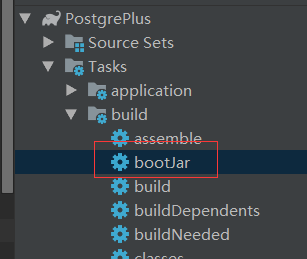
4、运行,找到项目build\libs对应的jar包,用java -jar XX.jar执行即可:
springboot maven项目转gradle的完整方法的更多相关文章
- eclipse 创建maven 项目 动态web工程完整示例
需求表均同springmvc案例 此处只是使用maven 注意,以下所有需要建立在你的eclipse等已经集成配置好了maven了,说白了就是新建项目的时候已经可以找到maven了 没有的话需要安装m ...
- eclipse 创建maven 项目 动态web工程完整示例 maven 整合springmvc整合mybatis
接上一篇: eclipse 创建maven 项目 动态web工程完整示例 eclipse maven工程自动添加依赖设置 maven工程可以在线搜索依赖的jar包,还是非常方便的 但是有的时候可能还需 ...
- springboot maven项目,为什么build成功,build path也没错误,project-->clean 也没用,项目上面还是有个红x呢?
springboot maven项目,为什么build成功,build path也没错误,project-->clean 也没用,项目上面还是有个红x呢? 看错误信息有提示: Descript ...
- 工具IDEA 配置springboot+maven项目
工具IDEA 配置springboot+maven项目 首先安装IDEA,至于怎么安装就不介绍了.. 第一步 配置maven环境 首先安装maven,先在网上下载一个maven包.在IDEA的sett ...
- 构建maven项目,自定义目录结构方法
构建maven项目 创建自定义的文件目录方法: 在项目名称右键-->Builder Path-->Configure Builder Path...Source菜单下的Add Folder ...
- eclipse 从git取项目,导入为maven项目,新加的方法,报加载主类错误
eclipse 从git取项目,导入为maven项目,新加的方法,报加载主类错误 具体描述: 整体编译能够编译成功,但新加一个java,里面创建一个main方法,运行时,报无法加载主类的错误, 整体编 ...
- idea新建maven项目后生成web.xml方法和添加到tomcat方法
idea新建maven项目后生成web.xml方法和添加到tomcat方法 参考:https://www.cnblogs.com/Liang-Haishan216/p/9302141.html 1.首 ...
- SpringBoot Maven项目 Helloworld 测试
SpringBoot 化繁为简,简化配置 SpringBoot官方:http://projects.spring.io/spring-boot/SpringBoot使用介绍:http://blog.c ...
- Maven项目执行java入口main方法
在Maven项目中配置pom.xml文件加载maven-surefire-plugin插件来执行testng.xml,相信大家对此种用法已经非常熟悉了.但是有些场景可能需要我们去加载执行java的ma ...
随机推荐
- construct2 入门
construct2特点 construct2是一款跨平台二维游戏开发引擎,不需要编码,通过定义各个部件和事件完成html5的游戏开发.该引擎可以将开发的封装成多种形式,如phonegap.cocoo ...
- 性能测试基础---jmeter webservice接口测试
·webservice接口测试实现.·SOA:面向服务的体系架构,主要为了应对大型系统的异构需求.典型的实现方式:webservice·微服务:为了对SOA这样的重服务架构进行解耦而存在的.一个or几 ...
- Python基础B(数据类型----交互)
数据类型 数字类型 一.整型(int) age = 18 % age=int(18) print(id(age)) print(type(age)) print(age) 4530100848 < ...
- Spring Cloud微服务安全实战_3-1_API安全 常见的安全机制
本章讲解,在不考虑微服务,只考虑一个简单的API ,如何保证这个API的安全? 三个问题: 1,什么是API ? 2,API安全的要素有哪些? 3,API安全基本机制 一.什么是API 百度百科:AP ...
- 为什么两个一样的对象,用===打印是false
对象的地址(变量名)存在栈中,对象的引用指向堆中,比较对象的时候,是比较对象的引用是否相等.obj和obj1的引用地址分别指向堆中的两块数据,所以不相等.
- PATB1014福尔摩斯的约会
参考代码: #include<cstdio> #include<cstring> #include<cstdlib> int main() { char week[ ...
- Android apps for “armeabi-v7a” and “x86” architecture: SoC vs. Processor vs. ABI
INSTRUCTION SET: Processors are made of semiconductor dies, usually electronic-grade mono-crystallin ...
- JUC锁框架_AbstractQueuedSynchronizer详细分析
AQS是JUC锁框架中最重要的类,通过它来实现独占锁和共享锁的.本章是对AbstractQueuedSynchronizer源码的完全解析,分为四个部分介绍: CLH队列即同步队列:储存着所有等待 ...
- 2019年上海市大学生网络安全大赛两道misc WriteUp
2019年全国大学生网络安全邀请赛暨第五届上海市大学生网络安全大赛 做出了两道Misc== 签到 题干 解题过程 题干提示一直注册成功,如果注册失败也许会出现flag. 下载下来是包含010edito ...
- Prometheus + Consul 自动发现服务监控
一.Prometheus支持的多种服务发现机制(常用如下) static_configs: 静态服务发现 file_sd_configs: 文件服务发现 dns_sd_configs: DNS 服务发 ...