
OCR6:Custom Traineddata
参考:https://groups.google.com/forum/#!msg/tesseract-ocr/MSYezIbckvs/kO1VoNKMDMQJ
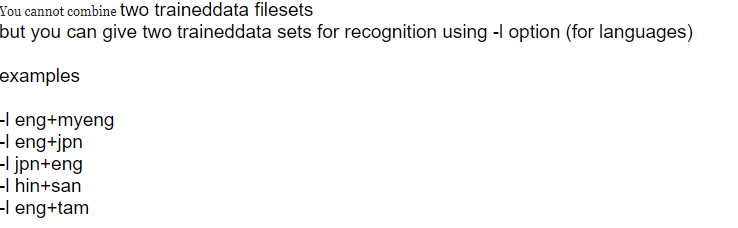
V4版本代码示例 :
import pytesseract

from PIL import Image as img

text = pytesseract.image_to_string(img.open('src2\B1.jpg'), lang='teld+chi_sim', config='--psm 3 --oem 1')

print(text.replace('”', ''))
合并识别结果
在实际使用 tesseract-orc 识别库的时候,初次制作的识别库很有可能识别率不太理想,需要后期慢慢补充。将多个修正过的box文件合并成一个识别库。
- 首先,需要图片样本.tif文件,位置文件.box ,只要有这两个文件在,就可以合并字典
假设已存在如下样品图片和修正过的box文件:
- image.font.1.tif image.font.1.box
- image.font.2.tif image.font.2.box
- image.font.3.fit image.font.3.box
1、先生成相对应的 .tr 文件
- tesseract image.font.1.tif image.font.1 nobatch box.train
- tesseract image.font.2.tif image.font.2 nobatch box.train
- tesseract image.font.3.tif image.font.3 nobatch box.train
2、提取字符
- unicharset_extractor image.font.1.box image.font.2.box image.font.3.box
3、生成字体特征文件
- echo image 0 0 0 0 0 >font_propertiesfont
4、执行如下命令
- mftraining -F font -U unicharset image.font.1.tr image.font.2.tr image.font.3.tr
5、聚集所有.tr 文件
- cntraining image.font.1.tr image.font.2.tr image.font.3.tr
6、重命名文件
- unicharset
- inttemp
- normproto
- pfftable
- shapetable
7、合并所有文件 生成一个大的字库文件
- combine_tessdata image.
示例代码:
/*生成box文件*/

/*tesseract teld.shz.exp0.tif teld.shz.exp0 -l chi_sim --psm 3 --oem 1 batch.nochop makebox*/

tesseract teld.shz.exp0.tif teld.shz.exp0 -l chi_sim batch.nochop makebox

/*生成font_properties文件*/

echo shz 0 0 0 0 0 >font_properties

/*生成.tr训练文件*/

tesseract teld.shz.exp0.tif teld.shz.exp0 nobatch box.train

/*生成字符集文件*/

unicharset_extractor teld.shz.exp0.box

/*生成shape文件*/

shapeclustering -F font_properties -U unicharset  teld.shz.exp0.tr

/*生成聚字符特征文件*/

mftraining -F font_properties -U unicharset  teld.shz.exp0.tr

/*生成字符正常化特征文件*/

cntraining teld.shz.exp0.tr

/*文件重命名*/

rename normproto teld.normproto

rename inttemp teld.inttemp

rename pffmtable teld.pffmtable

rename shapetable teld.shapetable

rename unicharset teld.unicharset

/*合并训练文件*/

combine_tessdata teld.
参考资料
OCR6:Custom Traineddata的更多相关文章
- 管理后台-第二部分:Custom sections in Umbraco 7 – Part 2 the views(翻译文档)
在上一篇文章中我们讨论了怎样在我们Umbraco7.0版本中去添加一个新的自定义的应用程序(或部分)和如何去定义一个树.现在我将给你展示你改何如添加视图,来使你的内容可以做一些更有意义的事情. The ...
- Unity扩展编辑器--类型3:Custom Editors
Custom Editors 加速游戏制作过程的关键是为哪些频繁使用的组件创建自定义的编辑器,为了举例,我们将会使用下面这个极其简单的脚本进行讲解,它的作用是始终保持一个对象注视某一点. public ...
- 问题:Custom tool error: Failed to generate code for the service reference 'AppVot;结果:添加Service Reference, 无法为服务生成代码错误的解决办法
添加Service Reference, 无法为服务生成代码错误的解决办法 我的解决方案是Silverlight+WCF的应用,Done Cretiria定义了需要在做完Service端的代码后首先运 ...
- Windows-universal-samples学习笔记系列五:Custom user interactions
Custom user interactions Basic input Complex inking Inking Low latency input Simple inking Touch key ...
- Entity Framework 6.0 Tutorials(8):Custom Code-First Conventions
Custom Code-First Conventions: Code-First has a set of default behaviors for the models that are ref ...
- Tomcat:Custom a common error page valve for all web application in tomcat
如果在一个Tomcat Server上会部署多个Web应用,又希望这多个Web应用共用一套错误页面,而不是使用默认的错误页面.就需要自定义错误页面了. 在每个web应用中都可以通过error-page ...
- EBS增加客制应用CUX:Custom Application
1. 创建数据库文件和帐号 [root@ebs12vis oracle]# su - oracle[oracle@ebs12vis ~]$ sqlplus / as sysdba SQL*Plus: ...
- 展望未来:使用 PostCSS 和 cssnext 书写 CSS
原文链接:A look into writing future CSS with PostCSS and cssnext 译者:nzbin 像twitter,google,bbc使用的一样,我打算看一 ...
- 如何用Unity制作自定义字体——Custom Font
一.效果图 二.步骤 将美术做好的字体分块导入BMFont,使用BMFont工具生成艺术字库: 将上面的数据导入unity资源目录下:*.fnt文件中记录每个文字的状态信息: 导入*.png图片并设置 ...
随机推荐
- Taro-UI 2.0样式在H5上生效,微信小程序不生效?
答案: https://taro-ui.aotu.io/#/docs/questions taro-ui 自定义样式覆盖小程序组件样式使用到了 globalClass 这个微信小程序特性,由于微信小程 ...
- sort函数实现多条件排序
js的sort方法,我们一般传入一个回调用于单排序,也就根据某一个条件排序,那么一个场景需要多条件排序(多重排序),我们怎么处理呢? 如下例子,我们按学生的总分排序,如果总分相等,我们再按照语文成绩排 ...
- 每日一问:Android 中内存泄漏都有哪些注意点?
内存泄漏对每一位 Android 开发一定是司空见惯,大家或多或少都肯定有些许接触.大家都知道,每一个手机都有一定的承载上限,多处的内存泄漏堆积一定会堆积如山,最终出现内存爆炸 OOM. 而这,也是极 ...
- Docker环境下的前后端分离项目部署与运维(六)搭建MySQL集群
单节点数据库的弊病 大型互联网程序用户群体庞大,所以架构必须要特殊设计 单节点的数据库无法满足性能上的要求 单节点的数据库没有冗余设计,无法满足高可用 单节点MySQL的性能瓶领颈 2016年春节微信 ...
- ESRally压测ElasticSearch性能 CentOS 7.5 安装 Python3.7
1,CentOS 7.5 安装 Python3.7 1.安装开发者工具 yum -y groupinstall "Development Tools"2.安装Python编译依赖包 ...
- 【Activiti学习之八】Spring整合Activiti
环境 JDK 1.8 MySQL 5.6 Tomcat 8 idea activiti 5.22 activiti-explorer是官方提供的一个演示项目,可以使用页面管理Activiti流程.ac ...
- 【06月10日】A股ROE最高排名
个股滚动ROE = 最近4个季度的归母净利润 / ((期初归母净资产 + 期末归母净资产) / 2). 查看更多个股ROE最高排名 兰州民百(SH600738) - ROE_TTM:86.45% - ...
- cad.net cad宋体问号 删除 KT_ST.ttf
我的两台电脑是win10的,(可能这个问题也存在在xp.win7.win8.......毕竟十年前我就遇到过了.......) 一台电脑的cad字体设置为"宋体",另一台电脑打开之 ...
- 去除img标签函数
需要去除一个长字符串中的img标签,网上找到了这个代码试试看,确实是有效的.代码如下: <?php function strip_tags_img($string='') { $pattern= ...
- 读《PMI 分析手册》
目录 读<PMI 分析手册> 官方 PMI 基本概况 官方制造业 PMI 官方非制造业 PMI 综合 PMI 产出指数 PMI 分析框架 PMI 与经济周期 官方 PMI 分析 参考研报 ...