
【亲测有效】运行docker ps 出现Got permission denied问题的解决方案
问题描述
今天在运行 docker ps 命令的时候出现如下问题:
Got permission denied while trying to connect to the Docker daemon socket at unix:///var/run/docker.sock: Get http://%2Fvar%2Frun%2Fdocker.sock/v1.38/containers/json: dial unix /var/run/docker.sock: connect: permission denied

看提示信息好像是权限不够,我们试试 root 权限:

我们发现用 root 权限就可以使用 docker 相关命令,那我们想在普通用户下使用 docker 相关命令,这该怎么办呢?
我们去 Docker Mannual 找到原因,原因如下:
Manage Docker as a non-root user

The docker daemon binds to a Unix socket instead of a TCP port. By default that Unix socket is owned by the user root and other users can only access it using sudo. The docker daemon always runs as the root user.

If you don’t want to use sudo when you use the docker command, create a Unix group called docker and add users to it. When the docker daemon starts, it makes the ownership of the Unix socket read/writable by the docker group.
上面这段话的意思是 docker 进程使用 Unix Socket 而不是 TCP 端口。而默认情况下, Unix socket 属于 root 用户,需要 root 权限才能访问。
我们该怎么解决这个问题呢?
解决方案一
使用 sudo 获取管理员权限,运行 docker 命令(当然我不推荐这种方法,因为我没成功过,似乎还是出现了如上问题)
解决方案二
由于 docker 守护进程启动的时候,会默认赋予名字为 docker 的用户组读写 Unix socket 的权限,因此只要创建 docker 用户组,并将当前用户加入到 docker 用户组中,那么当前用户就有权限访问 Unix socket 了,进而也就可以执行 docker 相关命令了。
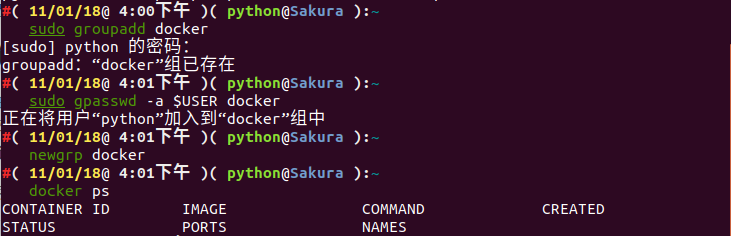
我们可以使用如下命令解决问题:
sudo groupadd docker     #添加docker用户组

sudo gpasswd -a $USER docker     #将登陆用户加入到docker用户组中

newgrp docker     #更新用户组

docker ps    #测试docker命令是否可以使用sudo正常使用
然后我们可以完美地解决了这个问题,效果如下:
【亲测有效】运行docker ps 出现Got permission denied问题的解决方案的更多相关文章
- 解决Docker运行命令时提示"Got permission denied while trying to connect to the Docker daemon socket"类情况
Docker安装命令: 解决Docker运行命令时提示"Got permission denied while trying to connect to the Docker daemon ...
- 执行docker命令遇到 Get Permission Denied
安装完docker后,执行docker相关命令,出现: Got permission denied while trying to connect to the Docker daemon socke ...
- docker cannot open directory .: Permission denied无权限问题
docker运行一个容器后,将主机中当前目录下的文件夹挂载到容器的文件夹后 进入到docker容器内对应的挂载目录中,运行命令ls后提示: ls: cannot open directory .: P ...
- Win10+YOLOv3完整安装过程(亲测可运行)
最近了解并尝试在Win10安装YOLOv3,参考了十几篇文章,发现每个人都有自己的安装方式,最初尝试用cmake编译,虽然安装完成,但无法使用GPU,坑非常多,经2天努力终于安装成功,分享并记录自己的 ...
- 【亲测有效】Kali Linux无法安装网易云音乐的解决方案
问题描述 由于 Kali Linux 的内核是基于 Debian 的,我们在安装网易云音乐的时候更偏向于选择安装网易云音乐 v1.1.0 deepin15(64位) 的包,可是我发现在安装过程中,无法 ...
- docker启动:Got permission denied while trying to connect to the Docker daemon
权限问题: 1.查看所有用户组与用户 vim /etc/group /etc/group 的内容包括用户组(Group).用户组口令.GID及该用户组所包含的用户(User),每个用户组一条记 ...
- GitLab CI with docker and dind "mount: permission denied (are you root?)"
今天配置gitlab-runner时候出现以上错误,在官网中找到答案 https://gitlab.com/gitlab-org/gitlab-runner/issues/1544
- 【IOS】mac终端运行.sh文件总是提示permission denied
如果我目录jni有一个list.sh文件 我直接 nxgametekiMacBook-Air:jni luonan$ ./list.sh ../../Classes 提示 permission de ...
- 运行 Docker 容器时的安全风险:别丢了你的套接字
我们都遇到过这种情况:你只是想尝试一段命令行,但安装进程却如同抵押贷款申请那般繁琐.如果不是强制要求完成这么多步骤,你的开发环境会被永远不会再使用的库弄乱.自然, Docker 来了以后,你惊异地发现 ...
随机推荐
- Python鸢尾花分类实现
#coding:utf-8 from sklearn.datasets import load_irisfrom sklearn.model_selection import train_test_s ...
- ARP单播请求?
在我的理解中,ARP请求是已知对方的IP地址,想要请求对方的MAC地址,用以封装以太网帧头.因此在不知道对方MAC地址的情况下,会广播ARP请求到整个子网,让子网中的所有设备收到这个广播ARP请求报文 ...
- Java的学习路线建议(转)
https://www.cnblogs.com/huaxingtianxia/p/5724093.html
- P1056 排座椅
非原创 #include<bits/stdc++.h>using namespace std;int t1[2009];int t2[2009]; int findmax(int *a){ ...
- ActivityThread main
public static void main(String[] args) { Trace.traceBegin(Trace.TRACE_TAG_ACTIVITY_MANAGER, "Ac ...
- centos7下安装docker(12docker网络)
docker 网络荣覆盖范围可分为:单个host上的容器网络和跨多个host的网络 docker 安装时会自动在host上创建三个网络,我们可以使用docker network ls查看到 1.non ...
- mysql 创建 mb4 字符集数据库
create database sina default character set utf8mb4 collate utf8mb4_unicode_ci; show variables like ' ...
- 理解 JavaScript 中的 for…of 循环
什么是 for…of 循环 for...of 语句创建一个循环来迭代可迭代的对象.在 ES6 中引入的 for...of 循环,以替代 for...in 和 forEach() ,并支持新的迭代协议. ...
- AirSim
https://github.com/Microsoft/AirSim 功能 1 虚拟模拟 2半虚拟模拟 安装教程 环境安装 1安装 cmake 直接下 .exe 2安装cuda 3安装Eigen 3 ...
- MATLAB——神经网络train函数