
吴裕雄 python 神经网络——TensorFlow 花瓣分类与迁移学习(2)
import glob

import os.path

import numpy as np

import tensorflow as tf

from tensorflow.python.platform import gfile

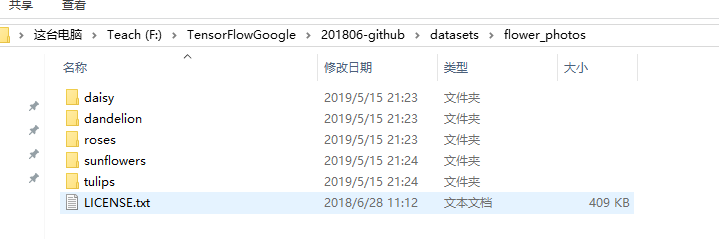
# 原始输入数据的目录,这个目录下有5个子目录,每个子目录底下保存这属于该

# 类别的所有图片。

INPUT_DATA = 'F:\\TensorFlowGoogle\\201806-github\\datasets\\flower_photos\\'

# 输出文件地址。我们将整理后的图片数据通过numpy的格式保存。

OUTPUT_FILE = 'F:\\shuju\\flower_processed_data.npy'

# 测试数据和验证数据比例。

VALIDATION_PERCENTAGE = 10

TEST_PERCENTAGE = 10

# 读取数据并将数据分割成训练数据、验证数据和测试数据。

def create_image_lists(sess, testing_percentage, validation_percentage):

    sub_dirs = [x[0] for x in os.walk(INPUT_DATA)]

    is_root_dir = True

    # 初始化各个数据集。

    training_images = []

    training_labels = []

    testing_images = []

    testing_labels = []

    validation_images = []

    validation_labels = []

    current_label = 0

    # 读取所有的子目录。

    for sub_dir in sub_dirs:

        if is_root_dir:

            is_root_dir = False

            continue

        # 获取一个子目录中所有的图片文件。

        extensions = ['jpg', 'jpeg', 'JPG', 'JPEG']

        file_list = []

        dir_name = os.path.basename(sub_dir)

        for extension in extensions:

            file_glob = os.path.join(INPUT_DATA, dir_name, '*.' + extension)

            file_list.extend(glob.glob(file_glob))

        if not file_list:

            continue

        print("processing:", dir_name)

        i = 0

        # 处理图片数据。

        for file_name in file_list:

            i += 1

            # 读取并解析图片,将图片转化为299*299以方便inception-v3模型来处理。

            image_raw_data = gfile.FastGFile(file_name, 'rb').read()

            image = tf.image.decode_jpeg(image_raw_data)

            if image.dtype != tf.float32:

                image = tf.image.convert_image_dtype(image, dtype=tf.float32)

            image = tf.image.resize_images(image, [299, 299])

            image_value = sess.run(image)

            # 随机划分数据聚。

            chance = np.random.randint(100)

            if chance < validation_percentage:

                validation_images.append(image_value)

                validation_labels.append(current_label)

            elif chance < (testing_percentage + validation_percentage):

                testing_images.append(image_value)

                testing_labels.append(current_label)

            else:

                training_images.append(image_value)

                training_labels.append(current_label)

            if i % 200 == 0:

                print(i, "images processed.")

        current_label += 1

    # 将训练数据随机打乱以获得更好的训练效果。

    state = np.random.get_state()

    np.random.shuffle(training_images)

    np.random.set_state(state)

    np.random.shuffle(training_labels)

    return np.asarray([training_images, training_labels,validation_images, validation_labels,testing_images, testing_labels])

with tf.Session() as sess:

    processed_data = create_image_lists(sess, TEST_PERCENTAGE, VALIDATION_PERCENTAGE)

    # 通过numpy格式保存处理后的数据。

    np.save(OUTPUT_FILE, processed_data)

import glob

import os.path

import numpy as np

import tensorflow as tf

from tensorflow.python.platform import gfile

import tensorflow.contrib.slim as slim

# 加载通过TensorFlow-Slim定义好的inception_v3模型。

import tensorflow.contrib.slim.python.slim.nets.inception_v3 as inception_v3

# 处理好之后的数据文件。

INPUT_DATA = 'F:\\shuju\\flower_processed_data.npy'

# 保存训练好的模型的路径。

TRAIN_FILE = 'E:\\train_dir\\model'

# 谷歌提供的训练好的模型文件地址。因为GitHub无法保存大于100M的文件,所以

# 在运行时需要先自行从Google下载inception_v3.ckpt文件。

CKPT_FILE = 'E:\\inception_v3\\inception_v3.ckpt'

# 定义训练中使用的参数。

LEARNING_RATE = 0.0001

STEPS = 300

BATCH = 32

N_CLASSES = 5

# 不需要从谷歌训练好的模型中加载的参数。

CHECKPOINT_EXCLUDE_SCOPES = 'InceptionV3/Logits,InceptionV3/AuxLogits'

# 需要训练的网络层参数明层,在fine-tuning的过程中就是最后的全联接层。

TRAINABLE_SCOPES='InceptionV3/Logits,InceptionV3/AuxLogit'

def get_tuned_variables():

    exclusions = [scope.strip() for scope in CHECKPOINT_EXCLUDE_SCOPES.split(',')]

    variables_to_restore = []

    # 枚举inception-v3模型中所有的参数,然后判断是否需要从加载列表中移除。

    for var in slim.get_model_variables():

        excluded = False

        for exclusion in exclusions:

            if var.op.name.startswith(exclusion):

                excluded = True

                break

        if not excluded:

            variables_to_restore.append(var)

    return variables_to_restore

def get_trainable_variables():

    scopes = [scope.strip() for scope in TRAINABLE_SCOPES.split(',')]

    variables_to_train = []

    # 枚举所有需要训练的参数前缀,并通过这些前缀找到所有需要训练的参数。

    for scope in scopes:

        variables = tf.get_collection(tf.GraphKeys.TRAINABLE_VARIABLES, scope)

        variables_to_train.extend(variables)

    return variables_to_train

def main():

    # 加载预处理好的数据。

    processed_data = np.load(INPUT_DATA)

    training_images = processed_data[0]

    n_training_example = len(training_images)

    training_labels = processed_data[1]

    validation_images = processed_data[2]

    validation_labels = processed_data[3]

    testing_images = processed_data[4]

    testing_labels = processed_data[5]

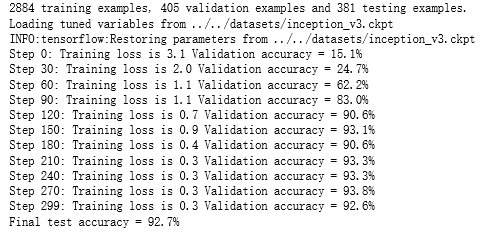
    print("%d training examples, %d validation examples and %d testing examples." % (n_training_example, len(validation_labels), len(testing_labels)))

    # 定义inception-v3的输入,images为输入图片,labels为每一张图片对应的标签。

    images = tf.placeholder(tf.float32, [None, 299, 299, 3], name='input_images')

    labels = tf.placeholder(tf.int64, [None], name='labels')

    # 定义inception-v3模型。因为谷歌给出的只有模型参数取值,所以这里

    # 需要在这个代码中定义inception-v3的模型结构。虽然理论上需要区分训练和

    # 测试中使用到的模型,也就是说在测试时应该使用is_training=False,但是

    # 因为预先训练好的inception-v3模型中使用的batch normalization参数与

    # 新的数据会有出入,所以这里直接使用同一个模型来做测试。

    with slim.arg_scope(inception_v3.inception_v3_arg_scope()):

        logits, _ = inception_v3.inception_v3(images, num_classes=N_CLASSES, is_training=True)

    trainable_variables = get_trainable_variables()

    # 定义损失函数和训练过程。

    tf.losses.softmax_cross_entropy(tf.one_hot(labels, N_CLASSES), logits, weights=1.0)

    total_loss = tf.losses.get_total_loss()

    train_step = tf.train.RMSPropOptimizer(LEARNING_RATE).minimize(total_loss)

    # 计算正确率。

    with tf.name_scope('evaluation'):

        correct_prediction = tf.equal(tf.argmax(logits, 1), labels)

        evaluation_step = tf.reduce_mean(tf.cast(correct_prediction, tf.float32))

    # 定义加载Google训练好的Inception-v3模型的Saver。

    load_fn = slim.assign_from_checkpoint_fn(

      CKPT_FILE,

      get_tuned_variables(),

      ignore_missing_vars=True)

    # 定义保存新模型的Saver。

    saver = tf.train.Saver()

    with tf.Session() as sess:

        # 初始化没有加载进来的变量。

        init = tf.global_variables_initializer()

        sess.run(init)

        # 加载谷歌已经训练好的模型。

        print('Loading tuned variables from %s' % CKPT_FILE)

        load_fn(sess)

        start = 0

        end = BATCH

        for i in range(STEPS):

            _, loss = sess.run([train_step, total_loss], feed_dict={

                images: training_images[start:end],

                labels: training_labels[start:end]})

            if i % 30 == 0 or i + 1 == STEPS:

                saver.save(sess, TRAIN_FILE, global_step=i)

                validation_accuracy = sess.run(evaluation_step, feed_dict={images: validation_images, labels: validation_labels})

                print('Step %d: Training loss is %.1f Validation accuracy = %.1f%%' % (i, loss, validation_accuracy * 100.0))

            start = end

            if start == n_training_example:

                start = 0

            end = start + BATCH

            if end > n_training_example:

                end = n_training_example

        # 在最后的测试数据上测试正确率。

        test_accuracy = sess.run(evaluation_step, feed_dict={

            images: testing_images, labels: testing_labels})

        print('Final test accuracy = %.1f%%' % (test_accuracy * 100))

if __name__ == '__main__':

    main()
吴裕雄 python 神经网络——TensorFlow 花瓣分类与迁移学习(2)的更多相关文章
- 吴裕雄 python 神经网络——TensorFlow 花瓣分类与迁移学习(4)
# -*- coding: utf-8 -*- import glob import os.path import numpy as np import tensorflow as tf from t ...
- 吴裕雄 python 神经网络——TensorFlow 花瓣分类与迁移学习(3)
import glob import os.path import numpy as np import tensorflow as tf from tensorflow.python.platfor ...
- 吴裕雄 python 神经网络——TensorFlow 花瓣分类与迁移学习(1)
import glob import os.path import numpy as np import tensorflow as tf from tensorflow.python.platfor ...
- 吴裕雄 python 神经网络——TensorFlow 花瓣识别2
import glob import os.path import numpy as np import tensorflow as tf from tensorflow.python.platfor ...
- 吴裕雄 python 神经网络——TensorFlow训练神经网络:花瓣识别
import os import glob import os.path import numpy as np import tensorflow as tf from tensorflow.pyth ...
- 吴裕雄 python 神经网络——TensorFlow 循环神经网络处理MNIST手写数字数据集
#加载TF并导入数据集 import tensorflow as tf from tensorflow.contrib import rnn from tensorflow.examples.tuto ...
- 吴裕雄 python 神经网络TensorFlow实现LeNet模型处理手写数字识别MNIST数据集
import tensorflow as tf tf.reset_default_graph() # 配置神经网络的参数 INPUT_NODE = 784 OUTPUT_NODE = 10 IMAGE ...
- 吴裕雄 PYTHON 神经网络——TENSORFLOW 无监督学习处理MNIST手写数字数据集
# 导入模块 import numpy as np import tensorflow as tf import matplotlib.pyplot as plt # 加载数据 from tensor ...
- 吴裕雄 python 神经网络——TensorFlow 使用卷积神经网络训练和预测MNIST手写数据集
import tensorflow as tf import numpy as np from tensorflow.examples.tutorials.mnist import input_dat ...
随机推荐
- 使用命令行生成动态库dll
1.安装开发工具,比如visual studio或者mingw等等.下面以visual studio编译器cl作为讲解. 2.导出dll中的函数基本使用两种方式,可以使用关键字__declspec(d ...
- Andriod正式打包、以及升级应用 重新打包 修改应用名称、应用图 标、应用启动画面
一, Android 正式打包.以及升级应用重新打包 1.android studio 把 Flutter 打包成正式包 2.修改应用版本以及升级打包 找到 AndroidManifest.xml ...
- linux虚拟机安装jenkins及maven/jdk配置
一.jenkins安装 (1)tomcat下载,下载地址:https://tomcat.apache.org 选择对应的版本,以下以新版的tomcat 9.0版本为例 下载zip包 (2)jenkin ...
- es7实现数学乘方
//math.pow简写方法 console.log(2 ** 6)
- 2019牛客暑期多校训练营(第三场) J LRU management 模拟链表操作
输入n, m,n表示n种操作,m表示最多可以容纳m个串. 第一种操作:先在容器里找是否存在这个串,如果不存在,则添加在末尾,这个串携带了一个值v. 如果存在,则先把之前存在的那个拿出来,然后在后面添加 ...
- AcWing 853. 有边数限制的最短路 bellman-ford 结构体
//存在负权值 处理负环 //如果能求出来 一般是不存在负权回路 //如果有负回路 那最小距离可能是负无穷 #include <cstring> #include <iostream ...
- 概率dp light1038
题意:问一个数一步步除以他的除数,最后转移到1,所需要的期望步数. 思路,概率dp问题,从结果逆推,本题是从1开始往后推,怎么个推法呢.参考一下别人的博客: 求操作次数的期望时,先设定第i个因子给期望 ...
- 洛谷P1044栈(DP)
题目背景 栈是计算机中经典的数据结构,简单的说,栈就是限制在一端进行插入删除操作的线性表. 栈有两种最重要的操作,即poppoppop(从栈顶弹出一个元素)和pushpushpush(将一个元素进栈) ...
- kali Linux 2020.1最新安装教程,亲身尝试,绝对能帮你安装好!不是root、没有桌面、中文乱码、下载太慢、ssh链接等问题!
既然已经开始研究kali Linux,小编就认为在下已经有了一定的基础.当然小编也是个小白用户.本人用的是Vmware虚拟机,这里只说一点,内存我选择的是4g因为这个包含桌面,所以稍微大一点.Linx ...
- Azure IoT Hub 十分钟入门系列 (3)- 使用消息路由将原始设备数据记录存档
本文主要分享一个案例: 10分钟使用消息路由将原始设备数据记录存档 B站视频讲解:https://www.bilibili.com/video/av90223893/ 本文主要有如下内容: 1.理解什 ...