
吴裕雄 python 神经网络——TensorFlow 花瓣分类与迁移学习(1)
import glob

import os.path

import numpy as np

import tensorflow as tf

from tensorflow.python.platform import gfile

# 原始输入数据的目录,这个目录下有5个子目录,每个子目录底下保存这属于该

# 类别的所有图片。

INPUT_DATA = 'F:\\TensorFlowGoogle\\201806-github\\datasets\\flower_photos\\'

# 输出文件地址。我们将整理后的图片数据通过numpy的格式保存。

OUTPUT_FILE = 'F:\\shuju\\flower_processed_data.npy'

# 测试数据和验证数据比例。

VALIDATION_PERCENTAGE = 10

TEST_PERCENTAGE = 10

# 读取数据并将数据分割成训练数据、验证数据和测试数据。

def create_image_lists(sess, testing_percentage, validation_percentage):

    sub_dirs = [x[0] for x in os.walk(INPUT_DATA)]

    is_root_dir = True

    # 初始化各个数据集。

    training_images = []

    training_labels = []

    testing_images = []

    testing_labels = []

    validation_images = []

    validation_labels = []

    current_label = 0

    # 读取所有的子目录。

    for sub_dir in sub_dirs:

        if is_root_dir:

            is_root_dir = False

            continue

        # 获取一个子目录中所有的图片文件。

        extensions = ['jpg', 'jpeg', 'JPG', 'JPEG']

        file_list = []

        dir_name = os.path.basename(sub_dir)

        for extension in extensions:

            file_glob = os.path.join(INPUT_DATA, dir_name, '*.' + extension)

            file_list.extend(glob.glob(file_glob))

        if not file_list:

            continue

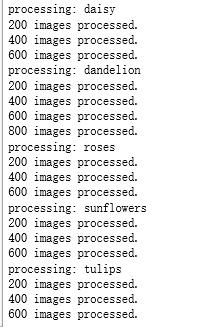
        print("processing:", dir_name)

        i = 0

        # 处理图片数据。

        for file_name in file_list:

            i += 1

            # 读取并解析图片,将图片转化为299*299以方便inception-v3模型来处理。

            image_raw_data = gfile.FastGFile(file_name, 'rb').read()

            image = tf.image.decode_jpeg(image_raw_data)

            if image.dtype != tf.float32:

                image = tf.image.convert_image_dtype(image, dtype=tf.float32)

            image = tf.image.resize_images(image, [299, 299])

            image_value = sess.run(image)

            # 随机划分数据聚。

            chance = np.random.randint(100)

            if chance < validation_percentage:

                validation_images.append(image_value)

                validation_labels.append(current_label)

            elif chance < (testing_percentage + validation_percentage):

                testing_images.append(image_value)

                testing_labels.append(current_label)

            else:

                training_images.append(image_value)

                training_labels.append(current_label)

            if i % 200 == 0:

                print(i, "images processed.")

        current_label += 1

    # 将训练数据随机打乱以获得更好的训练效果。

    state = np.random.get_state()

    np.random.shuffle(training_images)

    np.random.set_state(state)

    np.random.shuffle(training_labels)

    return np.asarray([training_images, training_labels,validation_images, validation_labels,testing_images, testing_labels])

with tf.Session() as sess:

    processed_data = create_image_lists(sess, TEST_PERCENTAGE, VALIDATION_PERCENTAGE)

    # 通过numpy格式保存处理后的数据。

    np.save(OUTPUT_FILE, processed_data)
吴裕雄 python 神经网络——TensorFlow 花瓣分类与迁移学习(1)的更多相关文章
- 吴裕雄 python 神经网络——TensorFlow 花瓣分类与迁移学习(4)
# -*- coding: utf-8 -*- import glob import os.path import numpy as np import tensorflow as tf from t ...
- 吴裕雄 python 神经网络——TensorFlow 花瓣分类与迁移学习(3)
import glob import os.path import numpy as np import tensorflow as tf from tensorflow.python.platfor ...
- 吴裕雄 python 神经网络——TensorFlow 花瓣分类与迁移学习(2)
import glob import os.path import numpy as np import tensorflow as tf from tensorflow.python.platfor ...
- 吴裕雄 python 神经网络——TensorFlow 花瓣识别2
import glob import os.path import numpy as np import tensorflow as tf from tensorflow.python.platfor ...
- 吴裕雄 python 神经网络——TensorFlow训练神经网络:花瓣识别
import os import glob import os.path import numpy as np import tensorflow as tf from tensorflow.pyth ...
- 吴裕雄 python 神经网络——TensorFlow 循环神经网络处理MNIST手写数字数据集
#加载TF并导入数据集 import tensorflow as tf from tensorflow.contrib import rnn from tensorflow.examples.tuto ...
- 吴裕雄 python 神经网络TensorFlow实现LeNet模型处理手写数字识别MNIST数据集
import tensorflow as tf tf.reset_default_graph() # 配置神经网络的参数 INPUT_NODE = 784 OUTPUT_NODE = 10 IMAGE ...
- 吴裕雄 PYTHON 神经网络——TENSORFLOW 无监督学习处理MNIST手写数字数据集
# 导入模块 import numpy as np import tensorflow as tf import matplotlib.pyplot as plt # 加载数据 from tensor ...
- 吴裕雄 python 神经网络——TensorFlow 使用卷积神经网络训练和预测MNIST手写数据集
import tensorflow as tf import numpy as np from tensorflow.examples.tutorials.mnist import input_dat ...
随机推荐
- 题解【POJ1160】Post Office
[POJ1160]Post Office Time Limit: 1000MS Memory Limit: 10000K Total Submissions: 22362 Accepted: 1208 ...
- 通过FormData对象可以组装一组用 [XMLHttpRequest]发送请求的键/值对,它可以更灵活方便的发送表单数据。
工作记录用 1 大概页面,点击选择按钮,选择文件,填写备注并可以上传前预览,然后点击上传按钮开始上传 2 html+js代码 <h2>Test</h2> <div id= ...
- E. Pavel and Triangles dp+问题转化
E. Pavel and Triangles dp+问题转化 题意 给出n种线段,每种线段给出一定数量,其中每个线段都是 \(2^k\) 问最多能组成多少个三角形 思路 因为每个是\(2^k\)所以能 ...
- MySql 怎么存取 Emoji
01.前言 Emoji 在我们生活中真的是越来越常见了,几乎每次发消息的时候不带个 Emoji,总觉得少了点什么,似乎干巴巴的文字已经无法承载我们丰富的感情了.对于我们开发者来说,如何将 Emoji ...
- 【转载】C++面试题(1-50)
转自http://www.jobui.com/mianshiti/it/cpp/5017/ 1. 面向对象的程序设计思想是什么? 答:把数据结构和对数据结构进行操作的方法封装形成一个个的对象. ...
- 我的reshape观
reshape(1,2)把结果分成1块,每一块2个元素 reshape(2,1)把结果分成2块,每一块1个元素 reshape(-1,1)把结果分成任意块,每一块1个元素 reshape(1,-1)把 ...
- Flask 教程 第十八章:Heroku上的部署
本文翻译自The Flask Mega-Tutorial Part XVIII: Deployment on Heroku 这是Flask Mega-Tutorial系列的第十八部分,我将在其中部署M ...
- MongoDB C#驱动使用方法
string connStr = ConfigurationManager.ConnectionStrings["MongoDBConnStr"].ConnectionString ...
- AcWing 871. 约数之和
#include <iostream> #include <algorithm> #include <unordered_map> #include <vec ...
- Linux实现树莓派3B的国密SM9算法交叉编译——(三)国密SM9算法实现
先参考这篇文章 Linux实现树莓派3B的国密SM9算法交叉编译——(二)miracl库的测试与静态库的生成 进行miracl库的交叉编译测试,并生成miracl静态链接库. 这篇文章主要介绍基于mi ...