
MySQL ERROR 1045 (28000): Access denied for user 'root'@'localhost' (using password: NO)的真正原因
在博客Linux mysql 5.6: ERROR 1045 (28000): Access denied for user 'root'@'localhost' (using password: NO)里面,我介绍了一下安装MySQL后登陆MySQL时会遇到ERROR 1045 (28000): Access denied for user 'root'@'localhost' (using password: NO) 这个错误,当时不知道真正的原因,搜索了一些网上的资料,测试验证了如何解决这个问题,但是一直不知道具体的原因。今天终于把这个问题给彻底搞清楚了。
下面我以MySQL 5.6.20为例子,刨析一下这个错误的真正原因,如下所示
[root@DB-Server tmp]# rpm -ivh MySQL-server-advanced-5.6.20-1.rhel5.x86_64.rpm
Preparing... ########################################### [100%]
1:MySQL-server-advanced ########################################### [100%]
warning: user mysql does not exist - using root
warning: group mysql does not exist - using root
2015-03-26 10:49:06 0 [Warning] TIMESTAMP with implicit DEFAULT value is deprecated. Please use --explicit_defaults_for_timestamp server option (see documentation for more details).
2015-03-26 10:49:07 5082 [Note] InnoDB: Using atomics to ref count buffer pool pages
2015-03-26 10:49:07 5082 [Note] InnoDB: The InnoDB memory heap is disabled
2015-03-26 10:49:07 5082 [Note] InnoDB: Mutexes and rw_locks use GCC atomic builtins
2015-03-26 10:49:07 5082 [Note] InnoDB: Memory barrier is not used
2015-03-26 10:49:07 5082 [Note] InnoDB: Compressed tables use zlib 1.2.3
2015-03-26 10:49:07 5082 [Note] InnoDB: Using Linux native AIO
2015-03-26 10:49:07 5082 [Note] InnoDB: Using CPU crc32 instructions
2015-03-26 10:49:07 5082 [Note] InnoDB: Initializing buffer pool, size = 128.0M
2015-03-26 10:49:07 5082 [Note] InnoDB: Completed initialization of buffer pool
2015-03-26 10:49:07 5082 [Note] InnoDB: The first specified data file ./ibdata1 did not exist: a new database to be created!
2015-03-26 10:49:07 5082 [Note] InnoDB: Setting file ./ibdata1 size to 12 MB
2015-03-26 10:49:07 5082 [Note] InnoDB: Database physically writes the file full: wait...
2015-03-26 10:49:07 5082 [Note] InnoDB: Setting log file ./ib_logfile101 size to 48 MB
2015-03-26 10:49:07 5082 [Note] InnoDB: Setting log file ./ib_logfile1 size to 48 MB
2015-03-26 10:49:08 5082 [Note] InnoDB: Renaming log file ./ib_logfile101 to ./ib_logfile0
2015-03-26 10:49:08 5082 [Warning] InnoDB: New log files created, LSN=45781
2015-03-26 10:49:08 5082 [Note] InnoDB: Doublewrite buffer not found: creating new
2015-03-26 10:49:08 5082 [Note] InnoDB: Doublewrite buffer created
2015-03-26 10:49:08 5082 [Note] InnoDB: 128 rollback segment(s) are active.
2015-03-26 10:49:08 5082 [Warning] InnoDB: Creating foreign key constraint system tables.
2015-03-26 10:49:08 5082 [Note] InnoDB: Foreign key constraint system tables created
2015-03-26 10:49:08 5082 [Note] InnoDB: Creating tablespace and datafile system tables.
2015-03-26 10:49:08 5082 [Note] InnoDB: Tablespace and datafile system tables created.
2015-03-26 10:49:08 5082 [Note] InnoDB: Waiting for purge to start
2015-03-26 10:49:08 5082 [Note] InnoDB: 5.6.20 started; log sequence number 0
2015-03-26 10:49:08 5082 [Note] RSA private key file not found: /var/lib/mysql//private_key.pem. Some authentication plugins will not work.
2015-03-26 10:49:08 5082 [Note] RSA public key file not found: /var/lib/mysql//public_key.pem. Some authentication plugins will not work.
A random root password has been set. You will find it in '/root/.mysql_secret'.
2015-03-26 10:49:09 5082 [Note] Binlog end
2015-03-26 10:49:09 5082 [Note] InnoDB: FTS optimize thread exiting.
2015-03-26 10:49:09 5082 [Note] InnoDB: Starting shutdown...
2015-03-26 10:49:10 5082 [Note] InnoDB: Shutdown completed; log sequence number 1625977
2015-03-26 10:49:10 0 [Warning] TIMESTAMP with implicit DEFAULT value is deprecated. Please use --explicit_defaults_for_timestamp server option (see documentation for more details).
2015-03-26 10:49:10 5104 [Note] InnoDB: Using atomics to ref count buffer pool pages
2015-03-26 10:49:10 5104 [Note] InnoDB: The InnoDB memory heap is disabled
2015-03-26 10:49:10 5104 [Note] InnoDB: Mutexes and rw_locks use GCC atomic builtins
2015-03-26 10:49:10 5104 [Note] InnoDB: Memory barrier is not used
2015-03-26 10:49:10 5104 [Note] InnoDB: Compressed tables use zlib 1.2.3
2015-03-26 10:49:10 5104 [Note] InnoDB: Using Linux native AIO
2015-03-26 10:49:10 5104 [Note] InnoDB: Using CPU crc32 instructions
2015-03-26 10:49:10 5104 [Note] InnoDB: Initializing buffer pool, size = 128.0M
2015-03-26 10:49:10 5104 [Note] InnoDB: Completed initialization of buffer pool
2015-03-26 10:49:10 5104 [Note] InnoDB: Highest supported file format is Barracuda.
2015-03-26 10:49:10 5104 [Note] InnoDB: 128 rollback segment(s) are active.
2015-03-26 10:49:10 5104 [Note] InnoDB: Waiting for purge to start
2015-03-26 10:49:10 5104 [Note] InnoDB: 5.6.20 started; log sequence number 1625977
2015-03-26 10:49:10 5104 [Note] RSA private key file not found: /var/lib/mysql//private_key.pem. Some authentication plugins will not work.
2015-03-26 10:49:10 5104 [Note] RSA public key file not found: /var/lib/mysql//public_key.pem. Some authentication plugins will not work.
2015-03-26 10:49:10 5104 [Note] Binlog end
2015-03-26 10:49:10 5104 [Note] InnoDB: FTS optimize thread exiting.
2015-03-26 10:49:10 5104 [Note] InnoDB: Starting shutdown...
2015-03-26 10:49:12 5104 [Note] InnoDB: Shutdown completed; log sequence number 1625987
A RANDOM PASSWORD HAS BEEN SET FOR THE MySQL root USER !
You will find that password in '/root/.mysql_secret'.
You must change that password on your first connect,
no other statement but 'SET PASSWORD' will be accepted.
See the manual for the semantics of the 'password expired' flag.
Also, the account for the anonymous user has been removed.
In addition, you can run:
/usr/bin/mysql_secure_installation
which will also give you the option of removing the test database.
This is strongly recommended for production servers.
See the manual for more instructions.
Please report any problems at http://bugs.mysql.com/
The latest information about MySQL is available on the web at
http://www.mysql.com
Support MySQL by buying support/licenses at http://shop.mysql.com
WARNING: Found existing config file /usr/my.cnf on the system.
Because this file might be in use, it was not replaced,
but was used in bootstrap (unless you used --defaults-file)
and when you later start the server.
The new default config file was created as /usr/my-new.cnf,
please compare it with your file and take the changes you need.
MySQL的安装日志信息中,你会看到MySQL生成了root用户的随机密码(如下截图所示),并将这个随机密码放置在/root/.mysql_secret中。并且强制在第一次登陆时修改root用户的密码。Mysql 5.6及以后版本出处于安全考虑,root密码不为空。所以在MySQL的安装过程中,会生成一个随机密码,但是对于我们这样的初学者,不了解情况,于是便从网上搜索如何解决问题的资料,而问题关键在此,很多做技术的人,了解不够深入,又喜欢随波逐流,停留在问题的表层,并未深入研究。而高手又不屑于这类简单的问题。

A RANDOM PASSWORD HAS BEEN SET FOR THE MySQL root USER !
You will find that password in '/root/.mysql_secret'.
You must change that password on your first connect,
no other statement but 'SET PASSWORD' will be accepted.
See the manual for the semantics of the 'password expired' flag.
Also, the account for the anonymous user has been removed.
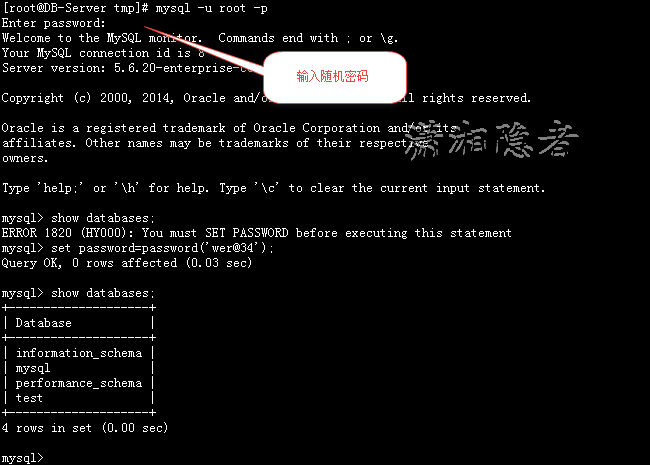
知道了错误的前因后果,那么很容易就搞定这个问题了。找到随机密码,登录数据库后修改密码。问题解决

[root@DB-Server tmp]# mysql -u root -p
Enter password:
Welcome to the MySQL monitor. Commands end with ; or \g.
Your MySQL connection id is 8
Server version: 5.6.20-enterprise-commercial-advanced
Copyright (c) 2000, 2014, Oracle and/or its affiliates. All rights reserved.
Oracle is a registered trademark of Oracle Corporation and/or its
affiliates. Other names may be trademarks of their respective
owners.
Type 'help;' or '\h' for help. Type '\c' to clear the current input statement.
mysql> show databases;
ERROR 1820 (HY000): You must SET PASSWORD before executing this statement
mysql> set password=password('wer@34');
Query OK, 0 rows affected (0.03 sec)
mysql> show databases;
+--------------------+
| Database |
+--------------------+
| information_schema |
| mysql |
| performance_schema |
| test |
+--------------------+
4 rows in set (0.00 sec)
MySQL ERROR 1045 (28000): Access denied for user 'root'@'localhost' (using password: NO)的真正原因的更多相关文章
- Mysql ERROR 1045 (28000): Access denied for user 'root'@'localhost'(using password: YSE)
安装mysql后,使用命令登录mysql居然报错了,Mysql ERROR 1045 (28000): Access denied for user 'root'@'localhost'(using ...
- MySQL ERROR 1045 (28000): Access denied for user 'root'@'localhost' (using password: NO
MySQL安装完server端和客户端后,登录Mysql时报错:[root@rhel204 MySQL 5.6.23-RMP]# mysqlERROR 2002 (HY000): Can't conn ...
- [mysql] ERROR 1045 (28000): Access denied for user 'root'@'localhost' (using password: YES).
用mysql -u root -p显示ERROR 1045 (28000): Access denied for user 'root'@'localhost' (using password: YE ...
- MySQL ERROR 1045 (28000): Access denied for user 'root'@'localhost' (using password: NO) 的解决办法和原因
这两天下载了MySQL5.7.11进行安装,发现到了初次使用输入密码的时候,不管怎样都进不去,即使按照网上说的在mysqld 下面添加skip-grant-tables也是不行,后来研究了两天,终于找 ...
- Linux mysql 5.6: ERROR 1045 (28000): Access denied for user 'root'@'localhost' (using password: NO)
案例环境: 操作系统 :Red Hat Enterprise Linux Server release 5.7 (Tikanga) 64 bit 数据库版本 : Mysql 5.6.19 64 bit ...
- mysql 链接失败(ERROR 1045 (28000): Access denied for user 'root'@'localhost' (using password: YES))
mysql链接失败(ERROR 1045 (28000): Access denied for user 'root'@'localhost' (using password: YES)) 修改: # ...
- 安装mysql因为/tmp权限不足而导致ERROR 1045 (28000): Access denied for user root@localhost (using password: NO)的解决方案
本机是centos 6.5 安装的mysql是5.1的版本. 在安装mysql之后,第一次启动mysql服务的时候,需要/tmp有777(rwxrwxrwx)的权限,然而楼主的/tmp是755(rw ...
- MySQL学习笔记——ERROR 1045 (28000): Access denied for user 'root'@'localhost' (using password: NO)
ERROR 1045 (28000): Access denied for user 'root'@'localhost' (using password: NO) Enter password: E ...
- 重置密码解决MySQL for Linux错误 ERROR 1045 (28000): Access denied for user 'root'@'localhost' (using password: YES)
出现报错: Warning: World-writable config file '/etc/my.cnf' is ignored // 该文件权限过高ERROR 1045 (28000): Acc ...
随机推荐
- C# 将PowerPoint文件转换成PDF文件
PowerPoint的优势在于对演示文档的操作上,而用PPT查看资料,反而会很麻烦.这时候,把PPT转换成PDF格式保存,再浏览,不失为一个好办法.在日常编程中和开发软件时,我们也有这样的需要.本文旨 ...
- Cesium应用篇:3控件(1)Clock
创建 跟Clock相关的主要有Animation控件和Timeline控件,通常两者会放在一起使用. 在Cesium中,Viewer默认开启这两个控件,如果你想要不显示控件,可以在Viewer初始化中 ...
- LeetCode - 415. Add Strings
Given two non-negative numbers num1 and num2 represented as string, return the sum of num1 and num2. ...
- Moon.Orm常见问题问答FAQ
有问题在评论,我看到邮件会尽快回复 1.重点了解Db里面的方法.这是核心. 2.关于查询语句MQL:http://www.cnblogs.com/humble/p/3380065.html 3.关于如 ...
- 数据结构Java实现01----算法概述
[声明] 欢迎转载,但请保留文章原始出处→_→ 生命壹号:http://www.cnblogs.com/smyhvae/ 文章来源:http://www.cnblogs.com/smyhvae/p/4 ...
- JS正则表达式总结
关于JS的正则用法,已经有很多文章了,大同小异 正则表达式30分钟入门教程 MDN正则表达式 玩转JavaScript正则表达式 ES6正则的扩展
- .Net语言 APP开发平台——Smobiler学习日志:如何在手机上实现电子签名功能
最前面的话:Smobiler是一个在VS环境中使用.Net语言来开发APP的开发平台,也许比Xamarin更方便 一.目标样式 我们要实现上图中的效果,需要如下的操作: 1.从工具栏上的“Smobil ...
- Spring 3.0 AOP (一)AOP 术语
关于AOP.之前我已写过一个系列的随笔: <自己实现简单的AOP>,它的关注点在于实现.实现语言是C#,实现方式为 自定义实现 RealProxy 抽象类.重写Invoke方法,以便进行方 ...
- iOS学习笔记——AutoLayout的约束
iOS学习笔记——AutoLayout约束 之前在开发iOS app时一直以为苹果的布局是绝对布局,在IB中拖拉控件运行或者直接使用代码去调整控件都会发上一些不尽人意的结果,后来发现iOS在引入了Au ...
- repeater三级嵌套绑定
<asp:Repeater ID="rpt1" runat="server" onitemdatabound="rpt1_ItemDataBou ...