
VC++Debug避免F11步进不想要的函数中
It's often useful to avoid stepping into some common code like constructors or overloaded operators.
Many times when you debug the code you probably step into functions you would like to step over, whether it's constructors, assignment operators or others. One of those that used to bother me the most was the CStringconstructor. Here is an example when stepping into take_a_string() function first steps into CString's constructor.
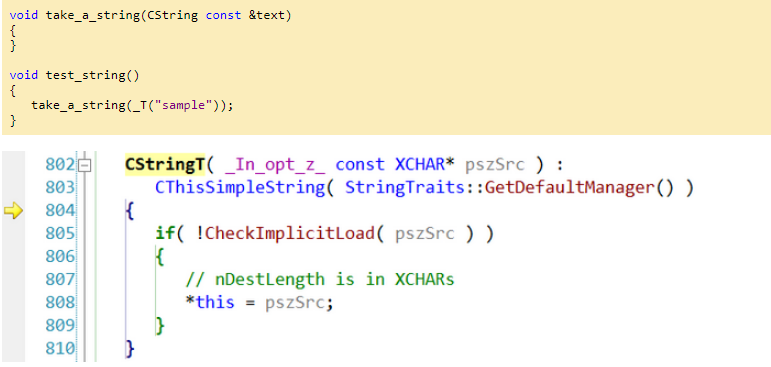
Luckily it is possible to tell the debugger to step over some methods, classes or entire namespaces. The way this was implemented has changed. Back in the days of VS 6 this used to be specified through the autoexp.dat file.
autoexp.dat provides this capability. Add a section called "[ExecutionControl]". Add keys where the key is the function name and the value is "NoStepInto". You can specify an asterisk (*) as a wildcard as the first set of colons for a namespace or class.
autoexp.dat is only read on Visual Studio's start up.
To ignore the function myfunctionname, and all calls to the class CFoo:
[ExecutionControl]
myfunctionname=NoStepInto
CFoo::*=NoStepInto
To ignore construction and assignment of MFC CStrings: (Notice the extra = in CString::operator=.)
[ExecutionControl]
CString::CString=NoStepInto
CString::operator==NoStepInto
To ignore all ATL calls:
[ExecutionControl]
ATL::*=NoStepInto
-------------------------------------------------------------------------分割线-----------------------------------------------------------------------------------------
Since Visual Studio 2002 this was changed to Registry settings. To enable stepping over functions you need to add some values in Registry (you can find all the details here):
- The actual location depends on the version of Visual Studio you have and the platform of the OS (x86 or x64, because the Registry has to views for 64-bit Windows)
- The value name is a number and represents the priority of the rule; the higher the number the more precedence the rules has over others.
- The value data is a REG_SZ value representing a regular expression that specifies what to filter and what action to perform.
To skip stepping into any CString method I have added the following rule:
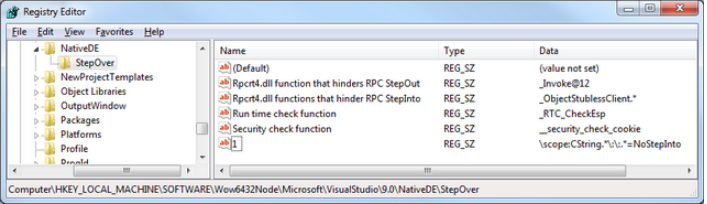
Having this enabled, even when you press to step into take_a_string() in the above example the debugger skips the CString's constructor.
Additional readings:
VC++Debug避免F11步进不想要的函数中的更多相关文章
- VC Debug和Release区别
https://msdn.microsoft.com/en-us/library/xz7ttk5s.aspx Optimizing Your Code Visual Studio 2015 The ...
- ES6 箭头函数中的 this?你可能想多了(翻译)
箭头函数=>无疑是ES6中最受关注的一个新特性了,通过它可以简写 function 函数表达式,你也可以在各种提及箭头函数的地方看到这样的观点——“=> 就是一个新的 function”. ...
- 怎么查看CI,codeigniter的版本信息?想看某个项目中使用的CI具体是哪个版本,怎么查看?
怎么查看CI的版本信息?想看某个项目中使用的CI具体是哪个版本,怎么查看?system\core\codeigniter.php中可以查看版本常量/** * CodeIgniter Version * ...
- python中,一个函数想使用另一个函数中的变量
问题: 第一个函数中用到了变量a:第二个函数也想使用变量a. 解决方法: 在第一个函数中将变量a定义为全局变量,然后在第二个函数中,也写上global a即可. 示例: def func1(): gl ...
- 要想在for语句中直接定义一个变量
要想在for语句中直接 定义一个变量 (如下的代码) 1 for(uint16_t i=0;i<10;i++); 2 if( GPIO_ReadInputDataBit(GPIOA, GPI ...
- VC++ Debug编译方式
字节填充 VC++在Debug编译方式下,new的内存用0xcd(助记词为Cleared Data)填充,防止未初始化: delete后,内存用0xdd(Dead Data)填充,防止再次被使用. 这 ...
- windows下VC界面 DIY系列1----写给想要写界面的C++程序猿的话
非常早就想写关于C++ UI开发的一系列博文,博客专栏刚审核通过,就立即開始刷博文,不能辜负自己的一番热血,我并非写界面的高手,仅仅想通过写博文提高我自己的技术积累,也顺便帮助大家解决界面开发的瓶颈. ...
- VC++ Debug产生异常时中断程序执行Break on Exception
It is possible to instruct the debugger to break when an exception occurs, before a handler is invok ...
- VC++ Debug内存值
Memory Values If you're using the debug heap, memory is initialized and cleared with special values. ...
随机推荐
- Unity 4.x 各版本IOS IL2CPP对比
不同Unity版本IL2CPP对比 Unity版本 C++代码总行数 泛型相关行数 Attribute相关行数 IPA大小 纯64位 64位+32位 备注 4.6.4f1 约3302万行 约2508万 ...
- 细说linux IPC(一):基于socket的进程间通信(上)
[版权声明:尊重原创.转载请保留出处:blog.csdn.net/shallnet 或 .../gentleliu,文章仅供学习交流,请勿用于商业用途] 在一个较大的project其中 ...
- 关于华为x1 7.0无法从eclipse发布的更新as发布的apk
目前只在华为x1 7.0手机上发现这个问题,坑大了. MediaPad 10 FHD 华为这款可以安装. HUAWEI G525-U00 华为这款也可以安装. 目前公司就这几款华为手机了. 原因是 在 ...
- STL源码剖析(迭代器)
在STL中,容器跟算法是分开设计的,算法是通过迭代器来对容器进行操作的. 在算法运用迭代器的时候,可能会用到其相应的型别,例如返回值为容器中元素的型别,又或者说根据迭代器的类型来选择更好的算法等等. ...
- 03-hibernate注解-关系映射级别注解-一对一
实体之间的映射关系 一对一:一个公民对应一个身份证号码 一对多(多对一):一个人可以有多个银行账号 多对多:一个学生有多个老师,一个老师有多个学生. 一对一单向外键关联 @OneToOne(casca ...
- Drupal显示白屏或500?
Drupal有时会显示白屏,或者500内部错误,这多半是由于PHP脚本什么地方有问题造成的.这个时候,可以先看看php.log里面有没有提示: [10-Oct-2013 15:55:26 Asia/S ...
- cookie存中文
cookie存取: 存: Cookie cookie = new Cookie("title",URLEncoder.encode("标题","utf ...
- jquery mobile 的loading提示“正在加载...”在不同版本中的不同实现方式
在jquery mobile开发中,在页面的切换.或者ajax获取数据时由于网速慢等其他原因,会有一个加载的时间,如果能在这段时间给一个“正在加载...”的提示,用户体验会更好.下面来简单的介绍一下在 ...
- Linux 目录和文件操作
Linux常用命令--目录和文件操作 [目录]删除.复制.移动 : 1.删除文件夹用:rmdir 文件夹名 但是rmdir不能删除非空的文件夹,那如何删除非空文件夹呢: 2.通常情况下,删除文件用:r ...
- 【转】C# 视频监控系列(12):H264播放器——播放录像文件
原文地址:http://www.cnblogs.com/over140/archive/2009/03/23/1419643.html?spm=5176.100239.blogcont51182.16 ...