
VC++Debug避免F11步进不想要的函数中
It's often useful to avoid stepping into some common code like constructors or overloaded operators.
Many times when you debug the code you probably step into functions you would like to step over, whether it's constructors, assignment operators or others. One of those that used to bother me the most was the CStringconstructor. Here is an example when stepping into take_a_string() function first steps into CString's constructor.
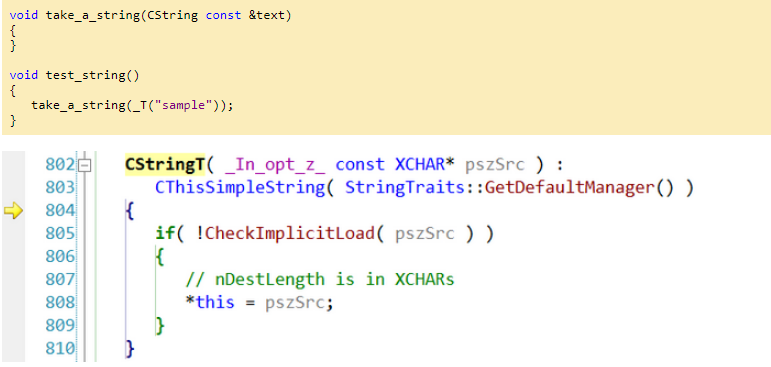
Luckily it is possible to tell the debugger to step over some methods, classes or entire namespaces. The way this was implemented has changed. Back in the days of VS 6 this used to be specified through the autoexp.dat file.
autoexp.dat provides this capability. Add a section called "[ExecutionControl]". Add keys where the key is the function name and the value is "NoStepInto". You can specify an asterisk (*) as a wildcard as the first set of colons for a namespace or class.
autoexp.dat is only read on Visual Studio's start up.
To ignore the function myfunctionname, and all calls to the class CFoo:
[ExecutionControl]
myfunctionname=NoStepInto
CFoo::*=NoStepInto
To ignore construction and assignment of MFC CStrings: (Notice the extra = in CString::operator=.)
[ExecutionControl]
CString::CString=NoStepInto
CString::operator==NoStepInto
To ignore all ATL calls:
[ExecutionControl]
ATL::*=NoStepInto
-------------------------------------------------------------------------分割线-----------------------------------------------------------------------------------------
Since Visual Studio 2002 this was changed to Registry settings. To enable stepping over functions you need to add some values in Registry (you can find all the details here):
- The actual location depends on the version of Visual Studio you have and the platform of the OS (x86 or x64, because the Registry has to views for 64-bit Windows)
- The value name is a number and represents the priority of the rule; the higher the number the more precedence the rules has over others.
- The value data is a REG_SZ value representing a regular expression that specifies what to filter and what action to perform.
To skip stepping into any CString method I have added the following rule:
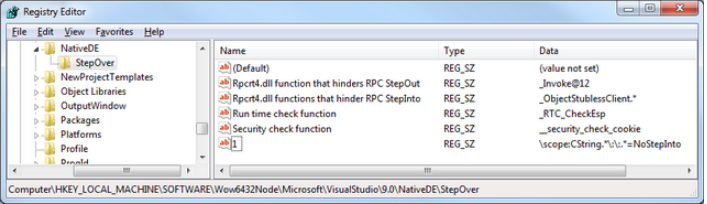
Having this enabled, even when you press to step into take_a_string() in the above example the debugger skips the CString's constructor.
Additional readings:
VC++Debug避免F11步进不想要的函数中的更多相关文章
- VC Debug和Release区别
https://msdn.microsoft.com/en-us/library/xz7ttk5s.aspx Optimizing Your Code Visual Studio 2015 The ...
- ES6 箭头函数中的 this?你可能想多了(翻译)
箭头函数=>无疑是ES6中最受关注的一个新特性了,通过它可以简写 function 函数表达式,你也可以在各种提及箭头函数的地方看到这样的观点——“=> 就是一个新的 function”. ...
- 怎么查看CI,codeigniter的版本信息?想看某个项目中使用的CI具体是哪个版本,怎么查看?
怎么查看CI的版本信息?想看某个项目中使用的CI具体是哪个版本,怎么查看?system\core\codeigniter.php中可以查看版本常量/** * CodeIgniter Version * ...
- python中,一个函数想使用另一个函数中的变量
问题: 第一个函数中用到了变量a:第二个函数也想使用变量a. 解决方法: 在第一个函数中将变量a定义为全局变量,然后在第二个函数中,也写上global a即可. 示例: def func1(): gl ...
- 要想在for语句中直接定义一个变量
要想在for语句中直接 定义一个变量 (如下的代码) 1 for(uint16_t i=0;i<10;i++); 2 if( GPIO_ReadInputDataBit(GPIOA, GPI ...
- VC++ Debug编译方式
字节填充 VC++在Debug编译方式下,new的内存用0xcd(助记词为Cleared Data)填充,防止未初始化: delete后,内存用0xdd(Dead Data)填充,防止再次被使用. 这 ...
- windows下VC界面 DIY系列1----写给想要写界面的C++程序猿的话
非常早就想写关于C++ UI开发的一系列博文,博客专栏刚审核通过,就立即開始刷博文,不能辜负自己的一番热血,我并非写界面的高手,仅仅想通过写博文提高我自己的技术积累,也顺便帮助大家解决界面开发的瓶颈. ...
- VC++ Debug产生异常时中断程序执行Break on Exception
It is possible to instruct the debugger to break when an exception occurs, before a handler is invok ...
- VC++ Debug内存值
Memory Values If you're using the debug heap, memory is initialized and cleared with special values. ...
随机推荐
- LoadRunner解决超时错误
在运行脚本回放过程中,有时会出现错误,这在实际测试中是不可避免的,毕竟自动录制生成的脚本难免会有问题,需要运行脚本进行验证,把问题都解决后才加入到场景中进行负载测试.下面结合常用的协议(如Web.We ...
- Android中Word转Html
一.POI方式 1.先看word效果图 2.再看下在android上使用WebView显示的效果 3. 生成的html的代码,如下: <html> <head> <M ...
- android项目解刨之时间轴
近期开发的app中要用到时间轴这东西.须要实现的效果例如以下: 想想这个东西应该能够用listview实现吧. 然后近期就模拟着去写了: 首先写 listview的item的布局: listview ...
- 关于 yii2 cron运行 console的脚本不运行,可是手动运行成功的原因
在yii2中运行脚本出现了一个问题 手动运行没有问题. 在cron中不运行.最后找出来了原因 打开yii文件(在根文件夹以下) #!/usr/bin/env php <?php /** * Yi ...
- 分享一下自己ios开发笔记
// ********************** 推断数组元素是否为空 ********************** NSString *element = [array objectAtIndex ...
- (二)Luence——代码实现索引及搜索
完成需求:使用Lucene完成对数据库中图书信息的索引和搜索功能. 1. 环境准备及工程搭建 1.1 环境准备 mysql5.5+java8+lucene4.10.3(目前最新7.0.1,这里够用就好 ...
- C# 异或校验算法
C# 的异或校验算法 直接上代码 public partial class FormCRC : Form { public FormCRC() { InitializeComponent(); } p ...
- HDU 5303 Delicious Apples(思维题)
Delicious Apples Time Limit: 5000/3000 MS (Java/Others) Memory Limit: 524288/524288 K (Java/Other ...
- loongson官方PMON使用
目录 [隐藏] 1 PMON使用介绍 1.1 进入PMON控制界面 1.2 Pmon的图形界面 1.3 Pmon的基本命令 1.3.1 Boot and Load 启动与加载内核 1.3.2 MyC ...
- springboot admin server常用配置
Property name Description Default value spring.boot.admin.context-path The context-path prefixes the ...