
USER Management | Role Categories | Roles | Indirect Responsibilities
User Mangement Application helps system administrators to assign or un-assign a responsibility for multiple users at a time. Yes, We don’t have to manage individual user accounts for assigning the responsibilities if you are using User Management Application.
In Oracle Applications, Traditional method of assigning a responsibility to a user is from System Administrator > Security > User > Define form
This approach works well when we have limited number of users and responsibilities which doesn’t change very often.
Consider a business scenario where you have 3 departments in your company namely
- IT with 10 people
- Sales Dept with 20 People
- Purchasing with 10 People
For each person in IT department you want to assign 5 different responsibilities. In this scenario you end up going to User screen 5 different times and then adding 5 responsibilities for each user. Basically you end up doing 25 tasks / mouse clicks (assuming you are not using key board shortcuts :) )
System Administrator:
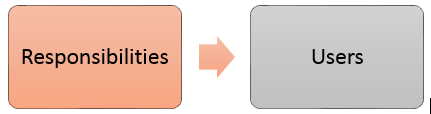
The same scenario can be implemented very easily with few steps if we go with User Management Application.
User Management:

Demo:
- Create Role Category ( erpSchools IT Dept)
- Create Role (erpSchools Authors) under the Role Category created in above step
- Assign multiple responsibilities to the Role created in above step.
- Check User screen for indirect responsibilities section.
1. Create Role Category: erpSchools IT Dept
Navigation: User Management responsibility
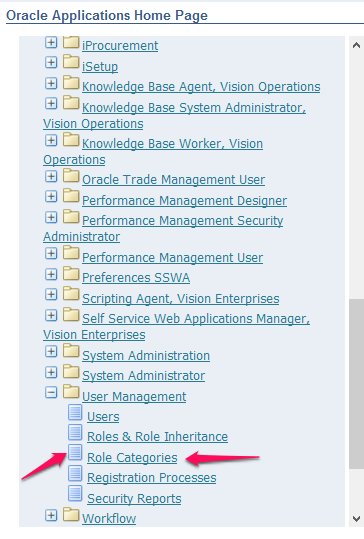
Once you enter User Management Responsibility make sure that you are in Role Categories Tab
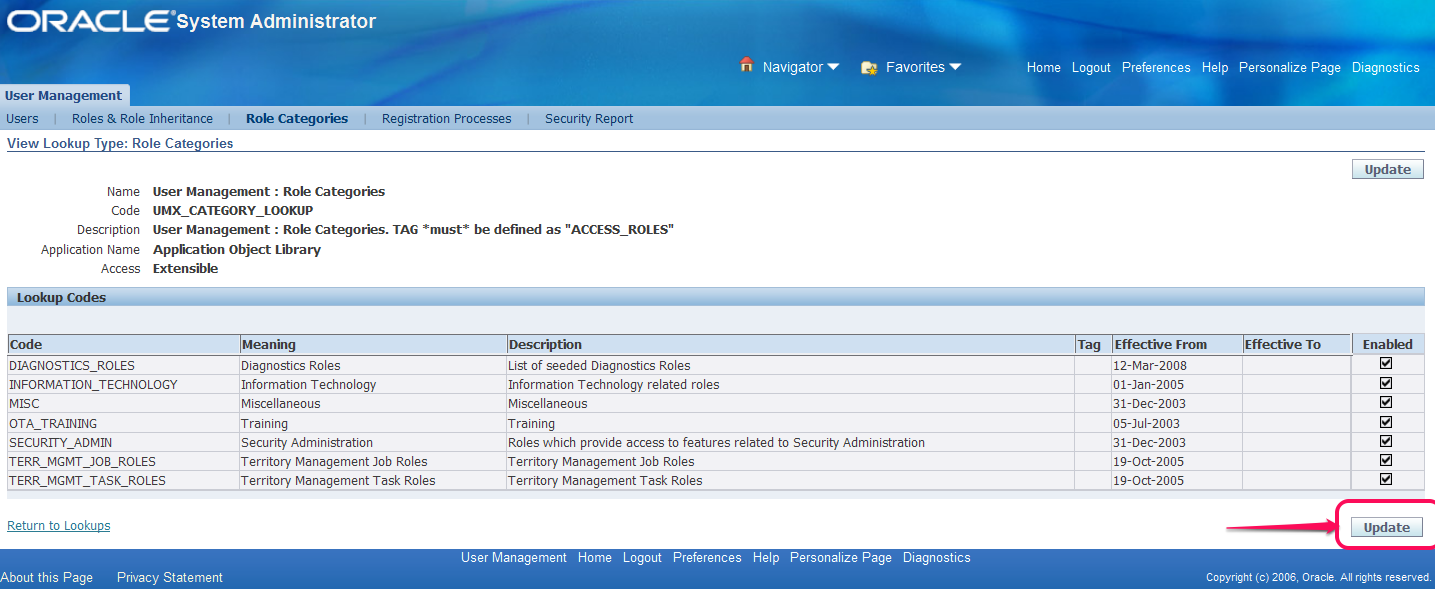
Click Update Button as shown above to create a new Role
Fill in the details as shown below and click Apply button to save the record.
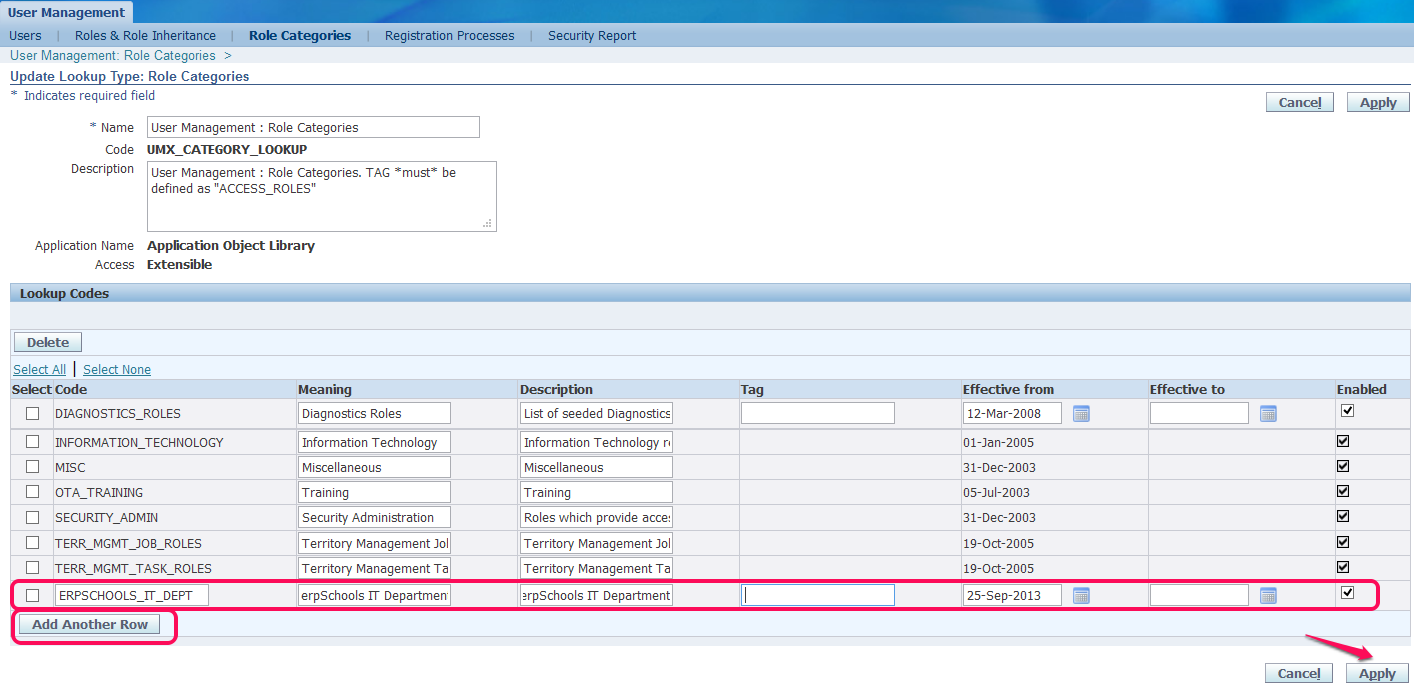
2. Create Role: erpSchools Authors
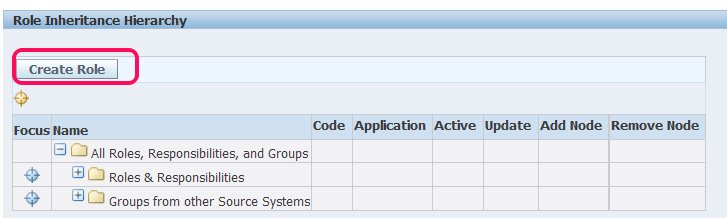
Select Roles & Role Inheritance tab

Click “Create Role” Button
Enter details as below and click Apply button to save data
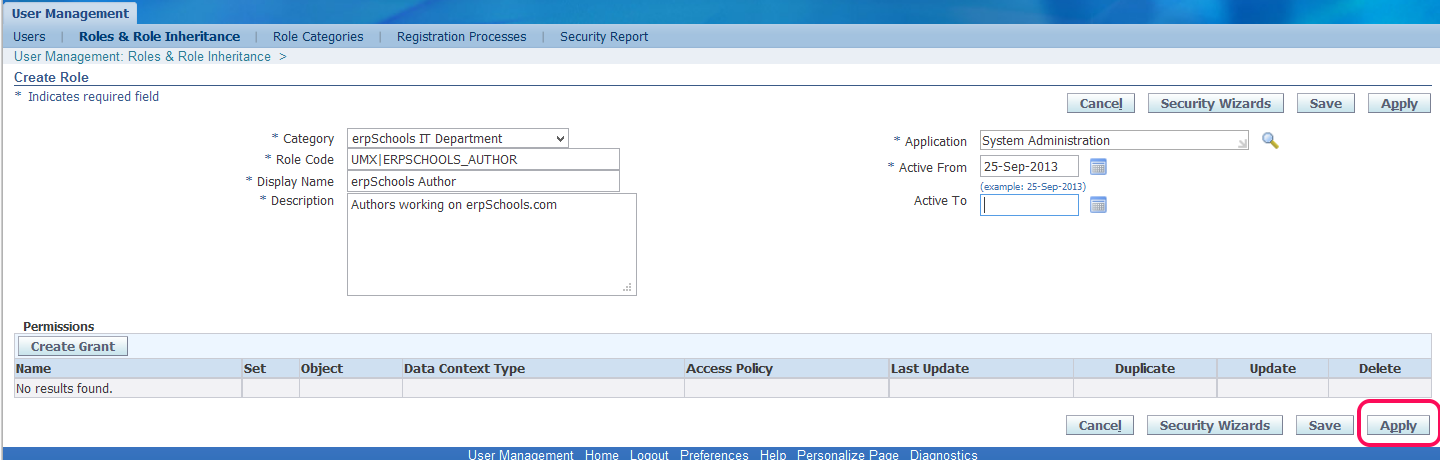
You will be prompted with a warning message “Updates to Role data will not be visible in the application until the following processes are started : Workflow Background Engine”
Go to system administrator responsibility or any other responsibility from where you can run “Workflow background process”

Once the workflow background process concurrent program is completed just refresh your OAF page by clicking on “Roles & Role Inheritance” tab one more time
So far you have done everything right you should be able to see the Role Category and Role that we created.
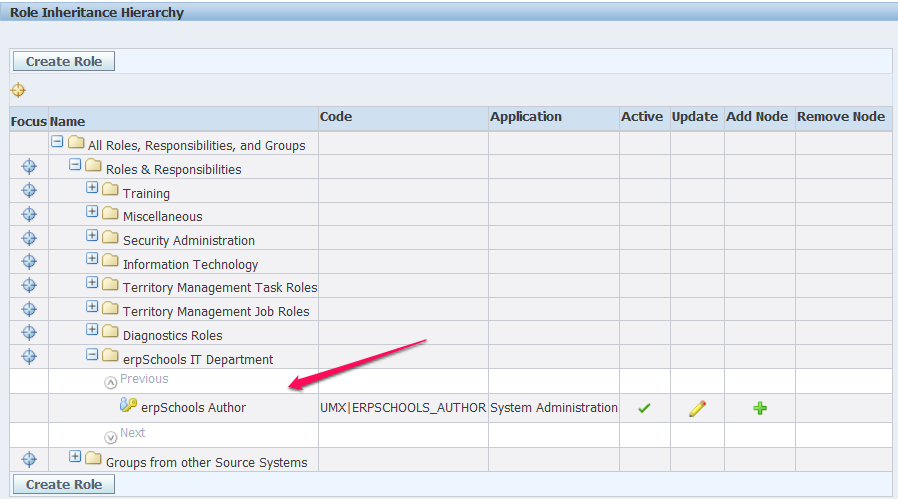
3. Assign few responsibilities to the Role we created in above step.
Click on  in Add Node section of the above screen shot
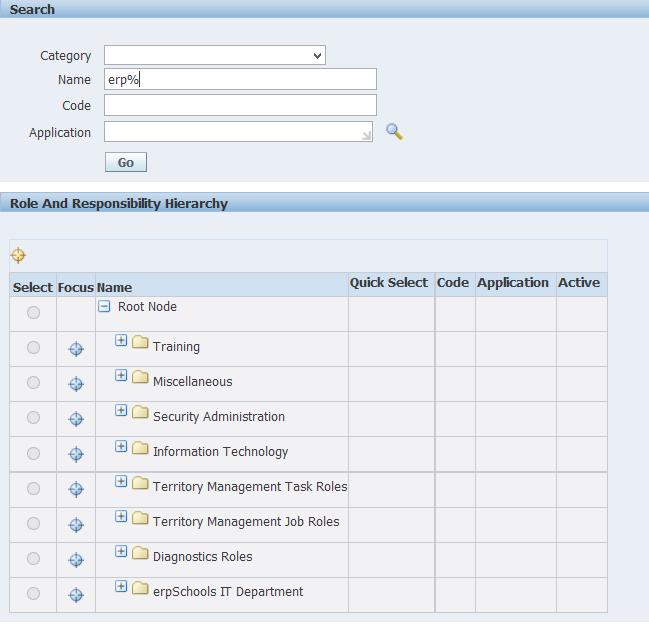
Search for the responsibility that you would like to add. In this case I would like add the below three responsibilities one after the other
a. erpSchools Demo
b. erpSchools Demo 32
c. erpSchools Demo 322
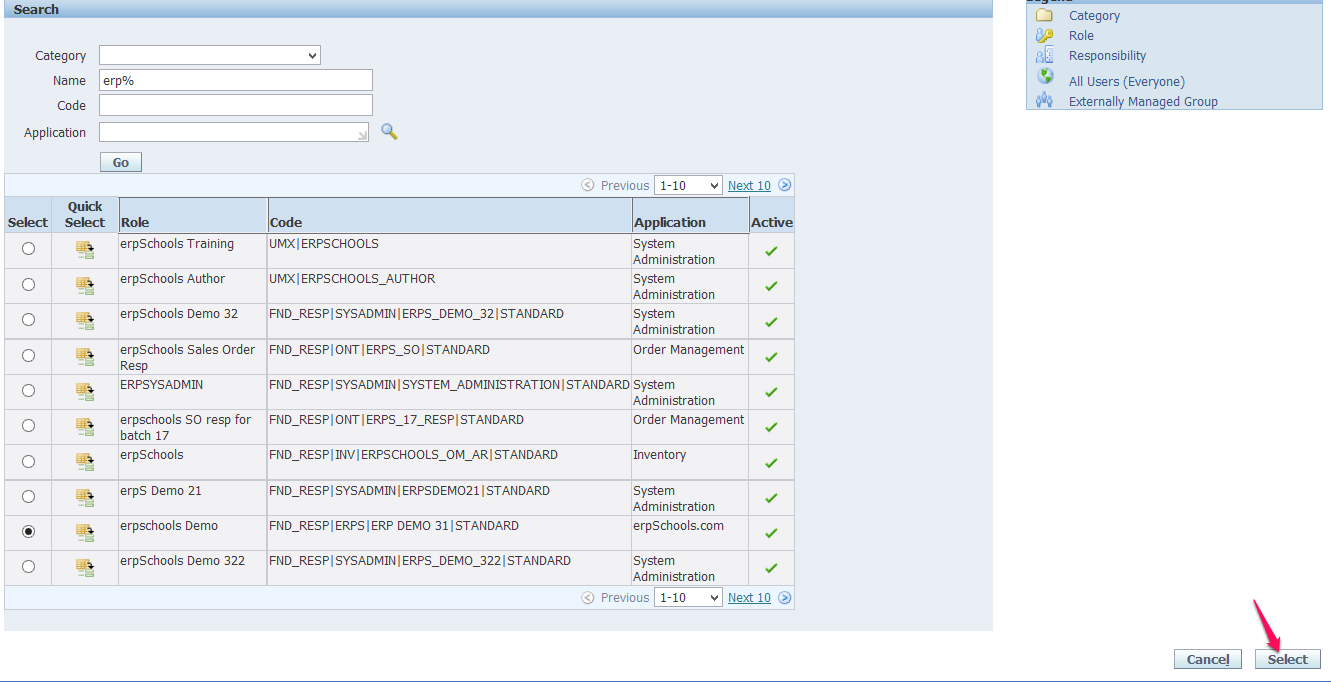
Select one responsibility at a time and click Select button
Once you add a responsibility to a Role a successfully you can see the responsibility under the Role

Repeat the above two steps to add two more responsibilities to the same Role

4. Assign the Role to a User.
Navigate to Users Tab.

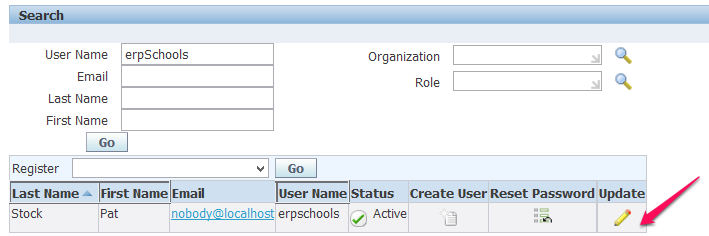
Search for the user to which you would like assign the Role and click Update Icon
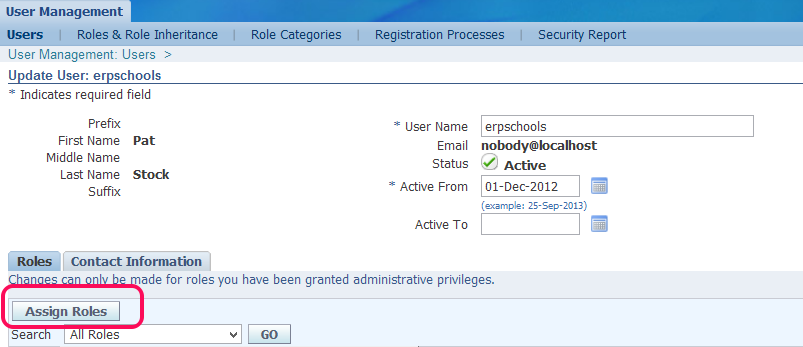
Once you navigate to the user screen select “Assign Roles”
In Search window look for the Role that we created.
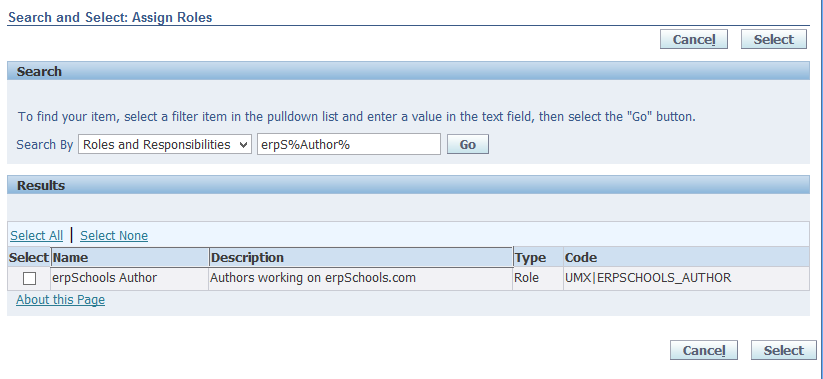
Check the checkbox and click on “Select” button
Enter Justification and click either Save or Apply button.

Again you will be prompted with Warning message asking to run “Workflow background process”. Go ahead and complete this step.
Finally, Login into System Administrator to see if indirect responsibilities are added
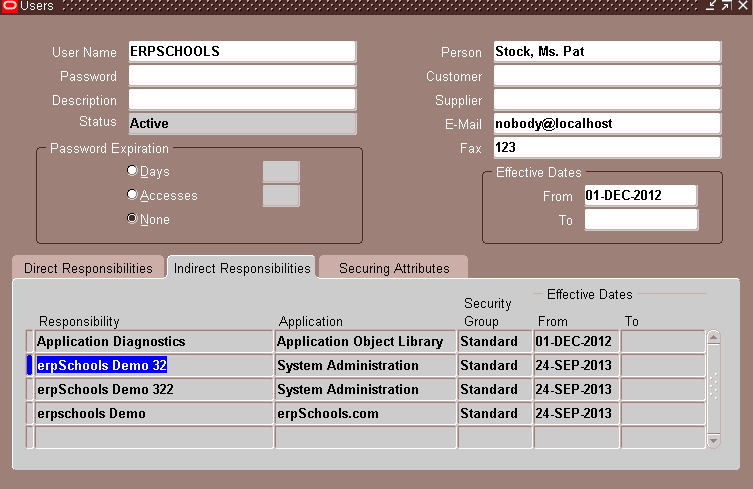
Done. Thank you for visiting erpSchools.com
USER Management | Role Categories | Roles | Indirect Responsibilities的更多相关文章
- Project Management Process
Project Management ProcessDescription .............................................................. ...
- Oracle User Management FAQ翻译及学习笔记
转载 最近了解到AME 的东西,很迫切,先转载一篇 [@more@] Oracle User Management FAQ翻译及学习笔记 写在前面 本文主要是翻译的英文版的Oracle User Ma ...
- The Simplified Project Management Process
One of the challenges of explaining project management to people who are unfamiliar with the approac ...
- A Framework for Programme Management
In business today organisations manage multiple projects concurrently with shared or overlapping res ...
- [Hive - LanguageManual] Create/Drop/Grant/Revoke Roles and Privileges / Show Use
Create/Drop/Grant/Revoke Roles and Privileges Hive Default Authorization - Legacy Mode has informati ...
- Product Management vs. Product Marketing
Posted by Marty Cagan on August 28, 2007 Tags: product management, product marketing, program manage ...
- Exam E05-001 Information Storage and Management Version 3 Exam
Emc 考试 e05-001信息存储和管理版本3考试 [总问题:171] 哪种 emc 产品提供软件定义的存储基础架构的自动监视和报告? A. viprSrmB. 斯纳普内C. 阿瓦马尔D. 快速副总 ...
- ansible-play中role的基本用法
#role应用 #roles跟调用角色的剧本文件应该与roles同级关系,即放在ansible目录下 #makir /root/ansible/roles/{nginx,http,ftp,mysql, ...
- Git+Gitlab+Ansible的roles实现一键部署Nginx静态网站(一)--技术流ken
前言 截止目前已经写了<Ansible基础认识及安装使用详解(一)--技术流ken>,<Ansible常用模块介绍及使用(二)--技术流ken><Ansible剧本介绍及 ...
随机推荐
- [ Python ] 基本数据类型及属性(上篇)
1. 基本数据类型 (1) 数字 - int (2) 字符串 - str (3) 布尔值 - bool 2. int 类型中重要的方法 (1) int 将字符串转 ...
- 《逐梦旅程 WINDOWS游戏编程之从零开始》笔记2——透明贴图,动画技术
第5章 透明贴图 像这样直接贴图会产生这种情况,所以我们需要透明贴图. 透明遮罩法:主要利用BitBlt函数中Raser(光栅)值的运算,需要准备素材图和遮罩图: 这个方法的原理解释见书131页. 示 ...
- hdu 1252(BFS)
Hike on a Graph Time Limit: 2000/1000 MS (Java/Others) Memory Limit: 65536/32768 K (Java/Others)T ...
- Ubuntu 16.04 apt-get搭建LAMP环境
本文重点介绍在Ubuntu中使用apt-get安装LAMP(Ubuntu 16.04,Apache2.4.18,mysql5.7.12,php7.0.4)环境,所以不再介绍如何安装Ubuntu. 安装 ...
- 通过javascript进行UTF-8编码
通过javascript进行UTF-8编码 javascript的字符集: javascript程序是使用Unicode字符集编写的.Unicode是ASCII和Latin-1的超集,并支持地球上几乎 ...
- PHP策略设计模式
<?php /** 抽象策略角色,以接口实现 */ interface Strategy { /** 算法接口 */ public function algorithmInterface(); ...
- FastJson过滤掉不需要的返回字段
/** * @Author:txp * @Description:过滤掉不需要返回的字段 * @Param: [src, clazz, args]` * @Data: 2017/10/10 9:10 ...
- sql 触发器 游标
在数据库中,删除一条记录的同时想要删除另一个表里的数据,这时我们可以选择使用触发器.触发器主要是通过事件进行触发被自动调用执行的,而存储过程可以通过存储过程的名称被调用.触发器是当对某一个表进行操作. ...
- ARM芯片stm32中的AHB和APB
AHB,是Advanced High performance Bus的缩写,译作高级高性能总线,这是一种“系统总线”.AHB主要用于高性能模块(如CPU.DMA和DSP等)之间的连接.AHB 系统由主 ...
- CodeForces 740A Alyona and copybooks
完全背包. 直接做个背包容量为$100000$的完全背包,这样就可以避免繁琐的分类讨论了. #pragma comment(linker, "/STACK:1024000000,102400 ...