
【代码笔记】iOS-点击一个按钮会出现多个按钮的动画效果
一,效果图。

二,工程图。
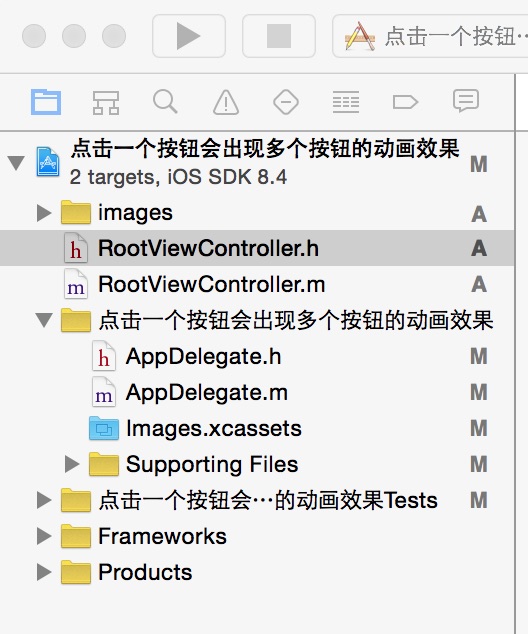
三,代码。
RootViewController.h

#import <UIKit/UIKit.h>

@interface RootViewController : UIViewController

{

    UIImageView *iCanImageView;

    UIImageView *menu_carImageView;

    UIImageView *menu_movieImageView;

    UIImageView *menu_setImageView;

    UIImageView *menu_photoImageView;

    BOOL isRonating;

    int count;

}

@end
RootViewController.m
#import "RootViewController.h"

@interface RootViewController ()

@end

@implementation RootViewController

- (id)initWithNibName:(NSString *)nibNameOrNil bundle:(NSBundle *)nibBundleOrNil

{

    self = [super initWithNibName:nibNameOrNil bundle:nibBundleOrNil];

    if (self) {

        // Custom initialization

    }

    return self;

}

- (void)viewDidLoad

{

    [super viewDidLoad];

    // Do any additional setup after loading the view.

    //初始化背景图

    [self initBackgroundView];

}

#pragma -mark -functions

-(void)initBackgroundView

{

    //隐藏导航条

    self.navigationController.navigationBarHidden=YES;

    //设置背景图片

    UIImageView *bgImage = [[UIImageView alloc] initWithImage:[UIImage imageNamed:@"main_bg.png"]];

    bgImage.frame = self.view.bounds;

    //背景图添加手势

    UITapGestureRecognizer *bgTgr = [[UITapGestureRecognizer alloc] initWithTarget:self action:@selector(bgClick)];

    [bgImage addGestureRecognizer:bgTgr];

    bgImage.userInteractionEnabled = YES;

    [self.view addSubview:bgImage];

    //背景图上的小图标

    iCanImageView = [[UIImageView alloc] initWithImage:[UIImage imageNamed:@"ican.png"]];

    iCanImageView.center = CGPointMake(50, 400);

    //小图标添加手势

    UITapGestureRecognizer *iCanTgr = [[UITapGestureRecognizer alloc] initWithTarget:self action:@selector(iCanClick)];

    [iCanImageView addGestureRecognizer:iCanTgr];

    iCanImageView.userInteractionEnabled = YES;

    //弹出的4个设置的小图标

    //车图标

    menu_carImageView = [[UIImageView alloc] initWithImage:[UIImage imageNamed:@"menu_car.png"]];

    menu_carImageView.tag = 3;

    menu_carImageView.center = iCanImageView.center;

    //视频的图标

    menu_movieImageView = [[UIImageView alloc] initWithImage:[UIImage imageNamed:@"menu_movie.png"]];

    menu_movieImageView.tag = 4;

    menu_movieImageView.center = iCanImageView.center;

    //图片的图标

    menu_photoImageView = [[UIImageView alloc] initWithImage:[UIImage imageNamed:@"image.png"]];

    menu_photoImageView.tag = 5;

    menu_photoImageView.center = iCanImageView.center;

    //设置的图标

    menu_setImageView = [[UIImageView alloc] initWithImage:[UIImage imageNamed:@"menu_set.png"]];

    menu_setImageView.tag = 6;

    menu_setImageView.center = iCanImageView.center;

    [self.view addSubview:menu_carImageView];

    [self.view addSubview:menu_movieImageView];

    [self.view addSubview:menu_photoImageView];

    [self.view addSubview:menu_setImageView];

    [self.view addSubview:iCanImageView];

    // 将小图片都添加到数组,最后循环数组为每一个小图片添加点击手势

    NSArray *imageViewArr = [[NSArray alloc] initWithObjects:menu_carImageView,menu_movieImageView,menu_photoImageView,menu_setImageView, nil];

    for(UIImageView *view in imageViewArr)

    {

        UITapGestureRecognizer *jumpTo = [[UITapGestureRecognizer alloc] initWithTarget:self action:@selector(Jump:)];

        view.userInteractionEnabled = YES;

        [view addGestureRecognizer:jumpTo];

    }

    // 判断图标是否旋转,还有小图标是否飞出

    isRonating = NO;

    // 用于计数小图片旋转的时间

    count = 0;

}

#pragma -mark -doClickActions

//点击iCan图标,弹出图标

-(void)iCanClick

{

    CGAffineTransform trans = iCanImageView.transform;

    if(isRonating == NO)

    {

        CGAffineTransform newTrans = CGAffineTransformRotate(trans, -2*M_1_PI);

        [UIView animateWithDuration:0.3 animations:^{

            iCanImageView.transform = newTrans;

            [NSTimer scheduledTimerWithTimeInterval:0.1 target:self selector:@selector(GoOut:) userInfo:nil repeats:YES];

        }];

        isRonating = YES;

    }

    else

    {

        CGAffineTransform newTrans = CGAffineTransformRotate(trans, 2*M_1_PI);

        [UIView animateWithDuration:0.3 animations:^{

            iCanImageView.transform = newTrans;

            [NSTimer scheduledTimerWithTimeInterval:0.1 target:self selector:@selector(Back:) userInfo:nil repeats:YES];

        }];

        isRonating = NO;

    }

}

//点击背景图,图标旋转回原位

-(void)bgClick

{

    if(isRonating == YES)

    {

        CGAffineTransform trans = iCanImageView.transform;

        CGAffineTransform newTrans = CGAffineTransformRotate(trans, 2*M_1_PI);

        [UIView animateWithDuration:0.3 animations:^{

            iCanImageView.transform = newTrans;

            [NSTimer scheduledTimerWithTimeInterval:0.1 target:self selector:@selector(Back:) userInfo:nil repeats:YES];

        }];

        isRonating = NO;

    }

}

//弹出的动作

-(void)GoOut:(id)sender

{

    NSTimer *tiemr = (NSTimer *)sender;

    count++;

    [UIView animateWithDuration:0.2 animations:^{

        menu_carImageView.center = [self location:CGPointMake(-10, 128)];

    }];

    if(count>2)

        [UIView animateWithDuration:0.2 animations:^{

            menu_movieImageView.center = [self location:CGPointMake(45, 100)];

        }];

    if(count>3)

        [UIView animateWithDuration:0.2 animations:^{

            menu_photoImageView.center = [self location:CGPointMake(88, 55)];

        }];

    if(count>4)

        [UIView animateWithDuration:0.2 animations:^{

            menu_setImageView.center = [self location:CGPointMake(105, -8)];

        }];

    if(count>5)

    {

        count = 0;

        [tiemr invalidate];

    }

}

//回归原位的动作

-(void)Back:(id)sender;

{

    NSTimer *timer = (NSTimer *)sender;

    count ++;

    [UIView animateWithDuration:0.2 animations:^{

        [self Ronate:menu_setImageView];

    }];

    if(count>3)

        [UIView animateWithDuration:0.2 animations:^{

            [self Ronate:menu_photoImageView];

        }];

    if(count>6)

        [UIView animateWithDuration:0.2 animations:^{

            menu_setImageView.center = iCanImageView.center;

        }];

    if(count>8)

        [UIView animateWithDuration:0.2 animations:^{

            menu_photoImageView.center = iCanImageView.center;

        }];

    if(count>5)

        [UIView animateWithDuration:0.2 animations:^{

            [self Ronate:menu_movieImageView];

        }];

    if(count>9)

        [UIView animateWithDuration:0.2 animations:^{

            menu_movieImageView.center = iCanImageView.center;

        }];

    if(count >7)

        [UIView animateWithDuration:0.2 animations:^{

            [self Ronate:menu_carImageView];

        }];

    if(count>10)

        [UIView animateWithDuration:0.2 animations:^{

            menu_carImageView.center = iCanImageView.center;

        }];

    if(count>11)

    {

        menu_carImageView.transform = CGAffineTransformMakeRotation(0);

        menu_movieImageView.transform = CGAffineTransformMakeRotation(0);

        menu_photoImageView.transform = CGAffineTransformMakeRotation(0);

        menu_setImageView.transform = CGAffineTransformMakeRotation(0);

        count = 0;

        [timer invalidate];

    }

}

-(CGPoint)location:(CGPoint)p

{

    CGFloat x = CGRectGetMaxX(iCanImageView.frame);

    CGFloat y = iCanImageView.center.y;

    CGPoint pp = CGPointMake(x+p.x+20, y-p.y-10);

    return pp;

}

-(void)Ronate:(UIImageView *)view

{

    view.transform = CGAffineTransformMakeRotation(360.0f*count);

}

// 界面跳转

-(void)Jump:(id)sender

{

    UIGestureRecognizer *t = (UIGestureRecognizer *)sender;

    UIImageView *view = (UIImageView *)t.view;

    UIEdgeInsets set;

    set.top = 5.0f;

    set.bottom = 5.0f;

    set.left = 5.0f;

    set.right = 5.0f;

    if(view.tag == 3)

    {

         [self Scale:view];

     }

    else if(view.tag == 4)

    {

        [self Scale:view];

     }

    else if(view.tag == 5)

    {

        [self Scale:view];

    }

    else

    {

        [self Scale:view];

    }

}

// 放大和缩小图片

-(void)Scale:(UIImageView *)view

{

    if(view.tag == 3)

    {

        CGFloat scale = 1.5;

        CGAffineTransform trans = view.transform;

        [UIImageView animateWithDuration:0.5 animations:^{

            CGAffineTransform newTrans = CGAffineTransformScale(trans, scale, scale);

            CGAffineTransform newTrans1 = CGAffineTransformScale(trans, 0.5, 0.5);

            view.transform = newTrans;

            menu_movieImageView.transform = newTrans1;

            menu_photoImageView.transform = newTrans1;

            menu_setImageView.transform = newTrans1;

            view.alpha = 0.1;

            menu_movieImageView.alpha = 0.1;

            menu_photoImageView.alpha = 0.1;

            menu_setImageView.alpha = 0.1;

        } completion:^(BOOL finished) {

            NSLog(@"--跳转到第一个图标的页面---");

        }];

    }

    else if(view.tag == 4)

    {

        CGFloat scale = 1.5;

        CGAffineTransform trans = view.transform;

        [UIImageView animateWithDuration:0.5 animations:^{

            CGAffineTransform newTrans = CGAffineTransformScale(trans, scale, scale);

            CGAffineTransform newTrans1 = CGAffineTransformScale(trans, 0.5, 0.5);

            view.transform = newTrans;

            menu_carImageView.transform = newTrans1;

            menu_photoImageView.transform = newTrans1;

            menu_setImageView.transform = newTrans1;

            view.alpha = 0.1;

            menu_carImageView.alpha = 0.1;

            menu_photoImageView.alpha = 0.1;

            menu_setImageView.alpha = 0.1;

        } completion:^(BOOL finished) {

            NSLog(@"--跳转到第二个图标的页面---");

        }];

    }

    else if(view.tag == 5)

    {

        CGFloat scale = 1.5;

        CGAffineTransform trans = view.transform;

        [UIImageView animateWithDuration:0.5 animations:^{

            CGAffineTransform newTrans = CGAffineTransformScale(trans, scale, scale);

            CGAffineTransform newTrans1 = CGAffineTransformScale(trans, 0.5, 0.5);

            view.transform = newTrans;

            menu_movieImageView.transform = newTrans1;

            menu_carImageView.transform = newTrans1;

            menu_setImageView.transform = newTrans1;

            view.alpha = 0.1;

            menu_movieImageView.alpha = 0.1;

            menu_carImageView.alpha = 0.1;

            menu_setImageView.alpha = 0.1;

        } completion:^(BOOL finished) {

            NSLog(@"--跳转到第三个图标的页面---");

        }];

    }

    else

    {

        CGFloat scale = 1.5;

        CGAffineTransform trans = view.transform;

        [UIImageView animateWithDuration:0.5 animations:^{

            CGAffineTransform newTrans = CGAffineTransformScale(trans, scale, scale);

            CGAffineTransform newTrans1 = CGAffineTransformScale(trans, 0.5, 0.5);

            view.transform = newTrans;

            menu_movieImageView.transform = newTrans1;

            menu_photoImageView.transform = newTrans1;

            menu_carImageView.transform = newTrans1;

            view.alpha = 0.1;

            menu_movieImageView.alpha = 0.1;

            menu_photoImageView.alpha = 0.1;

            menu_carImageView.alpha = 0.1;

        } completion:^(BOOL finished) {

            NSLog(@"--跳转到第四个图标的页面---");

        }];

    }

}

- (void)didReceiveMemoryWarning

{

    [super didReceiveMemoryWarning];

    // Dispose of any resources that can be recreated.

}
【代码笔记】iOS-点击一个按钮会出现多个按钮的动画效果的更多相关文章
- 【代码笔记】iOS-点击一个button,出6个button
一,效果图. 二,工程图. 三,代码. RootViewController.h #import <UIKit/UIKit.h> //加入头文件 #import "DCPathB ...
- 【代码笔记】iOS-点击cell时候的动画翻转
一,效果图. 二,工程图. 三,代码. RootViewController.h #import <UIKit/UIKit.h> @interface RootViewController ...
- web前端学习(三)css学习笔记部分(8)-- SVN的介绍和应用、CSS动画效果、CSS3布局属性全接触
15.SVN的介绍和应用 15.1.SVN的介绍和应用课程概要 将代码进行集中管理,有版本号的进行迭代,方便集体工作的build流程 15.2.SVN的介绍 SVN是Subversion的简称,是一个 ...
- 完整版百度地图点击列表定位到对应位置并有交互动画效果demo
1.前言 将地图嵌入到项目中的需求很多,好吧,我一般都是用的百度地图.那么今天就主要写一个完整的demo.展示一个列表,点击列表的任一内容,在地图上定位到该位置,并有动画效果.来来来,直接上demo ...
- 【代码笔记】iOS-点击搜索按钮,或放大镜后都会弹出搜索框
一, 效果图. 二,工程图. 三,代码. RootViewController.h #import <UIKit/UIKit.h> #import "CLHSearchBar.h ...
- 【代码笔记】iOS-点击顶点处,弹出另一个小的界面
一,效果图. 二,文件目录. 三,代码. RootViewController.h #import <UIKit/UIKit.h> @interface RootViewControlle ...
- 【代码笔记】iOS-点击搜索跳转到另外一个页面
一,效果图. 二,工程图. 三,代码. RootViewController.h #import <UIKit/UIKit.h> @interface RootViewController ...
- 【代码笔记】iOS-点击城市中的tableView跳转到旅游景点的tableView,下面会有“显示”更多。
一,效果图. 二,工程图. 三,代码. RootViewController.h #import <UIKit/UIKit.h> @interface RootViewController ...
- 【代码笔记】iOS-点击加号增加书架,点击减号减少书架
一,效果图. 二,工程图. 三,代码. ReaderViewController.h #import <UIKit/UIKit.h> @interface ReaderViewContro ...
随机推荐
- Shiro —— 从一个简单的例子开始
一.Shiro是用来做权限的. 二.权限 1.基本概念: (1)安全实体:要保护的数据. (2)权限:是否有能力去操作(查看.修改.删除 )保护的数据. 2.权限的两个特性 (1)权限的继承性:A 包 ...
- C#密封类
密封类 密封类使用sealed修饰符声明. 密封类中不可能有抽象方法[因为:抽象方法必须在抽象类中,而抽象类不能是密封的或者是静态的,也就是说abstract 和sealed不能同时修饰一个类] ...
- QTableWidget控件总结<一>
[1]QTableWidget简介 QTableWidget是QT对话框设计中常用的显示数据表格的控件. 学习QTableWidget就要首先看看QTableView控件(控件也是有"家世& ...
- c#中的正则表达式
using System; using System.Collections.Generic; using System.Linq; using System.Text; using System.T ...
- WinForm对话框
WinForm 对话框控件colorDialog - 颜色选择对话框 使用代码如下: private void 字体颜色ToolStripMenuItem_Click(object sender, E ...
- 点/边 双连通分量---Tarjan算法
运用Tarjan算法,求解图的点/边双连通分量. 1.点双连通分量[块] 割点可以存在多个块中,每个块包含当前节点u,分量以边的形式输出比较有意义. typedef struct{ //栈结点结构 保 ...
- 割点和桥---Tarjan算法
使用Tarjan算法求解图的割点和桥. 1.割点 主要的算法结构就是DFS,一个点是割点,当且仅当以下两种情况: (1)该节点是根节点,且有两棵以上的子树; (2)该节 ...
- 搭建java环境
操作系统:Win10 java版本:1.8.0_102 1.下载安装java JDK(安装时把jre放在了同级目录) 地址为:F:\Program Files\Java 目录下 2.配置环境变量 此电 ...
- Vue从零开始(一)
一.什么是Vue? Vue.js(读音 /vjuː/, 类似于 view) 是一套构建用户界面的 渐进式框架.与其他重量级框架不同的是,Vue 采用自底向上增量开发的设计.Vue 的核心库只关注视图层 ...
- oracle/MySQL 中的decode的使用
MySQL decode()的等同实现 在Oracle中使用decode方法可以轻松实现代码和值之间的转换,但是在MySQL中该如何实现类似功能呢? MySQL中没有直接的方法可以使用 ...