
%iowait和CPU使用率的正确认知
resources
- 理解 %IOWAIT (%WIO)
- LINUX系统的CPU使用率和LOAD
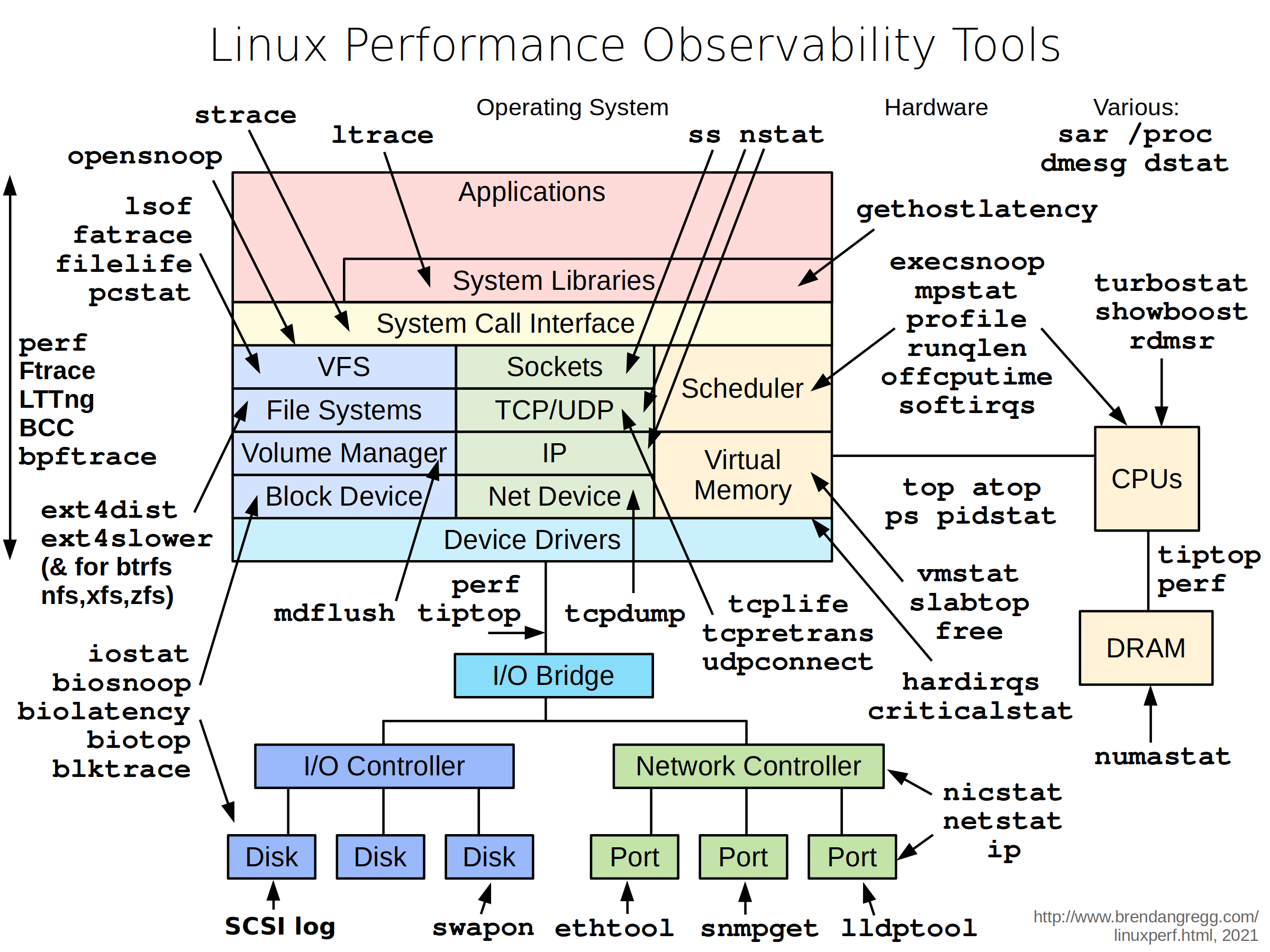
- Linux Performance Observability Tools
- How Linux CPU Usage Time and Percentage is calculated
- Linux进程状态
man (on RHEL 7)
# man mpstat

%usr

       Show the percentage of CPU utilization that occurred while executing at the user level (application).

%nice

       Show the percentage of CPU utilization that occurred while executing at the user level with nice priority.

%sys

       Show the percentage of CPU utilization that occurred while executing at the system level (kernel).Note that this does not include time spent servicing hardware and software interrupts.
%iowait

       Show the percentage of time that the CPU or CPUs were idle during which the system had an outstanding disk I/O request.

%irq

       Show the percentage of time spent by the CPU or CPUs to service hardware interrupts.

%soft

       Show the percentage of time spent by the CPU or CPUs to service software interrupts.

%steal

       Show the percentage of time spent in involuntary wait by the virtual CPU or CPUs while the hypervisor was servicing another virtual  processor.

%guest

       Show the percentage of time spent by the CPU or CPUs to run a virtual processor.

%gnice

       Show the percentage of time spent by the CPU or CPUs to run a niced guest.

%idle

       Show the percentage of time that the CPU or CPUs were idle and the system did not have an outstanding disk I/O request.

# man top

us, user : time running un-niced user processes

sy, system : time running kernel processes

ni, nice : time running niced user processes

id, idle : time spent in the kernel idle handler

wa, IO-wait : time waiting for I/O completion

hi : time spent servicing hardware interrupts

si : time spent servicing software interrupts

st : time stolen from this vm by the hypervisor
TIPS
- CPU Usage Time and Percentage
参考 mpstat 手册,%usr + %nice + %sys + %iwoait + %irq + %soft + %steal + %guest + %gnice + %idle = 100%

%steal一般是在虚拟机中才能看到数值,比如CPU overcommitment很严重的VPS,而%guest和%nice一般都很低,
所以也可以根据/proc/stat或者top可得,user + nice + system + idle + iowait + irq + softirq + steal = 100

To calculate Linux CPU usage time subtract the idle CPU time from the total CPU time as follows:

Total CPU time since boot       = user + nice + system + idle + iowait + irq + softirq + steal

Total CPU Idle time since boot  = idle + iowait

Total CPU usage time since boot = (Total CPU time since boot) - (Total CPU Idle time since boot)

Total CPU percentage            = (Total CPU usage time since boot)/(Total CPU time since boot X 100)
- Linux进程状态
运行状态(TASK_RUNNING):
  是运行态和就绪态的合并,表示进程正在运行或准备运行,Linux 中使用TASK_RUNNING 宏表示此状态

可中断睡眠状态(浅度睡眠)(TASK_INTERRUPTIBLE):
  进程正在睡眠(被阻塞),等待资源到来是唤醒,也可以通过其他进程信号或时钟中断唤醒,进入运行队列。Linux 使用TASK_INTERRUPTIBLE 宏表示此状态。

不可中断睡眠状态(深度睡眠状态)(TASK_UNINTERRUPTIBLE):
  其和浅度睡眠基本类似,但有一点就是不可被其他进程信号或时钟中断唤醒。Linux 使用TASK_UNINTERRUPTIBLE 宏表示此状态。

暂停状态(TASK_STOPPED):
  进程暂停执行接受某种处理。如正在接受调试的进程处于这种状态,Linux 使用TASK_STOPPED 宏表示此状态。

僵死状态(TASK_ZOMBIE):
  进程已经结束但未释放PCB,Linux 使用TASK_ZOMBIE 宏表示此状态
- %iowait 的正确认知
%iowait 表示在一个采样周期内有百分之几的时间属于以下情况:CPU空闲、并且有仍未完成的I/O请求。

对 %iowait 常见的误解有两个:
  一是误以为 %iowait 表示CPU不能工作的时间,
  二是误以为 %iowait 表示I/O有瓶颈。

首先 %iowait 升高并不能证明等待I/O的进程数量增多了,也不能证明等待I/O的总时间增加了。
  例如,在CPU繁忙期间发生的I/O,无论IO是多还是少,%iowait都不会变;当CPU繁忙程度下降时,有一部分IO落入CPU空闲时间段内,导致%iowait升高。
  再比如,IO的并发度低,%iowait就高;IO的并发度高,%iowait可能就比较低。

可见%iowait是一个非常模糊的指标,如果看到 %iowait 升高,还需检查I/O量有没有明显增加,avserv/avwait/avque等指标有没有明显增大,应用有没有感觉变慢,如果都没有,就没什么好担心的。
- 查看CPU使用率,推荐如下Linux命令:
# top

# sar -u 1 5

# vmstat -n 1 5

# mpstat -P ALL 1 5
- 查看Load的值,推荐如下Linux命令:
# top

# uptime

# sar -q 1 5
%iowait和CPU使用率的正确认知的更多相关文章
- 查看线程linux cpu使用率
Linux下如何查看高CPU占用率线程 LINUX CPU利用率计算 转 http://www.cnblogs.com/lidabo/p/4738113.html目录(?)[-] proc文件系统 p ...
- Linux性能优化从入门到实战:04 CPU篇:CPU使用率
CPU使用率是单位时间内CPU使用情况的统计,以百分比方式展示. $ top top - 11:46:45 up 7 days, 11:52, 1 user, load average: 0.00 ...
- Linux系统中CPU使用率查询常用的5个命令
在程序开发中,我们一般都是在Linux系统上进行开发,因此对Linux系统的维护工作很重要.在Linux系统维护中,我们需要经常查看的就是cpu的使用率,分析系统的整体运行情况.那CPU使用率怎么查询 ...
- Linux平台Cpu使用率的计算
proc文件系统 /proc文件系统是一个伪文件系统,它只存在内存当中,而不占用外存空间.它以文件系统的方式为内核与进程提供通信的接口.用户和应用程序可以通过/proc得到系统的信息,并可以改变内核的 ...
- 服务器CPU使用率过高排查与解决思路
发现服务器的cpu使用率特别高 排查思路: -使用top或者mpstat查看cpu的使用情况# mpstat -P ALL 2 1Linux 2.6.32-358.el6.x86_64 (linux— ...
- 服务器CPU使用率高的原因分析与解决办法
我们的服务器在使用操作系统的时候,用着用着系统就变慢了,打开“ 任务管理器 ”一看,才发现CPU使用率达到80%以上.这是怎么回事情呢?遇到病毒了吗?硬件有问题?还是系统设置有问题呢?在本文中将从硬件 ...
- CPU使用率统计办法
我们在搞性能测试的时候,对后台服务器的CPU利用率监控是一个常用的手段.服务器的CPU利用率高,则表明服务器很繁忙.如果前台响应时间越来越大,而后台CPU利用率始终上不去,说明在某个地方有瓶颈了,系统 ...
- 《Troubleshooting SQL Server》读书笔记-CPU使用率过高(下)
<Troubleshooting SQL Server>读书笔记-CPU使用率过高(下) 第三章 High CPU Utilization. CPU使用率过高的常见原因 查询优化器会尽量从 ...
- 监控-CPU使用率
原始脚本来自TG,自己对部分脚本做了调整,分享出来仅供参考,请勿整篇Copy! 使用以下语句获取[CPU使用率] USE [DBA_Monitor] GO /****** 对象: StoredProc ...
随机推荐
- 关于ubuntu实机与虚机互相copy
我的开发环境是在ubuntu上的,但是ubuntu上没有官方支持的QQ,有些不太方便,所以在上面虚了一个Win7(先是win10,但是win10最新版本太坑了,不说了),不过经常会出现复制文件,或者文 ...
- dotNET跨平台相关文档整理
一直在从事C#开发的相关技术工作,从C# 1.0一路用到现在的C# 6.0, 通常情况下被局限于Windows平台,Mono项目把我们C#程序带到了Windows之外的平台,在工作之余花了很多时间在M ...
- 拨开迷雾,找回自我:DDD 应对具体业务场景,Domain Model 到底如何设计?
写在前面 除了博文内容之外,和 netfocus 兄的讨论,也可以让你学到很多(至少我是这样),不要错过哦. 阅读目录: 迷雾森林 找回自我 开源地址 后记 毫无疑问,领域驱动设计的核心是领域模型,领 ...
- python笔记(持续更新)
1.编译python遇到下面的编码问题: SyntaxError: Non-ASCII character '\xe9' in file E:\projects\learn.py on lin ...
- Java 为值传递而不是引用传递
——reference Java is Pass by Value and Not Pass by Reference 其实这个问题是一个非常初级的问题,相关的概念初学者早已掌握,但是时间长了还是容易 ...
- Servlet监听器笔记总结
监听器Listener的概念 监听器的概念很好理解,顾名思义,就是监视目标动作或状态的变化,目标一旦状态发生变化或者有动作,则立马做出反应. Servlet中的也有实现监听器的机制,就是Listene ...
- 深入理解javascript的getTime方法
1.理解getTime getTime() 方法返回一个时间的格林威治时间数值. 可以使用这个方法把一个日期时间赋值给另一个Date 对象. 语法: dateObj.getTime() 参数: 无. ...
- UVA-146 ID Codes
It is 2084 and the year of Big Brother has finally arrived, albeit a century late. In order to exerc ...
- 笔记:Memory Notification: Library Cache Object loaded into SGA
笔记:Memory Notification: Library Cache Object loaded into SGA在警告日志中发现一些这样的警告信息:Mon Nov 21 14:24:22 20 ...
- Ubuntu安装redis并配置远程、密码以及开启php扩展
一.前言 redis是当前流行的nosql数据库,很多网站都用它来做缓存,今天我们来安装并配置下redis 二.安装并配置redis 1.安装redis sudo apt-get install re ...