
crossplatform---Nodejs in Visual Studio Code 07.学习Oracle
1.开始
Node.js:https://nodejs.org
OracleDB: https://github.com/oracle/node-oracledb/blob/master/INSTALL.md#instwin
https://github.com/oracle/node-oracledb/blob/master/doc/api.md#resultsethandling
2.OracleDB安装
下载安装即可,略
- C Compiler with support for C++ 11 (Xcode, gcc, Visual Studio or similar)
打开Visual Studio的安装文件,查看C编译器是否安装,见下图

- The small, free Oracle Instant Client "basic" and "SDK" packages if your database is remote. Or use a locally installed database such as the free Oracle XE release
打开Oracle Instant Client,免费下载basic和sdk两个压缩包,绿色软件无须安装
instantclient-basic-windows.x64-12.1.0.2.0.zip 69MB
instantclient-sdk-windows.x64-12.1.0.2.0.zip 2.62MB

将两个ZIP文件解压到同一个目录中Z:\Softs\OracleClient\12GX64
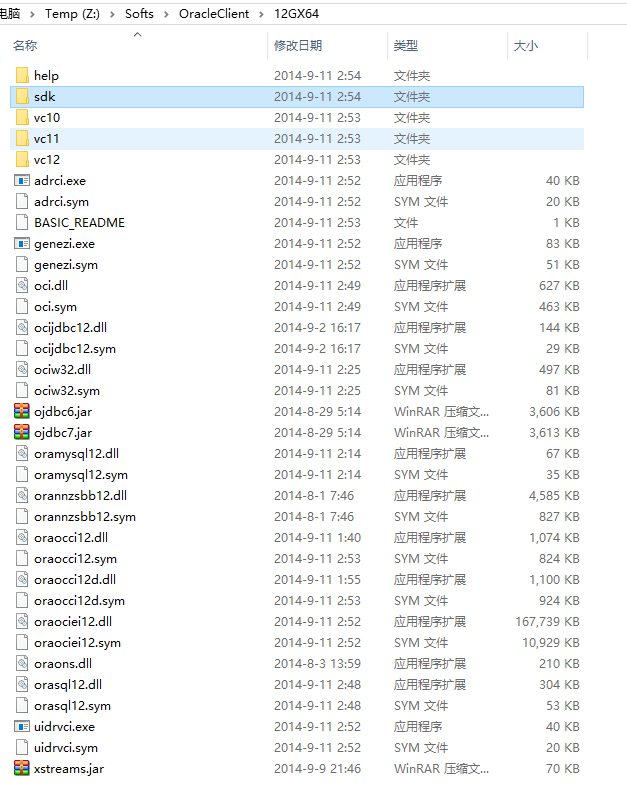
- Set
OCI_LIB_DIRandOCI_INC_DIRduring installation if the Oracle libraries and headers are in a non-default location
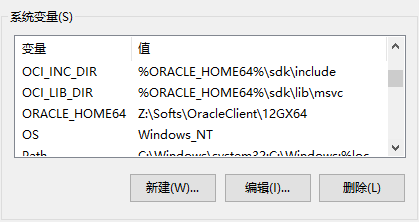
打开我的电脑->属性->高级属性->环境变量,新增两个环境变量ORACLE_HOME64,OCI_LIB_DIR 和 OCI_INV_DIR
ORACLE_HOME64 : Z:\Softs\OracleClient\12GX64
OCI_LIB_DIR : %ORACLE_HOME64%\sdk\lib\msvc
OCI_INV_DIR : %ORACLE_HOME64%\sdk\include
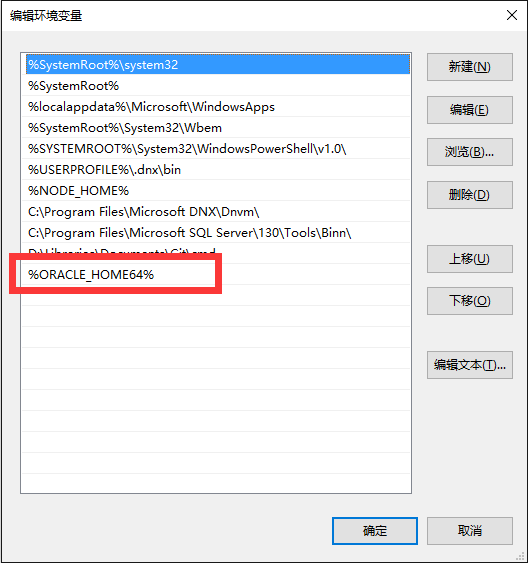
将Z:\Softs\OracleClient\12GX64这个路径%ORACLE_HOME64%加到Path中。
- 执行CMD命令
|
1
|
$ npm install oracledb |
3.OracleDB普通查询
dbconfig.js 配置数据库连接字符串
|
1
2
3
4
5
6
7
8
9
10
11
12
13
14
15
16
|
module.exports = { user : process.env.NODE_ORACLEDB_USER || "test", // Instead of hard coding the password, consider prompting for it, // passing it in an environment variable via process.env, or using // External Authentication. password : process.env.NODE_ORACLEDB_PASSWORD || "test", // For information on connection strings see: // https://github.com/oracle/node-oracledb/blob/master/doc/api.md#connectionstrings connectString : process.env.NODE_ORACLEDB_CONNECTIONSTRING || "192.168.1.100/orcl", // Setting externalAuth is optional. It defaults to false. See: // https://github.com/oracle/node-oracledb/blob/master/doc/api.md#extauth externalAuth : process.env.NODE_ORACLEDB_EXTERNALAUTH ? true : false}; |
app.js执行一个简单的查询语句
|
1
2
3
4
5
6
7
8
9
10
11
12
13
14
15
16
17
18
19
20
21
22
23
24
25
26
27
28
29
30
31
32
33
34
35
36
37
38
39
40
41
42
43
44
45
46
|
var oracledb = require('oracledb');var dbConfig = require('./dbconfig.js');//打开一个链接oracledb.getConnection( { user : dbConfig.user, password : dbConfig.password, connectString : dbConfig.connectString }, function(err, connection) { if (err) { console.error(err.message); return; } //执行查询语句 connection.execute( "SELECT department_id, department_name " + "FROM departments " + "WHERE manager_id < :id", [110], // bind value for :id { maxRows: 10 }, // a maximum of 10 rows will be returned. Default limit is 100 function(err, result) { if (err) { console.error(err.message); doRelease(connection); return; } console.log(result.metaData); console.log(result.rows); //查询结束后记得释放链接资源 doRelease(connection); }); });function doRelease(connection){ connection.release( function(err) { if (err) { console.error(err.message); } });} |
4.OracleDB ResultSet查询
普通查询,默认最大返回100条数据,如果需要查询更多的数据那么需要建立一个DataReader和数据库保持连接然后一行一行的读取数据,这个在nodejs oracledb里面就叫ResultSet查询。
你可以这样使用ResultSet,每次返回一行数据
|
1
2
3
4
5
6
7
8
9
10
11
12
13
14
15
16
17
18
19
20
21
22
23
24
25
26
27
28
|
connection.execute( "SELECT employee_id, last_name FROM employees ORDER BY employee_id", [], // no bind variables { resultSet: true }, // return a result set. Default is false function(err, result) { if (err) { . . . } fetchOneRowFromRS(connection, result.resultSet); });});. . .function fetchOneRowFromRS(connection, resultSet){ resultSet.getRow( // get one row function (err, row) { if (err) { . . . // close the result set and release the connection } else if (!row) { // no rows, or no more rows . . . // close the result set and release the connection } else { console.log(row); fetchOneRowFromRS(connection, resultSet); // get next row } });} |
当然也可以每次返回多行数据,请使用numRows参数
|
1
2
3
4
5
6
7
8
9
10
11
12
13
14
15
16
17
18
19
20
21
22
23
24
25
26
27
28
29
30
31
|
var numRows = 10; // number of rows to return from each call to getRows()connection.execute( "SELECT employee_id, last_name FROM employees ORDER BY employee_id", [], // no bind variables { resultSet: true }, // return a result set. Default is false function(err, result) { if (err) { . . . } fetchRowsFromRS(connection, result.resultSet, numRows); });});. . .function fetchRowsFromRS(connection, resultSet, numRows){ resultSet.getRows( // get numRows rows numRows, function (err, rows) { if (err) { . . . // close the result set and release the connection } else if (rows.length == 0) { // no rows, or no more rows . . . // close the result set and release the connection } else if (rows.length > 0) { console.log(rows); fetchRowsFromRS(connection, resultSet, numRows); // get next set of rows } });} |
http://www.cnblogs.com/mengkzhaoyun/p/5405912.html
crossplatform---Nodejs in Visual Studio Code 07.学习Oracle的更多相关文章
- Nodejs in Visual Studio Code 07.学习Oracle
1.开始 Node.js:https://nodejs.org OracleDB: https://github.com/oracle/node-oracledb/blob/master/INSTAL ...
- Nodejs in Visual Studio Code 02.学习Nodejs
1.开始 源码下载:https://github.com/sayar/NodeMVA 在线视频:https://mva.microsoft.com/en-US/training-courses/usi ...
- Nodejs in Visual Studio Code 03.学习Express
1.开始 下载源码:https://github.com/sayar/NodeMVA Express组件:npm install express -g(全局安装) 2.ExpressRest 打开目录 ...
- Nodejs in Visual Studio Code 14.IISNode与IIS7.x
1.开始 部署IISNode环境请参考:Nodejs in Visual Studio Code 08.IIS 部署Nodejs程序请参考:Nodejs in Visual Studio Code 1 ...
- Nodejs in Visual Studio Code 11.前端工程优化
1.开始 随着互联网技术的发展,企业应用里到处都是B/S设计,我有幸经历了很多项目有Asp.Net的,有Html/js的,有Silverlight的,有Flex的.很遗憾这些项目很少关注前端优化的问题 ...
- Nodejs in Visual Studio Code 10.IISNode
1.开始 Nodejs in Visual Studio Code 08.IIS : http://www.cnblogs.com/mengkzhaoyun/p/5410185.html 参考此篇内容 ...
- Nodejs in Visual Studio Code 04.Swig模版
1.开始 设置Node_Global:npm config set prefix "C:\Program Files\nodejs" Express组件:npm install e ...
- Nodejs in Visual Studio Code 01.简单介绍Nodejs
1.开始 作者自己:开发人员,Asp.Net , html / js , restful , memcached , oracle ,windows , iis 目标读者:供自己以后回顾 2.我看No ...
- crossplatform---Nodejs in Visual Studio Code 02.学习Nodejs
1.开始 源码下载:https://github.com/sayar/NodeMVA 在线视频:https://mva.microsoft.com/en-US/training-courses/usi ...
随机推荐
- Prefab强制使用文本模式
[Prefab强制使用文本模式] Edit -> ProjectSetting -> Editor:
- protobuff 配合 libevent 在Linux 和windows 下的使用
protobuff 配合 libevent 在Linux 和windows 下的使用待补全. libprotobuf.lib libproto-lite.lib libprotoc.lib
- 《机器学习实战》学习笔记——第14章 利用SVD简化数据
一. SVD 1. 基本概念: (1)定义:提取信息的方法:奇异值分解Singular Value Decomposition(SVD) (2)优点:简化数据, 去除噪声,提高算法的结果 (3)缺点: ...
- C# 命令绑定
在构建WinForm程序中,为了使系统的结构清晰,有好的用户交互体验,实现不同按钮之间的交互,不使主窗体里面的代码臃肿.将按钮的命令通过类进行绑定,实现命令的管理使很有必要的. 该文章是将如何实现Bu ...
- mysql学习(二)
(1)存储过程:存储过程是SQL语句和控制语句的预编译集合,以一个名称存储并作为一个单元处理: (2)存储过程优点:增强SQL语句的功能和灵活性,实现较快的执行速度,减少网络流量: (3)存储过程结构 ...
- Hdu OJ 5884-Sort (2016 ACM/ICPC Asia Regional Qingdao Online)(二分+优化哈夫曼)
题目链接:http://acm.hdu.edu.cn/showproblem.php?pid=5884 题目大意:有n个有序的序列,对于第i个序列有ai个元素. 现在有一个程序每次能够归并k个序列, ...
- NGUI 便捷的显示与隐藏界面
所有的UI都继承自class UIBase,可以把UI做成预设体,同个场景下,读取预设体时,将子UI对象都保存在类似Dictionary<UIType, UIBase>这样的结构中,这样的 ...
- npoi实现 从固定的行读取数据作为表头并返回datable
using System; using System.Collections.Generic; using System.Linq; using System.Text; using System.D ...
- 【ShaderForge】溶解测试
已支持粒子颜色的所有控制 折射效果已支持Alpha的影响(Texture必须是tga或dds带通道贴图,PNG贴图不支持折射Alpha效果的影响,其他贴图支持任何格式) 说明: SpecularC ...
- highcharts 使用实例
后端使用django实现,返回的数据可以修改为从数据库获取或其他方式获取,实例里是写死的数据. urls配置: url(r'^outip/chart/$', views.charts), url(r' ...