
Setup network on centos 7
How to Setup network on centos 7
After installing Centos 7, You may not able to connect network in that machine. This will happen because Ethernet interfaces are not enabled by default.This guide will help you to setup network on centos 7 .
This guide contains network configuration steps both in GUI and command mode.
Setup network on centos 7
let’s start, Type “nmcli d” command in your terminal for quick identification of Ethernet cards installed in your machine.
Here we have 2 interfaces named “enp0s17” and “enp0s18” . it might be different in your case ( Eg: em1 or p4p1 ).
GUI Mode
Recommended for beginners
Step 1 » Type this command “nmtui” to open Network manager and press enter after choosing ” Edit a connection” ( Use TAB for choosing options ) .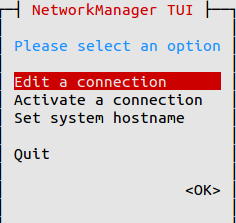
Step 2 » Now you can see all network interfaces, choose one and click “Edit“.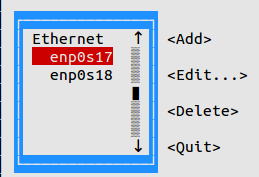
» DHCP configuration
Step 3 » For DHCP,
1. Choose “Automatic” in IPv4 CONFIGURATION.
2. Choose Automatic Connect check box.
3. Press OK and quit Network manager.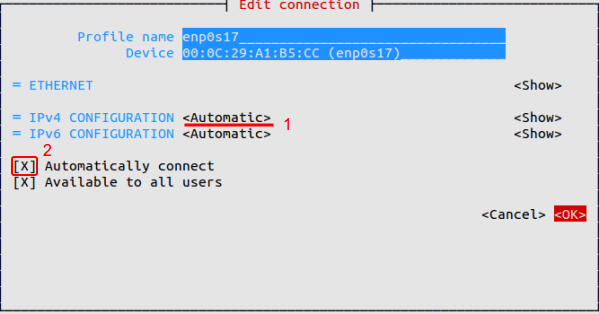
Now Restart network service by typing below command.systemctl restart networkNow your server will get IP Address from DHCP .
» Static configuration
Step 4 » For manual IP address,
1. Choose “Manual” in IPv4 CONFIGURATION.
2. Add IP Address with Subnet , Gateway and DNS server ( Refer below image ).
3. Choose Automatic Connect check box.
4. Press OK and quit Network manager.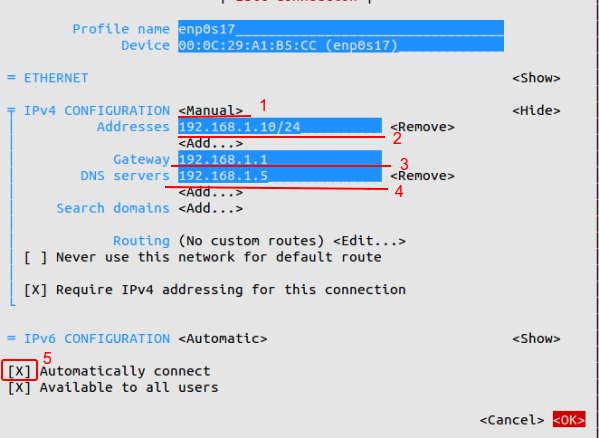
Now Restart network service by typing below command.systemctl restart networkThat’s it, Interface will have static IP.
Command Mode
Step 1 » Network interface config files are located in /etc/sysconfig/network-scripts/ directory. Open ifcfg-enp0s17 file ( For interface enp0s17 ) and you can see the content like below.[root@krizna ~]# vi /etc/sysconfig/network-scripts/ifcfg-enp0s17
TYPE=Ethernet
BOOTPROTO=none
DEFROUTE=yes
IPV4_FAILURE_FATAL=no
IPV6INIT=yes
IPV6_AUTOCONF=yes
IPV6_DEFROUTE=yes
IPV6_FAILURE_FATAL=no
NAME=enp0s17
UUID=7f1aff2d-b154-4436-9497-e3a4dedddcef
ONBOOT=no
HWADDR=00:0C:29:A1:B5:D6
PEERDNS=yes
PEERROUTES=yes
IPV6_PEERDNS=yes
IPV6_PEERROUTES=yes
» DHCP configuration
Step 2 » For DHCP
Find the below lines in config File.BOOTPROTO=noneand replace with
ONBOOT=noBOOTPROTO=dhcpNow Restart network service by typing below command.
ONBOOT=yessystemctl restart networkNow your server will get IP Address from DHCP
» Static configuration
Step 3 » For Static IP.
Find the below lines in config File.BOOTPROTO=noneand replace with
ONBOOT=noBOOTPROTO=staticAnd add the below lines at the end of the file.
ONBOOT=yesIPADDR=172.27.0.32File will look like below after changes.
NETMASK=255.255.255.0
GATEWAY=172.27.0.1
DNS1=172.27.0.5TYPE=Ethernet
BOOTPROTO=static
DEFROUTE=yes
IPV4_FAILURE_FATAL=no
IPV6INIT=yes
IPV6_AUTOCONF=yes
IPV6_DEFROUTE=yes
IPV6_FAILURE_FATAL=no
NAME=enp0s17
UUID=f0c5b37d-299a-43cb-b74b-618bb252d129
ONBOOT=yes
HWADDR=00:0C:29:A1:B5:CC
IPV6_PEERDNS=yes
IPV6_PEERROUTES=yes
IPADDR=192.168.1.10
NETMASK=255.255.255.0
GATEWAY=192.168.1.1
DNS1=192.168.1.5
Now Restart network service by typing below command.systemctl restart networkNow Interface will have static IP.
Additionally you can use /etc/sysconfig/network file for hostname and DNS .HOSTNAME=server.krizna.com
DNS1=192.168.1.5
DNS2=8.8.8.8
SEARCH=krizna.com
Have a nice day
Setup network on centos 7的更多相关文章
- Configuring Network in CentOS 6.3 Virtual Box + Screenshots
Configuring Network in CentOS 6.3 Virtual Box + Screenshots Posted: May 23, 2013 in Uncategorized Ta ...
- How to setup multimedia on CentOS 7
You will need to also install the EPEL repository as nux-dextop depends on this for some of its pack ...
- qemu vm setup network(ssh) with buildroot
1, build buildroot with buildroot.config, that is 'make qemu_x86_64_defconfig' + some packages, sshd ...
- CentOS报错:Could not retrieve mirrorlist http://mirrorlist.centos.org/?release=7&arch=x86_64&repo=os&infra=stock32 error was 14: curl#6 - "Could not resolve host: mirrorlist.centos.org; Unknown error"
今天安装完带图形界面的CentOS 7后,在Terminal中运行yum安装命令时报了以下错误: Could not retrieve mirrorlist http://mirrorlist.cen ...
- Could not retrieve mirrorlist http://mirrorlist.centos.org/?release=7&arch=x86_64&repo=os&infra=stock32 error was 14: curl#6 - "Could not resolve host: mirrorlist.centos.org; Unknown error"
今天安装完带图形界面的CentOS 7后,在Terminal中运行yum安装命令时报了以下错误: 1 2 3 4 5 6 7 8 9 10 11 12 13 14 15 16 17 18 19 20 ...
- centos7的网络管理(参考使用)
How to Setup network on centos 7 Posted krizna Centos, Centos 7 After installing Centos 7, You may ...
- procedure of intall and setup centos 6.5
select webserver install option,and select ,uncheck the postgresql option selected some “… platform” ...
- Centos7 编译安装 Nginx Mariadb Asp.net Core2 (实测 笔记 Centos 7.3 + Openssl 1.1.0h + Mariadb 10.3.7 + Nginx 1.14.0 + Asp.net. Core 2 )
环境: 系统硬件:vmware vsphere (CPU:2*4核,内存2G,双网卡) 系统版本:CentOS-7-x86_64-Minimal-1611.iso 安装步骤: 1.准备 1.0 查看硬 ...
- Centos 02 操作系统 & Linux安装
操作系统的概念 操作系统是沟通使用者和硬件之间传递信息的工具或程序,是电子计算机系统负责支撑应用程序运行环境以及用户操作环境的基础系统软件 硬件 ==> 系统核心 ==> 命令解释器she ...
随机推荐
- thinkphp关联模型的注意大小写
TP框架报错: think\Model:relation方法不存在 首先检查大小写,尤其是模型名称首字母大写 /**** 模型名字QqModel.class.php ***************** ...
- java学习第10天 (增加关于eclipse添项目)
自己遇到一个问题..觉得有必要说下,就是如何将别人发给你的文件也就是项目如何导入到你的eclipse中,不是直接add那么简单,首先右键找到import,找到general,展开找到existing ...
- 43. studio上的json串解析
var doc = O_PARAMETER.FJSonStr;(doc为:{"items":[],"nextId":0}) //1.先转为json对象,主要有以 ...
- iOS 调用拍照、选择本地相册、上传功能---未完善。
1.新建viewController 拖入一个Button,添加点击事件,使用代理方法 <UIActionSheetDelegate,UIImagePickerControllerDelegat ...
- checkinstall打包工具使用
checkinstall官网: http://asic-linux.com.mx/~izto/checkinstall/ 下载安装checkinstall: # git clone http://ch ...
- Python学习笔记(四)字符串型
字符串是 Python 中最常用的数据类型.我们可以使用引号('或")来创建字符串. 在最新的Python 3版本中,字符串是以Unicode编码的,也就是说,Python的字符串支持多语言 ...
- 京东B2B的4种供销模式
B2B的4种供销模式,以京东商城为例: FBP 京东给商家一个独立操作的后台, 商家五地入库(北京,上海,广州,成都,武汉),从仓储 到配送 到客服都是京东来操作, 京东本身自营的产品所有能享 ...
- 8.8 CSS知识点1
什么是CSS CSS(Cascading Style Sheet) 层叠样式表 CSS3在CSS2的基础上增加了很多强大的新功能,目前主流浏览器都支持CSS3大部分功能.为了更好的向前兼容,不同的浏览 ...
- 现成的HTML5框架
1>sencha-touch 2>phoneGap 3>jQuery mobile 4>bootstrap
- 记一次 Ubuntu 使用 arptables 抵御局域网 ARP 攻击
. . . . . 前段时间大概有一个月左右,租房的网络每天都断一次,每次断大概一两分钟左右就恢复了,所以没太在意.直到有一天晚上,LZ 正在写博客,但是网络频繁中断又重新连上再中断.待 LZ 好不容 ...