
SpringBoot系列之i18n集成教程
SpringBoot系统之i18n国际化语言集成教程
@
1、环境搭建
本博客介绍一下SpringBoot集成i18n,实现系统语言国际化处理,ok,先创建一个SpringBoot项目,具体的参考我的博客专栏:SpringBoot系列博客专栏链接
环境准备:
- IntelliJ IDEA
- Maven
项目集成:
- Thymeleaf(模板引擎,也可以选jsp或者freemark)
- SpringBoot2.2.1.RELEASE
2、resource bundle资源配置
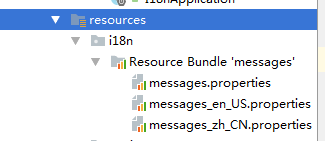
ok,要实现国际化语言,先要创建resource bundle文件:
在resources文件夹下面创建一个i18n的文件夹,其中:
- messages.properties是默认的配置
- messages_zh_CN.properties是(中文/中国)
- messages_en_US.properties是(英文/美国)
- etc.
IDEA工具就提供了很简便的自动配置功能,如图,只要点击新增按钮,手动输入,各配置文件都会自动生成属性
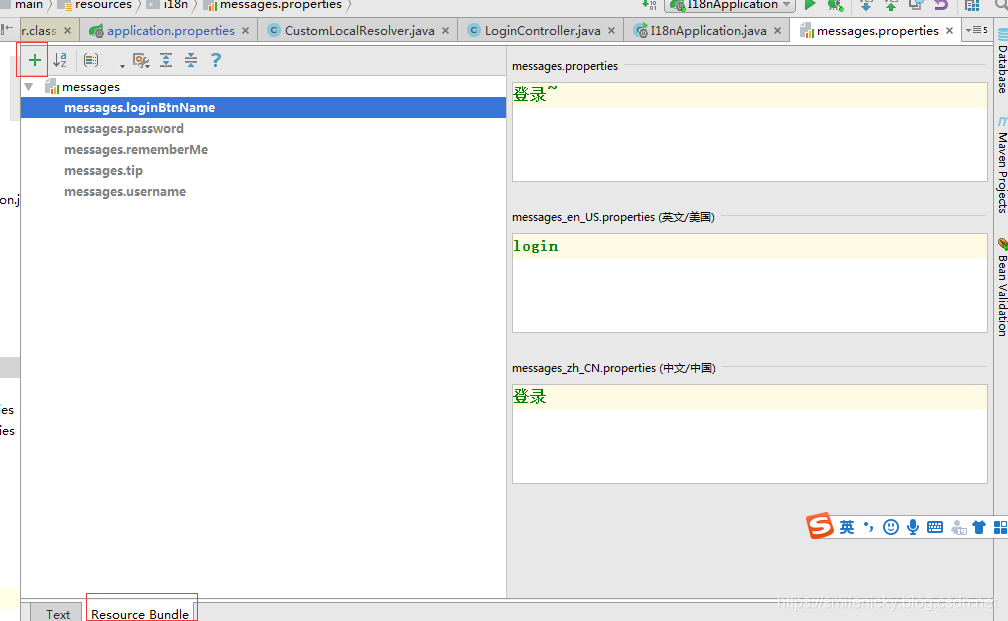
messages.properties:
messages.loginBtnName=登录~

messages.password=密码~

messages.rememberMe=记住我~

messages.tip=请登录~

messages.username=用户名~
messages_zh_CN.properties:
messages.loginBtnName=登录

messages.password=密码

messages.rememberMe=记住我

messages.tip=请登录

messages.username=用户名
messages_en_US.properties:
messages.loginBtnName=login

messages.password=password

messages.rememberMe=Remember me

messages.tip=Please login in

messages.username=userName
在项目的application.properties修改默认配置,让SpringBoot的自动配置能读取到resource bundle资源文件
## 配置i18n

# 默认是i18n(中文/中国)

spring.mvc.locale=zh_CN

# 配置resource bundle资源文件的前缀名eg:i18n是文件夹名,messages是资源文件名,支持的符号有.号或者/

spring.messages.basename=i18n.messages

# 设置缓存时间,2.2.1是s为单位,之前版本才是毫秒

spring.messages.cache-duration=1

# 设置资源文件编码格式为utf8

spring.messages.encoding=utf-8
注意要点:
- spring.messages.basename必须配置,否则SpringBoot的自动配置将失效
MessageSourceAutoConfiguration.ResourceBundleCondition 源码:
protected static class ResourceBundleCondition extends SpringBootCondition {

		//定义一个map缓存池

		private static ConcurrentReferenceHashMap<String, ConditionOutcome> cache = new ConcurrentReferenceHashMap<>();

		@Override

		public ConditionOutcome getMatchOutcome(ConditionContext context, AnnotatedTypeMetadata metadata) {

			String basename = context.getEnvironment().getProperty("spring.messages.basename", "messages");

			ConditionOutcome outcome = cache.get(basename);//缓存拿得到,直接从缓存池读取

			if (outcome == null) {//缓存拿不到,重新读取

				outcome = getMatchOutcomeForBasename(context, basename);

				cache.put(basename, outcome);

			}

			return outcome;

		}

		private ConditionOutcome getMatchOutcomeForBasename(ConditionContext context, String basename) {

			ConditionMessage.Builder message = ConditionMessage.forCondition("ResourceBundle");

			for (String name : StringUtils.commaDelimitedListToStringArray(StringUtils.trimAllWhitespace(basename))) {

				for (Resource resource : getResources(context.getClassLoader(), name)) {

					if (resource.exists()) {

					//匹配resource bundle资源

						return ConditionOutcome.match(message.found("bundle").items(resource));

					}

				}

			}

			return ConditionOutcome.noMatch(message.didNotFind("bundle with basename " + basename).atAll());

		}

		//解析资源文件

		private Resource[] getResources(ClassLoader classLoader, String name) {

			String target = name.replace('.', '/');//spring.messages.basename参数值的点号换成斜杆

			try {

				return new PathMatchingResourcePatternResolver(classLoader)

						.getResources("classpath*:" + target + ".properties");

			}

			catch (Exception ex) {

				return NO_RESOURCES;

			}

		}

	}
- cache-duration在2.2.1版本,指定的是s为单位,找到SpringBoot的MessageSourceAutoConfiguration自动配置类
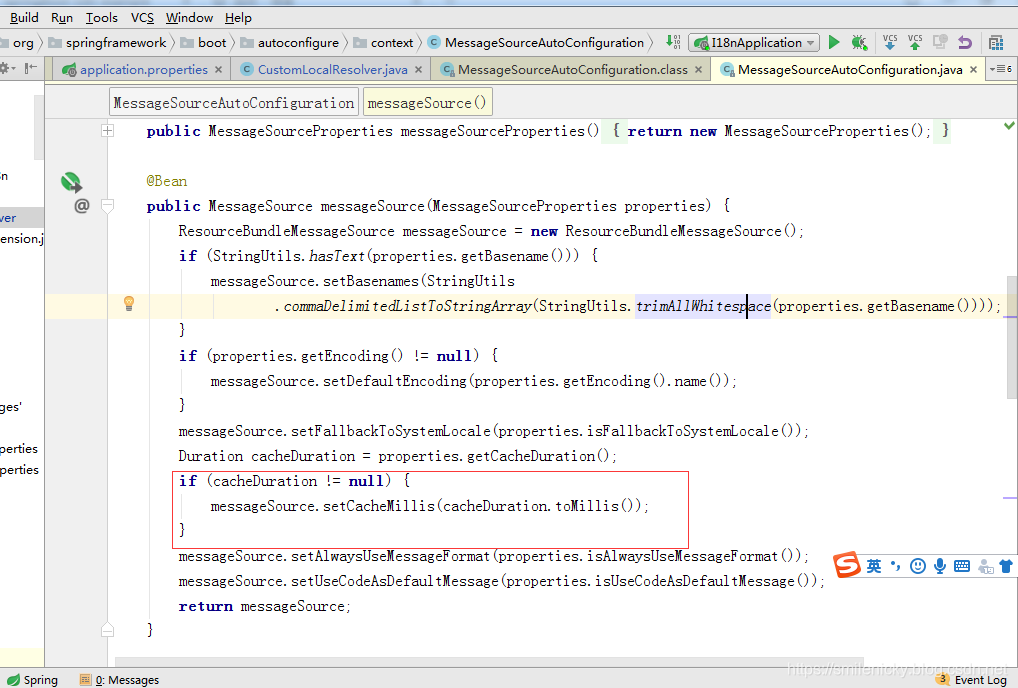
3、LocaleResolver类
SpringBoot默认采用AcceptHeaderLocaleResolver类作为默认LocaleResolver,LocaleResolver类的作用就是作为i18n的分析器,获取对应的i18n配置,当然也可以自定义LocaleResolver类
import org.slf4j.Logger;

import org.slf4j.LoggerFactory;

import org.springframework.lang.Nullable;

import org.springframework.util.StringUtils;

import org.springframework.web.servlet.LocaleResolver;

import javax.servlet.http.HttpServletRequest;

import javax.servlet.http.HttpServletResponse;

import java.util.Locale;

/**

 * <pre>

 *  自定义LocaleResolver类

 * </pre>

 * @author nicky

 * <pre>

 * 修改记录

 *    修改后版本:     修改人:  修改日期: 2019年11月23日  修改内容:

 * </pre>

 */

public class CustomLocalResolver implements LocaleResolver {

    Logger LOG = LoggerFactory.getLogger(this.getClass());

    @Nullable

    private Locale defaultLocale;

    public void setDefaultLocale(@Nullable Locale defaultLocale) {

        this.defaultLocale = defaultLocale;

    }

    @Nullable

    public Locale getDefaultLocale() {

        return this.defaultLocale;

    }

    @Override

    public Locale resolveLocale(HttpServletRequest request) {

        Locale defaultLocale = this.getDefaultLocale();//获取application.properties默认的配置

        if(defaultLocale != null && request.getHeader("Accept-Language") == null) {

            return defaultLocale;//http请求头没获取到Accept-Language才采用默认配置

        } else {//request.getHeader("Accept-Language")获取得到的情况

            Locale requestLocale = request.getLocale();//获取request.getHeader("Accept-Language")的值

            String localeFlag = request.getParameter("locale");//从URL获取的locale值

            //LOG.info("localeFlag:{}",localeFlag);

            //url链接有传locale参数的情况,eg:zh_CN

            if (!StringUtils.isEmpty(localeFlag)) {

                String[] split = localeFlag.split("_");

                requestLocale = new Locale(split[0], split[1]);

            }

            //没传的情况,默认返回request.getHeader("Accept-Language")的值

            return requestLocale;

        }

    }

    @Override

    public void setLocale(HttpServletRequest request, HttpServletResponse response, Locale locale) {

    }

}
4、I18n配置类
I18n还是要继承WebMvcConfigurer,注意,2.2.1版本才是实现接口就可以,之前1.+版本是要实现WebMvcConfigurerAdapter适配器类的
import com.example.springboot.i18n.component.CustomLocalResolver;

import org.springframework.beans.factory.annotation.Autowired;

import org.springframework.boot.autoconfigure.web.servlet.WebMvcProperties;

import org.springframework.boot.context.properties.EnableConfigurationProperties;

import org.springframework.context.annotation.Bean;

import org.springframework.context.annotation.Configuration;

import org.springframework.web.servlet.LocaleResolver;

import org.springframework.web.servlet.config.annotation.InterceptorRegistry;

import org.springframework.web.servlet.config.annotation.ViewControllerRegistry;

import org.springframework.web.servlet.config.annotation.WebMvcConfigurer;

import org.springframework.web.servlet.i18n.LocaleChangeInterceptor;

/**

 * <pre>

 *  I18nConfig配置类

 * </pre>

 * <p>

 * <pre>

 * @author nicky.ma

 * 修改记录

 *    修改后版本:     修改人:  修改日期: 2019/11/24 11:15  修改内容:

 * </pre>

 */

 //Configuration必须加上,不然不能加载到Spring容器

@Configuration

//使WebMvcProperties配置类可用,这个可以不加上,本博客例子才用

@EnableConfigurationProperties({ WebMvcProperties.class})

public class I18nConfig implements WebMvcConfigurer{

	//装载WebMvcProperties 属性

    @Autowired

    WebMvcProperties webMvcProperties;

    /**

     * 定义SessionLocaleResolver

     * @Author nicky.ma

     * @Date 2019/11/24 13:52

     * @return org.springframework.web.servlet.LocaleResolver

     */

//    @Bean

//    public LocaleResolver localeResolver() {

//        SessionLocaleResolver sessionLocaleResolver = new SessionLocaleResolver();

//        // set default locale

//        sessionLocaleResolver.setDefaultLocale(Locale.US);

//        return sessionLocaleResolver;

//    }

    /**

     * 定义CookieLocaleResolver

     * @Author nicky.ma

     * @Date 2019/11/24 13:51

     * @return org.springframework.web.servlet.LocaleResolver

     */

//    @Bean

//    public LocaleResolver localeResolver() {

//        CookieLocaleResolver cookieLocaleResolver = new CookieLocaleResolver();

//        cookieLocaleResolver.setCookieName("Language");

//        cookieLocaleResolver.setCookieMaxAge(1000);

//        return cookieLocaleResolver;

//    }

    /**

     * 自定义LocalResolver

     * @Author nicky.ma

     * @Date 2019/11/24 13:45

     * @return org.springframework.web.servlet.LocaleResolver

     */

    @Bean

    public LocaleResolver localeResolver(){

        CustomLocalResolver localResolver = new CustomLocalResolver();

        localResolver.setDefaultLocale(webMvcProperties.getLocale());

        return localResolver;

    }

    /**

     * 定义localeChangeInterceptor

     * @Author nicky.ma

     * @Date 2019/11/24 13:45

     * @return org.springframework.web.servlet.i18n.LocaleChangeInterceptor

     */

    @Bean

    public LocaleChangeInterceptor localeChangeInterceptor(){

        LocaleChangeInterceptor localeChangeInterceptor = new LocaleChangeInterceptor();

        //默认的请求参数为locale,eg: login?locale=zh_CN

        localeChangeInterceptor.setParamName(LocaleChangeInterceptor.DEFAULT_PARAM_NAME);

        return localeChangeInterceptor;

    }

    /**

     * 注册拦截器

     * @Author nicky.ma

     * @Date 2019/11/24 13:47

     * @Param [registry]

     * @return void

     */

    @Override

    public void addInterceptors(InterceptorRegistry registry) {

     registry.addInterceptor(localeChangeInterceptor()).addPathPatterns("/**");

    }

}
注意要点:
- 旧版代码可以不加LocaleChangeInterceptor 拦截器,2.2.1版本必须通过拦截器
- 如下代码,bean的方法名必须为localeResolver,否则会报错
@Bean

    public LocaleResolver localeResolver(){

        CustomLocalResolver localResolver = new CustomLocalResolver();

        localResolver.setDefaultLocale(webMvcProperties.getLocale());

        return localResolver;

    }
原理:
跟一下源码,点进LocaleChangeInterceptor类
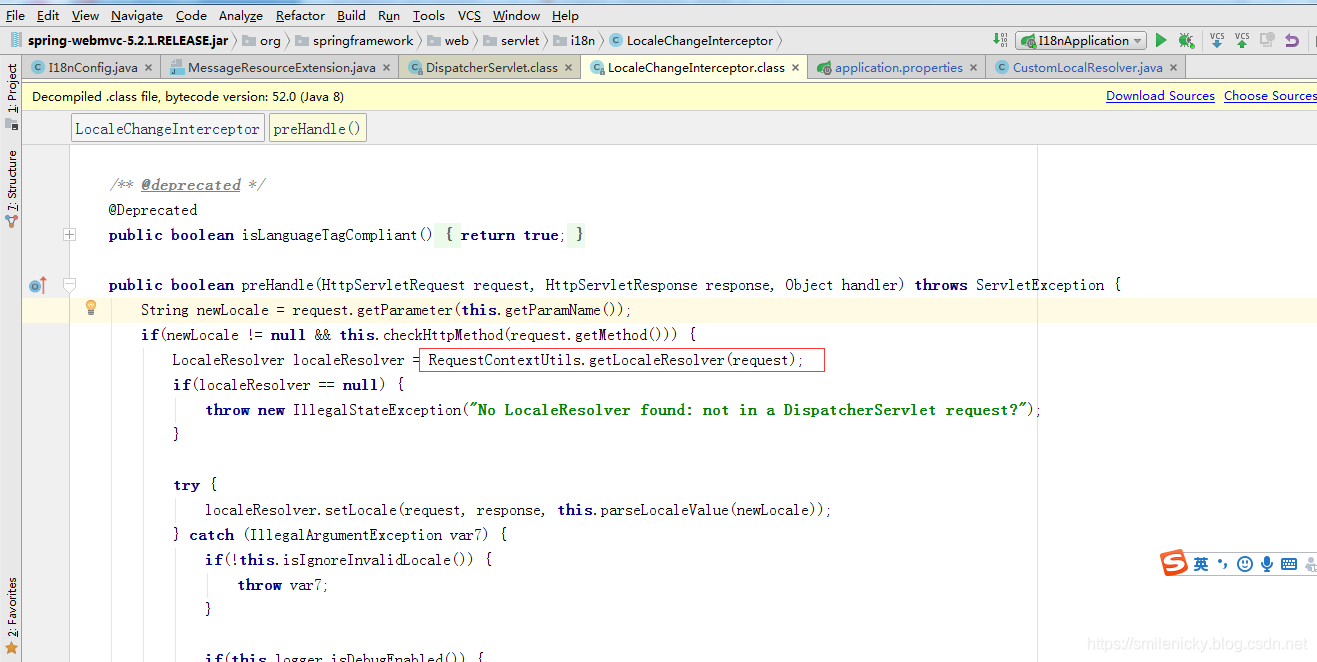
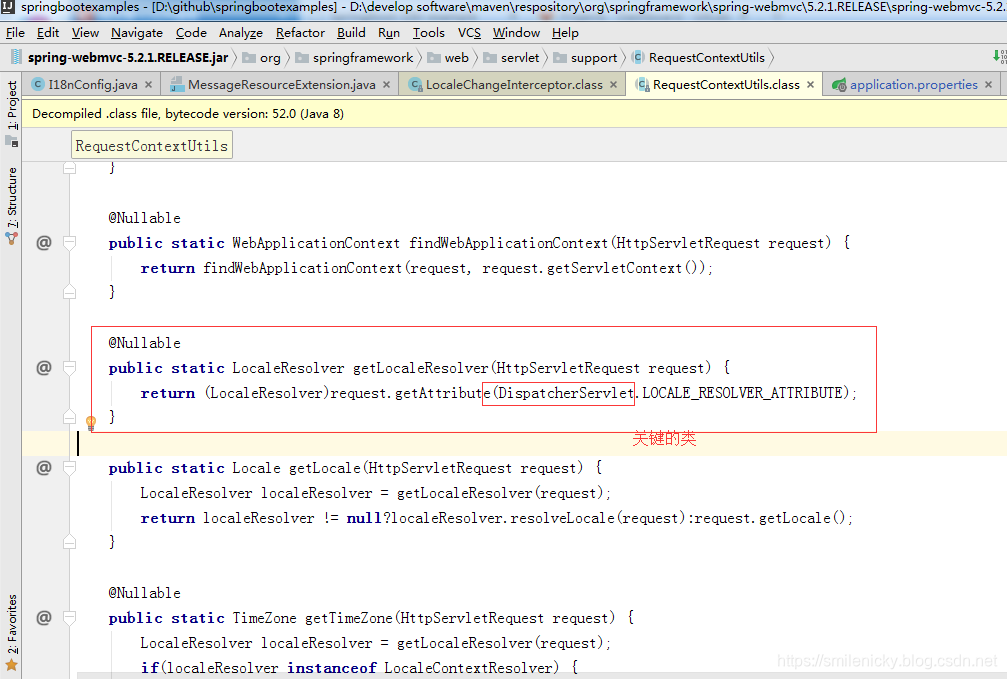
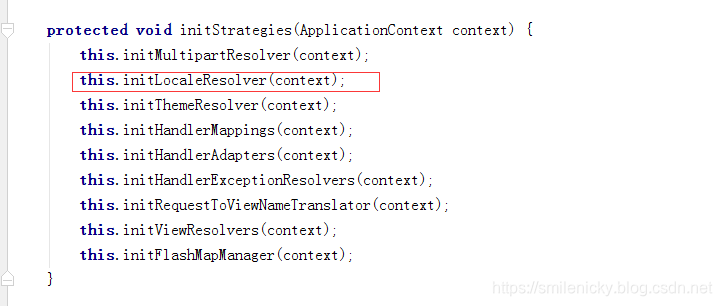
DispatcherServlet是Spring一个很重要的分发器类,在DispatcherServlet的一个init方法里找到这个LocaleResolver的init方法
这个IOC获取的bean类名固定为localeResolver,写例子的时候,我就因为改了bean类名,导致一直报错,跟了源码才知道Bean类名要固定为localeResolver
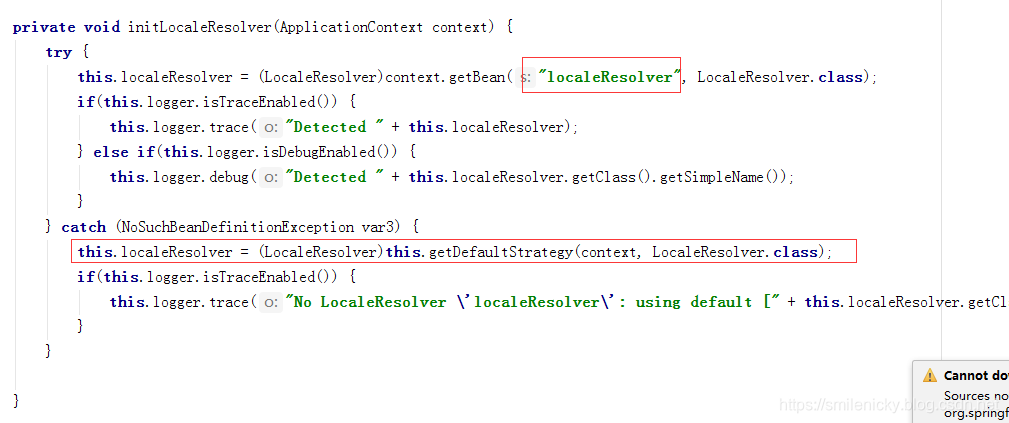
抛异常的时候,也是会获取默认的LocaleResolver的

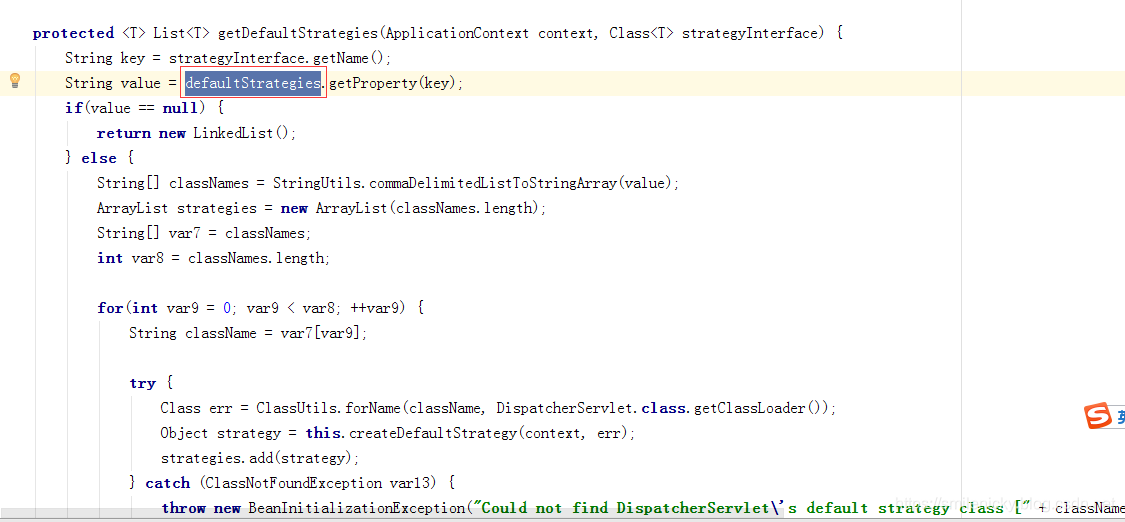

找到资源文件,确认,还是默认为AcceptHeaderLocaleResolver
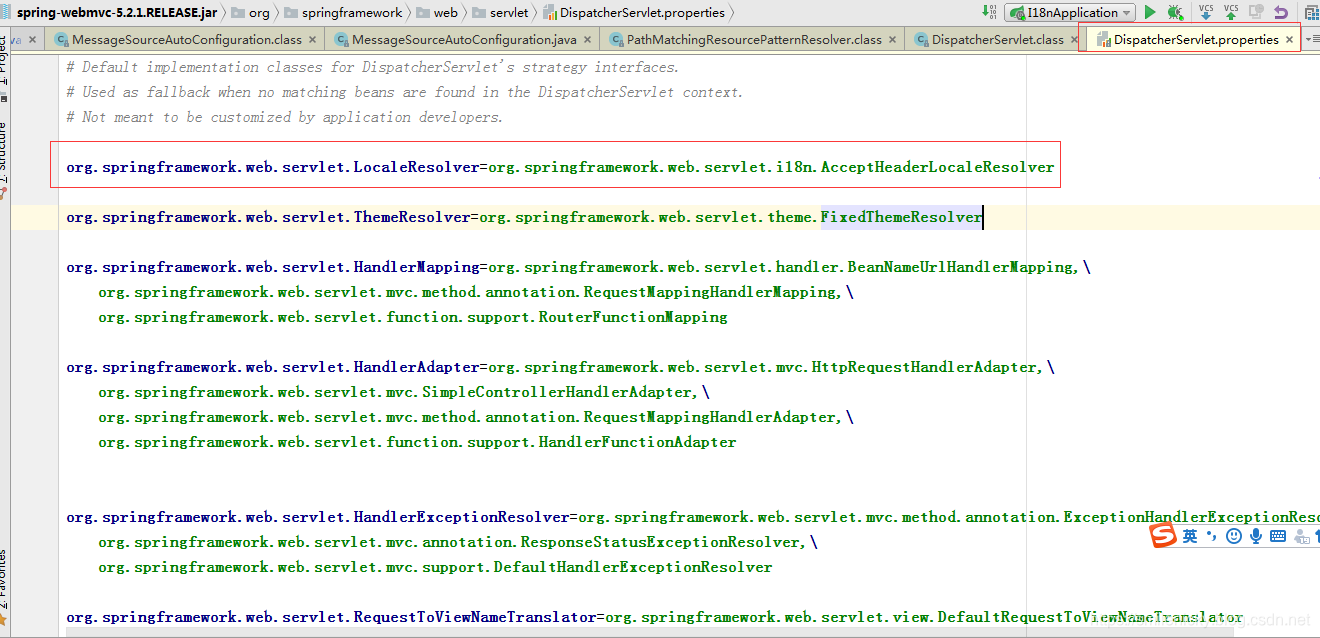
配置了locale属性的时候,还是选用AcceptHeaderLocaleResolver作为默认的LocaleResolver
spring.mvc.locale=zh_CN
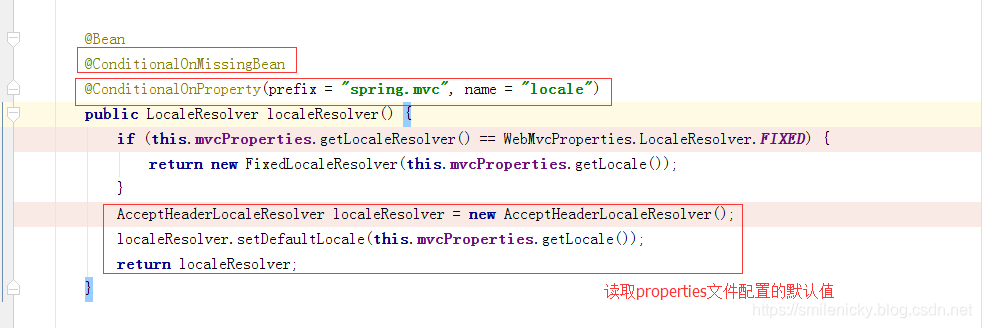
WebMvcAutoConfiguration.localeResolver方法源码,ConditionalOnMissingBean主键的意思是LocaleResolver没有自定义的时候,才作用,ConditionalOnProperty的意思,有配了属性才走这里的逻辑
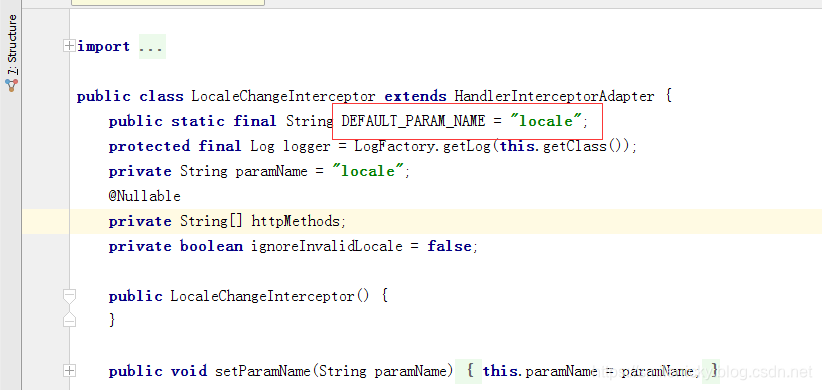
- 拦截器拦截的请求参数默认为locale,要使用其它参数,必须通过拦截器设置 ,eg:
localeChangeInterceptor.setParamName("lang");
- LocalResolver种类有:CookieLocaleResolver(Cookie)、SessionLocaleResolver(会话)、FixedLocaleResolver、AcceptHeaderLocaleResolver(默认)、.etc
5、Thymeleaf集成
本博客的模板引擎采用Thymeleaf的,所以新增项目时候就要加上maven相关依赖,没有的话,自己加上:
<dependency>

			<groupId>org.springframework.boot</groupId>

			<artifactId>spring-boot-starter-thymeleaf</artifactId>

		</dependency>

		<dependency>

			<groupId>org.springframework.boot</groupId>

			<artifactId>spring-boot-starter-web</artifactId>

		</dependency>
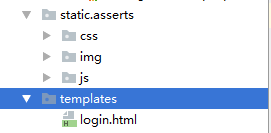
ok,然后去找个bootstrap的登录页面,本博客已尚硅谷老师的例子为例,进行拓展,引入静态资源文件:
Thymeleaf的i18n支持是采用#符号的
<!DOCTYPE html>

<html lang="en" xmlns:th="http://www.thymeleaf.org">

	<head>

		<meta http-equiv="Content-Type" content="text/html; charset=UTF-8">

		<meta name="viewport" content="width=device-width, initial-scale=1, shrink-to-fit=no">

		<meta name="description" content="">

		<meta name="author" content="">

		<title>SpringBoot i18n example</title>

		<!-- Bootstrap core CSS -->

		<link href="asserts/css/bootstrap.min.css" th:href="@{asserts/css/bootstrap.min.css}" rel="stylesheet">

		<!-- Custom styles for this template -->

		<link href="asserts/css/signin.css" th:href="@{asserts/css/signin.css}" rel="stylesheet">

	</head>

	<body class="text-center">

		<form class="form-signin" action="dashboard.html">

			<img class="mb-4" th:src="@{asserts/img/bootstrap-solid.svg}" alt="" width="72" height="72">

			<h1 class="h3 mb-3 font-weight-normal" th:text="#{messages.tip}">Please sign in</h1>

			<label class="sr-only" th:text="#{messages.username}">Username</label>

			<input type="text" class="form-control" th:placeholder="#{messages.username}" required="" autofocus="">

			<label class="sr-only" th:text="#{messages.password} ">Password</label>

			<input type="password" class="form-control" th:placeholder="#{messages.password}" required="">

			<div class="checkbox mb-3">

				<label>

          <input type="checkbox" value="remember-me" > [[#{messages.rememberMe}]]

        </label>

			</div>

			<button class="btn btn-lg btn-primary btn-block" type="submit" th:text="#{messages.loginBtnName}">Sign in</button>

			<p class="mt-5 mb-3 text-muted">© 2019</p>

			<a class="btn btn-sm" th:href="@{/login(locale='zh_CN')} ">中文</a>

			<a class="btn btn-sm" th:href="@{/login(locale='en_US')} ">English</a>

		</form>

	</body>

</html>
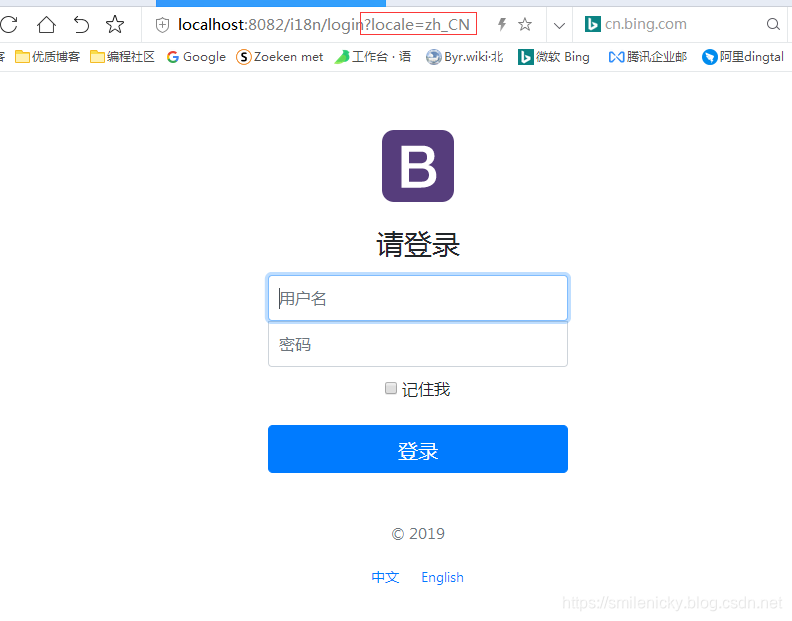
切换中文网页:
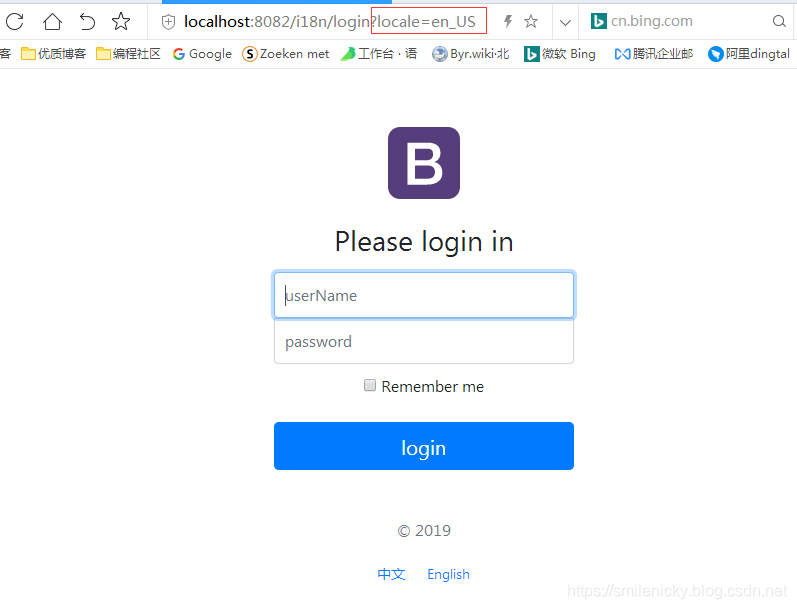
切换英文网页:
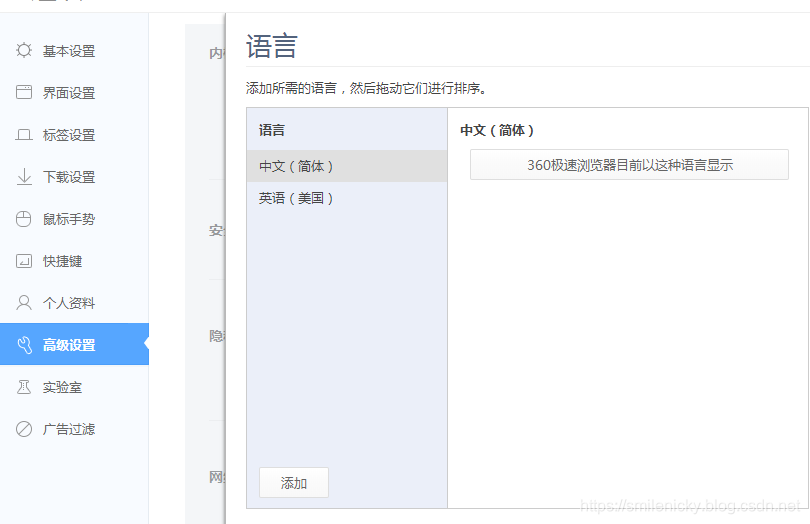
当然不点链接传locale的方式也是可以自动切换的,浏览器设置语言:
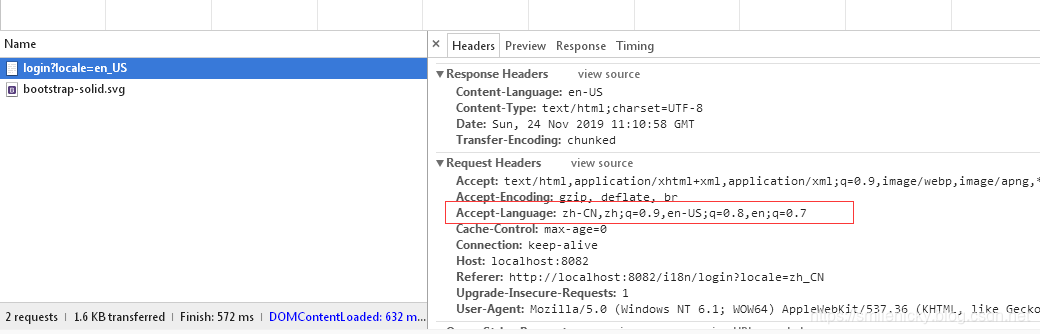
原理localeResolver类会获取Accept language参数
附录:
logging manual:SpringBoot官方手册
example source:例子代码下载链接
SpringBoot系列之i18n集成教程的更多相关文章
- SpringBoot系列之缓存使用教程
介绍SpringBoot项目中使用缓存,之前先介绍一下Spring的缓存抽象和JSR107,本博客是我在学习尚硅谷视频和参考其它博客之后做的笔记,仅供学习参考 @ 目录 一.Spring的缓存抽象 1 ...
- SpringBoot系列之集成Thymeleaf用法手册
目录 1.模板引擎 2.Thymeleaf简介 2.1).Thymeleaf定义 2.2).适用模板 3.重要知识点 3.1).th:text和th:utext 3.2).标准表达式 3.3).Thy ...
- SpringBoot系列之学习教程汇总
对应SpringBoot系列博客专栏,例子代码,本博客不定时更新 一.配置篇 SpringBoot系列之@PropertySource读取yaml文件 >> source down ...
- SpringBoot系列之从入门到精通系列教程
对应SpringBoot系列博客专栏,例子代码,本博客不定时更新 Spring框架:作为JavaEE框架领域的一款重要的开源框架,在企业应用开发中有着很重要的作用,同时Spring框架及其子框架很多, ...
- SpringBoot系列之日志框架介绍及其原理简介
SpringBoot系列之日志框架介绍及其原理简介 1.常用日志框架简介 市面上常用日志框架:JUL.JCL.jboss-logging.logback.log4j.log4j2.slf4j.etc. ...
- SpringBoot系列之集成Mybatis教程
SpringBoot系列之集成Mybatis教程 环境准备:IDEA + maven 本博客通过例子的方式,介绍Springboot集成Mybatis的两种方法,一种是通过注解实现,一种是通过xml的 ...
- SpringBoot系列之Spring Data Jpa集成教程
SpringBoot系列之Spring Data Jpa集成教程 Spring Data Jpa是属于Spring Data的一个子项目,Spring data项目是一款集成了很多数据操作的项目,其下 ...
- SpringBoot系列之集成logback实现日志打印(篇二)
SpringBoot系列之集成logback实现日志打印(篇二) 基于上篇博客SpringBoot系列之集成logback实现日志打印(篇一)之后,再写一篇博客进行补充 logback是一款开源的日志 ...
- SpringBoot系列之集成Dubbo的方式
SpringBoot系列之集成Dubbo的方式 本博客介绍Springboot框架集成Dubbo实现微服务的3种常用方式,对于Dubbo知识不是很熟悉的,请先学习我上一篇博客:SpringBoot系列 ...
随机推荐
- odoo联调
odoo联调(剑飞花 373500710) 1.准备工作 1.1.参考文章“odoo8.0+PyCharm4.5开发环境配置”配置好odoo开发环境 1.2.下载Chrome浏览器,安装. 1.3.下 ...
- 玩转 RTC时钟库 DS3231
1.前言 接着博主的上一篇 玩转 RTC时钟库 + DS1302,这一篇我们重点讲解DS3231时钟模块.没有看过上一篇的同学,麻烦先去阅读一下,因为很多理论基础已经在上一篇做了详细讲解,这里 ...
- 4、OGNL与值栈
一.OGNL 1.什么是OGNL 对象导航图语言(Object Graph Navigation Language),简称OGNL,是应用于Java中的一个开源的表达式语言(Expression La ...
- The usage of Markdown---代码块
目录 1. 序言 2. 代码块 3. 引用中的代码 4. 列表中的代码块 更新时间:2019.09.14 1. 序言 在写技术博客的时候,我们常常需要添加一下代码块用来做演示说明,实际上在这篇博客 ...
- Kerberos kinit crontab定时任务不生效的问题解决
问题 有这样一个定时任务 1 */12 * * * kinit -kt xxxxxx.keytab principle 这样写每天 12点,执行一次. 但是服务器的应用程序报错: GSS initia ...
- Kafka 权威指南阅读笔记(第三章,第四章)
Kafka 第三章,第四章阅读笔记 Kafka 发送消息有三种方式:不关心结果的,同步方式,异步方式. Kafka 的异常主要有两类:一种是可重试异常,一种是无需重试异常. 生产者的配置: acks ...
- OptimalSolution(2)--二叉树问题(1)遍历与查找问题
一.二叉树的按层打印与ZigZag打印 1.按层打印: 1 Level 1 : 1 / \ 2 3 Level 2 : 2 3 / / \ 4 5 6 Level 3 : 4 5 6 / \ 7 8 ...
- Linux生产下安装db2V10.1
Db210.1版本安装手册 装新的suse系统后需要做以下几步才能完整安装10.1版本的db2 1.要挂载2个iso文件 首先在跟目录下建目录test1和test2 2.把iso文件挂载到目录下 ...
- Modbus协议笔记
读线圈:就是说读开关量输出的状态,看看开关量输出的到底是开着的还是关着的,这样说有点不专业,但是好明白.比如要在上位机显示开关量输出的当状态,就得用这个功能码. 写线圈:就是说读开关量输入的状态,开关 ...
- srync:@ERROR: auth failed on module tee 的解决办法分析
首先:检查server端和client端的用户名和密码确认都无误: 然后:检查了服务器端/etc/rsyncd.conf 配置文件未发现异常, 再次:通过配置文件找到了log存放目录 $ cat /e ...