
SpringBoot系列之@Value和@ConfigurationProperties
继上一篇博客SpringBoot系列之YAML配置用法之后,再写一篇@Value、@ConfigurationProperties的对比博客
这两个主键都是可以获取配置文件属性的,不过是有比较大的区别的,所以本博客做一下对比,ok,继续拿上一篇博客的例子来实验
## 测试ConfigurationProperties

user:

  userName: root

  isAdmin: true

  regTime: 2019/11/01

  isOnline: 1

  maps: {k1 : v1,k2: v2}

  lists:

   - list1

   - list2

  address:

    tel: 15899988899

    name: 上海市
- 松散绑定(Relaxed binding)
比如例子user: userName也可以表示为user: user-name(大写用-符号),user: username表示为user: user_name(小写用_符号),比如支持这种写法的就是支持松散绑定
例子:
将yml的配置改一下
user:

  user-name: root
先用@ConfigurationProperties测试
package org.muses.jeeplatform.bean;

import org.springframework.boot.context.properties.ConfigurationProperties;

import org.springframework.stereotype.Component;

import java.util.Date;

import java.util.List;

import java.util.Map;

@Component

@ConfigurationProperties(prefix = "user")

public class User {

    private String userName;

    private boolean isAdmin;

    private Date regTime;

    private Long isOnline;

    private Map<String,Object> maps;

    private List<Object> lists;

    private Address address;

    @Override

    public String toString() {

        return "User{" +

                       "userName='" + userName + '\'' +

                       ", isAdmin=" + isAdmin +

                       ", regTime=" + regTime +

                       ", isOnline=" + isOnline +

                       ", maps=" + maps +

                       ", lists=" + lists +

                       ", address=" + address +

                       '}';

    }

    public String getUserName() {

        return userName;

    }

    public void setUserName(String userName) {

        this.userName = userName;

    }

    public boolean isAdmin() {

        return isAdmin;

    }

    public void setAdmin(boolean admin) {

        isAdmin = admin;

    }

    public Date getRegTime() {

        return regTime;

    }

    public void setRegTime(Date regTime) {

        this.regTime = regTime;

    }

    public Long getIsOnline() {

        return isOnline;

    }

    public void setIsOnline(Long isOnline) {

        this.isOnline = isOnline;

    }

    public Map<String, Object> getMaps() {

        return maps;

    }

    public void setMaps(Map<String, Object> maps) {

        this.maps = maps;

    }

    public List<Object> getLists() {

        return lists;

    }

    public void setLists(List<Object> lists) {

        this.lists = lists;

    }

    public Address getAddress() {

        return address;

    }

    public void setAddress(Address address) {

        this.address = address;

    }

}
Junit测试,可以读到数据
User{userName='root', isAdmin=false, regTime=Fri Nov 01 00:00:00 CST 2019, isOnline=1, maps={k1=v1, k2=v2}, lists=[list1, list2], address=Address{tel='15899988899', name='上海市'}}
改一下,用@Value去读
user:

  userName: root

  is-admin: true
 @Value("${userName}")

    private String userName;

    @Value("${is-Admin}")

    private boolean isAdmin;
ok,发现报错了
org.springframework.beans.TypeMismatchException: Failed to convert value of type 'java.lang.String' to required type 'boolean'
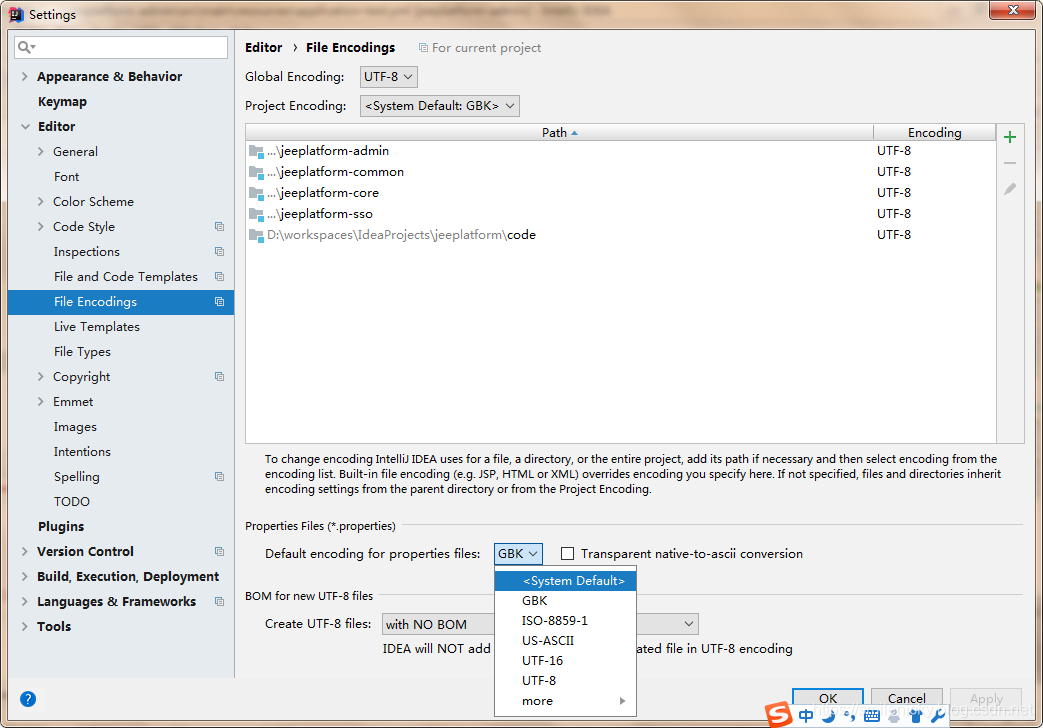
ok,本博客例子是用application.yml配置的,对于application.properties的本博客没介绍,不过还是要随便提一下,application.properties文件的默认文件编码是utf8,所以写中文时候有时候会出现乱码问题
这时候可以修改编码:file->settings->Editor->file encodings
- SpEL表达式
ok,再对比一下这两种注解对SpEL表达式的支持,对于SpEL表达式的可以参考:https://blog.csdn.net/fanxiaobin577328725/article/details/68942967
本博客之对比一下,这两种注解
ok,先改下配置,看看@ConfigurationProperties能获取到?
user:

  isOnline: #{1*1}
debug了一下,发现不能正常计算
ok,验证@value
@Value("#{1*1}")

    private Long isOnline;
junit测试,ok,@Value是支持的
User{userName='null', isAdmin=false, regTime=null, isOnline=1, maps=null, lists=null, address=null}
- JSR303数据校验
同样对于JSR303本博客也不进行详细介绍,详情可以参考博客:https://www.ibm.com/developerworks/cn/java/j-lo-jsr303/index.html
@ConfigurationProperties验证:
@AssertTrue

    private boolean isAdmin;
junit测试,发现可以支持
@Value验证
@AssertTrue

    @Value("${isAdmin}")

    private boolean isAdmin;
验证,校验发现不起效
- 复杂类型封装
ok,验证@Value是否支持对象类型和list类型,在上篇博客,很显然验证了@ConfigurationProperties是支持对象类型和list类型获取的
所以,本博客验证一下@Value是否支持就可以
@Value("${maps}")

    private Map<String,Object> maps;
junit测试,发现类型转换错误
Caused by: org.springframework.beans.ConversionNotSupportedException: Failed to convert value of type 'java.lang.String' to required type 'java.util.Map';
综上,可以归纳一下@Value和@ConfigurationProperties两种属性的区别
| @ConfigurationProperties | @Value | |
|---|---|---|
| 功能对比 | 批量注入配置文件属性 | 一个一个属性的注入 |
| 松散绑定 | 支持 | 不支持 |
| SpEL | 不支持 | 支持 |
| JSR303数据校验 | 支持 | 不支持 |
| 复杂类型封装 | 支持 | 不支持 |
所以,@ConfigurationProperties适用与注入配置文件整个对应bean的全部属性,而@Value正如其名称一样,适合注入配置文件单个值
SpringBoot系列之@Value和@ConfigurationProperties的更多相关文章
- SpringBoot系列之@PropertySource用法简介
SpringBoot系列之@PropertySource用法简介 继上篇博客:SpringBoot系列之@Value和@ConfigurationProperties用法对比之后,本博客继续介绍一下@ ...
- SpringBoot系列之学习教程汇总
对应SpringBoot系列博客专栏,例子代码,本博客不定时更新 一.配置篇 SpringBoot系列之@PropertySource读取yaml文件 >> source down ...
- SpringBoot系列之从入门到精通系列教程
对应SpringBoot系列博客专栏,例子代码,本博客不定时更新 Spring框架:作为JavaEE框架领域的一款重要的开源框架,在企业应用开发中有着很重要的作用,同时Spring框架及其子框架很多, ...
- Springboot 系列(九)使用 Spring JDBC 和 Druid 数据源监控
前言 作为一名 Java 开发者,相信对 JDBC(Java Data Base Connectivity)是不会陌生的,JDBC作为 Java 基础内容,它提供了一种基准,据此可以构建更高级的工具和 ...
- Springboot 系列(十五)如何编写自己的 Springboot starter
1. 前言 Springboot 中的自动配置确实方便,减少了我们开发上的复杂性,那么自动配置原理是什么呢?之前我也写过了一篇文章进行了分析. Springboot 系列(三)Spring Boot ...
- SpringBoot系列之集成Thymeleaf用法手册
目录 1.模板引擎 2.Thymeleaf简介 2.1).Thymeleaf定义 2.2).适用模板 3.重要知识点 3.1).th:text和th:utext 3.2).标准表达式 3.3).Thy ...
- SpringBoot系列之集成Druid配置数据源监控
SpringBoot系列之集成Druid配置数据源监控 继上一篇博客SpringBoot系列之JDBC数据访问之后,本博客再介绍数据库连接池框架Druid的使用 实验环境准备: Maven Intel ...
- SpringBoot系列之@PropertySource读取yaml文件
SpringBoot系列之@PropertySource支持yaml文件读取 最近在做实验,想通过@PropertySource注解读取配置文件的属性,进行映射,习惯上用properties都是测试没 ...
- SpringBoot系列之配置文件占位符使用
SpringBoot系列之配置文件占位符使用 Springboot占位符支持的有随机数和配置的值等等,本博客主要介绍的是随机数和获取属性配置值的简单用法 随机数获取 支持的写法有: ${random. ...
随机推荐
- QT两个窗口相互切换
信号(signals)与槽(slots)是QT重要机制,例子使用了C++11 lambda表达式进行了信号与槽的连接. 实现两个窗口通过点击按钮完成互相切换,注意子窗口只能发送信号,不能处理,所有信号 ...
- ┱Python中关于urllib和urllib2的问题
python3对urllib和urllib2进行了重构主要拆分成了:1.urllib.request 1.urllib.request.Request(url, data=None, headers= ...
- 爬虫那点事,干就玩了之seleunim
目录 selenium 环境准备 代码环境 开始爬虫 操作js 截图 切换窗口 在当前窗口切换访问地址 管理cookie # 加入战队 微信公众号 # 加入战队 微信公众号 做技术我们最重要的是[做] ...
- 超大规模商用 K8s 场景下,阿里巴巴如何动态解决容器资源的按需分配问题?
作者 | 张晓宇(衷源) 阿里云容器平台技术专家 关注『阿里巴巴云原生』公众号,回复关键词"1010",可获取本文 PPT. 导读:资源利用率一直是很多平台管理和研发人员关心的话 ...
- 设计一个A表数据抽取到B表的抽取过程
原题如下: 解题代码如下: table1类: @Data @NoArgsConstructor @AllArgsConstructor public class table1{ private Str ...
- python程序设计基础(嵩天)第五章课后习题部分答案
第五章p1515.2:实现isodd()函数,参数为整数,如果参数为奇数,返回true,否则返回false.def isodd(s): x=eval(s) if(x%2==0): return Fal ...
- 常用注解@Controller、@Service、@Autowired
@Controller.@Service在spring-context-5.1.10.RELEASE.jar包下,所在包如下 @Autowired在spring-beans-5.1.10.RELEAS ...
- centos7版本以上root密码破解
centos7版本以上root密码破解 主讲内容: 1.centos7版本以上root密码破解 一.centos7版本以上root密码破解 重启服务器,按键盘的方向键(上 下) 按e 进入紧急救援 ...
- 自学导航页(待续ing)
1 博客导航1.1 linuxlinux全线教程–提供了linux教程,服务器管理教程,BSD教程,还有编程语言(C/Java/Python/Perl),以及网络等全栈学习教程 1.2 存储技术NoS ...
- bugku 各种·绕过
点开是一段PHP的代码,先来审计一波代码. 发现将uname和passwd用sha1进行了加密,那么我们只要绕过这个函数构造相等就可以了. 可以使这两个值sha1的值相等,但他们本身的值又不等.(想详 ...