
django POST表单的使用
环境如下:django 1.7.8 版本.
1.在POST表单的时候会出现这个错误提示.
禁止访问 (403)

CSRF验证失败. 相应中断.

Help

Reason given for failure:

    CSRF token missing or incorrect.

In general, this can occur when there is a genuine Cross Site Request Forgery, or when Django's CSRF mechanism has not been used correctly.
For POST forms, you need to ensure:

    Your browser is accepting cookies.

    The view function passes a request to the template's render method.

    In the template, there is a {% csrf_token %} template tag inside each POST form that targets an internal URL.

    If you are not using CsrfViewMiddleware, then you must use csrf_protect on any views that use the csrf_token template tag, as well
as those that accept the POST data.

You're seeing the help section of this page because you have DEBUG = True in your Django settings file. Change that to False, and
only the initial error message will be displayed.

You can customize this page using the CSRF_FAILURE_VIEW setting.
无耐.看上面的提示是防止CSRF.也就是安全方面的,防止跨站请求伪造.
根据上面的提示来.需要有{% csrf_token %},那就在from表单中添加下
添加后的html代码如下.
{% extends "base.html" %}

{% block title %}

    hello

{% endblock %}

{% block content %}

    <div class="container">

      <form class="form-signin" action="/login_webmail/" method='post'>{% csrf_token %}

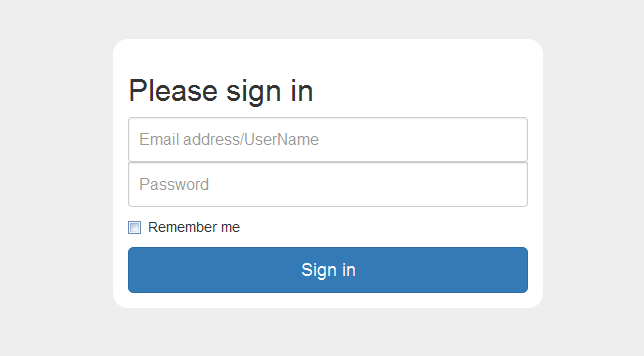
        <h2 class="form-signin-heading">Please sign in</h2>

        <label class="sr-only" for="inputUserName">Email address/UserName</label>

        <input type="text" autofocus="" required="" placeholder="Email address/UserName" class="form-control" id="inputUserName" name="inputUserName">

        <label class="sr-only" for="inputPassword">Password</label>

        <input type="password" required="" placeholder="Password" class="form-control" id="inputPassword">

        <div class="checkbox">

          <label>

            <input type="checkbox" value="remember-me"> Remember me

          </label>

        </div>

        <button type="submit" class="btn btn-lg btn-primary btn-block">Sign in</button>

      </form>

    </div> <!-- /container -->

{% endblock %}
重点是from后面的{% csrf_token %}
根据官网的提示及百度.
views.py的代码更改如下,主要的是return render_to_response('index.html',context_instance=RequestContext(request))
后面的 **context_instance=RequestContext(request)**
from django.http import HttpResponse

import datetime

from django.shortcuts import render_to_response

#post

from django.template import RequestContext

#post

def webindex(request):

    return render_to_response('index.html',context_instance=RequestContext(request))
接收的views视图方法
def login_webmail(request):

    if 'inputUserName' in request.POST:

        message = request.POST['inputUserName']

    else:

        message = "Not inputUserName"

    return render_to_response('test_post.html',{'test_post_name':message})
再测试.是否OK了.总结.只有两个步骤.
1.在from 表单中添加 {% csrf_token %}
2.在视图中添加 from django.template import RequestContext 导入项,并且在return 返回中添加context_instance=RequestContext(request)
然后就OK了.看来也是很简单的.新手可以参考.
---下面修改于2016-12-08好吧!要修改下上面的说法,好久以前的文章了,但还是要修改下,以免有再为此纠结的同学。
上面views的方法中,使用render_to_response的时候,仍可能会有问题的现象的话,使用下面的render则不会有问题,如:
return render(request,'test.html',{'uname':request.user,'error':error,'jc':jc})
其它的不用修改,仅将render_to_response修改为render,并且返回的值也相应的修改下,则就可以了。
这样在from下面会有一个隐藏的input的标签:

个人总结下,注意settings中的引用,还有html文件表单后{% csrf_token %},及在views中使用render进行返回就可以了。如果再有问题,欢迎留言下面,小伙伴一起看一下。
django POST表单的使用的更多相关文章
- python运维开发(十九)----Django后台表单验证、session、cookie、model操作
内容目录: Django后台表单验证 CSRF加密传输 session.cookie model数据库操作 Django后台Form表单验证 Django中Form一般有2种功能: 1.用于做用户提交 ...
- django form表单验证
一. django form表单验证引入 有时时候我们需要使用get,post,put等方式在前台HTML页面提交一些数据到后台处理例 ; <!DOCTYPE html> <html ...
- django from表单验证
django from表单验证 实现:表单验证 工程示例: urls.py 1 2 3 4 5 6 7 8 9 from django.conf.urls import url from djan ...
- django Form表单的使用
Form django表单系统中,所有的表单类都作为django.forms.Form的子类创建,包括ModelForm 关于django的表单系统,主要分两种 基于django.forms.Form ...
- Django(5) session登录注销、csrf及中间件自定义、django Form表单验证(非常好用)
一.Django中默认支持Session,其内部提供了5种类型的Session供开发者使用: 数据库(默认) 缓存 文件 缓存+数据库 加密cookie 1.数据库Session 1 2 3 4 5 ...
- django创建表单以及表单数据类型和属性
08.15自我总结 关于django的表单不同关系之间的创建 一.不同关系之间的创建 1.一对一 举例 母表:userinfo id name age 1 张三 12 2 李四 58 字表:priva ...
- Django form表单 组件
目录 Django form表单 组件 Form 组件介绍 普通方式手写注册功能 使用form组件实现注册功能 Form 常用字段与插件 常用字段(必备) 字段参数(必备) 内置验证(必备) 自定义效 ...
- [转]django自定义表单提交
原文网址:http://www.cnblogs.com/retop/p/4677148.html 注:本人使用的Django1.8.3版本进行测试 除了使用Django内置表单,有时往往我们需要自定义 ...
- Django实现表单验证、CSRF、cookie和session、缓存、数据库多表操作(双下划綫)
通常验证用户输入是否合法的话,是前端js和后端共同验证的,这是因为前端js是可以被禁用的,假如被禁用了,那就没法用js实现验证合法与否了,也就是即使用户输入的不合法,但是也没提示,用户也不知道怎么输入 ...
- 关于django post表单
CSRF verification failed. Request aborted. 默认会出现该状况,解决办法: 1. 使用requestcontext from django.template i ...
随机推荐
- ADO.Net 综合练习题
题目: 第一部分: 新建一个数据库:ADO测试,包含下面两个数据表,使用代码创建,并保留创建的代码文本. 专业表Subject: 专业编号(SubjectCode):nvarchar类型,不能为空,主 ...
- SPSS-生存分析
生存分析 定义:一些医学事件所经历的时间:从开始观察到事件发生的时间,不是短期内可以明确判断的.针对这类生存资料的分析方法叫生存分析.生存分析的基本概念1.终点事件终点事件outcome event: ...
- 线上问题!----------org.apache.catalina.connector.ClientAbortException: java.io.IOException: Broken pipe
1.问题出现 昨晚项目在上线的时候因为推广的原因,新增的大量请求.在八点的时候. org.apache.catalina.connector.ClientAbortException: java.io ...
- JavaScript数组方法大全(推荐)
原网址:http://www.jb51.net/article/87930.htm 数组在笔试中经常会出现的面试题,javascript中的数组与其他语言中的数组有些不同,为了方便之后数组的方法学习, ...
- 调整数组顺序使奇数位于偶数前面(python)
题目描述 输入一个整数数组,实现一个函数来调整该数组中数字的顺序,使得所有的奇数位于数组的前半部分,所有的偶数位于数组的后半部分,并保证奇数和奇数,偶数和偶数之间的相对位置不变. # -*- codi ...
- Flask之before_request、after_request
1.@app.before_request在请求(request)|在视图函数 之前做出响应 解决所有问题 from flask import Flask from flask import re ...
- 设置获取cookie,setCookie,getCookie
设置cookie: function setCookie(name,value) { var Days = 30; var exp = new Date(); exp.setTime(exp.getT ...
- stm32架构初认识
刚接触stm32f373c8t6的芯片,这到底是怎末开发的,应该说它是SOC,内部有一个核心芯片,然后在芯片的外部添加了一些有特殊功能的外设,使开发者能够完成想要的功能,以stm32f373c 8t6 ...
- Wannafly挑战赛13 D.applese的生日(贪心+思维)
题目描述 最可爱的applese生日啦,他准备了许多个质量不同的蛋糕,想请一些同学来参加他的派对为他庆生,为了不让一部分同学感到不爽,他决定把每个蛋糕都分割成几份(也可以不分割),使得最小的蛋糕的质量 ...
- UVa 10054 The Necklace(无向图欧拉回路)
My little sister had a beautiful necklace made of colorful beads. Two successive beads in the neckla ...