
jetBrains 插件开发第一课-- 在主菜单栏新增一个菜单
环境搭建完了,接下来可以开始写代码了:
1、新建 plugin 项目
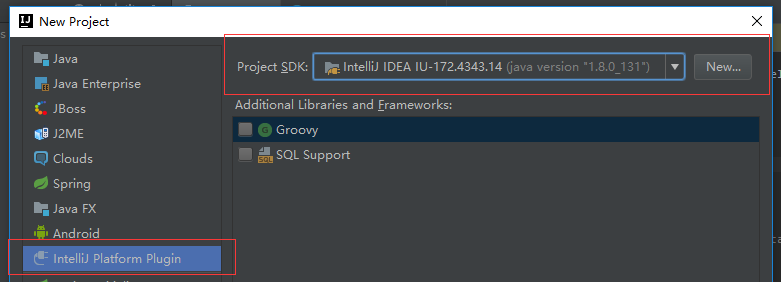
2、编辑 plugin.xml,修改一下里面的插件名那些信息,该文件的配置项可以看这里:plugin.xml
其中比较关键的有一个是 <depends>com.intellij.modules.platform</depends>,如果不加这个,你点击运行的时候插件可以正常运作,但是打包之后安装却会用不了。
<idea-plugin>

  <id>com.eleven24.helloWorld</id>

  <name>HelloWorld</name>

  <version>1.0</version>

  <vendor email="rubymay21s@gmail.com" url="http://www.cnblogs.com/eleven24">YourCompany</vendor>

  <description><![CDATA[

      Hello World Plugin.

    ]]></description>

  <change-notes><![CDATA[

      first version.

    ]]>

  </change-notes>

  <!-- please see http://www.jetbrains.org/intellij/sdk/docs/basics/getting_started/build_number_ranges.html for description -->

  <idea-version since-build="145.0"/>

  <!-- please see http://www.jetbrains.org/intellij/sdk/docs/basics/getting_started/plugin_compatibility.html

       on how to target different products -->

  <!-- uncomment to enable plugin in all products

  <depends>com.intellij.modules.lang</depends>

  -->

  <depends>com.intellij.modules.platform</depends>

  <extensions defaultExtensionNs="com.intellij">

    <!-- Add your extensions here -->

  </extensions>

  <actions>

    <!-- Add your actions here -->

  </actions>

</idea-plugin>
基本的信息如上,下面会添加一些菜单项的配置以及注册插件的配置
3、初始化的方法
package com.eleven24;

import com.intellij.openapi.actionSystem.ActionManager;

import com.intellij.openapi.actionSystem.DefaultActionGroup;

import com.intellij.openapi.components.ApplicationComponent;

import org.jetbrains.annotations.NotNull;

public class HelloWorldRegistration implements ApplicationComponent {

    @NotNull

    public String getComponentName() {

        return "HelloWorldPlugin";

    }

    public void initComponent() {

        ActionManager am = ActionManager.getInstance();

        MenuAction menuAction = new MenuAction();

        am.registerAction("menuAction", menuAction);

        DefaultActionGroup windowsM = (DefaultActionGroup) am.getAction("WindowMenu");

        windowsM.addSeparator();

        windowsM.add(menuAction);

    }

    // Disposes system resources.

    public void disposeComponent() {

    }

}
4、添加应用组件的配置到 plugin.xml 中,这样 ide 才会知道我们这个插件要做什么
<application-components>

    <component>

      <implementation-class>com.eleven24.HelloWorldRegistration</implementation-class>

    </component>

  </application-components>
5、添加一个点击菜单之后的处理方法,需要继承 AnAction 类
package com.eleven24;

import com.intellij.openapi.actionSystem.AnAction;

import com.intellij.openapi.actionSystem.AnActionEvent;

import com.intellij.openapi.ui.Messages;

public class MenuAction extends AnAction {

    @Override

    public void actionPerformed(AnActionEvent anActionEvent) {

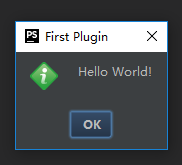
        Messages.showInfoMessage("Hello World!", "First Plugin");

    }

}
5、添加菜单,这个的话在 plugin.xml 中配置,同时也要指定该菜单点击之后对应的处理类(上面的menuAction)
我们添加一个组名叫 "HelloWorld" 的菜单组,添加到主菜单栏末尾,然后在其下添加一个名为 "menu action" 的菜单。具体配置如下:
 <actions>

    <!-- Add your actions here -->

    <group id="HelloWorld" text="_HelloWorld">

      <add-to-group group-id="MainMenu" anchor="last" />

    </group>

    <action class="com.eleven24.MenuAction" id="menuAction" text="menu action">

      <add-to-group group-id="HelloWorld" anchor="first" />

    </action>

  </actions>
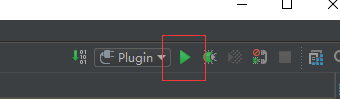
6、到此为止,我们已经完成了菜单的添加,点击右上角的运行按钮可以查看效果,运行的时候会再打开一个 ide,会有点慢。
7、效果图

8、下面是最终的配置文件
<idea-plugin>

  <id>com.eleven24.helloWorld</id>

  <name>HelloWorld</name>

  <version>1.0</version>

  <vendor email="rubymay21s@gmail.com" url="http://www.cnblogs.com/eleven24">YourCompany</vendor>

  <description><![CDATA[

      Hello World Plugin.

    ]]></description>

  <change-notes><![CDATA[

      first version.

    ]]>

  </change-notes>

  <!-- please see http://www.jetbrains.org/intellij/sdk/docs/basics/getting_started/build_number_ranges.html for description -->

  <idea-version since-build="145.0"/>

  <!-- please see http://www.jetbrains.org/intellij/sdk/docs/basics/getting_started/plugin_compatibility.html

       on how to target different products -->

  <!-- uncomment to enable plugin in all products

  <depends>com.intellij.modules.lang</depends>

  -->

  <depends>com.intellij.modules.platform</depends>

  <extensions defaultExtensionNs="com.intellij">

    <!-- Add your extensions here -->

  </extensions>

  <actions>

    <!-- Add your actions here -->

    <group id="HelloWorld" text="_HelloWorld" description="menu group">

      <add-to-group group-id="MainMenu" anchor="last" />

      <action class="com.eleven24.MenuAction" id="helloWorld.menuAction" text="menu action" />

    </group>

  </actions>

  <application-components>

    <component>

      <implementation-class>com.eleven24.HelloWorldRegistration</implementation-class>

    </component>

  </application-components>

</idea-plugin>
好了,就这么多了。
jetBrains 插件开发第一课-- 在主菜单栏新增一个菜单的更多相关文章
- Spring MVC第一课:用IDEA构建一个基于Spring MVC, Hibernate, My SQL的Maven项目
作为一个Spring MVC新手最基本的功夫就是学会如何使用开发工具创建一个完整的Spring MVC项目,本文站在一个新手的角度讲述如何一步一步创建一个基于Spring MVC, Hibernate ...
- visual Studio 2017 扩展开发(一)《向Visual Studio菜单栏新增一个菜单》
最近有接触到关于visual studio 2017 扩展的开发,特此记录,也是为了督促自己去深入了解其原理. 开始开发Visual Studio 扩展,在这里我安装了visual studio 20 ...
- NeHe OpenGL教程 第一课:OpenGL窗口
转自[翻译]NeHe OpenGL 教程 前言 声明,此 NeHe OpenGL教程系列文章由51博客yarin翻译(2010-08-19),本博客为转载并稍加整理与修改.对NeHe的OpenGL管线 ...
- Python之路第一课Day6--随堂笔记(面向对象 )
本节内容: 1. 面向对象编程介绍 2. 为什么要用面向对象进行开发? 3. 面向对象的特性:封装.继承.多态 4. 类.方法 一.面向过程 VS 面向对象 1. 编程范式 编程是 程序 员 用 ...
- Octave Tutorial(《Machine Learning》)之第一课《数据表示和存储》
Octave Tutorial 第一课 Computation&Operation 数据表示和存储 1.简单的四则运算,布尔运算,赋值运算(a && b,a || b,xor( ...
- Android入门第一课之Java基础
通知:由于本周六场地申请没通过,所以本周的培训临时取消. 今天给大家带来的是Android入门的第一课,由于教室申请的不确定性,因此,每次培训的内容都会在博客先提前释放出来.首先Android的APP ...
- vue.js学习(第一课)
学习资料 来自台湾小凡! vue.js是javascript的一个库,只专注于UI层面,核心价值永远是 API的简洁. 第一课: 不支持IE8. 1.声明式渲染: el元素的简称 element : ...
- Magento学习第一课——目录结构介绍
Magento学习第一课--目录结构介绍 一.Magento为何强大 Magento是在Zend框架基础上建立起来的,这点保证了代码的安全性及稳定性.选择Zend的原因有很多,但是最基本的是因为zen ...
- <-0基础学python.第一课->
初衷:我电脑里面的歌曲很久没换了,我想听一下新的歌曲,把他们下载下来听,比如某个榜单的,但是一首一首的点击下载另存为真的很恶心 所以我想有没有办法通过程序的方式来实现,结果还真的有,而且网上已经有有人 ...
随机推荐
- Dubbo使用心得2
- 【python】详解time模块功能asctime、localtime、mktime、sleep、strptime、strftime、time等函数以及时间的加减运算
在Python中,与时间处理相关的模块有:time.datetime以及calendar.学会计算时间,对程序的调优非常重要,可以在程序中狂打时间戳,来具体判断程序中哪一块耗时最多,从而找到程序调优的 ...
- springmvc 静态资源 配置
SpringMVC提供<mvc:resources>来设置静态资源,但是增加该设置如果采用通配符的方式增加拦截器的话仍然会被拦截器拦截,可采用如下方案进行解决: 方案一.拦截器中增加针对静 ...
- High School: Become Human(数学思维)
Year 2118. Androids are in mass production for decades now, and they do all the work for humans. But ...
- 1019psp
1.本周psp: 2.本周进度条: 3.累计进度图(折线图): 4.psp饼状图:
- 关于在eclipse Oxygen 2017环境下spring3.2 asm的异常
今天在oxygen 2017下构建spring3.2+mybatis项目时,发生异常,大概是说无法解析我mapper.class文件,错误发生在core.asm中<unknow:source&g ...
- C#高级编程 (第六版) 学习 第二章:C#基础
第二章 基础 1,helloworld示例: helloworld.cs using System; using System.Collections.Generic; using System.Li ...
- 基于图形学混色问题OpenGl的收获
void myDisplay(void) {glClearColor(0.0f,0.0f,0.0f,1.0f); glClear(GL_COLOR_BUFFER_BIT); glEnable(GL_B ...
- SQL Server 一些操作语句
查询表结构---sp_help 表名 或 sp_columns 表名 删表 -------drop table 表名删表中所有的数据----------truncate table 表名根据条件删表 ...
- 1st 四人小组项目
小组名称:好好学习 项目组长:林莉 组员:王东涵.宫丽君.胡丽娜 项目选题:基于jsp的车库管理系统 项目期限:十周内<暂定> 需求分析:有待进一步思考