
[iOS微博项目 - 4.0] - 自定义微博cell
- 创建自定义cell的雏形
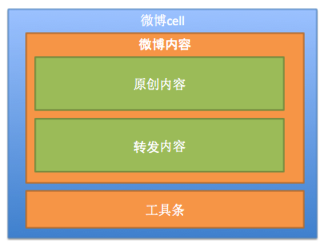
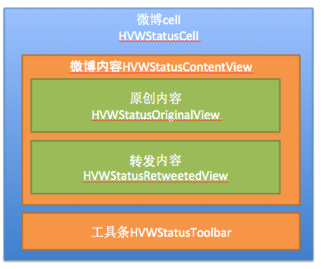
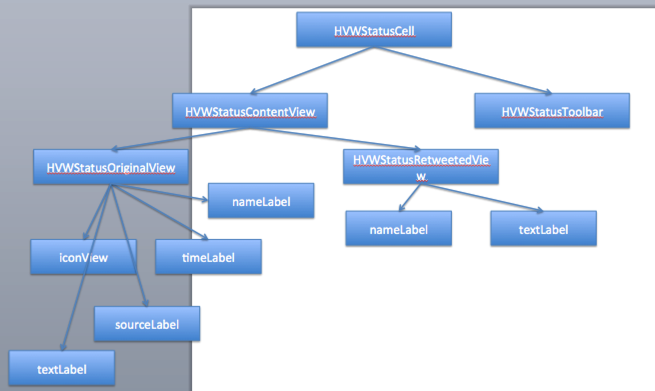
- cell包含:内容、工具条
- 内容包含:原创内容、转发内容
- 使用分层控件,逐层实现
- 分离model和view
- model:数据模型、frame模型
- view:就是控件本身
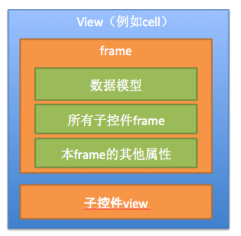
- frame模型:包含数据模型和子控件frame
- 根据数据模型来决定子控件是否显示(例如转发内容)
 //

 //  HVWStatusCell.m

 //  HVWWeibo

 //

 //  Created by hellovoidworld on 15/2/12.

 //  Copyright (c) 2015年 hellovoidworld. All rights reserved.

 //

 #import "HVWStatusCell.h"

 #import "HVWStatusContentView.h"

 #import "HVWStatusToolbar.h"

 @interface HVWStatusCell()

 /** 微博内容控件 */

 @property(nonatomic, weak) HVWStatusContentView *statusContentView;

 /** 微博工具条控件 */

 @property(nonatomic, weak) HVWStatusToolbar *toolbar;

 @end

 @implementation HVWStatusCell

 - (instancetype)initWithStyle:(UITableViewCellStyle)style reuseIdentifier:(NSString *)reuseIdentifier {

     self = [super initWithStyle:style reuseIdentifier:reuseIdentifier];

     if (self) { // 初始化子控件开始

         // 初始化微博内容控件

         [self setupStatusContentView];

         // 初始化工具条控件 */

         [self setupToolbar];

     }

     return self;

 }

 /** 初始化微博内容控件 */

 - (void) setupStatusContentView {

     HVWStatusContentView *statusContentView = [[HVWStatusContentView alloc] init];

     self.statusContentView = statusContentView;

     [self.contentView addSubview:statusContentView];

 }

 /** 初始化工具条控件 */

 - (void) setupToolbar {

     HVWStatusToolbar *toolbar = [[HVWStatusToolbar alloc] init];

     self.toolbar = toolbar;

     [self.contentView addSubview:toolbar];

 }

 @end
 //

 //  HVWStatusContentView.m

 //  HVWWeibo

 //

 //  Created by hellovoidworld on 15/2/12.

 //  Copyright (c) 2015年 hellovoidworld. All rights reserved.

 //

 #import "HVWStatusContentView.h"

 #import "HVWStatusOriginalView.h"

 #import "HVWStatusRetweetedView.h"

 @interface HVWStatusContentView()

 /** 原创内容 */

 @property(nonatomic, weak) HVWStatusOriginalView *originalView;

 /** 转发内容 */

 @property(nonatomic, weak) HVWStatusRetweetedView *retweetedView;

 @end

 @implementation HVWStatusContentView

 - (instancetype)initWithFrame:(CGRect)frame {

     self = [super initWithFrame:frame];

     if (self) { // 初始化子控件开始

         // 初始化原创内容控件

         [self setupOriginalView];

         // 初始化转发内容控件

         [self setupRetweetedView];

     }

     return self;

 }

 /** 初始化原创内容控件 */

 - (void) setupOriginalView {

 }

 /** 初始化转发内容控件 */

 - (void) setupRetweetedView {

 }

 @end
 //

 //  HVWStatusCell.h

 //  HVWWeibo

 //

 //  Created by hellovoidworld on 15/2/12.

 //  Copyright (c) 2015年 hellovoidworld. All rights reserved.

 //

 #import <UIKit/UIKit.h>

 @interface HVWStatusCell : UITableViewCell

 + (instancetype) cellWithTableView:(UITableView *)tableView;

 @end
 //

 //  HVWStatusCell.m

 //  HVWWeibo

 //

 //  Created by hellovoidworld on 15/2/12.

 //  Copyright (c) 2015年 hellovoidworld. All rights reserved.

 //

 #import "HVWStatusCell.h"

 #import "HVWStatusContentView.h"

 #import "HVWStatusToolbar.h"

 @interface HVWStatusCell()

 /** 微博内容控件 */

 @property(nonatomic, weak) HVWStatusContentView *statusContentView;

 /** 微博工具条控件 */

 @property(nonatomic, weak) HVWStatusToolbar *toolbar;

 @end

 @implementation HVWStatusCell

 /** 创建 */

 + (instancetype) cellWithTableView:(UITableView *)tableView {

     static NSString *ID = @"HVWStatusCell";

     HVWStatusCell *cell = [tableView dequeueReusableCellWithIdentifier:ID];

     if (nil == cell) {

         cell = [[self alloc] initWithStyle:UITableViewCellStyleSubtitle reuseIdentifier:ID];

     }

     return cell;

 }

 /** 初始化 */

 - (instancetype)initWithStyle:(UITableViewCellStyle)style reuseIdentifier:(NSString *)reuseIdentifier {

     self = [super initWithStyle:style reuseIdentifier:reuseIdentifier];

     if (self) { // 初始化子控件开始

         // 初始化微博内容控件

         [self setupStatusContentView];

         // 初始化工具条控件 */

         [self setupToolbar];

     }

     return self;

 }

 /** 初始化微博内容控件 */

 - (void) setupStatusContentView {

     HVWStatusContentView *statusContentView = [[HVWStatusContentView alloc] init];

     self.statusContentView = statusContentView;

     [self.contentView addSubview:statusContentView];

 }

 /** 初始化工具条控件 */

 - (void) setupToolbar {

     HVWStatusToolbar *toolbar = [[HVWStatusToolbar alloc] init];

     self.toolbar = toolbar;

     [self.contentView addSubview:toolbar];

 }

 @end
 //

 //  HVWStatusContentView.h

 //  HVWWeibo

 //

 //  Created by hellovoidworld on 15/2/12.

 //  Copyright (c) 2015年 hellovoidworld. All rights reserved.

 //

 #import <UIKit/UIKit.h>

 @interface HVWStatusContentView : UIView

 @end
 //

 //  HVWStatusContentView.m

 //  HVWWeibo

 //

 //  Created by hellovoidworld on 15/2/12.

 //  Copyright (c) 2015年 hellovoidworld. All rights reserved.

 //

 #import "HVWStatusContentView.h"

 #import "HVWStatusOriginalView.h"

 #import "HVWStatusRetweetedView.h"

 @interface HVWStatusContentView()

 /** 原创内容 */

 @property(nonatomic, weak) HVWStatusOriginalView *originalView;

 /** 转发内容 */

 @property(nonatomic, weak) HVWStatusRetweetedView *retweetedView;

 @end

 @implementation HVWStatusContentView

 - (instancetype)initWithFrame:(CGRect)frame {

     self = [super initWithFrame:frame];

     if (self) { // 初始化子控件开始

         // 初始化原创内容控件

         [self setupOriginalView];

         // 初始化转发内容控件

         [self setupRetweetedView];

     }

     return self;

 }

 /** 初始化原创内容控件 */

 - (void) setupOriginalView {

 }

 /** 初始化转发内容控件 */

 - (void) setupRetweetedView {

 }

 @end
 //

 //  HVWStatusToolbar.h

 //  HVWWeibo

 //

 //  Created by hellovoidworld on 15/2/12.

 //  Copyright (c) 2015年 hellovoidworld. All rights reserved.

 //

 #import <UIKit/UIKit.h>

 @interface HVWStatusToolbar : UIView

 @end
 //

 //  HVWStatusToolbar.m

 //  HVWWeibo

 //

 //  Created by hellovoidworld on 15/2/12.

 //  Copyright (c) 2015年 hellovoidworld. All rights reserved.

 //

 #import "HVWStatusToolbar.h"

 @implementation HVWStatusToolbar

 /** 代码自定义初始化方法 */

 - (instancetype)initWithFrame:(CGRect)frame {

     self = [super initWithFrame:frame];

     if (self) {

         self.backgroundColor = [UIColor greenColor];

     }

     return self;

 }

 @end
 //

 //  HVWStatusOriginalView.h

 //  HVWWeibo

 //

 //  Created by hellovoidworld on 15/2/12.

 //  Copyright (c) 2015年 hellovoidworld. All rights reserved.

 //

 #import <UIKit/UIKit.h>

 @interface HVWStatusOriginalView : UIView

 @end
 //

 //  HVWStatusOriginalView.m

 //  HVWWeibo

 //

 //  Created by hellovoidworld on 15/2/12.

 //  Copyright (c) 2015年 hellovoidworld. All rights reserved.

 //

 #import "HVWStatusOriginalView.h"

 @interface HVWStatusOriginalView()

 /** 昵称 */

 @property(nonatomic, weak) UILabel *nameLabel;

 /** 头像 */

 @property(nonatomic, weak) UIImageView *iconView;

 /** 微博发表时间 */

 @property(nonatomic, weak) UILabel *timeLabel;

 /** 微博来源 */

 @property(nonatomic, weak) UILabel *sourceLabel;

 /** 微博文本内容 */

 @property(nonatomic, weak) UILabel *textLabel;

 @end

 @implementation HVWStatusOriginalView

 /** 代码初始化方法 */

 - (instancetype)initWithFrame:(CGRect)frame {

     self = [super initWithFrame:frame];

     if (self) { // 初始化子控件开始

         // 昵称

         UILabel *nameLabel = [[UILabel alloc] init];

         nameLabel.font = HVWStatusOriginalNameFont;

         self.nameLabel = nameLabel;

         [self addSubview:nameLabel];

         // 头像

         UIImageView *iconView = [[UIImageView alloc] init];

         self.iconView = iconView;

         [self addSubview:iconView];

         // 发表时间

         UILabel *timeLabel = [[UILabel alloc] init];

         self.timeLabel = timeLabel;

         [self addSubview:timeLabel];

         // 来源

         UILabel *sourceLabel = [[UILabel alloc] init];

         self.sourceLabel = sourceLabel;

         [self addSubview:sourceLabel];

         // 正文

         UILabel *textLabel = [[UILabel alloc] init];

         self.textLabel = textLabel;

         [self addSubview:textLabel];

     }

     return self;

 }

 @end
 //

 //  HVWStatusRetweetedView.h

 //  HVWWeibo

 //

 //  Created by hellovoidworld on 15/2/12.

 //  Copyright (c) 2015年 hellovoidworld. All rights reserved.

 //

 #import <UIKit/UIKit.h>

 @interface HVWStatusRetweetedView : UIView

 @end
 //

 //  HVWStatusRetweetedView.m

 //  HVWWeibo

 //

 //  Created by hellovoidworld on 15/2/12.

 //  Copyright (c) 2015年 hellovoidworld. All rights reserved.

 //

 #import "HVWStatusRetweetedView.h"

 @interface HVWStatusRetweetedView()

 /** 昵称 */

 @property(nonatomic, weak) UILabel *nameLabel;

 /** 微博文本内容 */

 @property(nonatomic, weak) UILabel *textLabel;

 @end

 @implementation HVWStatusRetweetedView

 /** 代码初始化方法 */

 - (instancetype)initWithFrame:(CGRect)frame {

     self = [super initWithFrame:frame];

     if (self) { // 初始化子控件开始

         // 昵称

         UILabel *nameLabel = [[UILabel alloc] init];

         nameLabel.font = HVWStatusOriginalNameFont;

         self.nameLabel = nameLabel;

         [self addSubview:nameLabel];

         // 正文

         UILabel *textLabel = [[UILabel alloc] init];

         self.textLabel = textLabel;

         [self addSubview:textLabel];

     }

     return self;

 }

 @end
[iOS微博项目 - 4.0] - 自定义微博cell的更多相关文章
- [iOS微博项目 - 3.0] - 手动刷新微博
github: https://github.com/hellovoidworld/HVWWeibo A.下拉刷新微博 1.需求 在“首页”界面,下拉到一定距离的时候刷新微博数据 刷新数据的时候使 ...
- [iOS微博项目 - 3.2] - 发送微博
github: https://github.com/hellovoidworld/HVWWeibo A.使用微博API发送微博 1.需求 学习发送微博API 发送文字微博 发送带有图片的微博 ...
- [iOS微博项目 - 2.0] - OAuth授权3步
A.概念 OAUTH协议为用户资源的授权提供了一个安全的.开放而又简易的标准.与以往的授权方式不同之处是OAUTH的授权不会使第三方触及到用户的帐号信息(如用户名与密码),即第三方无需使用用 ...
- [iOS微博项目 - 1.6] - 自定义TabBar
A.自定义TabBar 1.需求 控制TabBar内的item的文本颜色(普通状态.被选中状态要和图标一致).背景(普通状态.被选中状态均为透明) 重新设置TabBar内的item位置,为下一步在Ta ...
- [iOS微博项目 - 1.0] - 搭建基本框架
A.搭建基本环境 github: https://github.com/hellovoidworld/HVWWeibo 项目结构: 1.使用代码构建UI,不使用storyboard ...
- AJ学IOS 之微博项目实战(12)发送微博自定义工具条代理实现点击事件
AJ分享,必须精品 一:效果 二:封装好的工具条 NYComposeToolbar.h 带代理方法 #import <UIKit/UIKit.h> typedef enum { NYCom ...
- AJ学IOS 之微博项目实战(11)发送微博自定义TextView实现带占位文字
AJ分享,必须精品 一:效果 二:代码: 由于系统自带的UITextField:和UITextView:不能满足我们的需求,所以我们需要自己设计一个. UITextField: 1.文字永远是一行,不 ...
- [iOS微博项目 - 3.1] - 发微博界面
github: https://github.com/hellovoidworld/HVWWeibo A.发微博界面:自定义UITextView 1.需求 用UITextView做一个编写微博的输 ...
- [iOS微博项目 - 2.6] - 获取微博数据
github: https://github.com/hellovoidworld/HVWWeibo A.新浪获取微博API 1.读取微博API 2.“statuses/home_time ...
随机推荐
- [转]html5调用摄像头实例
原文:https://blog.csdn.net/binquan_liang/article/details/79489989 最近在学习在做HTML5的项目,看了博客上html5调用摄像头拍照的文章 ...
- Vim-复制选中内容至系统剪贴板,光标移动到指定行的行首和行尾
1.全选并复制到系统剪贴板 ggVG或ggvG 然后 "+y gg 让光标移到首行,在vim才有效,vi中无效 V 是进入Visual(可视)模式 G 光标移到最后一行 "+y 复 ...
- 使用C语言实现一个虚拟机
使用C语言实现一个虚拟机 2015-6-22 21:32| 发布者: joejoe0332| 查看: 2891| 评论: 0|原作者: leoxu, Serval, 社会主义好, lostTemple ...
- Maven实战(插件管理)
1.前言 近期在做项目中,用到了Maven来管理项目,当理解了Maven的基础知识后,忽然看到好多的插件信息,所以在此总结一下.其有使用方法基本上都一样. 2.源码打包插件 我们能够在Apache的站 ...
- Math - Uva 11300 Spreading the Wealth
Spreading the Wealth Problem's Link ---------------------------------------------------------------- ...
- 数据库 proc编程七
#define _CRT_SECURE_NO_WARNINGS #include <stdio.h> #include <stdlib.h> #include <stri ...
- opencv 摄像头人脸检测
PYTHON ubuntu16.04 默认安装的Python版本2.7.12,当用pip install opencv-python 安装了opencv for python 3.3.0.10后,运行 ...
- 如果没有指定Cookie的时效,那么默认的时效是。(选择1项)
如果没有指定Cookie的时效,那么默认的时效是.(选择1项) A.一天 B. 永不过期 C.会话级别 D.一分钟 解答:C 这是API的原文:By default, -1 indicating th ...
- php -- 文件操作类(文件或文件夹的:创建、删除、复制、移动)
<? /** * 操纵文件类 * * 例子: * FileUtil::createDir('a/1/2/3'); 测试建立文件夹 建一个a/1/2/3文件夹 * FileUtil::create ...
- 【BZOJ】1612: [Usaco2008 Jan]Cow Contest奶牛的比赛(floyd/dfs)
http://www.lydsy.com/JudgeOnline/problem.php?id=1612 赢+输==n-1 则一定确定 dfs和floyd都行(dfs我不确定,因为我没提交,权限还没开 ...