
Mininet实验 基于Mininet测量路径的损耗率
实验原理
在SDN环境中,控制器可以通过对交换机下发流表操作来控制交换机的转发行为,此外,还可以利用控制器测量路径的损耗率。在本实验中,基于Mininet脚本,设置特定的交换机间的路径损耗速率,然后编写POX脚本,实现对路径的损耗率的测量。
拓扑图:

在该环境下,h0向h1发送数据包,由于在mininet脚本中设置了连接损耗率,在传输过程中会丢失一些包,本次实验的目的是展示如何通过控制器计算路径损耗速率(h0-s0-s1-h1)。这里假设控制器预先知道网络拓扑,所以我没有显示发现网络的代码以及其他相关代码。控制器将向s0和s1发送flowstatsrequest,当控制器接收到来自s0的response时,将特定流的数据包数保存在inputpkts中,当控制器接收到来自s1的response时,将接收到特定流的数据包数保存在outputpkts中,差值就是丢失的数据包数量。
实验操作
编写mininet脚本
 #!/usr/bin/python

 from mininet.net import Mininet

 from mininet.node import Node

 from mininet.link import TCLink

 from mininet.log import  setLogLevel, info

 from threading import Timer

 from mininet.util import quietRun

 from time import sleep

 def myNet(cname='controller', cargs='-v ptcp:'):

     "Create network from scratch using Open vSwitch."

     info( "*** Creating nodes\n" )

     controller = Node( 'c0', inNamespace=False )

     switch = Node( 's0', inNamespace=False )

     switch1 = Node( 's1', inNamespace=False )

     h0 = Node( 'h0' )

     h1 = Node( 'h1' )

     info( "*** Creating links\n" )

     linkopts0=dict(bw=100, delay='1ms', loss=0)

     linkopts1=dict(bw=100, delay='1ms', loss=10)

     link0=TCLink( h0, switch, **linkopts0)

     link1 = TCLink( switch, switch1, **linkopts1)

     link2 = TCLink( h1, switch1, **linkopts0)

     #print link0.intf1, link0.intf2

     link0.intf2.setMAC("0:0:0:0:0:1")

     link1.intf1.setMAC("0:0:0:0:0:2")

     link1.intf2.setMAC("0:1:0:0:0:1")

     link2.intf2.setMAC("0:1:0:0:0:2")

     info( "*** Configuring hosts\n" )

     h0.setIP( '192.168.123.1/24' )

     h1.setIP( '192.168.123.2/24' )

     info( "*** Starting network using Open vSwitch\n" )

     switch.cmd( 'ovs-vsctl del-br dp0' )

     switch.cmd( 'ovs-vsctl add-br dp0' )

     switch1.cmd( 'ovs-vsctl del-br dp1' )

     switch1.cmd( 'ovs-vsctl add-br dp1' )

     controller.cmd( cname + ' ' + cargs + '&' )

     for intf in switch.intfs.values():

         print intf

         print switch.cmd( 'ovs-vsctl add-port dp0 %s' % intf )

     for intf in switch1.intfs.values():

         print intf

         print switch1.cmd( 'ovs-vsctl add-port dp1 %s' % intf )

     # Note: controller and switch are in root namespace, and we

     # can connect via loopback interface

     switch.cmd( 'ovs-vsctl set-controller dp0 tcp:127.0.0.1:6633' )

     switch1.cmd( 'ovs-vsctl set-controller dp1 tcp:127.0.0.1:6633' )

     info( '*** Waiting for switch to connect to controller' )

     while 'is_connected' not in quietRun( 'ovs-vsctl show' ):

         sleep( 1 )

         info( '.' )

     info( '\n' )

     #info( "*** Running test\n" )

     h0.cmdPrint( 'ping -Q 0x64 -c 20 ' + h1.IP() )

     sleep( 1 )

     info( "*** Stopping network\n" )

     controller.cmd( 'kill %' + cname )

     switch.cmd( 'ovs-vsctl del-br dp0' )

     switch.deleteIntfs()

     switch1.cmd( 'ovs-vsctl del-br dp1' )

     switch1.deleteIntfs()

     info( '\n' )

 if __name__ == '__main__':

     setLogLevel( 'info' )

     info( '*** Scratch network demo (kernel datapath)\n' )

     Mininet.init()

     myNet()
PS:52,53行的地址是pox所在的ip地址,根据实际修改。不然会链接不上控制器。
编写POX脚本
 # standard includes

 from pox.core import core

 from pox.lib.util import dpidToStr

 import pox.openflow.libopenflow_01 as of

 from pox.lib.addresses import IPAddr, EthAddr

 # include as part of the betta branch

 from pox.openflow.of_json import *

 from pox.lib.recoco import Timer

 import time

 log = core.getLogger()

 src_dpid = 0

 dst_dpid = 0

 input_pkts = 0

 output_pkts = 0

 def getTheTime():  #fuction to create a timestamp

   flock = time.localtime()

   then = "[%s-%s-%s" %(str(flock.tm_year),str(flock.tm_mon),str(flock.tm_mday))

   if int(flock.tm_hour)<10:

     hrs = "0%s" % (str(flock.tm_hour))

   else:

     hrs = str(flock.tm_hour)

   if int(flock.tm_min)<10:

     mins = "0%s" % (str(flock.tm_min))

   else:

     mins = str(flock.tm_min)

   if int(flock.tm_sec)<10:

     secs = "0%s" % (str(flock.tm_sec))

   else:

     secs = str(flock.tm_sec)

   then +="]%s.%s.%s" % (hrs,mins,secs)

   return then

 # handler for timer function that sends the requests to all the

 # switches connected to the controller.

 def _timer_func ():

   for connection in core.openflow._connections.values():

     connection.send(of.ofp_stats_request(body=of.ofp_flow_stats_request()))

     connection.send(of.ofp_stats_request(body=of.ofp_port_stats_request()))

   log.debug("Sent %i flow/port stats request(s)", len(core.openflow._connections))

 # handler to display flow statistics received in JSON format

 # structure of event.stats is defined by ofp_flow_stats()

 def _handle_flowstats_received (event):

    #stats = flow_stats_to_list(event.stats)

    #log.debug("FlowStatsReceived from %s: %s", dpidToStr(event.connection.dpid), stats)

    global src_dpid, dst_dpid, input_pkts, output_pkts

    #print "src_dpid=", dpidToStr(src_dpid), "dst_dpid=", dpidToStr(dst_dpid)

    for f in event.stats:

      if f.match.dl_type==0x0800 and f.match.nw_dst==IPAddr("192.168.123.2") and f.match.nw_tos==0x64 and event.connection.dpid==src_dpid:

        #print "input: ", f.byte_count, f.packet_count

        input_pkts = f.packet_count

      if f.match.dl_type==0x0800 and f.match.nw_dst==IPAddr("192.168.123.2") and f.match.nw_tos==0x64 and event.connection.dpid==dst_dpid:

        #print "output: ", f.byte_count, f.packet_count

        output_pkts = f.packet_count

        if input_pkts !=0:

          print getTheTime(), "Path Loss Rate =", (input_pkts-output_pkts)*1.0/input_pkts*100, "%"

 # handler to display port statistics received in JSON format

 def _handle_portstats_received (event):

    #print "\n<<<STATS-REPLY: Return PORT stats for Switch", event.connection.dpid,"at ",getTheTime()

    #for f in event.stats:

       #if int(f.port_no)<65534:

         #print "   PortNo:", f.port_no, " Fwd's Pkts:", f.tx_packets, " Fwd's Bytes:", f.tx_bytes, " Rc'd Pkts:", f.rx_packets, " Rc's Bytes:", f.rx_bytes

         #print "   PortNo:", f.port_no,  " TxDrop:", f.tx_dropped, " RxDrop:", f.rx_dropped, " TxErr:", f.tx_errors, " RxErr:", f.rx_errors, " CRC:", f.rx_crc_err, " Coll:", f.collisions

   stats = flow_stats_to_list(event.stats)

   log.debug("PortStatsReceived from %s: %s", dpidToStr(event.connection.dpid), stats)

 def _handle_ConnectionUp (event):

   global src_dpid, dst_dpid

   print "ConnectionUp: ", dpidToStr(event.connection.dpid)

   for m in event.connection.features.ports:

     if m.name == "s0-eth0":

       src_dpid = event.connection.dpid

     elif m.name == "s1-eth0":

       dst_dpid = event.connection.dpid

   msg = of.ofp_flow_mod()

   msg.priority =1

   msg.idle_timeout = 0

   msg.match.in_port =1

   msg.actions.append(of.ofp_action_output(port = of.OFPP_ALL))

   event.connection.send(msg)

   msg = of.ofp_flow_mod()

   msg.priority =1

   msg.idle_timeout = 0

   msg.match.in_port =2

   msg.actions.append(of.ofp_action_output(port = of.OFPP_ALL))

   event.connection.send(msg)

   msg = of.ofp_flow_mod()

   msg.priority =10

   msg.idle_timeout = 0

   msg.hard_timeout = 0

   msg.match.dl_type = 0x0800

   msg.match.nw_tos = 0x64

   msg.match.in_port=1

   msg.match.nw_dst = "192.168.123.2"

   msg.actions.append(of.ofp_action_output(port = 2))

   event.connection.send(msg)

   msg = of.ofp_flow_mod()

   msg.priority =10

   msg.idle_timeout = 0

   msg.hard_timeout = 0

   msg.match.dl_type = 0x0800

   msg.match.nw_tos = 0x64

   msg.match.nw_dst = "192.168.123.1"

   msg.actions.append(of.ofp_action_output(port = 1))

   event.connection.send(msg)

 # main functiont to launch the module

 def launch ():

   # attach handsers to listners

   core.openflow.addListenerByName("FlowStatsReceived",

     _handle_flowstats_received)

   core.openflow.addListenerByName("PortStatsReceived",

     _handle_portstats_received)

   core.openflow.addListenerByName("ConnectionUp", _handle_ConnectionUp)

   # timer set to execute every five seconds

   Timer(1, _timer_func, recurring=True)
运行POX脚本flow_stats.py
./pox.py flow_stats

运行mininet脚本
sudo ./sckmininet.py
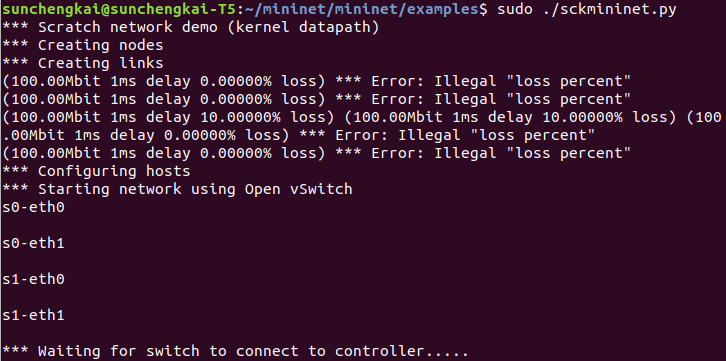
mininet信息:
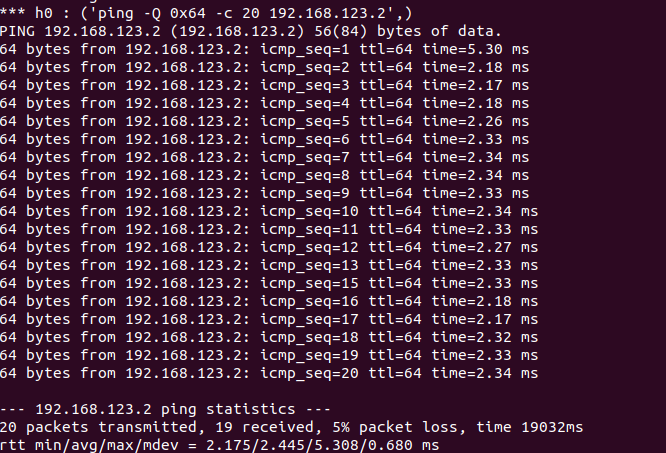
pox信息:

结果符合预期。
Mininet实验 基于Mininet测量路径的损耗率的更多相关文章
- Mininet系列实验(四):基于Mininet测量路径的损耗率
1 实验目的 熟悉Mininet自定义拓扑脚本的编写与损耗率的设定: 熟悉编写POX脚本,测量路径损耗速率 2 实验原理 在SDN环境中,控制器可以通过对交换机下发流表操作来控制交换机的转发行为,此外 ...
- 实验 3:Mininet 实验——测量路径的损耗率
实验目的 在实验 2 的基础上进一步熟悉 Mininet 自定义拓扑脚本,以及与损耗率相关的设 定:初步了解 Mininet 安装时自带的 POX 控制器脚本编写,测试路径损耗率. 实验任务 h0 向 ...
- SDN实验 3: Mininet 实验——测量路径的损耗率
验 3:Mininet 实验--测量路径的损耗率 一.实验目的 在实验 2 的基础上进一步熟悉 Mininet 自定义拓扑脚本,以及与损耗率相关的设定:初步了解 Mininet 安装时自带的 POX ...
- 基于Mininet测量路径的损耗率
基于Mininet测量路径的损耗率 控制器采用POX,基于OVS仿真 Mininet脚本 创建Node mininet.node Node 创建链路连接 mininet.link TCLink 设置i ...
- 软件定义网络实验记录③--Mininet 实验——测量路径的损耗率
一.实验目的 在实验 2 的基础上进一步熟悉 Mininet 自定义拓扑脚本,以及与损耗率相关的设定: 初步了解 Mininet 安装时自带的 POX 控制器脚本编写,测试路径损耗率. 二.实验任务 ...
- 实验 3:Mininet 实验——测量路径的损耗率
一.实验目的 在实验 2 的基础上进一步熟悉 Mininet 自定义拓扑脚本,以及与损耗率相关的设定;初步了解 Mininet 安装时自带的 POX 控制器脚本编写,测试路径损耗率. 二.实验任务 h ...
- Mininet实验 基于Mininet实现BGP路径挟持攻击实验
参考:基于Mininet实现BGP路径挟持攻击实验 实验目的: 掌握如何mininet内模拟AS. 掌握BGP路径挟持的原理和分析过程. 实验原理: 互联网是由相互连接的自治系统AS组成的,通过一个通 ...
- Mininet实验 测量路径损耗率
参照:基于Mininet测量路径的损耗率 在SDN环境中,可以利用控制器来测量特定路径的损耗率,在本实验中,基于Mininet脚本,设置特定的交换机间的路径损耗速率,然后编写POX脚本,实现对路径的损 ...
- Mininet实验 OpenFlow1.3协议基于Mininet部署与验证
参照:OpenFlow1.3协议基于Mininet部署与验证 安装过程,参考原文. 实验 使用ifconfig查看本机IP地址:192.168.1.101 进入OpenDayLight界面,cd到bi ...
随机推荐
- Django-rest-framework(八)使用技巧(持续补充中)
当viewset中,多个action对应了不同的serializers的时候 class UserView(viewsets.GenericViewSet): queryset = User.obje ...
- SecureCRT 个人使用爱好配置。
1.设置默认启动会话设置. 2.设置执行 ls命令显示文件夹,各种文件,不同的对比颜色 2.1 设置前: 2.2 设置后: 3. 如果出现会话框中文乱码 ,设置以下选项 4 . 更改 命令 ls -a ...
- Python基础—14-邮件与短信
邮件与短信 邮件发送 简介: 邮件服务器.账户.密码 相关协议:SMTP.POP3.IMAP 默认TCP协议端口:25 用途:经常用在一个网站的注册激活.通知.找回密码等场景 库:smtplib 示例 ...
- 你不知道的javaScript笔记(3)
对象 对象可以通过两种形式定义: 声明形式和构造形式 声明形式语法: var myObj = {key:value} 构造形式语法: var myObj = new Object(); myObj.k ...
- vue和react总结
一.总结一下Vue和React的区别 相同点: 1.都支持服务器端渲染 2.都有Virtual DOM,组件化开发,通过props参数进行父子组件数据的传递,都实现webComponent ...
- stm32+lwip(五):以太网帧发送测试
我是卓波,很高兴你来看我的博客. 系列文章: stm32+lwip(一):使用STM32CubeMX生成项目 stm32+lwip(二):UDP测试 stm32+lwip(三):TCP测试 stm32 ...
- SIMD数据并行(四)——三种结构的比较
在计算机体系中,数据并行有两种实现路径:MIMD(Multiple Instruction Multiple Data,多指令流多数据流)和SIMD(Single Instruction Multip ...
- Windows 10 下如何彻底关闭 Hyper-V 服务(翻外篇)
原文:Windows 10 下如何彻底关闭 Hyper-V 服务(翻外篇) windows禁用/启用hyper-V,解决hyper-V与模拟器同时启用时造成冲突 我是这样解决的,以管理员身份运行命令提 ...
- 台湾ML笔记--1.1什么时候适合使用ML
适用情况: 1 exists some 'underlying pattern' to be learned --so 'performance measure' can be imporoved 例 ...
- leetcode笔记--2 reverse string
my answer: 出错点:new_list[s] = list_s[u-1-s] 这样会出错, 重点:(1) map(str, s) 函数的使用,例:ls = [1,2,3]rs = map(st ...