
实验 3:Mininet 实验——测量路径的损耗率
一、实验目的
在实验 2 的基础上进一步熟悉 Mininet 自定义拓扑脚本,以及与损耗率相关的设定;初步了解 Mininet 安装时自带的 POX 控制器脚本编写,测试路径损耗率。
二、实验任务
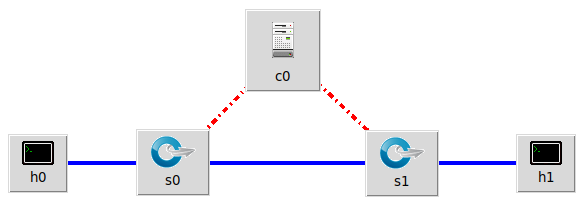
h0 向 h1 发送数据包,由于在 Mininet 脚本中设置了连接损耗率,在传输过程中会丢失一些包,本次实验的目的是展示如何通过控制器计算路径损耗速率(h0-s0-s1-h1)。这里假设控制器预先知道网络拓扑。控制器将向 s0 和 s1 发送flow_stats_request,当控制器接收到来自 s0 的 response 时,将特定流的数据包数保存在 input_pkts 中,当控制器接收到来自 s1 的 response 时,将接收到特定流的数据包数保存在 output_pkts 中,差值就是丢失的数据包数量。
基于上述拓扑,编写 Mininet 脚本,设置特定的交换机间的路径损耗速率,然后编写 POX 控制器脚本,实现对路径的损耗率的测量。
三、实验步骤
- 实验环境
安装了 Ubuntu 18.04.5 Desktop amd64 的虚拟机 - 实验过程
- 新建并编辑 pox 脚本 flow_stats.py:
# standard includes

from pox.core import core

from pox.lib.util import dpidToStr

import pox.openflow.libopenflow_01 as of

from pox.lib.addresses import IPAddr, EthAddr

# include as part of the betta branch

from pox.openflow.of_json import *

from pox.lib.recoco import Timer

import time

log = core.getLogger()

src_dpid = 0

dst_dpid = 0

input_pkts = 0

output_pkts = 0

def getTheTime():  #fuction to create a timestamp

  flock = time.localtime()

  then = "[%s-%s-%s" %(str(flock.tm_year),str(flock.tm_mon),str(flock.tm_mday))

  if int(flock.tm_hour)<10:

    hrs = "0%s" % (str(flock.tm_hour))

  else:

    hrs = str(flock.tm_hour)

  if int(flock.tm_min)<10:

    mins = "0%s" % (str(flock.tm_min))

  else:

    mins = str(flock.tm_min)

  if int(flock.tm_sec)<10:

    secs = "0%s" % (str(flock.tm_sec))

  else:

    secs = str(flock.tm_sec)

  then +="]%s.%s.%s" % (hrs,mins,secs)

  return then

# handler for timer function that sends the requests to all the

# switches connected to the controller.

def _timer_func ():

  for connection in core.openflow._connections.values():

    connection.send(of.ofp_stats_request(body=of.ofp_flow_stats_request()))

    connection.send(of.ofp_stats_request(body=of.ofp_port_stats_request()))

  log.debug("Sent %i flow/port stats request(s)", len(core.openflow._connections))

# handler to display flow statistics received in JSON format

# structure of event.stats is defined by ofp_flow_stats()

def _handle_flowstats_received (event):

   #stats = flow_stats_to_list(event.stats)

   #log.debug("FlowStatsReceived from %s: %s", dpidToStr(event.connection.dpid), stats)

   global src_dpid, dst_dpid, input_pkts, output_pkts

   #print "src_dpid=", dpidToStr(src_dpid), "dst_dpid=", dpidToStr(dst_dpid)

   for f in event.stats:

     if f.match.dl_type==0x0800 and f.match.nw_dst==IPAddr("192.168.123.2") and f.match.nw_tos==0x64 and event.connection.dpid==src_dpid:

       #print "input: ", f.byte_count, f.packet_count

       input_pkts = f.packet_count

     if f.match.dl_type==0x0800 and f.match.nw_dst==IPAddr("192.168.123.2") and f.match.nw_tos==0x64 and event.connection.dpid==dst_dpid:

       #print "output: ", f.byte_count, f.packet_count

       output_pkts = f.packet_count

       if input_pkts !=0:

         print getTheTime(), "Path Loss Rate =", (input_pkts-output_pkts)*1.0/input_pkts*100, "%"

# handler to display port statistics received in JSON format

def _handle_portstats_received (event):

   #print "\n<<<STATS-REPLY: Return PORT stats for Switch", event.connection.dpid,"at ",getTheTime()

   #for f in event.stats:

      #if int(f.port_no)<65534:

        #print "   PortNo:", f.port_no, " Fwd's Pkts:", f.tx_packets, " Fwd's Bytes:", f.tx_bytes, " Rc'd Pkts:", f.rx_packets, " Rc's Bytes:", f.rx_bytes

        #print "   PortNo:", f.port_no,  " TxDrop:", f.tx_dropped, " RxDrop:", f.rx_dropped, " TxErr:", f.tx_errors, " RxErr:", f.rx_errors, " CRC:", f.rx_crc_err, " Coll:", f.collisions

  stats = flow_stats_to_list(event.stats)

  log.debug("PortStatsReceived from %s: %s", dpidToStr(event.connection.dpid), stats)

def _handle_ConnectionUp (event):

  global src_dpid, dst_dpid

  print "ConnectionUp: ", dpidToStr(event.connection.dpid)

  for m in event.connection.features.ports:

    if m.name == "s0-eth0":

      src_dpid = event.connection.dpid

    elif m.name == "s1-eth0":

      dst_dpid = event.connection.dpid

  msg = of.ofp_flow_mod()

  msg.priority =1

  msg.idle_timeout = 0

  msg.match.in_port =1

  msg.actions.append(of.ofp_action_output(port = of.OFPP_ALL))

  event.connection.send(msg)

  msg = of.ofp_flow_mod()

  msg.priority =1

  msg.idle_timeout = 0

  msg.match.in_port =2

  msg.actions.append(of.ofp_action_output(port = of.OFPP_ALL))

  event.connection.send(msg)

  msg = of.ofp_flow_mod()

  msg.priority =10

  msg.idle_timeout = 0

  msg.hard_timeout = 0

  msg.match.dl_type = 0x0800

  msg.match.nw_tos = 0x64

  msg.match.in_port=1

  msg.match.nw_dst = "192.168.123.2"

  msg.actions.append(of.ofp_action_output(port = 2))

  event.connection.send(msg)

  msg = of.ofp_flow_mod()

  msg.priority =10

  msg.idle_timeout = 0

  msg.hard_timeout = 0

  msg.match.dl_type = 0x0800

  msg.match.nw_tos = 0x64

  msg.match.nw_dst = "192.168.123.1"

  msg.actions.append(of.ofp_action_output(port = 1))

  event.connection.send(msg)

# main functiont to launch the module

def launch ():

  # attach handsers to listners

  core.openflow.addListenerByName("FlowStatsReceived",

    _handle_flowstats_received)

  core.openflow.addListenerByName("PortStatsReceived",

    _handle_portstats_received)

  core.openflow.addListenerByName("ConnectionUp", _handle_ConnectionUp)

  # timer set to execute every five seconds

  Timer(1, _timer_func, recurring=True)
- 在 pox 安装目录下(Mininet 完整安装包含了 pox)执行以下命令运行 pox 脚本
$ ./pox.py flow_stats
- 编辑 Mininet 脚本 mymininet.py
#!/usr/bin/python

from mininet.net import Mininet

from mininet.node import Node

from mininet.link import TCLink

from mininet.log import  setLogLevel, info

from threading import Timer

from mininet.util import quietRun

from time import sleep

def myNet(cname='controller', cargs='-v ptcp:'):

    "Create network from scratch using Open vSwitch."

    info( "*** Creating nodes\n" )

    controller = Node( 'c0', inNamespace=False )

    switch = Node( 's0', inNamespace=False )

    switch1 = Node( 's1', inNamespace=False )

    h0 = Node( 'h0' )

    h1 = Node( 'h1' )

    info( "*** Creating links\n" )

    linkopts0=dict(bw=100, delay='1ms', loss=0)

    linkopts1=dict(bw=100, delay='1ms', loss=0)

    link0=TCLink( h0, switch, **linkopts0)

    link1 = TCLink( switch, switch1, **linkopts1)

    link2 = TCLink( h1, switch1, **linkopts0)

    #print link0.intf1, link0.intf2

    link0.intf2.setMAC("0:0:0:0:0:1")

    link1.intf1.setMAC("0:0:0:0:0:2")

    link1.intf2.setMAC("0:1:0:0:0:1")

    link2.intf2.setMAC("0:1:0:0:0:2")

    info( "*** Configuring hosts\n" )

    h0.setIP( '192.168.123.1/24' )

    h1.setIP( '192.168.123.2/24' )

    info( "*** Starting network using Open vSwitch\n" )

    switch.cmd( 'ovs-vsctl del-br dp0' )

    switch.cmd( 'ovs-vsctl add-br dp0' )

    switch1.cmd( 'ovs-vsctl del-br dp1' )

    switch1.cmd( 'ovs-vsctl add-br dp1' )

    controller.cmd( cname + ' ' + cargs + '&' )

    for intf in switch.intfs.values():

        print intf

        print switch.cmd( 'ovs-vsctl add-port dp0 %s' % intf )

    for intf in switch1.intfs.values():

        print intf

        print switch1.cmd( 'ovs-vsctl add-port dp1 %s' % intf )

    # Note: controller and switch are in root namespace, and we

    # can connect via loopback interface

    switch.cmd( 'ovs-vsctl set-controller dp0 tcp:127.0.0.1:6633' )

    switch1.cmd( 'ovs-vsctl set-controller dp1 tcp:127.0.0.1:6633' )

    info( '*** Waiting for switch to connect to controller' )

    while 'is_connected' not in quietRun( 'ovs-vsctl show' ):

        sleep( 1 )

        info( '.' )

    info( '\n' )

    #info( "*** Running test\n" )

    h0.cmdPrint( 'ping -Q 0x64 -c 20 ' + h1.IP() )

    sleep( 1 )

    info( "*** Stopping network\n" )

    controller.cmd( 'kill %' + cname )

    switch.cmd( 'ovs-vsctl del-br dp0' )

    switch.deleteIntfs()

    switch1.cmd( 'ovs-vsctl del-br dp1' )

    switch1.deleteIntfs()

    info( '\n' )

if __name__ == '__main__':

    setLogLevel( 'info' )

    info( '*** Scratch network demo (kernel datapath)\n' )

    Mininet.init()

    myNet()!
- 执行命令运行 Mininet 脚本 mymininet.py
$ sudo python mymininet.py
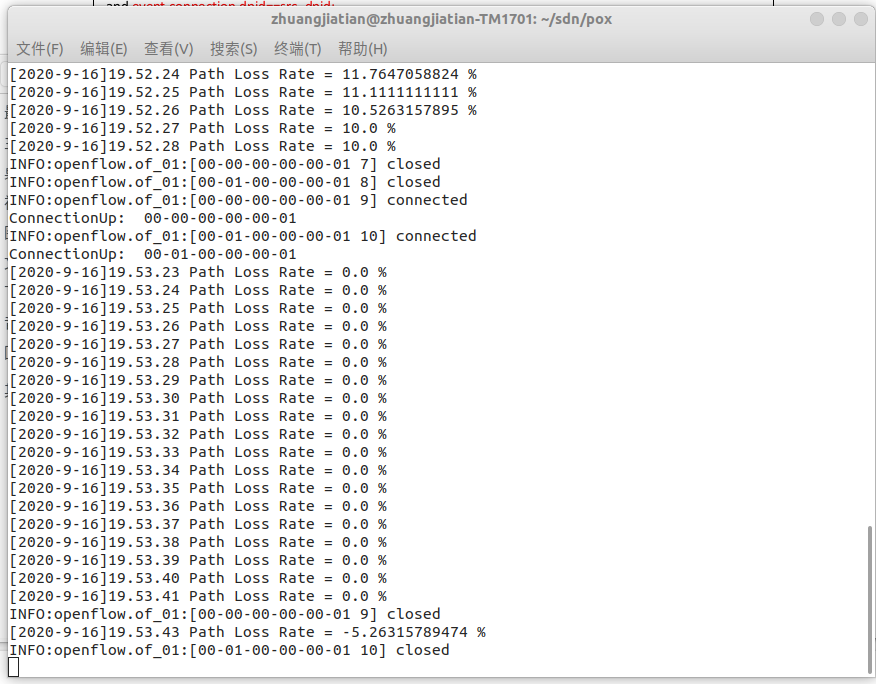
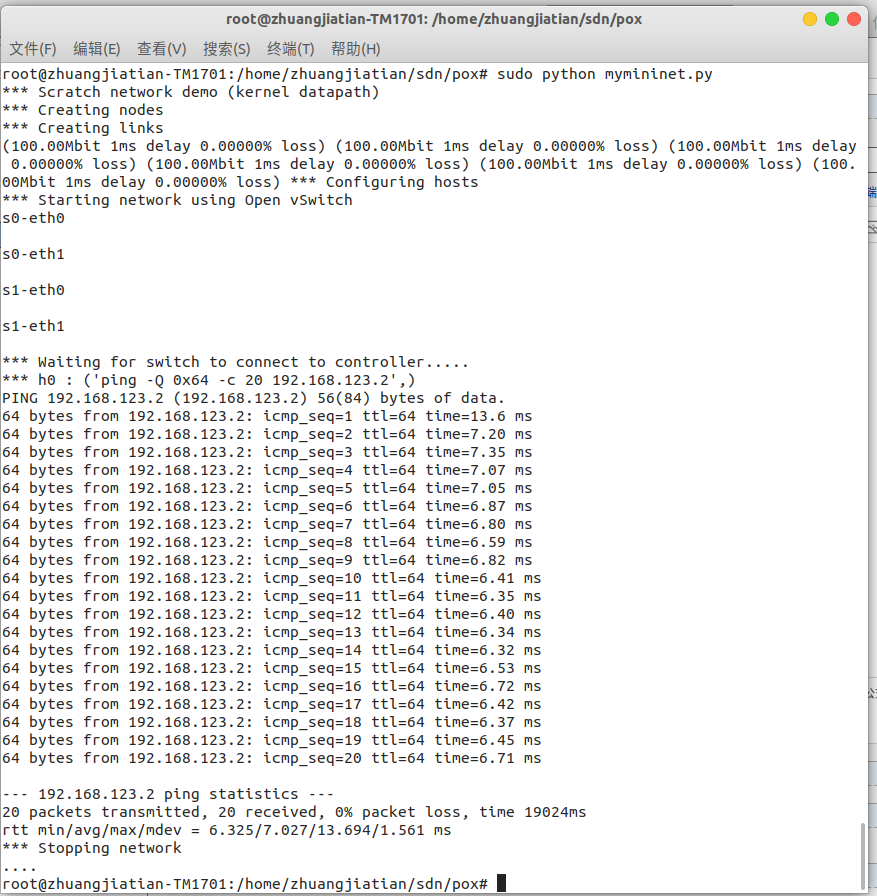
Ping 默认是每 1 秒钟测一次, ping 的结果会显示一个丢包率,这里的丢包率是根据 ping 不通的次数占总次数的百分比计算得到的。上图中由于一共 ping 了 20次,每次都能通,所以丢包率是 0。观察 pox 侧的实时状态更新平均丢包率为 0,结果符合 Mininet 脚本中设置的损耗率,也有可能出现负值,可以认为没有丢包。
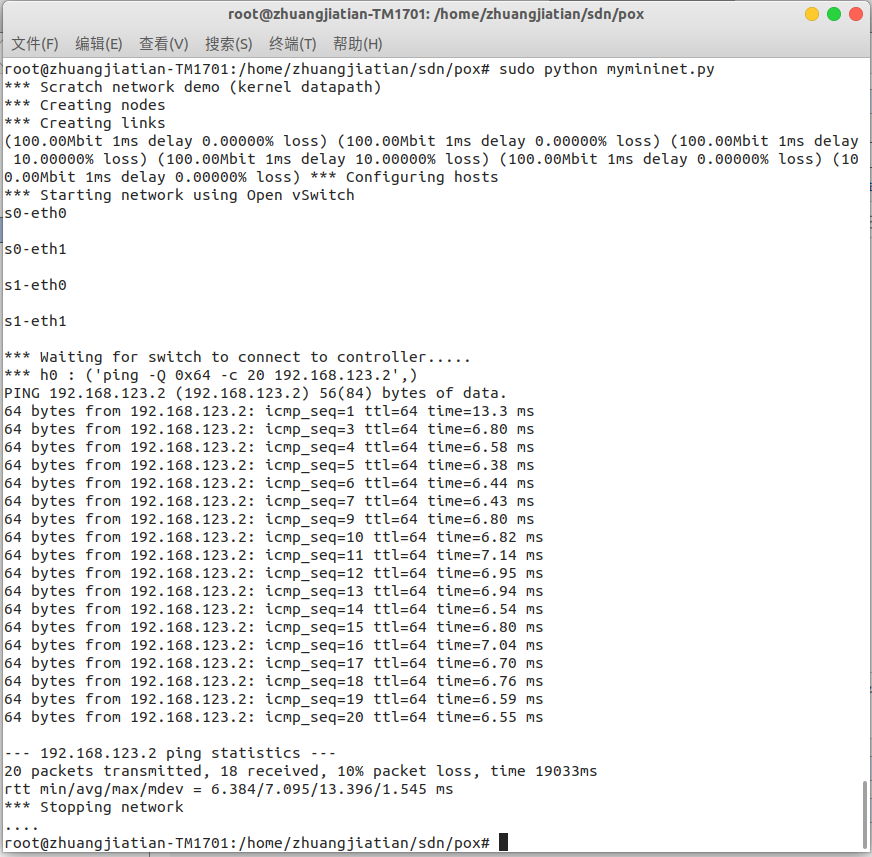
如果修改代码中 s0 和 s1 之间链路的丢包率为 10。
info( "*** Creating links\n" )

linkopts0=dict(bw=100, delay='1ms', loss=0)

linkopts1=dict(bw=100, delay='1ms', loss=10)

link0=TCLink( h0, switch, **linkopts0)

link1 = TCLink( switch, switch1, **linkopts1)

link2 = TCLink( h1, switch1, **linkopts0)
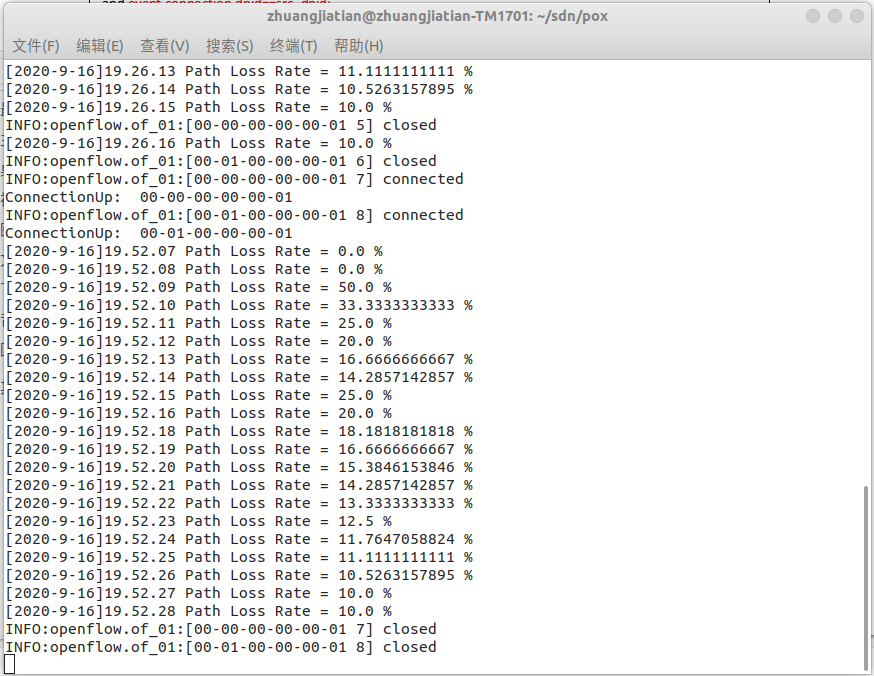
重新运行 Mininet 脚本 mymininet3.py,20 秒时间的 ping 过程中有 icmp_seq 为
2/8 共 2 次 ping 不通,所以丢包率计算为 10%。
四、实验心得
通过本次实验,在实验2的基础上进一步熟悉Mininet自定义拓扑脚本,了解了Mininet安装时自带的POX控制器脚本编写,以及路径损耗率的测试方式。
实验 3:Mininet 实验——测量路径的损耗率的更多相关文章
- Mininet实验 基于Mininet测量路径的损耗率
实验原理 在SDN环境中,控制器可以通过对交换机下发流表操作来控制交换机的转发行为,此外,还可以利用控制器测量路径的损耗率.在本实验中,基于Mininet脚本,设置特定的交换机间的路径损耗速率,然后编 ...
- Mininet系列实验(四):基于Mininet测量路径的损耗率
1 实验目的 熟悉Mininet自定义拓扑脚本的编写与损耗率的设定: 熟悉编写POX脚本,测量路径损耗速率 2 实验原理 在SDN环境中,控制器可以通过对交换机下发流表操作来控制交换机的转发行为,此外 ...
- 实验 3:Mininet 实验——测量路径的损耗率
实验目的 在实验 2 的基础上进一步熟悉 Mininet 自定义拓扑脚本,以及与损耗率相关的设 定:初步了解 Mininet 安装时自带的 POX 控制器脚本编写,测试路径损耗率. 实验任务 h0 向 ...
- SDN实验 3: Mininet 实验——测量路径的损耗率
验 3:Mininet 实验--测量路径的损耗率 一.实验目的 在实验 2 的基础上进一步熟悉 Mininet 自定义拓扑脚本,以及与损耗率相关的设定:初步了解 Mininet 安装时自带的 POX ...
- 基于Mininet测量路径的损耗率
基于Mininet测量路径的损耗率 控制器采用POX,基于OVS仿真 Mininet脚本 创建Node mininet.node Node 创建链路连接 mininet.link TCLink 设置i ...
- 软件定义网络实验记录③--Mininet 实验——测量路径的损耗率
一.实验目的 在实验 2 的基础上进一步熟悉 Mininet 自定义拓扑脚本,以及与损耗率相关的设定: 初步了解 Mininet 安装时自带的 POX 控制器脚本编写,测试路径损耗率. 二.实验任务 ...
- Mininet实验 基于Mininet实现BGP路径挟持攻击实验
参考:基于Mininet实现BGP路径挟持攻击实验 实验目的: 掌握如何mininet内模拟AS. 掌握BGP路径挟持的原理和分析过程. 实验原理: 互联网是由相互连接的自治系统AS组成的,通过一个通 ...
- 软件定义网络实验记录②--Mininet 实验——拓扑的命令脚本生成
一.实验目的 掌握 Mininet 的自定义拓扑生成方法:命令行创建.Python 脚本编写 二.实验任务 通过使用命令行创建.Python 脚本编写生成拓扑,熟悉 Mininet 的基本功能. 三. ...
- 实验 2:Mininet 实验——拓扑的命令脚本生成
一.实验目的 掌握 Mininet 的自定义拓扑生成方法:命令行创建.Python 脚本编写 二.实验任务 通过使用命令行创建.Python 脚本编写生成拓扑,熟悉 Mininet 的基本功能. 三. ...
随机推荐
- MyTerm入选北极代码库计划,喜获「Arctic Code Vault Contributor」勋章
- Kubernetes K8S之资源控制器Daemonset详解
Kubernetes的资源控制器Daemonset详解与示例 主机配置规划 服务器名称(hostname) 系统版本 配置 内网IP 外网IP(模拟) k8s-master CentOS7.7 2C/ ...
- Unity Plugins的使用方法
一.为插件设置平台的方法 unity5之前,是通过把插件搞到对应目录进行区分平台的(比如在build target是ios平台时只把IOS目录的插件build进去),unity5之后提供了设置平台/c ...
- 避免nullpointer 空指针
来自知乎: 一般在服务器返回的数据上我们会做数据合法性检测,所以在api文档上需要注明字段的取值范围,然后客户端根据这个去做数据检测,缺段就直接走数据错误的流程,这个很大程度上避免了不少nullpoi ...
- [BUUOJ记录] [GXYCTF2019]Ping Ping Ping
主要考察RCE的防护绕过,感觉考的还是比较全的 先构造Payload: ?ip=127.0.0.1;ls 看到目录下有两个文件,fuzz一下发现过滤了 空格 / + * ? { } ( ) [ ]等符 ...
- window.location.href跳转无效
window.location.href跳转无效 问题情况 JS中设置window.location.href跳转无效 原因是 a标签的href跳转会执行在window.location. ...
- jenkins iOS自动打包
1.Jenkins配置 采用命令行下载配置Jenkins,防止产生权限问题 1)先安装brew,打开命令行,输入:/usr/bin/ruby -e "$(curl -fsSL https:/ ...
- python模块之----subprocess
例子 >>> subprocess.getstatusoutput('pwd')(0, '/home/ronny')>>> subprocess.getoutput ...
- [LeetCode]66. 加一(数组)
###题目 给定一个由整数组成的非空数组所表示的非负整数,在该数的基础上加一. 最高位数字存放在数组的首位, 数组中每个元素只存储单个数字. 你可以假设除了整数 0 之外,这个整数不会以零开头. 示例 ...
- 尚硅谷阳哥JVM笔记
JVM体系结构 类加载器(快递员): 只负责加载java文件,编译后的class文件在文件开头有特定的文件表示,将class文件字节码内容从硬盘加载到JVM内存中并将这些内容转换成方法区的运行时数据结 ...