
Python GUI--Tkinter实践
之前写了Testlink自动执行程序,现使用Tkinter加上GUI试试,想要实现如下图功能
可以实现通过选择要执行的url及报告url自动执行用例,或可以直接写报告结果内容
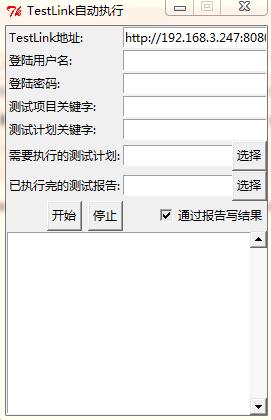

因项目原因,只列出部分代码功能
from Tkinter import *

from SimpleDialog import *

from tkFileDialog import askopenfilename

root = Tk()

root.title("TestLink自动执行")

root.resizable(False, False)   #让窗口不可以缩放

'''

增加变量

'''

addvar=StringVar()

vv=StringVar()

vv.set('已执行完的测试报告:')

v=StringVar()

'''

增加label及text

'''

urladdress=Label(root,text='TestLink地址:')

urladdress.grid(row=0,sticky=W)

address=Entry(root,text='input you text here',textvariable = addvar)

address.grid(row=0,column=1,sticky=E)

user=Label(root,text='登陆用户名:')

user.grid(row=1,sticky=W)

usertext=Entry(root,text='input you user here')

usertext.grid(row=1,column=1,sticky=E)

Label(root,text='登陆密码:').grid(row=2,sticky=W)

password=Entry(root,text='Input you passowrd here')

password.grid(row=2,column=1,sticky=E)

Label(root,text='测试项目关键字:').grid(row=3,sticky=W)

testproject=Entry(root,text='Input you testprojectid here')

testproject.grid(row=3,column=1,sticky=E)

Label(root,text='测试计划关键字:').grid(row=4,sticky=W)

testplan=Entry(root,text='Input you testplanid here')

testplan.grid(row=4,column=1,sticky=E)

planurl=StringVar()

Label(root,text='需要执行的测试计划:').grid(row=5,sticky=W)

testplanurl=Entry(root,text='Input you testplanurl here',textvariable = planurl)

testplanurl.grid(row=5,column=1,sticky=E)

choseplan=Button(root,text='选择')

choseplan.grid(row=5,column=1,sticky=E)

reporturl=StringVar()

report=Label(root,textvariable=vv,text="已执行完的测试报告:")

report.grid(row=6,sticky=W)

reportentry=Entry(root,textvariable = reporturl)

reportentry.grid(row=6,column=1,sticky=E)

chosereport=Button(root,text='选择')

chosereport.grid(row=6,column=1,sticky=E)

addvar.set('http://192.168.3.247:8080/testlink/login.php')

def planopen(event):

    global filename

    filename=askopenfilename()

    if filename=="":

        filename=None

    else:

        root.title("xxxx"+os.path.basename(filename))

        pathdir=os.path.abspath(filename)

        if "http://" not in pathdir:

            pathdir="file:///"+pathdir

        planurl.set(pathdir)

def reportopen(event):

    global filename

    filename=askopenfilename()

    try:

        if filename=="":

            filename=None

        else:

            root.title("xxxx"+os.path.basename(filename))

            pathdir=os.path.abspath(filename)

            if "http://" not in pathdir:

                pathdir="file:///"+pathdir

            reporturl.set(pathdir)

            #return os.path.abspath(filename)

    except Exception,e:

        print e

choseplan.bind("<Button-1>",planopen)

chosereport.bind("<Button-1>",reportopen)

start=Button(root,text='开始')

stop=Button(root,text='停止')

chose=Checkbutton(root,text='通过报告写结果',variable=v,command=callCheckbutton,onvalue="已执行完的测试报告:",offvalue="直接写结果:")

#b2.bind("<Return>", cb2)  #建立事件与响应函数之间的关系,每当产生Return事件后,程序调用cb2

start.grid(row=7)

stop.grid(row=7,sticky=E)

chose.grid(row=7,sticky=E,column=1)

start.bind('<Button-1>', printc)

stop.bind("<Button-1>",execut)

var = StringVar()

lb2 = Listbox(root,  listvariable = var)

s1=Scrollbar(root)

lb2.grid(row=8,columnspan = 2,sticky=E+W)

s1.grid(row=8,columnspan = 2,rowspan=5,sticky=N+E+S)

lb2['yscrollcommand']=s1.set

s1['command']=lb2.yview

root.columnconfigure(0,minsize = 10)

root.mainloop()
Python GUI--Tkinter实践的更多相关文章
- Python GUI - Tkinter tkMessageBox
Python GUI - Tkinter tkMessageBox: tkMessageBox模块用于显示在您的应用程序的消息框.此模块提供了一个功能,您可以用它来显示适当的消息 tkMess ...
- Python GUI编程实践
看完了<python编程实践>对Python的基本语法有了一定的了解,加上认识到python在图形用户界面和数据库支持方面快捷,遂决定动手实践一番. 因为是刚接触Python,对于基本的数 ...
- Python GUI - tkinter
目录: Tkinter 组件 标准属性 几何管理 代码实例: 1. Label & Button 2. Entry & Text 3.Listbox列表 4.Radiobutton单选 ...
- python gui tkinter快速入门教程 | python tkinter tutorial
本文首发于个人博客https://kezunlin.me/post/d5c57f56/,欢迎阅读最新内容! python tkinter tutorial Guide main ui messageb ...
- Python GUI——tkinter菜鸟编程(中)
8. Radiobutton 选项按钮:可以用鼠标单击方式选取,一次只能有一个选项被选取. Radiobutton(父对象,options,-) 常用options参数: anchor,bg,bitm ...
- python gui tkinter用法杂记
1.treeview遍历 iids = tree.selection() t = tree.get_children() for i in t: print(tree.item(i,'values') ...
- Python GUI tkinter 学习笔记(一)
第一个python程序 #!/usr/bin/python # -*- coding: UTF-8 -*- from Tkinter import * # 创建一个根窗口,其余的控件都在这个窗口之上 ...
- Python GUI tkinter 学习笔记(三)
草稿 # -*- coding: utf-8 -*- from Tkinter import * root = Tk() Label(root, text = "First").g ...
- Python GUI tkinter 学习笔记(二)
第二个程序 # -*- coding: utf-8 -*- from Tkinter import * class App: def __init__(self, master): # frame 创 ...
- python GUI实战项目——tkinter库的简单实例
一.项目说明: 本次通过实现一个小的功能模块对Python GUI进行实践学习.项目来源于软件制造工程的作业.记录在这里以复习下思路和总结编码过程.所有的源代码和文件放在这里: 链接: https:/ ...
随机推荐
- 02 Architecture Overview
本章提要---------------------------------------------arthiecture, and some componentconnect to oracle这一章 ...
- 丰富您设计的10个CSS3效果库
Magic CSS3 Animations Magic CSS3 Animations是一个CSS3动画包,拥有一些特效可以你的Web项目中免费使用.拥有像金光闪闪,角度,旋转,炸弹等特殊效果.使用简 ...
- VMware ESXi 不支持NTFS格式的USB外接硬盘
本来想搞直通USB外接大容量硬盘(希捷Seagate Backup+ Hub WH 8T),实现在同一部ESXi下,直接将NAS的数据转移到外接硬盘.结果发现虚拟机下的win server系统识别不了 ...
- 关于Cocos2d-x有些头文件无法引入或者类显示无法打开
选中工程右键“属性”->"配置属性“->"c/c++"->"常规”->"附加包含目录"中添加“”$(EngineRo ...
- VC dimension(Vapnik-Chervonenkis dimension)
二维平面的线性分类器的VC维讨论:http://www.tuicool.com/articles/JjaMfe VC维介绍:http://blog.csdn.net/lucylove3943/arti ...
- python print 不换行
#!/usr/bin/python # -*- coding: UTF- -*- ,): ,i+): print "%d * %d = %2d\t" % (j, i, i*j), ...
- SSH远程登录其他机器
常用格式:ssh [-l login_name] [-p port] [user@]hostname更详细的可以用ssh -h查看. 不指定用户: ssh 192.168.0.11 指定用户: ssh ...
- C#中的程序集和命名空间
C#中的程序集和命名空间 如果说命名空间是类库的逻辑组织形式,那么程序集就是类库的物理组织形式.只有同时指定类型所在的命名空间及实现该类型的程序集,才能完全限定该类型.<精通.NET核心技术-- ...
- FFMPEG的解码后的数据格式
这两天在阅读电视转发服务器中的流媒体底层库的源码时,在看到显示部分的时候,遇到了一些疑问: 就是在用d3d做显示时候,我们显示的数据格式,指定为yv12,对于YV12的数据格式在内存中的分布,可以参考 ...
- js得到当前文档的编码:document.characterSet
<!DOCTYPE HTML> <html > <head> <meta charset="utf-8"> <!--meta ...