
【Python爬虫】BeautifulSoup网页解析库
BeautifulSoup解析 HTML或XML
阅读目录
- 初识Beautiful Soup
- Beautiful Soup库的4种解析器
- Beautiful Soup类的基本元素
- 基本使用
- 标签选择器
- 节点操作
- 标准选择器
- find_all( name , attrs , recursive , text , **kwargs )
- find( name , attrs , recursive , text , **kwargs )
- CSS选择器
- 实例:中国大学排名爬虫
初识Beautiful Soup
官方文档:https://www.crummy.com/software/BeautifulSoup/bs4/doc/#
中文文档:https://www.crummy.com/software/BeautifulSoup/bs4/doc/index.zh.html
Beautiful Soup 是一个可以从HTML或XML文本中提取数据的Python库,它能对HTML、XML格式进行解析成树形结构并提取相关信息。
Beautiful Soup库是一个灵活又方便的网页解析库,处理高效,支持多种解析库(后面会介绍),利用它不用编写正则表达式即可方便地实现网页信息的提取。
安装
Beautiful Soup 3 目前已经停止开发,推荐在现在的项目中使用Beautiful Soup 4,安装方法:
pip install beautifulsoup4
Beautiful Soup库的4种解析器
| 解析器 | 使用方法 | 优势 | 劣势 |
|---|---|---|---|
| Python标准库 | BeautifulSoup(markup, "html.parser") | Python的内置标准库、执行速度适中 、文档容错能力强 | Python 2.7.3 or 3.2.2)前的版本中文容错能力差 |
| lxml HTML 解析器 | BeautifulSoup(markup, "lxml") | 速度快、文档容错能力强 | 需要安装C语言库 |
| lxml XML 解析器 | BeautifulSoup(markup, "xml") | 速度快、唯一支持XML的解析器 | 需要安装C语言库 |
| html5lib | BeautifulSoup(markup, "html5lib") | 最好的容错性、以浏览器的方式解析文档、生成HTML5格式的文档 | 速度慢、不依赖外部扩展 |
如果仅是想要解析HTML文档,只要用文档创建 BeautifulSoup 对象就可以了。Beautiful Soup会自动选择一个解析器来解析文档.但是还可以通过参数指定使用那种解析器来解析当前文档。BeautifulSoup 第一个参数应该是要被解析的文档字符串或是文件句柄,第二个参数用来标识怎样解析文档.如果第二个参数为空,那么Beautiful Soup根据当前系统安装的库自动选择解析器,解析器的优先数序: lxml, html5lib, Python标准库(python自带的解析库).
安装解析器库:
pip install html5lib

pip  install lxml
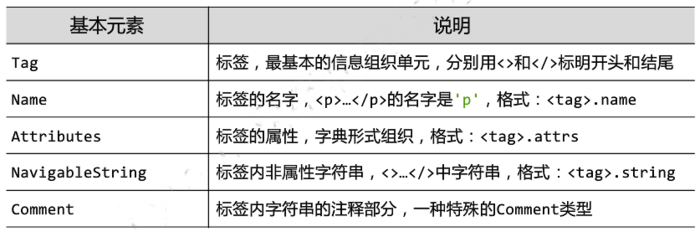
Beautiful Soup类的基本元素
基本使用
容错处理,文档的容错能力指的是在html代码不完整的情况下,使用该模块可以识别该错误。
使用BeautifulSoup解析上述代码,能够得到一个 BeautifulSoup 的对象,并能按照 标准的缩进格式结构输出
html = """

<html><head><title>The Dormouse's story</title></head>

<body>

<p class="title" name="dromouse"><b>The Dormouse's story</b></p>

<p class="story">Once upon a time there were three little sisters; and their names were

<a href="http://example.com/elsie" class="sister" id="link1"><!-- Elsie --></a>,

<a href="http://example.com/lacie" class="sister" id="link2">Lacie</a> and

<a href="http://example.com/tillie" class="sister" id="link3">Tillie</a>;

and they lived at the bottom of a well.</p>

<p class="story">...</p>

"""

from bs4 import BeautifulSoup

soup = BeautifulSoup(html, 'lxml')

print(soup.prettify())  #处理好缩进,结构化显示

print(soup.title.string)
<html>

 <head>

  <title>

   The Dormouse's story

  </title>

 </head>

 <body>

  <p class="title" name="dromouse">

   <b>

    The Dormouse's story

   </b>

  </p>

  <p class="story">

   Once upon a time there were three little sisters; and their names were

   <a class="sister" href="http://example.com/elsie" id="link1">

    <!-- Elsie -->

   </a>

   ,

   <a class="sister" href="http://example.com/lacie" id="link2">

    Lacie

   </a>

   and

   <a class="sister" href="http://example.com/tillie" id="link3">

    Tillie

   </a>

   ;

and they lived at the bottom of a well.

  </p>

  <p class="story">

   ...

  </p>

 </body>

</html>

The Dormouse's story
输出结果
标签选择器
选择标签元素(存在多个时取第一个)
获取标签名称 + 获取标签 + 获取标签内容 + 获取标签属性
from bs4 import BeautifulSoup

import requests

html = """

<html><head><title>The Dormouse's story</title></head>

<body>

<p class="title" name="dromouse"><b>The is pppp</b></p>

<p class="story">Once upon a time there were three little sisters; and their names were

<a href="http://example.com/elsie" class="sister" id="link1"><!-- Elsie --></a>,

<a href="http://example.com/lacie" class="sister" id="link2">Lacie</a> and

<a href="http://example.com/tillie" class="sister" id="link3">Tillie</a>;

and they lived at the bottom of a well.</p>

<p class="story">...</p>

"""

soup = BeautifulSoup(html, 'lxml')

print(soup.title)      #获取改标签 <title>The Dormouse's story</title>

print(soup.title.name)      #获取标签名

print(soup.title.text)      #获取标签内容

print(soup.p.text)

print(soup.p.string)

dic = soup.p.attrs     #获取 p标签所有属性返回一个字典结构

print(dic)     #获取 p标签所有属性返回一个字典结构

print(dic["name"])

print(soup.p.attrs["class"])    #获取指定属性值,返回列表

print(soup.p["class"])
打印输出:
<title>The Dormouse's story</title>

title

The Dormouse's story

The is pppp

The is pppp

{'class': ['title'], 'name': 'dromouse'}

dromouse

['title']

['title']
标签嵌套选择
html = """

<html><head><title>The Dormouse's story</title></head>

<body>

<div class="title" name="dromouse"><b class='bb bcls xiong'>The Dormouse's story</b></div>

<p class="story">Once upon a time there were three little sisters; and their names were

<a href="http://example.com/elsie" class="sister" id="link1"><!-- Elsie --></a>,

<a href="http://example.com/lacie" class="sister" id="link2">Lacie</a> and

<a href="http://example.com/tillie" class="sister" id="link3">Tillie</a>;

and they lived at the bottom of a well.</p>

<p class="story">...</p>

"""

soup = BeautifulSoup(html, 'lxml')

print(soup.div.b['class'])      #标签嵌套选择

print(soup.p.stripped_strings)      #<generator object stripped_strings at 0x000002C7CC772830>

print(list(soup.p.stripped_strings))

print(soup.p.text)
打印输出:
['bb', 'bcls', 'xiong']

<generator object stripped_strings at 0x000002471D323830>

['Once upon a time there were three little sisters; and their names were', ',', 'Lacie', 'and', 'Tillie', ';\nand they lived at the bottom of a well.']

Once upon a time there were three little sisters; and their names were

,

Lacie and

Tillie;

and they lived at the bottom of a well.
节点操作


子节点和子孙节点
对于一个标签的儿子节点不仅包括标签节点,也包括字符串节点,空格表示为'\n'
html = """

<html>

    <head>

        <title>The Dormouse's story</title>

    </head>

    <body>

        <p class="story">

            Once upon a time there were three little sisters; and their names were

            <a href="http://example.com/elsie" class="sister" id="link1">

                <span>Elsie</span>

            </a>

            <a href="http://example.com/lacie" class="sister" id="link2">Lacie</a>

            and

            <a href="http://example.com/tillie" class="sister" id="link3">Tillie</a>

            and they lived at the bottom of a well.

        </p>

        <p class="story">...</p>

"""

soup = BeautifulSoup(html, 'lxml')

print(soup.p.contents)      #子节点列表,将<p>所有子节点存在列表中

print("======================================================================>")

print(soup.p.children)      #子节点的可迭代类型,<list_iterator object at 0x0000029154DF7FD0>

for i, child in enumerate(soup.p.children):

    print(i, str(child).strip())        #child 是bs4.element 对象

print("======================================================================>")

print(soup.p.descendants)       #子孙节点的迭代类型,<generator object descendants at 0x000001C7583D2888>

for i, child in enumerate(soup.p.descendants):

    print(i, child)
打印输出:
['\n            Once upon a time there were three little sisters; and their names were\n            ', <a class="sister" href="http://example.com/elsie" id="link1">

<span>Elsie</span>

</a>, '\n', <a class="sister" href="http://example.com/lacie" id="link2">Lacie</a>, '\n            and\n            ', <a class="sister" href="http://example.com/tillie" id="link3">Tillie</a>, '\n            and they lived at the bottom of a well.\n        ']

======================================================================>

<list_iterator object at 0x000001C2E2AB6EF0>

0 Once upon a time there were three little sisters; and their names were

1 <a class="sister" href="http://example.com/elsie" id="link1">

<span>Elsie</span>

</a>

2

3 <a class="sister" href="http://example.com/lacie" id="link2">Lacie</a>

4 and

5 <a class="sister" href="http://example.com/tillie" id="link3">Tillie</a>

6 and they lived at the bottom of a well.

======================================================================>

<generator object descendants at 0x000001C2E2AA3830>

0

            Once upon a time there were three little sisters; and their names were

1 <a class="sister" href="http://example.com/elsie" id="link1">

<span>Elsie</span>

</a>

2

3 <span>Elsie</span>

4 Elsie

5

6

7 <a class="sister" href="http://example.com/lacie" id="link2">Lacie</a>

8 Lacie

9

            and

10 <a class="sister" href="http://example.com/tillie" id="link3">Tillie</a>

11 Tillie

12

            and they lived at the bottom of a well.
父节点和祖先节点
html = """

<html>

    <head>

        <title>The Dormouse's story</title>

    </head>

    <body>

        <p class="story">

            Once upon a time there were three little sisters; and their names were

            <a href="http://example.com/elsie" class="sister" id="link1">

                <span>Elsie</span>

            </a>

            <a href="http://example.com/lacie" class="sister" id="link2">Lacie</a>

            and

            <a href="http://example.com/tillie" class="sister" id="link3">Tillie</a>

            and they lived at the bottom of a well.

        </p>

        <p class="story">...</p>

"""

soup = BeautifulSoup(html, 'lxml')

print(soup.a.parent)

print("========================================================================>")

print(soup.a.parents)   #祖先节点,返回可迭代类型

for item in soup.a.parents:

    print(item)
打印输出:
<p class="story">

            Once upon a time there were three little sisters; and their names were

            <a class="sister" href="http://example.com/elsie" id="link1">

<span>Elsie</span>

</a>

<a class="sister" href="http://example.com/lacie" id="link2">Lacie</a>

            and

            <a class="sister" href="http://example.com/tillie" id="link3">Tillie</a>

            and they lived at the bottom of a well.

        </p>

========================================================================>

<generator object parents at 0x000001A078752830>

<p class="story">

            Once upon a time there were three little sisters; and their names were

            <a class="sister" href="http://example.com/elsie" id="link1">

<span>Elsie</span>

</a>

<a class="sister" href="http://example.com/lacie" id="link2">Lacie</a>

            and

            <a class="sister" href="http://example.com/tillie" id="link3">Tillie</a>

            and they lived at the bottom of a well.

        </p>

<body>

<p class="story">

            Once upon a time there were three little sisters; and their names were

            <a class="sister" href="http://example.com/elsie" id="link1">

<span>Elsie</span>

</a>

<a class="sister" href="http://example.com/lacie" id="link2">Lacie</a>

            and

            <a class="sister" href="http://example.com/tillie" id="link3">Tillie</a>

            and they lived at the bottom of a well.

        </p>

<p class="story">...</p>

</body>

<html>

<head>

<title>The Dormouse's story</title>

</head>

<body>

<p class="story">

            Once upon a time there were three little sisters; and their names were

            <a class="sister" href="http://example.com/elsie" id="link1">

<span>Elsie</span>

</a>

<a class="sister" href="http://example.com/lacie" id="link2">Lacie</a>

            and

            <a class="sister" href="http://example.com/tillie" id="link3">Tillie</a>

            and they lived at the bottom of a well.

        </p>

<p class="story">...</p>

</body></html>

<html>

<head>

<title>The Dormouse's story</title>

</head>

<body>

<p class="story">

            Once upon a time there were three little sisters; and their names were

            <a class="sister" href="http://example.com/elsie" id="link1">

<span>Elsie</span>

</a>

<a class="sister" href="http://example.com/lacie" id="link2">Lacie</a>

            and

            <a class="sister" href="http://example.com/tillie" id="link3">Tillie</a>

            and they lived at the bottom of a well.

        </p>

<p class="story">...</p>

</body></html>
兄弟节点
html = """

<html>

    <head>

        <title>The Dormouse's story</title>

    </head>

    <body>

        <p class="story">

            Once upon a time there were three little sisters; and their names were

            <a href="http://example.com/elsie" class="sister" id="link1">

                <span>Elsie</span>

            </a>

            <a href="http://example.com/lacie" class="sister" id="link2">Lacie</a>

            and

            <a href="http://example.com/tillie" class="sister" id="link3">Tillie</a>

            and they lived at the bottom of a well.

        </p>

        <p class="story">...</p>

"""

soup = BeautifulSoup(html, 'lxml')

print(list(enumerate(soup.a.next_sibling)))     #下一个兄弟节点

print(list(enumerate(soup.a.next_siblings)))       #下面所有的兄弟节点

print(list(enumerate(soup.a.previous_sibling)))     #上一个兄弟节点

print(list(enumerate(soup.a.previous_siblings)))    #上面所有的兄弟节点
打印输出:
[(0, '\n')]

[(0, '\n'), (1, <a class="sister" href="http://example.com/lacie" id="link2">Lacie</a>), (2, '\n            and\n            '), (3, <a class="sister" href="http://example.com/tillie" id="link3">Tillie</a>), (4, '\n            and they lived at the bottom of a well.\n        ')]

[(0, '\n'), (1, ' '), (2, ' '), (3, ' '), (4, ' '), (5, ' '), (6, ' '), (7, ' '), (8, ' '), (9, ' '), (10, ' '), (11, ' '), (12, ' '), (13, 'O'), (14, 'n'), (15, 'c'), (16, 'e'), (17, ' '), (18, 'u'), (19, 'p'), (20, 'o'), (21, 'n'), (22, ' '), (23, 'a'), (24, ' '), (25, 't'), (26, 'i'), (27, 'm'), (28, 'e'), (29, ' '), (30, 't'), (31, 'h'), (32, 'e'), (33, 'r'), (34, 'e'), (35, ' '), (36, 'w'), (37, 'e'), (38, 'r'), (39, 'e'), (40, ' '), (41, 't'), (42, 'h'), (43, 'r'), (44, 'e'), (45, 'e'), (46, ' '), (47, 'l'), (48, 'i'), (49, 't'), (50, 't'), (51, 'l'), (52, 'e'), (53, ' '), (54, 's'), (55, 'i'), (56, 's'), (57, 't'), (58, 'e'), (59, 'r'), (60, 's'), (61, ';'), (62, ' '), (63, 'a'), (64, 'n'), (65, 'd'), (66, ' '), (67, 't'), (68, 'h'), (69, 'e'), (70, 'i'), (71, 'r'), (72, ' '), (73, 'n'), (74, 'a'), (75, 'm'), (76, 'e'), (77, 's'), (78, ' '), (79, 'w'), (80, 'e'), (81, 'r'), (82, 'e'), (83, '\n'), (84, ' '), (85, ' '), (86, ' '), (87, ' '), (88, ' '), (89, ' '), (90, ' '), (91, ' '), (92, ' '), (93, ' '), (94, ' '), (95, ' ')]

[(0, '\n            Once upon a time there were three little sisters; and their names were\n            ')]
标准选择器 find/find_all(* * * * *)
基于bs4库的HTML内容查找方法
<>.find_all(name,attrs,recursive,text,**kwargs)  # 返回一个列表类型,存储查找的结果

name      对标签名称的检索字符串

attrs     对标签属性值的检索字符串,可标注属性检索

recursive 是否对子孙全部搜索,默认True

text      对文本内容进行检索
其他的 find 方法:

find_all( name , attrs , recursive , text , **kwargs )
可根据标签名、属性、内容查找文档
name
html='''

<div class="panel">

    <div class="panel-heading">

        <h4>Hello</h4>

    </div>

    <div class="panel-body">

        <ul class="list" id="list-1">

            <li class="element">Foo</li>

            <li class="element">Bar</li>

            <li class="element">Jay</li>

        </ul>

        <ul class="list list-small" id="list-2">

            <li class="element">Foo</li>

            <li class="element">Bar</li>

        </ul>

    </div>

</div>

'''

from bs4 import BeautifulSoup

soup = BeautifulSoup(html, 'lxml')

print(soup.find_all('ul'))

print(type(soup.find_all('ul')[0]))
[<ul class="list" id="list-1">

<li class="element">Foo</li>

<li class="element">Bar</li>

<li class="element">Jay</li>

</ul>, <ul class="list list-small" id="list-2">

<li class="element">Foo</li>

<li class="element">Bar</li>

</ul>]

<class 'bs4.element.Tag'>
html='''

<div class="panel">

    <div class="panel-heading">

        <h4>Hello</h4>

    </div>

    <div class="panel-body">

        <ul class="list" id="list-1">

            <li class="element">Foo</li>

            <li class="element">Bar</li>

            <li class="element">Jay</li>

        </ul>

        <ul class="list list-small" id="list-2">

            <li class="element">Foo</li>

            <li class="element">Bar</li>

        </ul>

    </div>

</div>

'''

from bs4 import BeautifulSoup

soup = BeautifulSoup(html, 'lxml')

for ul in soup.find_all('ul'):

    print(ul.find_all('li'))
[<li class="element">Foo</li>, <li class="element">Bar</li>, <li class="element">Jay</li>]

[<li class="element">Foo</li>, <li class="element">Bar</li>]
属性attrs
html='''

<div class="panel">

    <div class="panel-heading">

        <h4>Hello</h4>

    </div>

    <div class="panel-body">

        <ul class="list" id="list-1" name="elements">

            <li class="element">Foo</li>

            <li class="element">Bar</li>

            <li class="element">Jay</li>

        </ul>

        <ul class="list2 list-small" id="list-2">

            <li class="element">Foo</li>

            <li class="element">Bar</li>

        </ul>

    </div>

</div>

'''

soup = BeautifulSoup(html, 'lxml')

print(soup.find_all(attrs={'id': 'list-1'}))        #推荐这种写法

print(soup.find_all(id="list-1"))         #类似于**kwargs传值,与上一种写法效果相同

print(soup.find_all(attrs={'class': 'list-small'}))

print(soup.find_all(class_="list2"))
打印输出:
[<ul class="list" id="list-1" name="elements">

<li class="element">Foo</li>

<li class="element">Bar</li>

<li class="element">Jay</li>

</ul>]

[<ul class="list" id="list-1" name="elements">

<li class="element">Foo</li>

<li class="element">Bar</li>

<li class="element">Jay</li>

</ul>]

[<ul class="list2 list-small" id="list-2">

<li class="element">Foo</li>

<li class="element">Bar</li>

</ul>]

[<ul class="list2 list-small" id="list-2">

<li class="element">Foo</li>

<li class="element">Bar</li>

</ul>]
text
html='''

<div class="panel">

    <div class="panel-heading">

        <h4>Hello</h4>

    </div>

    <div class="panel-body">

        <ul class="list" id="list-1">

            <li class="element">Foo</li>

            <li class="element">Bar</li>

            <li class="element">Jay</li>

        </ul>

        <ul class="list list-small" id="list-2">

            <li class="element">Foo</li>

            <li class="element">Bar</li>

        </ul>

    </div>

</div>

'''

from bs4 import BeautifulSoup

soup = BeautifulSoup(html, 'lxml')

print(soup.find_all(text='Foo'))
['Foo', 'Foo']
find( name , attrs , recursive , text , **kwargs )
find返回单个元素,find_all返回所有元素
html='''

<div class="panel">

    <div class="panel-heading">

        <h4>Hello</h4>

    </div>

    <div class="panel-body">

        <ul class="list" id="list-1">

            <li class="element">Foo</li>

            <li class="element">Bar</li>

            <li class="element">Jay</li>

        </ul>

        <ul class="list list-small" id="list-2">

            <li class="element">Foo</li>

            <li class="element">Bar</li>

        </ul>

    </div>

</div>

'''

from bs4 import BeautifulSoup

soup = BeautifulSoup(html, 'lxml')

print(soup.find('ul'))

print(type(soup.find('ul')))

print(soup.find('page'))
<ul class="list" id="list-1">

<li class="element">Foo</li>

<li class="element">Bar</li>

<li class="element">Jay</li>

</ul>

<class 'bs4.element.Tag'>

None
find_parents() find_parent()
find_parents()返回所有祖先节点,find_parent()返回直接父节点。
find_next_siblings() find_next_sibling()
find_next_siblings()返回后面所有兄弟节点,find_next_sibling()返回后面第一个兄弟节点。
find_previous_siblings() find_previous_sibling()
find_previous_siblings()返回前面所有兄弟节点,find_previous_sibling()返回前面第一个兄弟节点。
find_all_next() find_next()
find_all_next()返回节点后所有符合条件的节点, find_next()返回第一个符合条件的节点
find_all_previous() 和 find_previous()
find_all_previous()返回节点后所有符合条件的节点, find_previous()返回第一个符合条件的节点
CSS选择器(* * * * * )
通过select()直接传入CSS选择器即可完成选择
html='''

<div class="panel">

    <div class="panel-heading">

        <h4>Hello</h4>

    </div>

    <div class="panel-heading">

        <h4>World</h4>

    </div>

    <div class="panel-body">

        <ul class="list" id="list-1">

            <li class="element">Foo</li>

            <li class="element">Bar</li>

            <li class="element">Jay</li>

        </ul>

        <ul class="list list-small" id="list-2">

            <li class="element">Foo</li>

            <li class="element">Bar</li>

        </ul>

    </div>

</div>

'''

soup = BeautifulSoup(html, 'lxml')

print(soup.select('.panel .panel-heading'))

print(soup.select('ul li'))

print(soup.select('#list-2 .element'))

print(type(soup.select('ul')[0]))
输出结果:
[<div class="panel-heading">

<h4>Hello</h4>

</div>, <div class="panel-heading">

<h4>World</h4>

</div>]

[<li class="element">Foo</li>, <li class="element">Bar</li>, <li class="element">Jay</li>, <li class="element">Foo</li>, <li class="element">Bar</li>]

[<li class="element">Foo</li>, <li class="element">Bar</li>]

<class 'bs4.element.Tag'>
html='''

<div class="panel">

    <div class="panel-heading">

        <h4>Hello</h4>

    </div>

    <div class="panel-body">

        <ul class="list" id="list-1">

            <li class="element">Foo</li>

            <li class="element">Bar</li>

            <li class="element">Jay</li>

        </ul>

        <ul class="list list-small" id="list-2">

            <li class="element">Foo</li>

            <li class="element">Bar</li>

        </ul>

    </div>

</div>

'''

from bs4 import BeautifulSoup

soup = BeautifulSoup(html, 'lxml')

for ul in soup.select('ul'):

    print(ul.select('li'))
[<li class="element">Foo</li>, <li class="element">Bar</li>, <li class="element">Jay</li>]

[<li class="element">Foo</li>, <li class="element">Bar</li>]
获取属性
ul.attrs['id']
ul['id']
html='''

<div class="panel">

    <div class="panel-heading">

        <h4>Hello</h4>

    </div>

    <div class="panel-body">

        <ul class="list" id="list-1">

            <li class="element">Foo</li>

            <li class="element">Bar</li>

            <li class="element">Jay</li>

        </ul>

        <ul class="list list-small" id="list-2">

            <li class="element">Foo</li>

            <li class="element">Bar</li>

        </ul>

    </div>

</div>

'''

from bs4 import BeautifulSoup

soup = BeautifulSoup(html, 'lxml')

for ul in soup.select('ul'):

    print(ul['id'])

    print(ul.attrs['id'])
list-1

list-1

list-2

list-2
获取内容
li.get_text()
html='''

<div class="panel">

    <div class="panel-heading">

        <h4>Hello</h4>

    </div>

    <div class="panel-body">

        <ul class="list" id="list-1">

            <li class="element">Foo</li>

            <li class="element">Bar</li>

            <li class="element">Jay</li>

        </ul>

        <ul class="list list-small" id="list-2">

            <li class="element">Foo</li>

            <li class="element">Bar</li>

        </ul>

    </div>

</div>

'''

from bs4 import BeautifulSoup

soup = BeautifulSoup(html, 'lxml')

for li in soup.select('li'):

    print(li.get_text())
Foo

Bar

Jay

Foo

Bar
总结:
- 推荐使用lxml解析库,必要时使用html.parser
- 标签选择筛选功能弱但是速度快
- 建议使用find()、find_all() 查询匹配单个结果或者多个结果
- 如果对CSS选择器熟悉建议使用select()
实例:中国大学排名爬虫
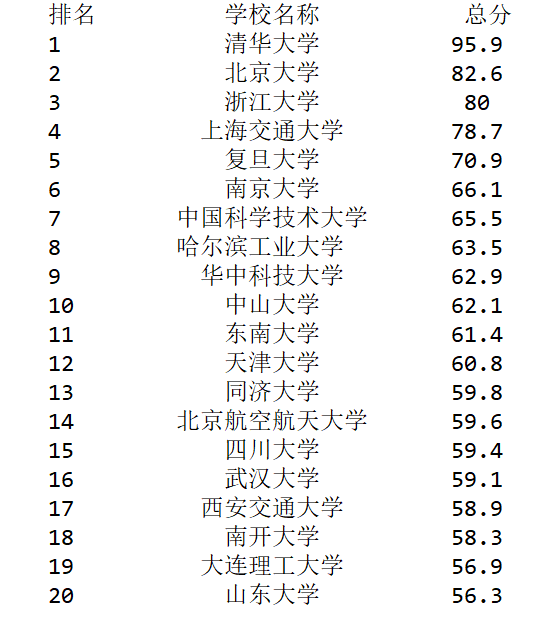
步骤1:从网络上获取大学排名网页内容getHTMLText()
步骤2:提取网页内容中信息到合适的数据结构fillUnivList()
步骤3:利用数据结构展示并输出结果printUnivLise()
import requests

from bs4 import BeautifulSoup

import bs4

def getHTMLText(url):

    try:

        r = requests.get(url, timeout=30)

        r.raise_for_status()

        r.encoding = r.apparent_encoding

        return r.text

    except:

        return "error"

def fillUnivList(ulist, html):

    soup = BeautifulSoup(html, "html.parser")

    for tr in soup.find('tbody').children:

        if isinstance(tr, bs4.element.Tag):  # 过滤掉非标签类型

            tds = tr('td')

            ulist.append([tds[0].string, tds[1].string, tds[3].string])

# 中文对齐问题的解决:

# 采用中文字符的空格填充 chr(12288)

def printUnivList(ulist, num):

    tplt = "{0:^10}\t{1:{3}^10}\t{2:^10}"

    print(tplt.format("排名", "学校名称", "总分", chr(12288)))

    for i in range(num):

        u = ulist[i]

        print(tplt.format(u[0], u[1], u[2], chr(12288)))

def main():

    uinfo = []

    url = 'http://www.zuihaodaxue.cn/zuihaodaxuepaiming2019.html'

    html = getHTMLText(url)

    fillUnivList(uinfo, html)

    printUnivList(uinfo, 20)

if __name__ == '__main__':

    main()
代码
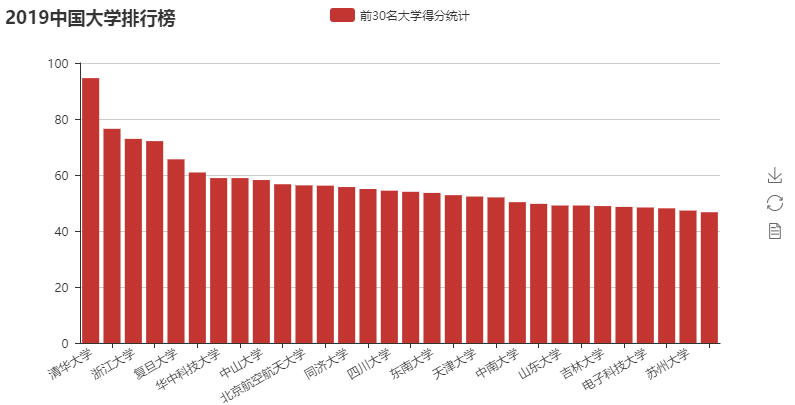
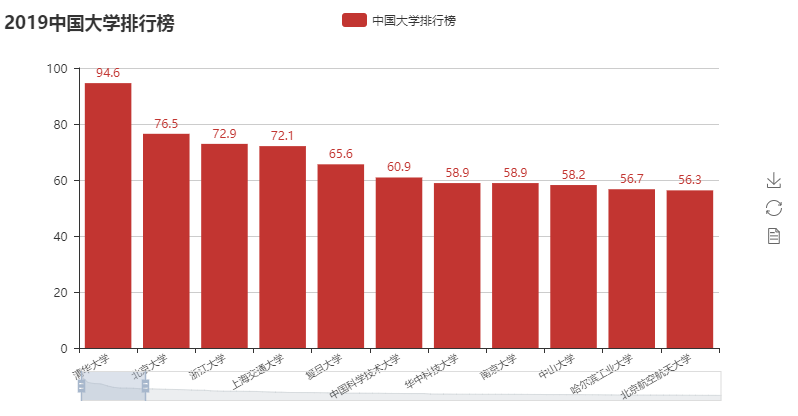
采集到的数据使用pyecharts进行数据可视化展示
import requests,json,re,bs4

from bs4 import BeautifulSoup

header = {'User-Agent': 'Mozilla/5.0 (Windows NT 10.0; WOW64) AppleWebKit/537.36 (KHTML, like Gecko) Chrome/69.0.3472.3 Safari/537.36'}

def getHtmlText(url):

    try:

        ret = requests.get(url , headers=header , timeout=30)

        ret.encoding =  "utf8"

        ret.raise_for_status()

        return ret.text

    except:

        return None

def fillUnivList(ulist,html):

    soup = BeautifulSoup(html,"lxml")

    for tr in soup.tbody.children:

        if isinstance(tr, bs4.element.Tag):     #判断tr是否是bs4.element.Tag类型

            tds = tr("td")

            # print(tds)

            ulist.append([tds[0].string,tds[1].string,tds[2].string,tds[3].string])

# 中文对齐问题的解决:

# 采用中文字符的空格填充 chr(12288)

def printUnivList(ulist, num):

    tplt = "{0:^10}\t{1:{3}^10}\t{2:^10}"

    print(tplt.format("排名", "学校名称", "总分", chr(12288)))

    for i in range(num):

        u = ulist[i]

        print(tplt.format(u[0], u[1], u[3], chr(12288)))

#pyecharts数据可视化展示

def showData(ulist,num):

    from pyecharts import Bar

    attrs = []

    vals = []

    for i in range(num):

        attrs.append(ulist[i][1])

        vals.append(ulist[i][3])

    bar = Bar("2019中国大学排行榜")

    bar.add(

        "中国大学排行榜",

        attrs,

        vals,

        is_datazoom_show=True,

        datazoom_type="both",

        datazoom_range=[0, 10],

        xaxis_rotate=30,

        xaxis_label_textsize=8,

        is_label_show=True,

    )

    bar.render("2019中国大学排行榜4.html")

def showData_funnel(ulist,num):

    from pyecharts import Funnel

    attrs = []

    vals = []

    for i in range(num):

        attrs.append(ulist[i][1])

        vals.append(ulist[i][3])

    funnel = Funnel(width=1000,height=800)

    funnel.add(

        "大学排行榜",

        attrs,

        vals,

        is_label_show=True,

        label_pos="inside",

        label_text_color="#fff",

    )

    funnel.render("2019中国大学排行榜4.html")

def main():

    uinfo = []

    url = 'http://www.zuihaodaxue.cn/zuihaodaxuepaiming2019.html'

    html = getHtmlText(url)

    fillUnivList(uinfo, html)

    print(uinfo)

    # showData(uinfo,100)

    showData_funnel(uinfo,20)

    # printUnivList(uinfo, 30)

if __name__ == '__main__':

    main()
代码
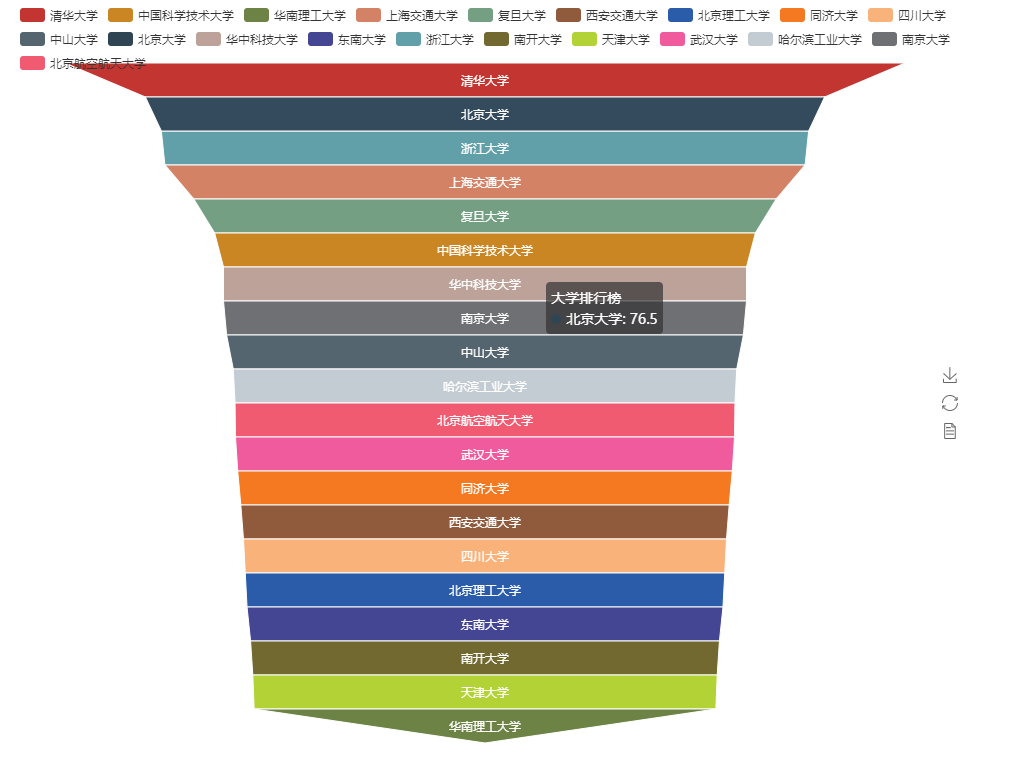
补充1:
语法:isinstance(object,type)
作用:来判断一个对象是否是一个已知的类型。
其第一个参数(object)为对象,第二个参数(type)为类型名(int...)或类型名的一个列表((int,list,float)是一个列表)。其返回值为布尔型(True or flase)。
若对象的类型与参数二的类型相同则返回True。若参数二为一个元组,则若对象类型与元组中类型名之一相同即返回True。
下面是两个例子:
例一
>>> a = 4
>>> isinstance (a,int)
True
>>> isinstance (a,str)
False
>>> isinstance (a,(str,int,list))
True
例二
>>> a = "b"
>>> isinstance(a,str)
True
>>> isinstance(a,int)
False
>>> isinstance(a,(int,list,float))
False
>>> isinstance(a,(int,list,float,str))
True
补充2:
Response.raise_for_status()
如果发送了一个错误请求(一个 4XX 客户端错误,或者 5XX 服务器错误响应),我们可以通过 Response.raise_for_status() 来抛出异常:
>>> bad_r = requests.get('http://httpbin.org/status/404')

>>> bad_r.status_code

404
>>> bad_r.raise_for_status()

Traceback (most recent call last):

  File "requests/models.py", line 832, in raise_for_status

    raise http_error

requests.exceptions.HTTPError: 404 Client Error
但是,由于我们的例子中 r 的 status_code 是 200 ,当我们调用 raise_for_status()时,得到的是:
>>> r.raise_for_status()

None
参考:
http://www.cnblogs.com/0bug/p/8260834.html
http://pyecharts.org/#/
https://www.cnblogs.com/kongzhagen/p/6472746.html
https://www.cnblogs.com/haiyan123/p/8289560.html
https://www.cnblogs.com/haiyan123/p/8317398.html
【Python爬虫】BeautifulSoup网页解析库的更多相关文章
- Python_爬虫_BeautifulSoup网页解析库
BeautifulSoup网页解析库 from bs4 import BeautifulSoup 0.BeautifulSoup网页解析库包含 的 几个解析器 Python标准库[主要,系统自带;] ...
- 【Python爬虫】PyQuery解析库
PyQuery解析库 阅读目录 初始化 基本CSS选择器 查找元素 遍历 获取信息 DOM操作 伪类选择器 PyQuery 是 Python 仿照 jQuery 的严格实现.语法与 jQuery 几乎 ...
- Python爬虫3大解析库使用导航
1. Xpath解析库 2. BeautifulSoup解析库 3. PyQuery解析库
- python爬虫之网页解析
CSS Selector 与Xpath path = ‘D:\\Postgraduate\\Python\\python_projects\\Python视频 分布式 爬虫Scrapy入门到精通\\第 ...
- Python爬虫-- BeautifulSoup库
BeautifulSoup库 beautifulsoup就是一个非常强大的工具,爬虫利器.一个灵活又方便的网页解析库,处理高效,支持多种解析器.利用它就不用编写正则表达式也能方便的实现网页信息的抓取 ...
- Python网页解析库:用requests-html爬取网页
Python网页解析库:用requests-html爬取网页 1. 开始 Python 中可以进行网页解析的库有很多,常见的有 BeautifulSoup 和 lxml 等.在网上玩爬虫的文章通常都是 ...
- Python的网页解析库-PyQuery
PyQuery库也是一个非常强大又灵活的网页解析库,如果你有前端开发经验的,都应该接触过jQuery,那么PyQuery就是你非常绝佳的选择,PyQuery 是 Python 仿照 jQuery 的严 ...
- python爬虫知识点总结(一)库的安装
环境要求: 1.编程语言版本python3: 2.系统:win10; 3.浏览器:Chrome68.0.3440.75:(如果不是最新版有可能影响到程序执行) 4.chromedriver2.41 注 ...
- python爬虫---BeautifulSoup的用法
BeautifulSoup是一个灵活的网页解析库,不需要编写正则表达式即可提取有效信息. 推荐使用lxml作为解析器,因为效率更高. 在Python2.7.3之前的版本和Python3中3.2.2之前 ...
随机推荐
- buildroot 编译问题
buildroot 编译的时候,出现 g++: internal compiler error: Killed (program cc1plus) 这个是因为虚拟机内存不足的原因, 加上一些内存即可 ...
- Mysql系列八:Mycat和Sharding-jdbc的区别、Mycat分片join、Mycat分页中的坑、Mycat注解、Catlet使用
一.Mycat和Sharding-jdbc的区别 1)mycat是一个中间件的第三方应用,sharding-jdbc是一个jar包 2)使用mycat时不需要改代码,而使用sharding-jdbc时 ...
- ubuntu下mysql远程连接和访问慢的解决方法
原本连接很快的mysql服务器,连接速度奇慢.以前几十毫秒的连接现在完成一次要近5秒钟,在排除了网络问题后,只有从mysql下手.原来每次访问db,mysql就会试图去解析来访问的机器的domain ...
- 这才是真正的裸眼3D!超级震撼!!
大家有没认为有意思啦,反正俺是被震撼到了. 好奇异-- ! " src="http://www.yixieshi.com/uploads/allimg/141116/1446431 ...
- Fiddler 使用命令行
在 Fiddler 界面左下角处,可以输出一些快捷命令,常用的快捷命令如下: help:查看命令帮助cls:清屏,即清空会话列表中的所有会话select:选择某一类型的会话,如 select html ...
- Linux Platform驱动模型(一) _设备信息
我在Linux字符设备驱动框架一文中简单介绍了Linux字符设备编程模型,在那个模型中,只要应用程序open()了相应的设备文件,就可以使用ioctl通过驱动程序来控制我们的硬件,这种模型直观,但是从 ...
- LeetCode - 872. Leaf-Similar Trees
Consider all the leaves of a binary tree. From left to right order, the values of those leaves form ...
- LinkedIn文本分析平台:主题挖掘的四大技术步骤
作者 Yongzheng (Tiger) Zhang ,译者 木环 ,本人只是备份一下.. LinkedIn前不久发布两篇文章分享了自主研发的文本分析平台Voices的概览和技术细节.LinkedIn ...
- asp.net C#绘制太极图
成品图: html页面: 注意设置 ContentType="Image/Jpeg" <%@ Page Language="C#" AutoEventWi ...
- cc2640 细节展示
1. 对于 cc2640内部有两个单片机,一个m3负责内核,另一个是一个16位单片机,应该是msp430可以替代主机完成一些数据采集,adc采集,iic等等功能,传感器软件内部可以进行外设配置,并使用 ...