
吴裕雄--天生自然 R语言开发学习:重抽样与自助法(续一)

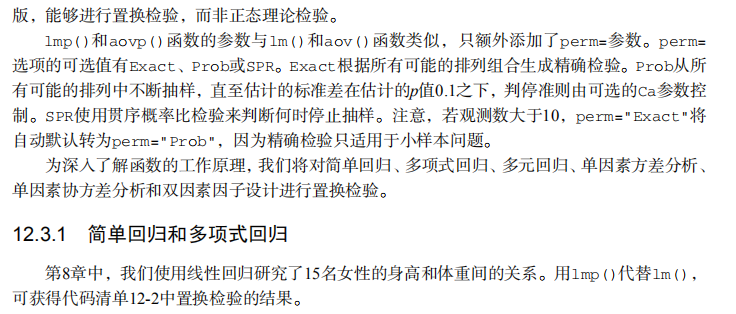






#-------------------------------------------------------------------------#

# R in Action (2nd ed): Chapter 12                                        #

# Resampling statistics and bootstrapping                                 #

# requires packages coin, multcomp, vcd, MASS, lmPerm, boot               #

# install.packages(c("coin","multcomp", "vcd", "MASS", "boot"))           #

# Follow chapter instructions for installing lmPerm                       #

#-------------------------------------------------------------------------#

par(ask=TRUE)

# Listing 12.1 - t-test vs. oneway permutation test for the hypothetical data

library(coin)

score <- c(40, 57, 45, 55, 58, 57, 64, 55, 62, 65)

treatment <- factor(c(rep("A",5), rep("B",5)))

mydata <- data.frame(treatment, score)

t.test(score~treatment, data=mydata, var.equal=TRUE)

oneway_test(score~treatment, data=mydata, distribution="exact")

# Wilcoxon Mann-Whitney U test

UScrime <- transform(UScrime, So = factor(So))

wilcox_test(Prob ~ So, data=UScrime, distribution="exact")

# k sample test

library(multcomp)

set.seed(1234) # make results reproducible

oneway_test(response~trt, data=cholesterol,

            distribution=approximate(B=9999))

# independence in contingency tables

library(coin)

library(vcd)

Arthritis <- transform(Arthritis,

                       Improved = as.factor(as.numeric(Improved)))

set.seed(1234)

chisq_test(Treatment~Improved, data=Arthritis,

           distribution=approximate(B=9999))

# independence between numeric variables

states <- as.data.frame(state.x77)

set.seed(1234)

spearman_test(Illiteracy ~ Murder, data=states,

              distribution=approximate(B=9999))

# dependent 2-sample and k-sample tests

library(coin)

library(MASS)

wilcoxsign_test(U1 ~ U2, data=UScrime, distribution="exact")

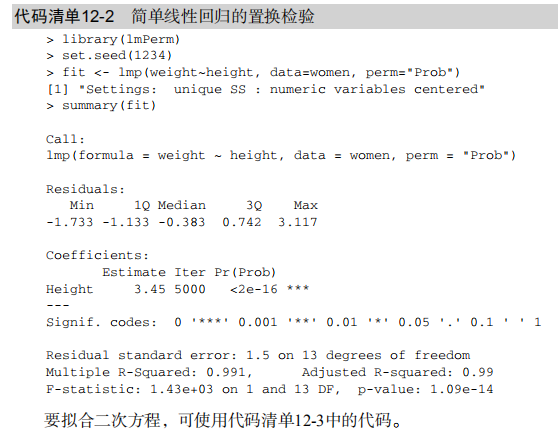
# Listing 12.2 - Permutation tests for simple linear regression

library(lmPerm)

set.seed(1234)

fit <- lmp(weight ~ height, data=women, perm="Prob")

summary(fit)

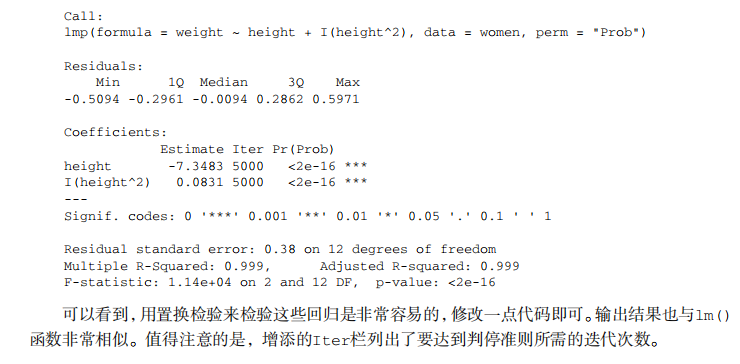
# Listing 12.3 - Permutation tests for polynomial regression

library(lmPerm)

set.seed(1234)

fit <- lmp(weight ~ height + I(height^2), data=women, perm="Prob")

summary(fit)

# Listing 12.4 - Permutation tests for multiple regression

library(lmPerm)

set.seed(1234)

states <- as.data.frame(state.x77)

fit <- lmp(Murder ~ Population + Illiteracy+Income+Frost,data=states, perm="Prob")

summary(fit)

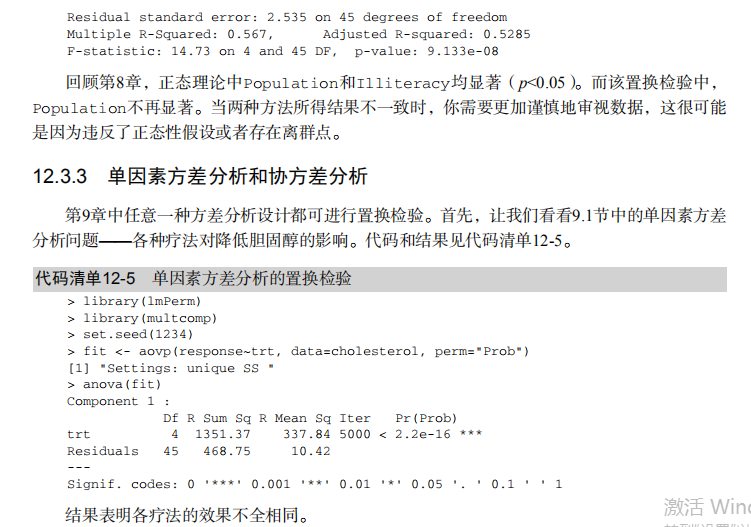
# Listing 12.5 - Permutation test for One-Way ANOVA

library(lmPerm)

library(multcomp)

set.seed(1234)

fit <- lmp(response ~ trt, data=cholesterol, perm="Prob")

anova(fit)

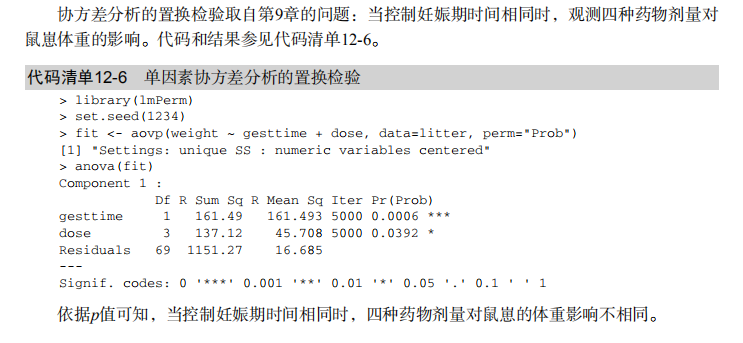
#  Listing 12.6 - Permutation test for One-Way ANCOVA

library(lmPerm)

set.seed(1234)

fit <- lmp(weight ~ gesttime + dose, data=litter, perm="Prob")

anova(fit)

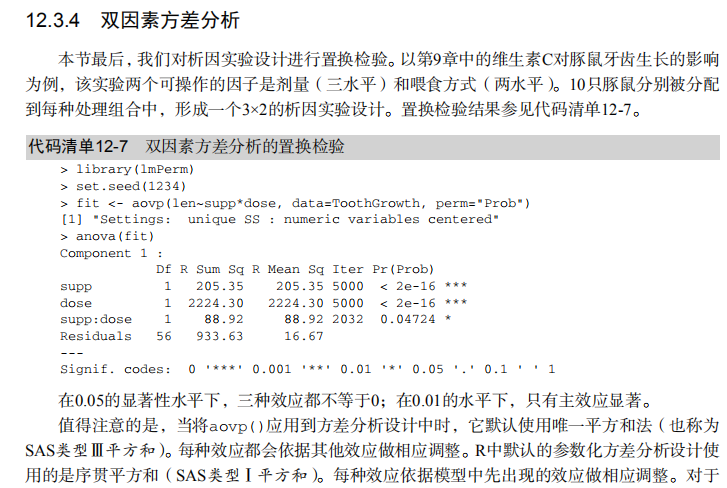
# Listing 12.7 - Permutation test for Two-way ANOVA

library(lmPerm)

set.seed(1234)

fit <- lmp(len ~ supp*dose, data=ToothGrowth, perm="Prob")

anova(fit)

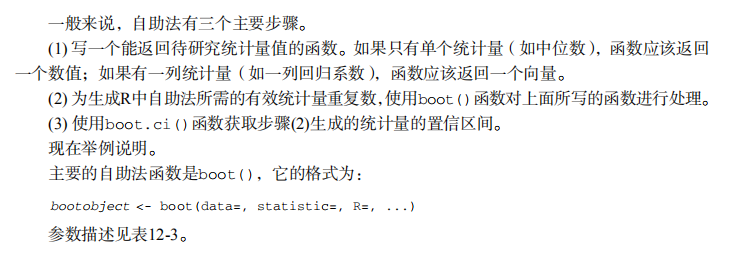
# bootstrapping a single statistic (R2)

rsq <- function(formula, data, indices) {

  d <- data[indices,]

  fit <- lm(formula, data=d)

  return(summary(fit)$r.square)

}

library(boot)

set.seed(1234)

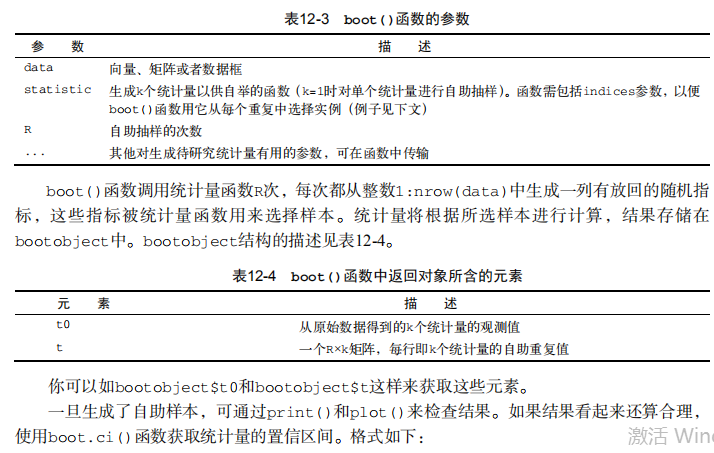
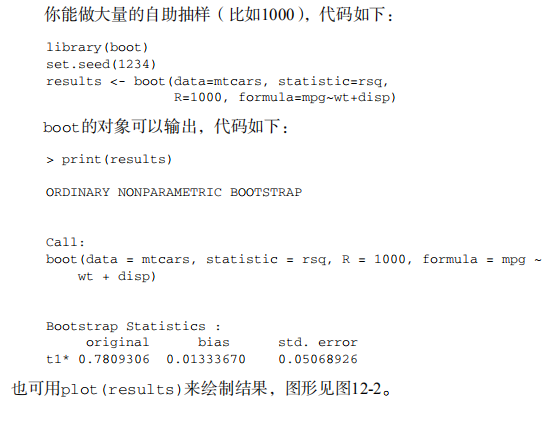
results <- boot(data=mtcars, statistic=rsq,

                R=1000, formula=mpg~wt+disp)

print(results)

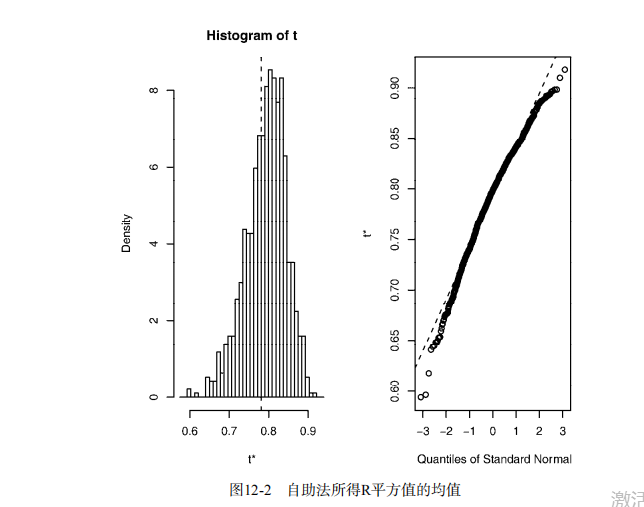
plot(results)

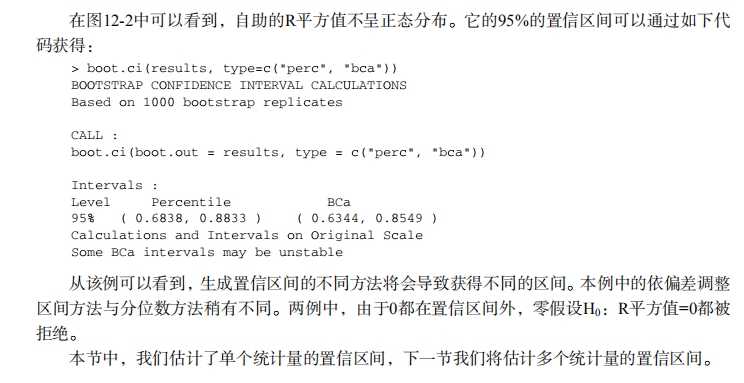
boot.ci(results, type=c("perc", "bca"))

# bootstrapping several statistics (regression coefficients)

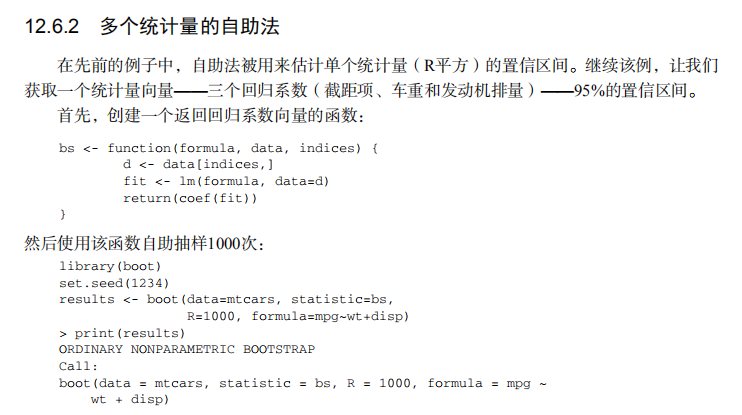
bs <- function(formula, data, indices) {

  d <- data[indices,]

  fit <- lm(formula, data=d)

  return(coef(fit))

}

library(boot)

set.seed(1234)

results <- boot(data=mtcars, statistic=bs,

                R=1000, formula=mpg~wt+disp)

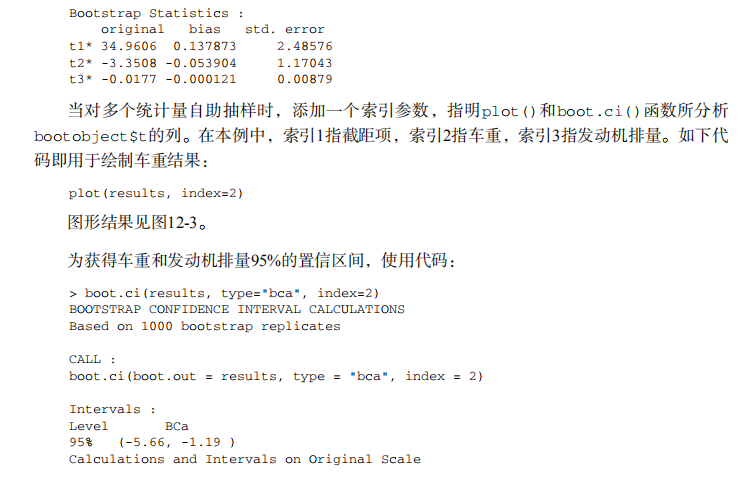
print(results)

plot(results, index=2)

boot.ci(results, type="bca", index=2)

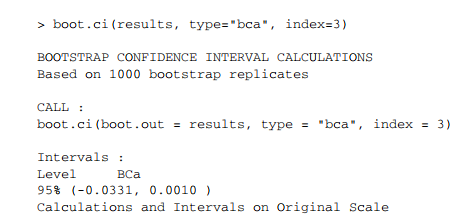
boot.ci(results, type="bca", index=3)
吴裕雄--天生自然 R语言开发学习:重抽样与自助法(续一)的更多相关文章
- 吴裕雄--天生自然 R语言开发学习:基本图形(续二)
#---------------------------------------------------------------# # R in Action (2nd ed): Chapter 6 ...
- 吴裕雄--天生自然 R语言开发学习:基本图形(续一)
#---------------------------------------------------------------# # R in Action (2nd ed): Chapter 6 ...
- 吴裕雄--天生自然 R语言开发学习:高级数据管理(续三)
#-----------------------------------# # R in Action (2nd ed): Chapter 5 # # Advanced data management ...
- 吴裕雄--天生自然 R语言开发学习:基本数据管理(续二)
#---------------------------------------------------------# # R in Action (2nd ed): Chapter 4 # # Ba ...
- 吴裕雄--天生自然 R语言开发学习:广义线性模型(续一)
#----------------------------------------------# # R in Action (2nd ed): Chapter 13 # # Generalized ...
- 吴裕雄--天生自然 R语言开发学习:中级绘图(续二)
#------------------------------------------------------------------------------------# # R in Action ...
- 吴裕雄--天生自然 R语言开发学习:中级绘图(续一)
#------------------------------------------------------------------------------------# # R in Action ...
- 吴裕雄--天生自然 R语言开发学习:功效分析(续一)
#----------------------------------------# # R in Action (2nd ed): Chapter 10 # # Power analysis # # ...
- 吴裕雄--天生自然 R语言开发学习:基本统计分析(续三)
#---------------------------------------------------------------------# # R in Action (2nd ed): Chap ...
- 吴裕雄--天生自然 R语言开发学习:基本图形(续三)
#---------------------------------------------------------------# # R in Action (2nd ed): Chapter 6 ...
随机推荐
- 撤销上一次的commit
撤销上一次的commit git reset HEAD~ 如果是撤销所有的已经add的文件: git reset HEAD .
- Maven--Maven 入门
1.POM <?xml version="1.0" encoding="utf-8" ?> <project xmlns="http ...
- vue 中使用print.js 打印遇到的问题 ?
不管怎么设置打印部分的 margin和height 仍会在预览时多出一张空白页?求各位大佬遇到过的请留言谢谢!
- ORM表之间高级设计
ORM表之间高级设计 一.表的继承 # db_test1 # 一.基表 # Model类的内部配置Meta类要设置abstract=True, # 这样的Model类就是用来作为基表 # 多表:Boo ...
- MAC上的爬虫软件怎么选?看完这篇就够了
在上一篇文章:网络爬虫软件哪个好用? 中,我们介绍了目前市面上比较成熟好用的网络爬虫软件, 但是其中有些不能在MAC上使用,因此今天这篇文章我们单独介绍一下在MAC操作系统中有哪些好用的爬虫软件,给大 ...
- Python笔记_第二篇_面向过程_第二部分_2.路径、栈和队列、内存修改
这一部分分三个主题进行讲解,主要为后面的模块.包.第三方库的概念补充一些相关的内容. 1. 路径(Path): 相对路径和绝对路径. 举例1:我们先导入一个os库(模块)来观察一下路径 import ...
- Python语言学习:字符串常用的方法
python字符串常用的方法 1. find( ):在字符串中搜索指定的值并返回它被找到的位置,如果没有找到,则返回-1 string.find(value,start,end) #value:必需, ...
- [CTS2019]无处安放(提交答案)
由于蒟蒻太菜没报上CTS,只能在家打VP. 感觉这题挺有意思的,5h中有3h在玩这题,获得74分的“好”成绩. 说说我的做法吧: subtask1~3:手玩,不知道为什么sub2我只能玩9分,但9和1 ...
- 正则表达式中 /s 可以帮助“.”匹配所有的字符,包括换行,从而实现【\d\D】的功能
正则表达式中 /s 可以帮助“.”匹配所有的字符,包括换行,从而实现[\d\D]的功能
- SLAM——视觉里程计(一)feature
从现在开始下面两篇文章来介绍SLAM中的视觉里程计(Visual Odometry).这个是我们正式进入SLAM工程的第一步,而之前介绍的更多的是一些基础理论.视觉里程计完成的事情是视觉里程计VO的目 ...