
Android给ListView添加侧滑菜单功能
贼简单,但是上次集成完之后忘记整理,所以写的有点简单
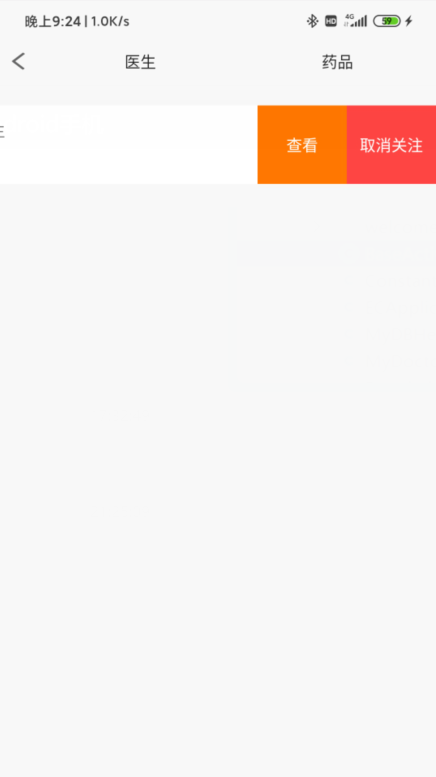
SwipeMenu类
继承自ViewGroup
package com.onepilltest.others;

import android.content.Context;

import android.util.AttributeSet;

import android.util.Log;

import android.view.MotionEvent;

import android.view.View;

import android.view.ViewGroup;

import android.widget.Scroller;

//抽屉ListView

public class SwipeMenu extends ViewGroup {

    private int downX, moveX, moved;

    private Scroller scroller = new Scroller(getContext());

    private boolean haveShowRight = false;

    public static SwipeMenu swipeMenu;

    public SwipeMenu(Context context) {

        super(context);

    }

    public SwipeMenu(Context context, AttributeSet attrs) {

        super(context, attrs);

    }

    public SwipeMenu(Context context, AttributeSet attrs, int defStyleAttr) {

        super(context, attrs, defStyleAttr);

    }

    @Override

    protected void onDetachedFromWindow() {

        super.onDetachedFromWindow();

        if (swipeMenu != null&&swipeMenu==this) {

            swipeMenu.closeMenus();

            swipeMenu = null;

        }

    }

    //缓慢滚动到指定位置

    private void smoothScrollTo(int destX, int destY) {

        int scrollX = getScrollX();

        int delta = destX - scrollX;

        //1000ms内滑动destX,效果就是慢慢滑动

        scroller.startScroll(scrollX, 0, delta, 0, 100);

        invalidate();

    }

    public void closeMenus() {

        smoothScrollTo(0, 0);

        haveShowRight = false;

    }

    public static void closeMenu() {

        swipeMenu.closeMenus();

    }

    @Override

    public void computeScroll() {

        if (scroller.computeScrollOffset()) {

            scrollTo(scroller.getCurrX(), scroller.getCurrY());

            postInvalidate();

        }

    }

    @Override

    public boolean onTouchEvent(MotionEvent ev) {

        if (!scroller.isFinished()) {

            return false;

        }

        switch (ev.getAction()) {

            case MotionEvent.ACTION_DOWN:

                downX = (int) ev.getRawX();

                break;

            case MotionEvent.ACTION_MOVE:

                if (swipeMenu != null && swipeMenu == this && haveShowRight) {

                    closeMenu();

                    return true;

                }

                moveX = (int) ev.getRawX();

                moved = moveX - downX;

                if (haveShowRight) {

                    moved -= getChildAt(1).getMeasuredWidth();

                }

                scrollTo(-moved, 0);

                if (getScrollX() <= 0) {

                    scrollTo(0, 0);

                } else if (getScrollX() >= getChildAt(1).getMeasuredWidth()) {

                    scrollTo(getChildAt(1).getMeasuredWidth(), 0);

                }

                break;

            case MotionEvent.ACTION_CANCEL:

            case MotionEvent.ACTION_UP:

                if (swipeMenu != null) {

                    closeMenu();

                }

//                设置最小触发滑动的距离

                if (getScrollX() >= 30) {

                    haveShowRight = true;

                    swipeMenu = this;

                    smoothScrollTo(getChildAt(1).getMeasuredWidth(), 0);

                } else {

                    haveShowRight = false;

                    smoothScrollTo(0, 0);

                }

                break;

        }

        return true;

    }

    @Override

    protected void onSizeChanged(int w, int h, int oldw, int oldh) {

        super.onSizeChanged(w, h, oldw, oldh);

    }

    @Override

    public LayoutParams generateLayoutParams(AttributeSet attrs) {

        return new MarginLayoutParams(getContext(), attrs);

    }

    @Override

    protected void onMeasure(int widthMeasureSpec, int heightMeasureSpec) {

        super.onMeasure(widthMeasureSpec, heightMeasureSpec);

        measureChildren(widthMeasureSpec, heightMeasureSpec);

        int width = MeasureSpec.getSize(widthMeasureSpec);

        View child = getChildAt(0);

        int margin =

                ((MarginLayoutParams) child.getLayoutParams()).topMargin +

                        ((MarginLayoutParams) child.getLayoutParams()).bottomMargin;

        setMeasuredDimension(width, getChildAt(0).getMeasuredHeight() + margin);

    }

    @Override

    protected void onLayout(boolean changed, int l, int t, int r, int b) {

        int cCount = getChildCount();

        for (int i = 0; i < cCount; i++) {

            View child = getChildAt(i);

            if (i == 0) {

                child.layout(l, t, r, b);

            } else if (i == 1) {

                child.layout(r, t, r + child.getMeasuredWidth(), b);

            }

        }

    }

}
- 修改item布局文件
<com.onepilltest.others.SwipeMenu

        android:layout_width="match_parent"

        android:layout_height="match_parent">

      第一个View

      ...

      第二个View(这个View表示侧滑后出现的视图)

      ...

</com.onepilltest.others.SwipeMenu>
- 在Adapter中设置监听器方法
略
Android给ListView添加侧滑菜单功能的更多相关文章
- Android 打造完美的侧滑菜单/侧滑View控件
概述 Android 打造完美的侧滑菜单/侧滑View控件,完全自定义实现,支持左右两个方向弹出,代码高度简洁流畅,兼容性高,控件实用方便. 详细 代码下载:http://www.demodashi. ...
- Android 自定义ListView Item侧滑删除
本程序是基于网上开源项目修改而来,具体来源忘了,懒得搜了,如果有不合适的地方,请原作者联系我,我会及时回复和处理的! 该例子程序中主要包含两个ListView,一个是实现侧滑删除,一个是侧滑出菜单,代 ...
- 自定义listView添加滑动删除功能
今天研究了一下android里面的手势,结合昨天学习的自定义View,做了一个自定义的listview,继承自listView,添加了条目的滑动手势操作,滑动后出现一个删除按钮,点击删除按钮,触发一个 ...
- MTK Android 设置下添加一级菜单[ZedielPcbTest]
功能描述:Android7.1.2 设置下添加一级菜单[ZedielPcbTest],点击ZedielPcbTest,启动ZedielPcbTest.apk应用. 编译:需要在out目录删除Settt ...
- Android之listview添加数据篇
一.ListView: 1. ListView通常有两个职责: 1.向布局填充数据 2.处理选择点击等操作 2.ListView的创建需要3个元素: 1. ListView中的每一列的View. 2. ...
- Android DrawerLayout设置左右侧滑菜单为全屏
我们可以在MainActivity中获取屏幕宽度后动态赋值给侧滑菜单. 在oncreate时 DisplayMetrics metric = new DisplayMetrics(); getWind ...
- Android在listview添加checkbox实现单选多选操作问题
android根据View的不同状态更换不同的背景http://www.eoeandroid.com/thread-198029-1-1.html android 模仿朋友网推出的菜单效果[改进版]h ...
- Android在listview添加checkbox实现单选多选操作问题(转)
转自:http://yangshen998.iteye.com/blog/1310183 在Android某些开发需求当中,有时候需要在listveiw中加入checkbox实现单选,多选操作.表面上 ...
- android 继承ListView实现滑动删除功能.
在一些用户体验较好的应用上,可以经常遇见 在ListView中 向左或向右滑动便可删除那一项列表. 具体实现 则是继承ListView实现特定功能即可. (1). 新建 delete_butt ...
随机推荐
- express高效入门教程(2)
2.请求和响应 2.1.请求相关 2.1.1.返回一个html页面 // 注意path模块需要先引入 app.get('/', function (req, res){ res.sendFile(pa ...
- Js数据类型、Json格式、Json对象、Json字符串
数据类型,从结构上看,所有的数据最终都可以分成三种类型: 第一种类型是scalar(标量),也就是一个单独的string(字符串)或数字(numbers),比如“北京”这个单独的词. 第二种类型是se ...
- nginx location 知识知多少
写在之前 众所周知 nginx location 路由转发规则多种多样,尤其是 [ = | ~ | ~* | ^~ ] 这些前缀是什么意思.root 与 alias 是否可以区分开,nginx 作为反 ...
- 1年转行资深前端工程师,开源项目过 1k stars,完整学习过程
先介绍下大致情况时间线. 18 年 8 月正式转方向为前端,之前做了一段时间的 iOS,后来因为对前端更感兴趣所以就打算转方向了.19 年 10 月入职当前公司,定级资深前端,分配到业务架构小组,自此 ...
- java.sql.SQLException: The server time zone value '�й���ʱ��' is unrecognized
idea数据库连接字符串需要添加一些参数: ?useUnicode=true&characterEncoding=UTF-8&serverTimezone=Asia/Shanghai ...
- win10 麦克风无法使用,可能是设置了权限
驱动什么的都正常,平白无故麦克风不好用了,原来是之前自己设置了麦克风权限: 把这个开关打开就可以了. (完)
- 关于WebServices的调用
1.使用soapui测试接口是否能通 具体操作步骤请查看:https://www.cnblogs.com/BINDAI/p/13201513.html Soapui请求结果集 2.获得soapu ...
- 3.第一个scrapy项目
第一个scrapy项目 1. 创建scrapy项目 1.1 创建项目三剑客 这里的三剑客指的是:创建项目以及运行项目的三条命令 1.1.1 创建项目 scrapy stratproject 项目名称 ...
- 基本数据类型--------------------集合set()
一.作用:集合.list.tuple.dict一样都可以存放多个值,但是集合主要用于:关系运算.去重 # 1.1 关系运算 friends1 = ["zero","kev ...
- redis(九):Redis 哈希(Hash)(python)
# -*- coding: utf-8 -*- import redis #这个redis不能用,请根据自己的需要修改 r =redis.Redis(host="123.56.74.190& ...