
hystrix(3) 熔断器
讲完metrics我们就来了解一下熔断器的执行情况,熔断器的判断取决metrics数据。
hystrix在执行命令前需要经过熔断器判断,如果服务被熔断,则执行fallback流程,熔断判断逻辑如下:
- 如果强制未开启,返回true(未熔断)。
- 如果强制开启,返回false(熔断)。
- 判断熔断标识
- 如果未熔断则返回true。
- 如果half_open,返回false(熔断)。
- 如果熔断,判断当前时间是否超过短路窗口期,
- 如果没有超过,返回false。
- 如果超过则返回true。 并设置熔断状态为half_open。
命令执行失败后逻辑如下:
如果熔断标识为half_open,并重新计算短路窗口期(记录当前时间)。
如果熔断标识为close,通过命令metric组件,获取命令指定窗口时间内执行总错误数和错误率。如果实际错误率或错误数高于配置错误率或错误数,则设置熔断标识为熔断。
命令执行成功后逻辑如下:
只有在熔断状态为half_open状态下,才能解除熔断。
如果请求执行成功,解除熔断。
熔断器还会监听metrics数据流,当错误比率或者请求量大于配置的值时,就会设置熔断标识为熔断。每个commandkey都会对应一个熔断器。
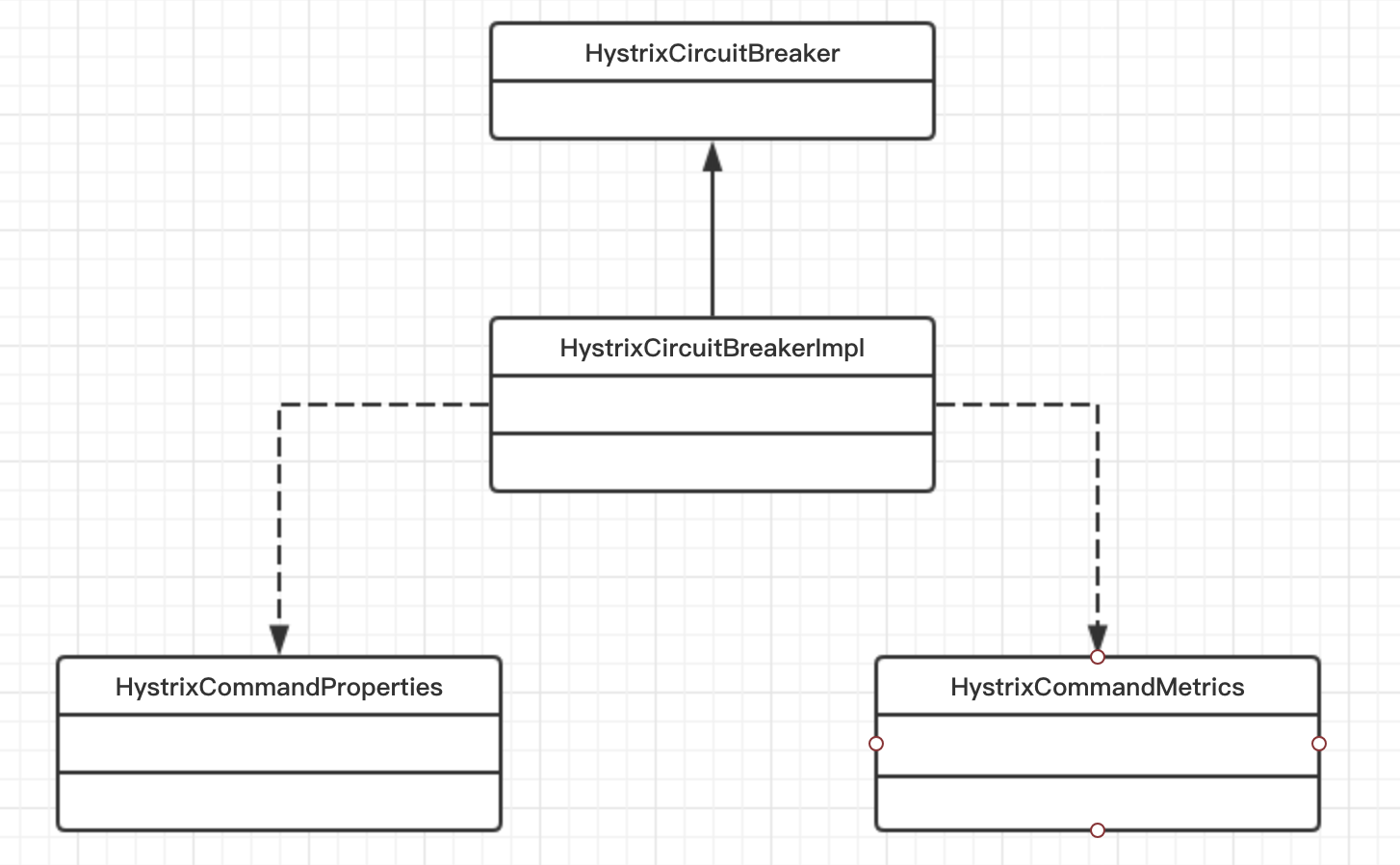
熔断器判断
private Observable<R> applyHystrixSemantics(final AbstractCommand<R> _cmd) {

        ...

        if (circuitBreaker.allowRequest()) {

            ...

           return executeCommandAndObserve(_cmd)

                            .doOnError(markExceptionThrown)

                            .doOnTerminate(singleSemaphoreRelease)

                            .doOnUnsubscribe(singleSemaphoreRelease);

            ...

        } else {

            return handleShortCircuitViaFallback();

        }

    }
熔断器逻辑
static class HystrixCircuitBreakerImpl implements HystrixCircuitBreaker {

        private final HystrixCommandProperties properties;

        private final HystrixCommandMetrics metrics;

        /* track whether this circuit is open/closed at any given point in time (default to false==closed) */

        private AtomicBoolean circuitOpen = new AtomicBoolean(false);

        /* when the circuit was marked open or was last allowed to try a 'singleTest' */

        private AtomicLong circuitOpenedOrLastTestedTime = new AtomicLong();

        protected HystrixCircuitBreakerImpl(HystrixCommandKey key, HystrixCommandGroupKey commandGroup, HystrixCommandProperties properties, HystrixCommandMetrics metrics) {

            this.properties = properties;

            this.metrics = metrics;

        }

        public void markSuccess() {

            if (circuitOpen.get()) {

                if (circuitOpen.compareAndSet(true, false)) {

                    //win the thread race to reset metrics

                    //Unsubscribe from the current stream to reset the health counts stream.  This only affects the health counts view,

                    //and all other metric consumers are unaffected by the reset

                    metrics.resetStream();

                }

            }

        }

        @Override

        public boolean allowRequest() {

            if (properties.circuitBreakerForceOpen().get()) {

                // properties have asked us to force the circuit open so we will allow NO requests

                return false;

            }

            if (properties.circuitBreakerForceClosed().get()) {

                // we still want to allow isOpen() to perform it's calculations so we simulate normal behavior

                isOpen();

                // properties have asked us to ignore errors so we will ignore the results of isOpen and just allow all traffic through

                return true;

            }

            return !isOpen() || allowSingleTest();

        }

        public boolean allowSingleTest() {

            long timeCircuitOpenedOrWasLastTested = circuitOpenedOrLastTestedTime.get();

            // 1) if the circuit is open

            // 2) and it's been longer than 'sleepWindow' since we opened the circuit

            if (circuitOpen.get() && System.currentTimeMillis() > timeCircuitOpenedOrWasLastTested + properties.circuitBreakerSleepWindowInMilliseconds().get()) {

                // We push the 'circuitOpenedTime' ahead by 'sleepWindow' since we have allowed one request to try.

                // If it succeeds the circuit will be closed, otherwise another singleTest will be allowed at the end of the 'sleepWindow'.

                if (circuitOpenedOrLastTestedTime.compareAndSet(timeCircuitOpenedOrWasLastTested, System.currentTimeMillis())) {

                    // if this returns true that means we set the time so we'll return true to allow the singleTest

                    // if it returned false it means another thread raced us and allowed the singleTest before we did

                    return true;

                }

            }

            return false;

        }

        @Override

        public boolean isOpen() {

            if (circuitOpen.get()) {

                // if we're open we immediately return true and don't bother attempting to 'close' ourself as that is left to allowSingleTest and a subsequent successful test to close

                return true;

            }

            // we're closed, so let's see if errors have made us so we should trip the circuit open

            HealthCounts health = metrics.getHealthCounts();

            // check if we are past the statisticalWindowVolumeThreshold

            if (health.getTotalRequests() < properties.circuitBreakerRequestVolumeThreshold().get()) {

                // we are not past the minimum volume threshold for the statisticalWindow so we'll return false immediately and not calculate anything

                return false;

            }

            if (health.getErrorPercentage() < properties.circuitBreakerErrorThresholdPercentage().get()) {

                return false;

            } else {

                // our failure rate is too high, trip the circuit

                if (circuitOpen.compareAndSet(false, true)) {

                    // if the previousValue was false then we want to set the currentTime

                    circuitOpenedOrLastTestedTime.set(System.currentTimeMillis());

                    return true;

                } else {

                    // How could previousValue be true? If another thread was going through this code at the same time a race-condition could have

                    // caused another thread to set it to true already even though we were in the process of doing the same

                    // In this case, we know the circuit is open, so let the other thread set the currentTime and report back that the circuit is open

                    return true;

                }

            }

        }

    }
hystrix(3) 熔断器的更多相关文章
- 分布式RPC框架Dubbo实现服务治理:集成Kryo实现高速序列化,集成Hystrix实现熔断器
Dubbo+Kryo实现高速序列化 Dubbo RPC是Dubbo体系中最核心的一种高性能,高吞吐量的远程调用方式,是一种多路复用的TCP长连接调用: 长连接: 避免每次调用新建TCP连接,提高调用的 ...
- Spring Cloud Hystrix Dashboard熔断器-Turbine集群监控(六)
序言 上一篇说啦hystrix的使用方法与配置还有工作流程及为何存在,我去,上一篇这么屌,去看看吧,没这么屌的话,我贴的有官方文档,好好仔细看看 hystrix除啦基本的熔断器功能之外,还可以对接口的 ...
- Hystrix核心熔断器
在深入研究熔断器之前,我们需要先看一下Hystrix的几个重要的默认配置,这几个配置在HystrixCommandProperties 中 //时间窗(ms) static final Integer ...
- SpringCloud学习笔记:熔断器Hystrix(5)
1. Hystrix简介 在分布式系统中,服务与服务之间相互依赖,一种不可避免的情况是某些服务会出现故障,导致依赖于它们的其他服务出现远程调度的线程阻塞. Hystrix提供熔断器功能,能够阻止分布式 ...
- 熔断器---Hystrix
Hystrix:熔断器,容错管理工具,旨在通过熔断机制控制服务和第三方库的节点,从而对延迟和故障提供更强大的容错能力. 说到熔断器,先要引入另外一个词,雪崩效应. 雪崩效应,百度百科的解释是这样的: ...
- 6、Spring Cloud -熔断器Hystrix
6.1.什么是Hystrix 在分布式系统中.服务与服务之间的依赖错综复杂,一种不可避免的情况就是某些服务 出现故障,导致依赖于它们的其他服务出现远程调度的线程阻塞. Hystrix是Netfli ...
- spring boot 2.0.3+spring cloud (Finchley)4、熔断器Hystrix
在分布式系统中服务与服务之间的依赖错综复杂,一种不可避免的情况就是某些服务会出现故障,导致依赖于他们的其他服务出现远程调度的线程阻塞.某个服务的单个点的请求故障会导致用户的请求处于阻塞状态,最终的结果 ...
- Spring-Cloud之Hystrix熔断器-5
一.在分布式系统中,服务与服务之间的依赖错综复杂,一种不可避免的情况就是某些服务会出现故障,导致依赖于它们的其他服务出现远程调度的线程阻塞 Hystrix是Netflix 公司开源的一个项目,它提供了 ...
- springCloud四:熔断器ribbon--Hystrix
注:前文概念部分摘抄自博客园 纯洁的微笑 熔断器 雪崩效应 在微服务架构中通常会有多个服务层调用,基础服务的故障可能会导致级联故障,进而造成整个系统不可用的情况,这种现象被称为服务雪崩效应.服务雪崩 ...
随机推荐
- C/C++ 程序反调试的方法
C/C++ 要实现程序反调试有多种方法,BeingDebugged,NtGlobalFlag,ProcessHeap,CheckRemoteDebuggerPresent,STARTUPINFO,Is ...
- pandas参数设置小技巧
在日常使用pandas的过程中,由于我们所分析的数据表规模.格式上的差异,使得同样的函数或方法作用在不同数据上的效果存在差异. 而pandas有着自己的一套参数设置系统,可以帮助我们在遇到不同的数据时 ...
- struts中的一些问题
QueryRunner()方法内要传数据源
- C# 接口的Get、Post、WebService请求方法一览,值得收藏
C# 接口的Get.Post.WebService请求方法一览,值得收藏 public static class HttpHelper { const string DEFAULT_USER_AGEN ...
- C语言如何动态分配二维数组
C语言如何动态分配二维数组(转载) 原文链接:https://www.cnblogs.com/0xWitch/p/9314621.html 使用malloc().free()函数进行动态分配,这两个函 ...
- python - Lambda函数 匿名函数
Lambda 匿名函数 python 使用 lambda 来创建匿名函数. lambda只是一个表达式,函数体比def简单很多. lambda的主体是一个表达式,而不是一个代码块.仅仅能在lambda ...
- CRMEB小程序商城首页强制在微信中打开解决办法
先说一下,这也算不上二开,小小修改一下而已. CRMEB安装完成后,PC端直接打开首页,真是一言难尽~ 然后,我就想了,用手机浏览器或者PC浏览器直接打开首页也没啥用,干脆直接强制在微信中打开算了! ...
- android开发 app闪退后fragment重叠bug解决方法,推荐使用第二种方法,完美解决问题
解决方案为以下两种: 方法1:在fragmentActivity里oncreate方法判断savedInstanceState==null才生成新Fragment,否则不做处理. 方法2:在fragm ...
- unity3d插入android有米广告
有米官网:http://www.youmi.net/register?r=MTI0MDg= 国内的广告,我觉得万普和有米还不错,我也只试了这两个,其他的都是看评价的,呵呵~~~首先我们去有米官网注册一 ...
- Unity内生成深度贴图
https://qiita.com/bokkuri_orz/items/08cbaeae6a34fed7f903 https://www.cnblogs.com/sifenkesi/p/4721649 ...