
拖拽编写SVG图形化工具(二)
getAttributesNs/setAttributesNs
element.setAttributeNS(namespace,name,value)
namespace是指定属性的命名空间的一个字符串。name是标识要设置的属性的一个字符串。value是新属性的所需字符串值。
添加/或者查询一个新属性或更改具有给定命名空间和名称的一个属性的值。
setAttribute()是DOM 1函数。setAttributeNS()是DOM 2函数
果属性没有定义的名称空间前缀,则第一个参数必须为null。您可以使用setAttribute(),但是为了保持一致性,建议坚持使用setAttributeNS()
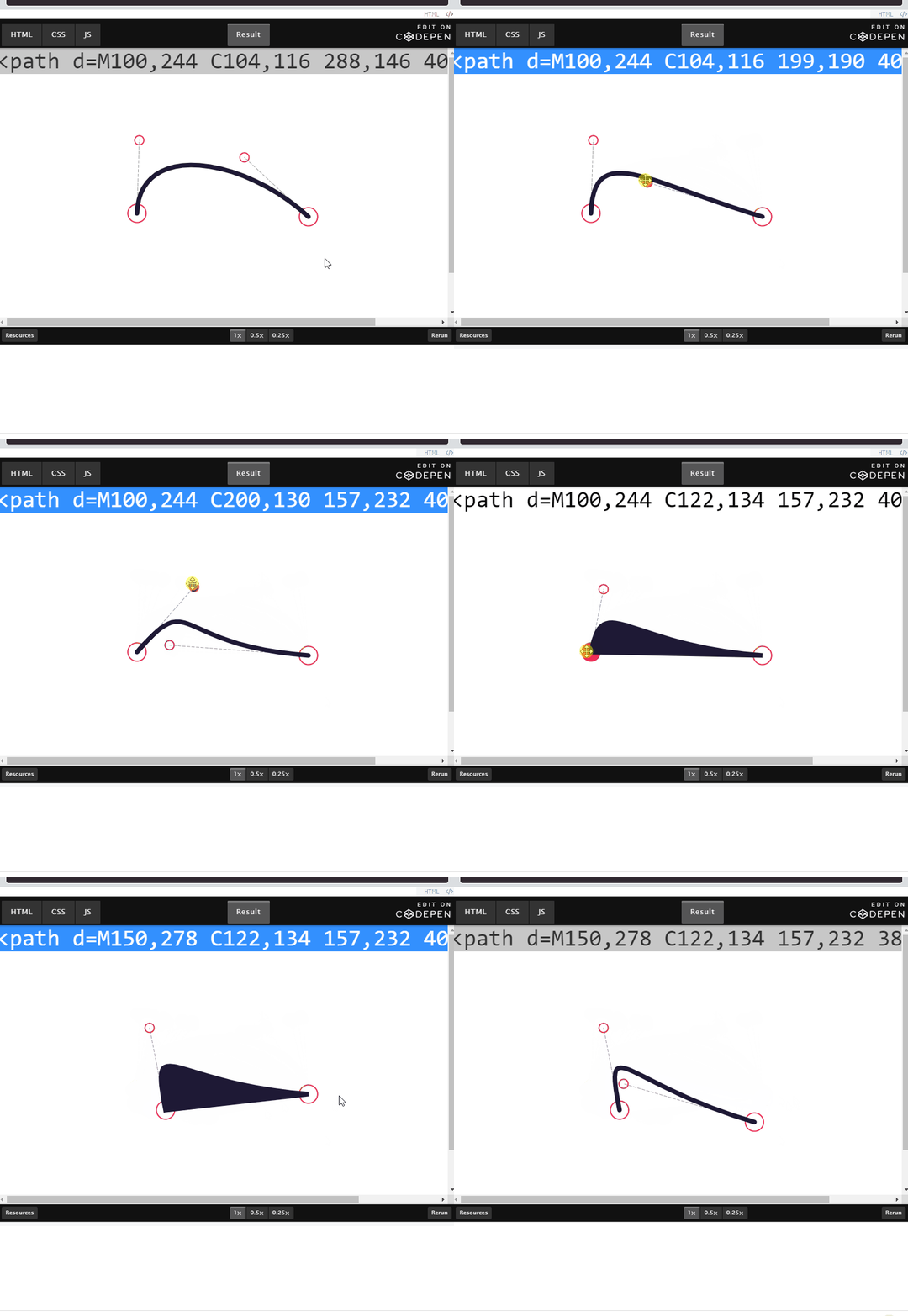
应用demo
程序思路
首先我们看看代码映射
 // 按下

  box.onmousedown = function (event) {

    console.log(1);

    // 移动

    box.onmousemove=function () {

      console.log(2);

    }

    // 抬起

    box.onmouseup=function () {

      console.log(3);

    }

  }
通过point拿到所有
circle图形的原点line拿到直线的dom和path的dom
限制坐标的范围, 由于
circle的半径有一定长度,所以减去5做一定的限制maxX = container.offsetWidth - 5
maxY = container.offsetHeight - 5,
// 鼠标范围限制
function PointM(x, y) {
return {
x: Math.max(0, Math.min(maxX, x)),
y: Math.max(0, Math.min(maxY, y))
}
}
m = PointM(e.pageX, e.pageY);
当鼠标点在path上可以通过fill 进行切换背景颜色
+circle[i].getAttributeNS(null, 'cx')
要知道我们通过
getAttributeNS拿到的是字符串所以要进行转化
['p1', 'p2', 'c1', 'c2'].includes(id)
是为了保证按在是个点上面,然后后面的id容易报错
整体的逻辑就是
鼠标按下开始的时候,记录当前的坐标,拿到点击的那个dom
后续鼠标移动的时候, 当前的坐标-开始的坐标的差值=本来应该指向的坐标
并且移动的时候要设置一定的范围,以便更新点不能离开当前的范围
鼠标离开的时候,关闭移动/松开的事件
<!doctype html>

<html lang="en">

<head>

  <meta charset="UTF-8">

  <meta name="viewport"

        content="width=device-width, user-scalable=no, initial-scale=1.0, maximum-scale=1.0, minimum-scale=1.0">

  <meta http-equiv="X-UA-Compatible" content="ie=edge">

  <title>Document</title>

  <style>

    * {

      margin: 0;

      padding: 0;

    }

    #container {

      width: 100%;

      height: 500px;

      background-color: #fff;

      margin: 0 auto;

      text-align: center;

    }

    path {

      stroke-width: 8;

      stroke: #1E1935;

      stroke-linecap: round;

      fill: none;

    }

    circle {

      stroke-width: 2;

      stroke: #ef2d56;

      fill: #fff;

    }

    circle:hover {

      fill: #ef2d56;

      cursor: move;

    }

    line {

      stroke-width: 1;

      stroke: #999;

      stroke-linecap: round;

      stroke-dasharray: 5, 3;

    }

    path {

      stroke-width: 2;

      stroke: #1E1935;

      stroke-linecap: round;

      /* fill: none; */

    }

    path.fill {

      fill: #1E1935

    }

  </style>

</head>

<body>

<div style="text-align: center">

  <pre id="code" style="font-size: 40px;font-family: Consolas;">code</pre>

</div>

<div id="container" class="C">

  <svg id="svg" viewBox="0 0 499 499" width="500" height="500"

       preserveAspectRatio="xMidYMid meet">

    <g id="main">

      <circle id="p1" cx="100" cy="250" r="16"/>

      <circle id="p2" cx="400" cy="250" r="16"/>

      <circle id="c1" cx="100" cy="100" r="8"/>

      <circle id="c2" cx="400" cy="100" r="8"/>

      <line id="l1" x1="100" y1="250" x2="100" y2="100"/>

      <line id="l2" x1="400" y1="250" x2="400" y2="100"/>

      <path id="path" d="M100,250 C100,100 400,100 400,250"/>

    </g>

  </svg>

</div>

<script>

  let svg = document.getElementById('svg'),

    container = document.getElementById('container')

  let point = {}, line = {}

    , maxX = container.offsetWidth - 5

    , maxY = container.offsetHeight - 5,

    fill = false,

    code = document.getElementById('code'),

    // 状态

    drap = null,

    dPonit;

  function init() {

    let circle = svg.getElementsByTagName('circle');

    for (let i = 0; i < circle.length; i++) {

      point[circle[i].getAttributeNS(null, 'id')] = {

        x: +circle[i].getAttributeNS(null, 'cx'),

        y: +circle[i].getAttributeNS(null, 'cy'),

      }

    }

    line.l1 = svg.getElementById('l1')

    line.l2 = svg.getElementById('l2')

    line.path = svg.getElementById('path')

    svg.onmousedown = document.onmousemove = document.onmouseup = Drag

    svg.ontouchstart = document.ontouchmove = document.ontouchend = Drag

  }

  // 鼠标范围限制

  function PointM(x, y) {

    return {

      x: Math.max(0, Math.min(maxX, x)),

      y: Math.max(0, Math.min(maxY, y))

    }

  }

  function Drag(e) {

    e.stopPropagation()

    let t = e.target, id = t.id, et = e.type, m = PointM(e.pageX, e.pageY);

    // 鼠标按在path区域

    if (!drap && id === 'path' && et === 'mousedown') {

      fill = !fill;

      t.setAttributeNS(null, 'class', (fill ? 'fill' : ''))

      DragGet();

    }

    // 鼠标按在开始

    // typeof(point[id]!==undefined) 意思就是要按在这几个点上

    if (!drap && ['p1', 'p2', 'c1', 'c2'].includes(id) && (et === 'mousedown' || et === 'touchstart')) {

      drap = t;

      dPonit = m

    }

    // 移动的时候

    if (drap && ['p1', 'p2', 'c1', 'c2'].includes(id) && (et === 'mousemove' || et === 'touchmove')) {

      console.log(id);

      // 当前的坐标-开始的坐标等于差值

      point[id].x += m.x - dPonit.x;

      point[id].y += m.y - dPonit.y;

      if (point[id].x < maxX && point[id].y < maxY) {

        id = drap.id;

        dPonit = m;

        drap.setAttributeNS(null, "cx", point[id].x);

        drap.setAttributeNS(null, "cy", point[id].y);

      }

      DragGet()

    }

    // 松开的时候

    if (drap && (et === "mouseup" || et === "touchend")) {

      drap = null;

    }

  }

  // 更新数据

  function DragGet() {

    // line1

    line.l1.setAttributeNS(null, 'x1', point.p1.x);

    line.l1.setAttributeNS(null, 'y1', point.p1.y);

    line.l1.setAttributeNS(null, 'x2', point.c1.x);

    line.l1.setAttributeNS(null, 'y2', point.c1.y);

    // line2

    line.l2.setAttributeNS(null, 'x1', point.p2.x)

    line.l2.setAttributeNS(null, 'y1', point.p2.y)

    line.l2.setAttributeNS(null, 'x2', point.c2.x)

    line.l2.setAttributeNS(null, 'y2', point.c2.y)

    let d = `M ${point.p1.x},${point.p1.y} C ${point.c1.x},${point.c1.y} ${point.c2.x},${point.c2.y} ${point.p2.x},${point.p2.y}${fill ? 'Z' : ''}`

    line.path.setAttributeNS(null, 'd', d)

    code.textContent = d;

  }

  init()

</script>

</body>

</html>
See the Pen SVG Cubic Bézier Curve Generator by 973782523
(@973782523) on CodePen.
拖拽编写SVG图形化工具(二)的更多相关文章
- 6.MySQL图形化工具的使用
6.图形化工具的使用6.1 Mysql Workbench Mysql Workbench是Mysql官方推出的集成图形化工具,替代了之前的图形化管理工具Mysql Administrator和图形化 ...
- 通过图形化工具来画shape
前两天一个哥们分享了十分好用的图形化工具,这样我们就能实时的看到自己用代码写出来的shape是怎么样的了,更牛的是它可以让我们自己去设定值,最后生成代码,这样我们为什么要去自己写shape呢?如果一个 ...
- Git的图形化工具使用教程
虽然感觉并没有什么暖用,但姑且还是写出来留作纪念好了 Git这种分布式版本控制系统最适合的就是单枪匹马搞开发的选手,不需要服务器,下载个git和图形工具,网速快十分钟就能搞定开始愉快的开发工作.我在搭 ...
- Docker图形化工具——Portainer
目标搭建docker-ui 一.Docker图形化工具 docker 图形页面管理工具常用的有三种,DockerUI ,Portainer ,Shipyard .DockerUI 是 Portaine ...
- Python音视频开发:消除抖音短视频Logo的图形化工具实现
☞ ░ 前往老猿Python博文目录 ░ 一.引言 在<Python音视频开发:消除抖音短视频Logo和去电视台标的实现详解>节介绍了怎么通过Python+Moviepy+OpenCV实现 ...
- Moviepy音视频开发:视频转gif动画或jpg图片exe图形化工具开发案例
☞ ░ 前往老猿Python博文目录 ░ 一.引言 老猿之所以学习和研究Moviepy的使用,是因为需要一个将视频转成动画的工具,当时在网上到处搜索查找免费使用工具,结果找了很多自称免费的工具,但转完 ...
- Moviepy音视频开发:开发视频转gif动画或jpg图片exe图形化工具的案例
☞ ░ 前往老猿Python博文目录 ░ 一.引言 老猿之所以学习和研究Moviepy的使用,是因为需要一个将视频转成动画的工具,当时在网上到处搜索查找免费使用工具,结果找了很多自称免费的工具,但转完 ...
- 树莓派安装docker并使用docker图形化工具portainer
配置环境 系统:Raspbian 11(64位) 设备:树莓派4B 一.安装docker 1.安装 curl -fsSL https://get.docker.com -o get-docker.sh ...
- js正则表达式图形化工具-rline
github地址:https://github.com/finance-sh/rline 在线demo: http://lihuazhai.com/demo/test.html 这是一个js正则表达式 ...
随机推荐
- dubbo学习(四)配置dubbo 注解方式配置
provider(生产者) service注解暴露服务 /** * 用户管理实现类 */ @Service //用的dubbo的注解,表明这是一个分布式服务 @Component //注册为sprin ...
- js实现表单验证
<!DOCTYPE html> <html> <head lang="en"> <meta charset="UTF-8&quo ...
- python 报错 wxPyDeprecationWarning: Using deprecated class PySimpleApp.
如题:python 报错 提示为 : wxPyDeprecationWarning: Using deprecated class PySimpleApp. 解决:将 wx.PySimpleApp() ...
- visual studio 2015 安装MSDN全称Microsoft Developer Network 安装离线的MSDN
MSDN: 微软向开发人员提供的一套帮助系统,其中包含大量的开发文档,技术文章和示例代码. 这里介绍了vs2015 装离线的MSDN(说明一点是,如果不行,说明你的文件有缺陷,没安装好,之前我用vs2 ...
- Visual C++中各种文件的作用(详细)
参考:http://blog.sina.com.cn/s/blog_6975d67c0100r3kx.html DSW:全称是Developer Studio Workspace,最高级别的配置文件, ...
- P5664 Emiya 家今天的饭
题面 link 前言 去年把我做自闭的一道题,看了一眼题面,发现只有 t1 有点思路,结果写到一半发现自己读错题了,又只能花时间来重构,结果后面的暴力一点都没写(主要是自己当时不会) 然后,这道题还因 ...
- 在 Minecraft 中管理 Kubernetes 集群
原文链接:在 Minecraft 中管理 Kubernetes 集群 微软 2015 年收购 Minecraft 之后不久开源了一个项目叫 Dockercraft,这个项目当时看起来非常有趣,通过 D ...
- 前端传递的json格式与SpringMVC接收实体类的对应关系
这篇文章主要是帮助刚刚入行的猿猿尽快适应Restful风格的搬砖生活 @RequestBody注解 基本介绍:@RequestBody主要用来接收前端传递给后端的json字符串中的数据的(请求体中的数 ...
- 实验五 Internet与网络工具的使用
实验五 Internet与网络工具的使用 [实验目的]⑴.FTP服务器的架设和客户端的使用. ⑵.使用云盘和云笔记应用 ⑶.运用QQ的远程协助功能. (4).默认安装foxmail软件,进行邮件的收发 ...
- Js电子时钟
简单版电子时钟,需要以下几个步骤 1. 封装一个函数 返回当前的时分秒 2. 使用定时器使当前以获取到的系统时间走动,每间隔一面调用 3. 把获取到的时间放到span盒子里,添加样式 效果展示 实现 ...