
Nginx 核心配置-根目录root指令与别名alias指令实战案例
Nginx核心配置-根目录root指令与别名alias指令实战案例
作者:尹正杰
版权声明:原创作品,谢绝转载!否则将追究法律责任。
一.试验环境说明
1>.虚拟机环境说明
[root@node101.yinzhengjie.org.cn ~]# uname -r

3.10.-.el7.x86_64

[root@node101.yinzhengjie.org.cn ~]#

[root@node101.yinzhengjie.org.cn ~]# uname -m

x86_64

[root@node101.yinzhengjie.org.cn ~]#

[root@node101.yinzhengjie.org.cn ~]# cat /etc/redhat-release

CentOS Linux release 7.6. (Core)

[root@node101.yinzhengjie.org.cn ~]#

[root@node101.yinzhengjie.org.cn ~]# grep 172.30.1.101 /etc/hosts

172.30.1.101 node101.yinzhengjie.org.cn

[root@node101.yinzhengjie.org.cn ~]#
2>.主配置文件
[root@node101.yinzhengjie.org.cn ~]# cat /yinzhengjie/softwares/nginx/conf/nginx.conf

worker_processes  ;

worker_cpu_affinity    ;

events {

    worker_connections  ;

    use epoll;

    accept_mutex on;

    multi_accept on;

}

http {

    include       mime.types;

    default_type  application/octet-stream;

    sendfile        on;

    gzip  on;

    charset utf-;

    keepalive_timeout   ;

    server {

        listen       ;

        server_name  localhost;

        location / {

            root   html;

            index  index.html index.htm;

        }

        error_page        /50x.html;

        location = /50x.html {

            root   html;

        }

    }

   #导入其他路径的配置文件

   include /yinzhengjie/softwares/nginx/conf.d/*.conf;

}

[root@node101.yinzhengjie.org.cn ~]#

[root@node101.yinzhengjie.org.cn ~]# nginx -t

nginx: the configuration file /yinzhengjie/softwares/nginx/conf/nginx.conf syntax is ok

nginx: configuration file /yinzhengjie/softwares/nginx/conf/nginx.conf test is successful

[root@node101.yinzhengjie.org.cn ~]#
3>.Nginx源码方式安装步骤
博主推荐阅读:

    https://www.cnblogs.com/yinzhengjie/p/12031651.html
二.编辑root案例
1>.编辑子配置文件
[root@node101.yinzhengjie.org.cn ~]# cat /yinzhengjie/softwares/nginx/conf.d/image.conf

server {

    listen ;

    server_name node101.yinzhengjie.org.cn;

    location / {

        root /yinzhengjie/data/web/nginx/html/pc;

        index index.html;

    }

    location /image {

        root /yinzhengjie/data/web/nginx/html;

        index index.html;

    }

}

[root@node101.yinzhengjie.org.cn ~]#

[root@node101.yinzhengjie.org.cn ~]# nginx -t

nginx: the configuration file /yinzhengjie/softwares/nginx/conf/nginx.conf syntax is ok

nginx: configuration file /yinzhengjie/softwares/nginx/conf/nginx.conf test is successful

[root@node101.yinzhengjie.org.cn ~]#
2>.创建测试数据
[root@node101.yinzhengjie.org.cn ~]# echo "<h1 style='color:rgb(255,0,255)'>Welcome to 'https://www.cnblogs.com/yinzhengjie/'</h1>" > /yinzhengjie/data/web/nginx/html/index.html

[root@node101.yinzhengjie.org.cn ~]#

[root@node101.yinzhengjie.org.cn ~]# cat  /yinzhengjie/data/web/nginx/html/index.html

<h1 style='color:rgb(255,0,255)'>Welcome to 'https://www.cnblogs.com/yinzhengjie/'</h1>

[root@node101.yinzhengjie.org.cn ~]#

[root@node101.yinzhengjie.org.cn ~]# file  /yinzhengjie/data/web/nginx/html/index.html

/yinzhengjie/data/web/nginx/html/index.html: ASCII text

[root@node101.yinzhengjie.org.cn ~]#

[root@node101.yinzhengjie.org.cn ~]# mkdir -pv /yinzhengjie/data/web/nginx/html/image

mkdir: created directory ‘/yinzhengjie/data/web/nginx/html/image’

[root@node101.yinzhengjie.org.cn ~]#

[root@node101.yinzhengjie.org.cn ~]# ll

total

-rw-r--r--  root root  Dec  : 01人柱力.jpg

[root@node101.yinzhengjie.org.cn ~]#

[root@node101.yinzhengjie.org.cn ~]# mv 01人柱力.jpg /yinzhengjie/data/web/nginx/html/image/.jpg        #你可以自己从网上下载一些图片,我这直接从本地拷贝的。

[root@node101.yinzhengjie.org.cn ~]#

[root@node101.yinzhengjie.org.cn ~]# ll

total

[root@node101.yinzhengjie.org.cn ~]#

[root@node101.yinzhengjie.org.cn ~]# echo "<h1 style='color:rgb(0,0,255)'>In the Image</h1>" > /yinzhengjie/data/web/nginx/html/image/index.html

[root@node101.yinzhengjie.org.cn ~]#

[root@node101.yinzhengjie.org.cn ~]# ll /yinzhengjie/data/web/nginx/html/image/

total

-rw-r--r--  root root  Dec  : .jpg

-rw-r--r--  root root      Dec  : index.html

[root@node101.yinzhengjie.org.cn ~]#

[root@node101.yinzhengjie.org.cn ~]# cd /yinzhengjie/data/web/nginx/html/image/

[root@node101.yinzhengjie.org.cn /yinzhengjie/data/web/nginx/html/image]#

[root@node101.yinzhengjie.org.cn /yinzhengjie/data/web/nginx/html/image]# file .jpg

.jpg: JPEG image data, JFIF standard 1.01

[root@node101.yinzhengjie.org.cn /yinzhengjie/data/web/nginx/html/image]#

[root@node101.yinzhengjie.org.cn /yinzhengjie/data/web/nginx/html/image]# file index.html

index.html: ASCII text

[root@node101.yinzhengjie.org.cn /yinzhengjie/data/web/nginx/html/image]#
3>.重新加载配置文件,是子配置文件生效
[root@node101.yinzhengjie.org.cn ~]# ps -ef | grep nginx | grep -v grep

root              : ?        :: nginx: master process nginx

nginx          : ?        :: nginx: worker process

nginx          : ?        :: nginx: worker process

nginx          : ?        :: nginx: worker process

nginx          : ?        :: nginx: worker process

[root@node101.yinzhengjie.org.cn ~]#

[root@node101.yinzhengjie.org.cn ~]# nginx -s reload

[root@node101.yinzhengjie.org.cn ~]#

[root@node101.yinzhengjie.org.cn ~]# ps -ef | grep nginx | grep -v grep             #master进程的ID并没有发生改变,但worker进程的PID变化了,说明reload执行成功了。

root              : ?        :: nginx: master process nginx

nginx          : ?        :: nginx: worker process

nginx          : ?        :: nginx: worker process

nginx          : ?        :: nginx: worker process

nginx          : ?        :: nginx: worker process

[root@node101.yinzhengjie.org.cn ~]# 、
4>.浏览器访问"http://node101.yinzhengjie.org.cn/image/",可以访问到数据,如下图所示。

5>.浏览器访问"http://node101.yinzhengjie.org.cn/image/01.jpg",可以访问到数据,如下图所示。

三.编辑alias案例
1>.修改子配置文件
[root@node101.yinzhengjie.org.cn ~]# vim /yinzhengjie/softwares/nginx/conf.d/image.conf

[root@node101.yinzhengjie.org.cn ~]#

[root@node101.yinzhengjie.org.cn ~]# cat /yinzhengjie/softwares/nginx/conf.d/image.conf

server {

    listen ;

    server_name node101.yinzhengjie.org.cn;

    location / {

        root /yinzhengjie/data/web/nginx/html/pc;

        index index.html;

    }

    location /image {

        #注意,root指令表示指定默认的web根目录所在位置,当请求到当前location时,其实访问的是/yinzhengjie/data/web/nginx/html/image/index.html

        #root /yinzhengjie/data/web/nginx/html;

        #alias和root是有所区别的,alias指令表示指定路径别名,当请求到当前location时,其实访问的是/yinzhengjie/data/web/nginx/html/index.html

        alias /yinzhengjie/data/web/nginx/html;

        index index.html;

    }

}

[root@node101.yinzhengjie.org.cn ~]#

[root@node101.yinzhengjie.org.cn ~]# nginx -t

nginx: the configuration file /yinzhengjie/softwares/nginx/conf/nginx.conf syntax is ok

nginx: configuration file /yinzhengjie/softwares/nginx/conf/nginx.conf test is successful

[root@node101.yinzhengjie.org.cn ~]#
2>.重新加载nginx的配置文件
[root@node101.yinzhengjie.org.cn ~]# ps -ef | grep nginx | grep -v grep

root              : ?        :: nginx: master process nginx

nginx          : ?        :: nginx: worker process

nginx          : ?        :: nginx: worker process

nginx          : ?        :: nginx: worker process

nginx          : ?        :: nginx: worker process

[root@node101.yinzhengjie.org.cn ~]#

[root@node101.yinzhengjie.org.cn ~]# nginx -s reload

[root@node101.yinzhengjie.org.cn ~]#

[root@node101.yinzhengjie.org.cn ~]# ps -ef | grep nginx | grep -v grep

root              : ?        :: nginx: master process nginx

nginx          : ?        :: nginx: worker process

nginx          : ?        :: nginx: worker process

nginx          : ?        :: nginx: worker process

nginx          : ?        :: nginx: worker process

[root@node101.yinzhengjie.org.cn ~]#
3>.浏览器访问"http://node101.yinzhengjie.org.cn/image/",可以访问到数据,如下图所示。

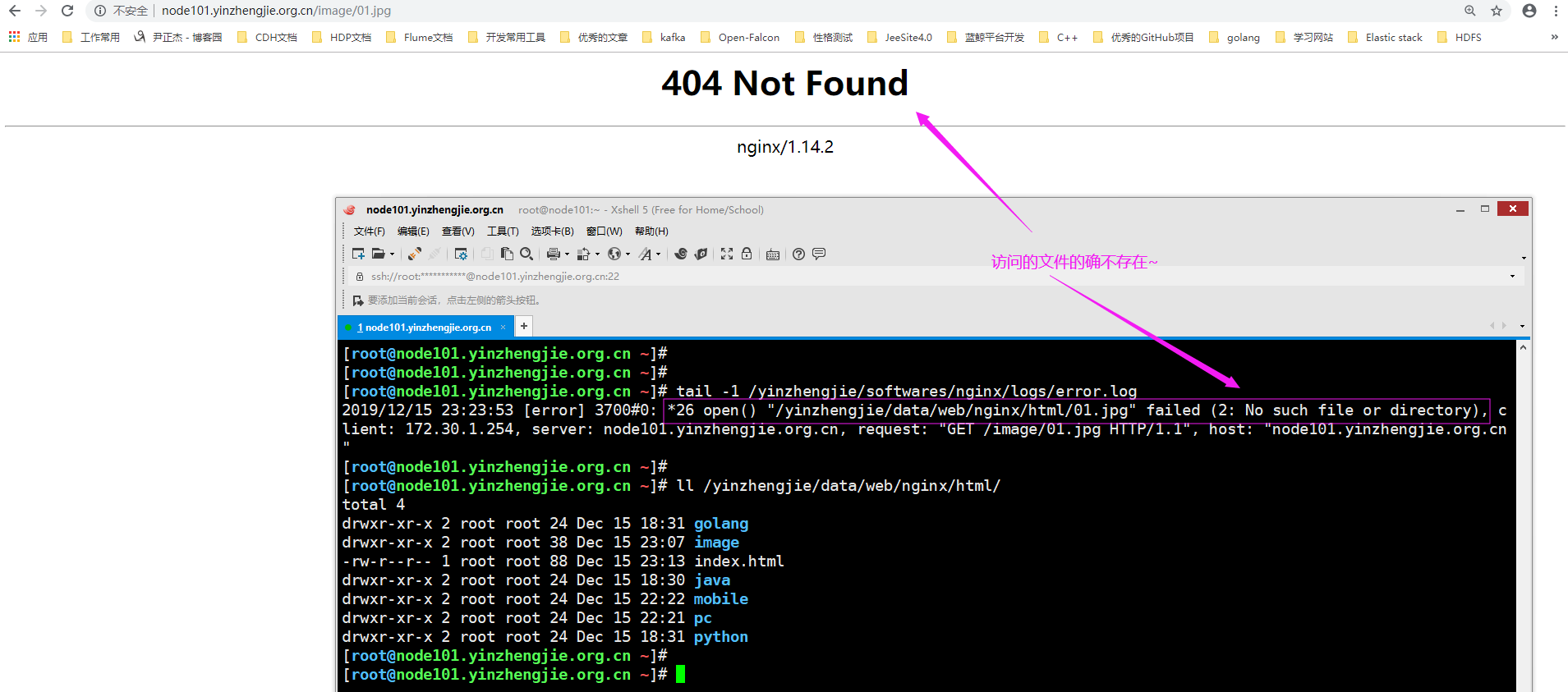
4>.浏览器访问"http://node101.yinzhengjie.org.cn/image/01.jpg",不可以访问到数据,如下图所示。
Nginx 核心配置-根目录root指令与别名alias指令实战案例的更多相关文章
- Nginx 核心配置-可优化配置参数
Nginx 核心配置-可优化配置参数 作者:尹正杰 版权声明:原创作品,谢绝转载!否则将追究法律责任. 一.nginx的官网查看指令帮助信息方法 1>.打开nginx的官网(https://ng ...
- Nginx 核心配置-作为上传服务器配置
Nginx 核心配置-作为上传服务器配置 作者:尹正杰 版权声明:原创作品,谢绝转载!否则将追究法律责任. 一.关键参数说明 client_max_body_size 1m: 设置允许客户端上传单 ...
- Nginx 核心配置-新建一个web站点
Nginx 核心配置-新建一个web站点 作者:尹正杰 版权声明:原创作品,谢绝转载!否则将追究法律责任. 一.Nginx基础配置常用参数说明 [root@node101.yinzhengjie.or ...
- Nginx 核心配置-作为下载服务器配置
Nginx 核心配置-作为下载服务器配置 作者:尹正杰 版权声明:原创作品,谢绝转载!否则将追究法律责任. 一.无限速版本的下载服务器 1>.查看主配置文件 [root@node101.yinz ...
- Nginx 核心配置-长连接配置
Nginx 核心配置-长连接配置 作者:尹正杰 版权声明:原创作品,谢绝转载!否则将追究法律责任. 一.长连接配置参数说明 keepalive_timeout number; 设定保持连接超时时长,0 ...
- Nginx 核心配置-检测文件是否存在
Nginx 核心配置-检测文件是否存在 作者:尹正杰 版权声明:原创作品,谢绝转载!否则将追究法律责任. try_files会按顺序检查文件是否存在,返回第一个找到的文件或文件夹(结尾加斜线表示为文件 ...
- Nginx 核心配置-自定义日志路径及清空日志注意事项
Nginx 核心配置-自定义日志路径及清空日志注意事项 作者:尹正杰 版权声明:原创作品,谢绝转载!否则将追究法律责任. 一.关于日志清空注意事项 1>.nginx服务写访问日志是基于acces ...
- Nginx 核心配置-自定义错误页面
Nginx 核心配置-自定义错误页面 作者:尹正杰 版权声明:原创作品,谢绝转载!否则将追究法律责任. 生产环境中错误页面一般都是UI或开发工程师提供的,他们已经在软件中定义好了,我们这里就简单写个h ...
- Nginx 核心配置-location的登录账户认证实战篇
Nginx 核心配置-location的登录账户认证实战篇 作者:尹正杰 版权声明:原创作品,谢绝转载!否则将追究法律责任. 一.使用ab命令模拟网站攻击 1>.安装httpd-tools工具 ...
随机推荐
- cf1208G Polygons 欧拉函数
链接 cf 给你两个正整数\(n\)和\(k\),询问在一个圆上你最少需要几个点构才能造出\(k\)个边数小于等于\(n\)的正多边形 思路 深受迫害,所以写的详细一点,不会请留言. 性质1 考虑加进 ...
- [探究] [Luogu4550]收集邮票的概率意义
自认为这道题是一道比较简单的扩展题--?此处采用了和别的题解思路不同的,纯概率意义上的解法. 首先考虑一个简化版问题: 每次随机一个\([1,n]\)的整数,问期望几次能凑出所有数 这东西我写过一个b ...
- [LeetCode] 402. Remove K Digits 去掉K位数字
Given a non-negative integer num represented as a string, remove k digits from the number so that th ...
- 使用PAC文件来管理代理连接
生成PAC文件 谷歌浏览器插件商店安装SwitchyOmega,找到立即更新模式,然后导出PAC文件 使用PAC文件 pac采用js编写 Windows Windows上面使用PAC文件很简单,新建一 ...
- C语言I作业12—学期总结
一.我学到的内容 二我的收获 作业 收获 C语言博客作业1 刚开始初步了解C语言方面的知识 学会Markdown基本语法 C语言博客作业2 学会了应该如何提问 PTA系统常见问题解答 学会了MinGW ...
- Django性能优化的几种方法
1.一次性取出你所需要的数据 单一动作,需要多次连接数据库里的时候,最好一次性取出所有需要的数据,减少连接数据库的次数.此类需求推荐使用QuerySet.select_related()和prefet ...
- Windows&Mac安装Redis
Windows&Mac安装Redis Window 下安装Redis Redis 支持 32 位和 64 位.这个需要根据你系统平台的实际情况选择,这里我下载 Redis-x64-xxx.zi ...
- springcloud(六,多个服务提供者)
spring cloud (一.服务注册demo_eureka) spring cloud (二.服务注册安全demo_eureka) spring cloud (三.服务提供者demo_provid ...
- 第25课 std::thread对象的析构
一. 线程的等待与分离 (一)join和detach函数 1. 线程等待:join() (1)等待子线程结束,调用线程处于阻塞模式. (2)join()执行完成之后,底层线程id被设置为0,即join ...
- session的工作原理与session用法
一直在使用session存储数据,一直没有好好总结一下session的使用方式以及其工作原理,今天在这里做一下梳理. 这里的介绍主要是基于php语言,其他的语言操作可能会有差别,但基本的原理不变. 1 ...