
Nginx 核心配置-检测文件是否存在
Nginx核心配置-检测文件是否存在
作者:尹正杰
版权声明:原创作品,谢绝转载!否则将追究法律责任。
try_files会按顺序检查文件是否存在,返回第一个找到的文件或文件夹(结尾加斜线表示为文件夹),如果所有文件或文件夹都找不到,会进行一个内部重定向到最后一个参数。只有最后一个参数可以引起一个内部重定向,之前的参数只设置内部URI的指向。最后一个参数是回退URI且必须存在,否则会出现内部500错误。
一.try_files使用案例1
1>.编辑主配置文件
[root@node101.yinzhengjie.org.cn ~]# cat /yinzhengjie/softwares/nginx/conf/nginx.conf

worker_processes  4;

worker_cpu_affinity 00000001 00000010 00000100 00001000;

events {

    worker_connections  100000;

    use epoll;

    accept_mutex on;

    multi_accept on;

}

http {

    include       mime.types;

    default_type  application/octet-stream;

    sendfile        on;

    gzip  on;

    charset utf-8;

    keepalive_timeout  65 65;

    #导入其他路径的配置文件

    include /yinzhengjie/softwares/nginx/conf.d/*.conf;

}

[root@node101.yinzhengjie.org.cn ~]#

[root@node101.yinzhengjie.org.cn ~]# nginx -t

nginx: the configuration file /yinzhengjie/softwares/nginx/conf/nginx.conf syntax is ok

nginx: configuration file /yinzhengjie/softwares/nginx/conf/nginx.conf test is successful

[root@node101.yinzhengjie.org.cn ~]#
2>.编辑子配置文件
[root@node101.yinzhengjie.org.cn ~]# cat /yinzhengjie/softwares/nginx/conf.d/auth.conf

server {

    listen 80;

    server_name node101.yinzhengjie.org.cn;

    location / {

        root /yinzhengjie/data/web/nginx/static;

        index index.html;

    }

    location /login {

        root /yinzhengjie/data/web/nginx;

        index index.html;

        try_files $uri /default.html;          #如果访问当前localtion出现了错误页面,都会被跳转到"/default.html"

    }

}

[root@node101.yinzhengjie.org.cn ~]#

[root@node101.yinzhengjie.org.cn ~]# nginx -t

nginx: the configuration file /yinzhengjie/softwares/nginx/conf/nginx.conf syntax is ok

nginx: configuration file /yinzhengjie/softwares/nginx/conf/nginx.conf test is successful

[root@node101.yinzhengjie.org.cn ~]#
3>.创建测试数据
[root@node101.yinzhengjie.org.cn ~]# echo "<h1 style='color:rgb(255,0,255)'>Defalut</h1>" > /yinzhengjie/data/web/nginx/static/default.html

[root@node101.yinzhengjie.org.cn ~]#

[root@node101.yinzhengjie.org.cn ~]# ll /yinzhengjie/data/web/nginx/ -R

/yinzhengjie/data/web/nginx/:

total 0

drwxr-xr-x 2 root root 24 Dec 17 12:49 login

drwxr-xr-x 2 root root 44 Dec 17 12:54 static

/yinzhengjie/data/web/nginx/login:

total 4

-rw-r--r-- 1 root root 171 Dec 17 09:41 index.html

/yinzhengjie/data/web/nginx/static:

total 8

-rw-r--r-- 1 root root 46 Dec 17 12:53 default.html

-rw-r--r-- 1 root root 73 Dec 17 12:54 index.html

[root@node101.yinzhengjie.org.cn ~]#

[root@node101.yinzhengjie.org.cn ~]# cat /yinzhengjie/data/web/nginx/static/default.html

<h1 style='color:rgb(255,0,255)'>Defalut</h1>

[root@node101.yinzhengjie.org.cn ~]#
4>.重新加载配置文件
[root@node101.yinzhengjie.org.cn ~]# ps -ef | grep nginx | grep -v grep

root      2840     1  0 09:37 ?        00:00:00 nginx: master process nginx

nginx     4011  2840  0 12:38 ?        00:00:00 nginx: worker process

nginx     4012  2840  0 12:38 ?        00:00:00 nginx: worker process

nginx     4013  2840  0 12:38 ?        00:00:00 nginx: worker process

nginx     4014  2840  0 12:38 ?        00:00:00 nginx: worker process

[root@node101.yinzhengjie.org.cn ~]#

[root@node101.yinzhengjie.org.cn ~]#

[root@node101.yinzhengjie.org.cn ~]# nginx -s reload

[root@node101.yinzhengjie.org.cn ~]#

[root@node101.yinzhengjie.org.cn ~]# ps -ef | grep nginx | grep -v grep

root      2840     1  0 09:37 ?        00:00:00 nginx: master process nginx

nginx     4066  2840  2 12:42 ?        00:00:00 nginx: worker process

nginx     4067  2840  3 12:42 ?        00:00:00 nginx: worker process

nginx     4068  2840  3 12:42 ?        00:00:00 nginx: worker process

nginx     4069  2840  3 12:42 ?        00:00:00 nginx: worker process

[root@node101.yinzhengjie.org.cn ~]#

[root@node101.yinzhengjie.org.cn ~]#
5>.浏览器访问一个不存在的页面,默认匹配到的是"http://node101.yinzhengjie.org.cn/default.html"。

二.try_files使用案例2
1>.编辑子配置文件
[root@node101.yinzhengjie.org.cn ~]# cat /yinzhengjie/softwares/nginx/conf.d/auth.conf

server {

    listen 80;

    server_name node101.yinzhengjie.org.cn;

    location / {

        root /yinzhengjie/data/web/nginx/static;

        index index.html;

    }

    location /login {

        root /yinzhengjie/data/web/nginx;

        index index.html;

        #try_files $uri /default.html;

        try_files $uri $uri.html $uri/index.html /default.html;        #根据给定的参数依次匹配,首先获取到用户输入的uri,然后用用户的uri的值添加".html"后缀进行配置,若不成功就继续访问uri目录下的index.html,若前面两个都匹配失败,则最后匹配"/defalut.html"。

    }

}

[root@node101.yinzhengjie.org.cn ~]#

[root@node101.yinzhengjie.org.cn ~]# nginx -t

nginx: the configuration file /yinzhengjie/softwares/nginx/conf/nginx.conf syntax is ok

nginx: configuration file /yinzhengjie/softwares/nginx/conf/nginx.conf test is successful

[root@node101.yinzhengjie.org.cn ~]#
2>.编写测试数据
[root@node101.yinzhengjie.org.cn ~]# ll /yinzhengjie/data/web/nginx/login/

total 4

-rw-r--r-- 1 root root 171 Dec 17 09:41 index.html

[root@node101.yinzhengjie.org.cn ~]#

[root@node101.yinzhengjie.org.cn ~]# echo "<h1 style='color:rgb(0,0,255)'>Golang</h1>" > /yinzhengjie/data/web/nginx/login/go.html

[root@node101.yinzhengjie.org.cn ~]#

[root@node101.yinzhengjie.org.cn ~]# mkdir /yinzhengjie/data/web/nginx/login/test

[root@node101.yinzhengjie.org.cn ~]#

[root@node101.yinzhengjie.org.cn ~]# echo "<h1 style='color:rgb(255,0,255)'>TEST Page</h1>"  > /yinzhengjie/data/web/nginx/login/test/index.html

[root@node101.yinzhengjie.org.cn ~]#

[root@node101.yinzhengjie.org.cn ~]# ll /yinzhengjie/data/web/nginx/ -R

/yinzhengjie/data/web/nginx/:

total 4

-rw-r--r-- 1 root root 43 Dec 17 13:04 index.html

drwxr-xr-x 3 root root 51 Dec 17 13:08 login

drwxr-xr-x 2 root root 44 Dec 17 12:54 static

/yinzhengjie/data/web/nginx/login:

total 8

-rw-r--r-- 1 root root  43 Dec 17 13:08 go.html

-rw-r--r-- 1 root root 171 Dec 17 09:41 index.html

drwxr-xr-x 2 root root  24 Dec 17 13:09 test

/yinzhengjie/data/web/nginx/login/test:

total 4

-rw-r--r-- 1 root root 48 Dec 17 13:09 index.html

/yinzhengjie/data/web/nginx/static:

total 8

-rw-r--r-- 1 root root 46 Dec 17 12:53 default.html

-rw-r--r-- 1 root root 73 Dec 17 12:54 index.html

[root@node101.yinzhengjie.org.cn ~]#
3>.重新加载配置文件
[root@node101.yinzhengjie.org.cn ~]# ps -ef | grep nginx |grep -v grep

root      2840     1  0 09:37 ?        00:00:00 nginx: master process nginx

nginx     4434  2840  0 13:06 ?        00:00:00 nginx: worker process

nginx     4435  2840  0 13:06 ?        00:00:00 nginx: worker process

nginx     4436  2840  0 13:06 ?        00:00:00 nginx: worker process

nginx     4437  2840  0 13:06 ?        00:00:00 nginx: worker process

[root@node101.yinzhengjie.org.cn ~]#

[root@node101.yinzhengjie.org.cn ~]# nginx -s reload

[root@node101.yinzhengjie.org.cn ~]#

[root@node101.yinzhengjie.org.cn ~]# ps -ef | grep nginx |grep -v grep

root      2840     1  0 09:37 ?        00:00:00 nginx: master process nginx

nginx     4497  2840  2 13:14 ?        00:00:00 nginx: worker process

nginx     4498  2840  2 13:14 ?        00:00:00 nginx: worker process

nginx     4499  2840  2 13:14 ?        00:00:00 nginx: worker process

nginx     4500  2840  3 13:14 ?        00:00:00 nginx: worker process

[root@node101.yinzhengjie.org.cn ~]#
4>.客户端验证
浏览器输入:"http://node101.yinzhengjie.org.cn/login/test",匹配到了"http://node101.yinzhengjie.org.cn/login/test/index.html"的内容,如下图所示。

浏览器输入:"http://node101.yinzhengjie.org.cn/login/go",匹配到的是:"http://node101.yinzhengjie.org.cn/login/go.html",如下图所示

浏览器输入一个不存在的路径,默认匹配到的是"http://node101.yinzhengjie.org.cn/default.html",如下图所示。

三.try_files使用案例3
1>.编写子配置文件
[root@node101.yinzhengjie.org.cn ~]# cat /yinzhengjie/softwares/nginx/conf.d/auth.conf

server {

    listen 80;

    server_name node101.yinzhengjie.org.cn;

    location / {

        root /yinzhengjie/data/web/nginx/static;

        index index.html;

    }

    location /login {

        root /yinzhengjie/data/web/nginx;

        index index.html;

        #try_files $uri /default.html;

        #try_files $uri $uri.html $uri/index.html /default.html;

        try_files $uri $uri.html $uri/index.html /default.html =888;

    }

}

[root@node101.yinzhengjie.org.cn ~]#

[root@node101.yinzhengjie.org.cn ~]# nginx -t

nginx: the configuration file /yinzhengjie/softwares/nginx/conf/nginx.conf syntax is ok

nginx: configuration file /yinzhengjie/softwares/nginx/conf/nginx.conf test is successful

[root@node101.yinzhengjie.org.cn ~]#
2>.重新加载配置文件
[root@node101.yinzhengjie.org.cn ~]# ps -ef | grep nginx | grep -v grep

root      2840     1  0 09:37 ?        00:00:00 nginx: master process nginx

nginx     4497  2840  0 13:14 ?        00:00:00 nginx: worker process

nginx     4498  2840  0 13:14 ?        00:00:00 nginx: worker process

nginx     4499  2840  0 13:14 ?        00:00:00 nginx: worker process

nginx     4500  2840  0 13:14 ?        00:00:00 nginx: worker process

[root@node101.yinzhengjie.org.cn ~]#

[root@node101.yinzhengjie.org.cn ~]# nginx -s reload

[root@node101.yinzhengjie.org.cn ~]#

[root@node101.yinzhengjie.org.cn ~]# ps -ef | grep nginx | grep -v grep

root      2840     1  0 09:37 ?        00:00:00 nginx: master process nginx

nginx     4604  2840  1 13:23 ?        00:00:00 nginx: worker process

nginx     4605  2840  2 13:23 ?        00:00:00 nginx: worker process

nginx     4606  2840  2 13:23 ?        00:00:00 nginx: worker process

nginx     4607  2840  2 13:23 ?        00:00:00 nginx: worker process

[root@node101.yinzhengjie.org.cn ~]#

[root@node101.yinzhengjie.org.cn ~]#
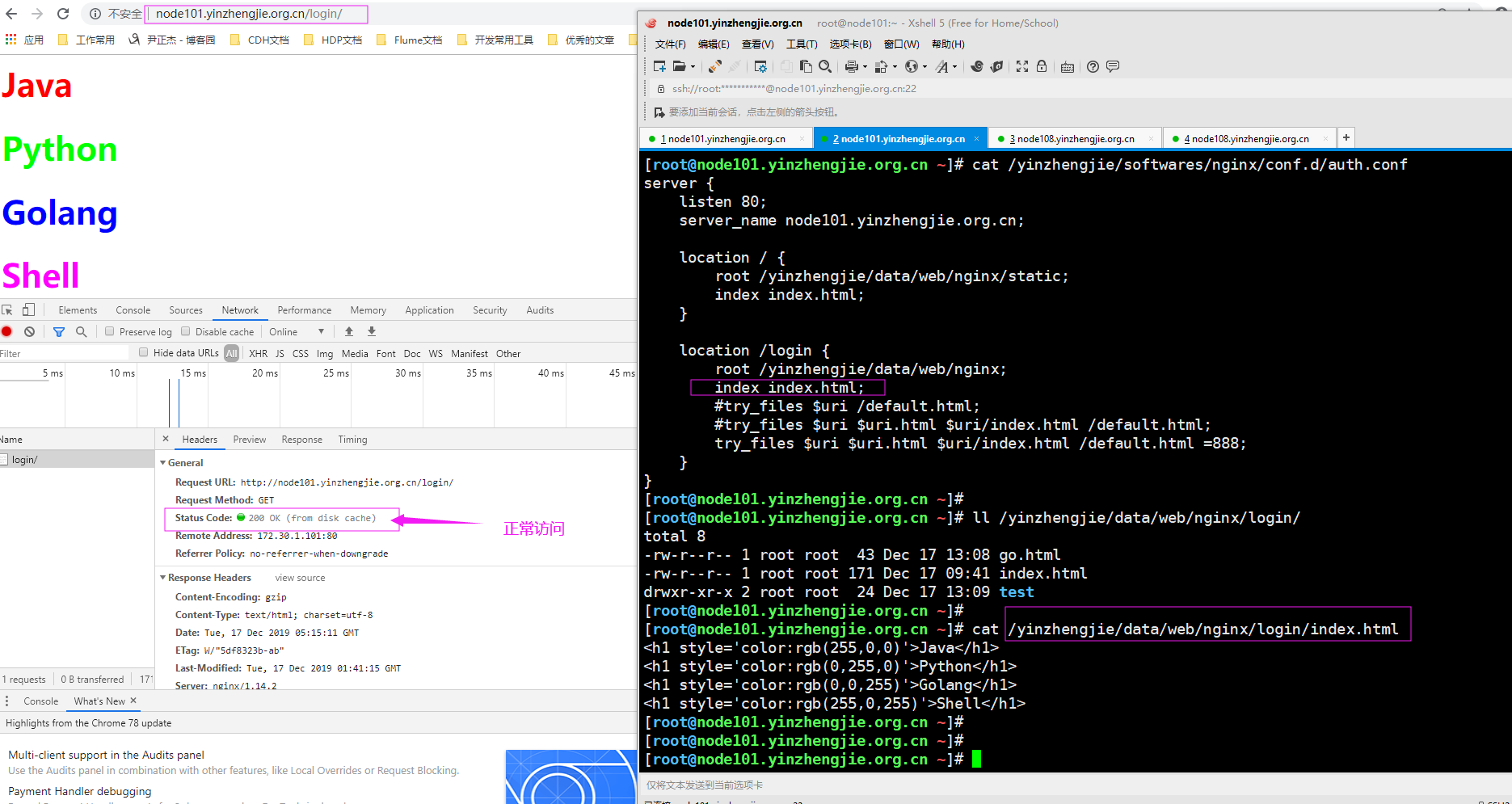
3>.浏览器访问"http://node101.yinzhengjie.org.cn/login/",如下图所示
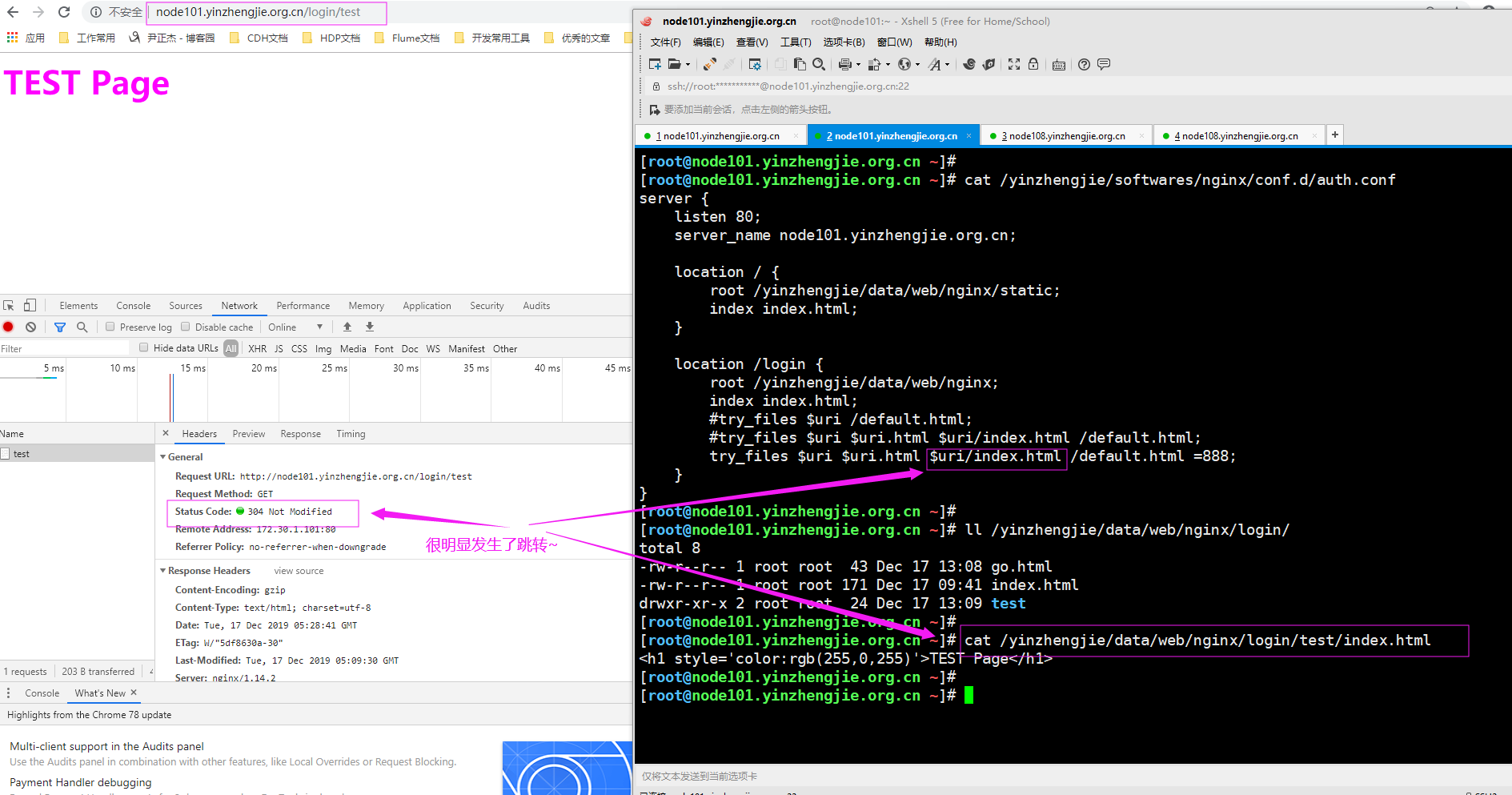
4>.浏览器访问"http://node101.yinzhengjie.org.cn/login/test",如下图所示
5>.浏览器访问一个不存在的资源, "http://node101.yinzhengjie.org.cn/login/",如下图所示

Nginx 核心配置-检测文件是否存在的更多相关文章
- Nginx 核心配置详解
目录 Nginx 核心配置详解 Nginx 四层访问控制: Nginx账户认证功能: 自定义错误页面: 自定义访问日志: 检测文件是否存在: 长连接配置: 作为下载服务器配置: 作为上传服务器: 其他 ...
- Nginx 核心配置-可优化配置参数
Nginx 核心配置-可优化配置参数 作者:尹正杰 版权声明:原创作品,谢绝转载!否则将追究法律责任. 一.nginx的官网查看指令帮助信息方法 1>.打开nginx的官网(https://ng ...
- Nginx 核心配置-作为上传服务器配置
Nginx 核心配置-作为上传服务器配置 作者:尹正杰 版权声明:原创作品,谢绝转载!否则将追究法律责任. 一.关键参数说明 client_max_body_size 1m: 设置允许客户端上传单 ...
- Nginx 核心配置-作为下载服务器配置
Nginx 核心配置-作为下载服务器配置 作者:尹正杰 版权声明:原创作品,谢绝转载!否则将追究法律责任. 一.无限速版本的下载服务器 1>.查看主配置文件 [root@node101.yinz ...
- Nginx 核心配置-自定义日志路径及清空日志注意事项
Nginx 核心配置-自定义日志路径及清空日志注意事项 作者:尹正杰 版权声明:原创作品,谢绝转载!否则将追究法律责任. 一.关于日志清空注意事项 1>.nginx服务写访问日志是基于acces ...
- Nginx 核心配置-自定义错误页面
Nginx 核心配置-自定义错误页面 作者:尹正杰 版权声明:原创作品,谢绝转载!否则将追究法律责任. 生产环境中错误页面一般都是UI或开发工程师提供的,他们已经在软件中定义好了,我们这里就简单写个h ...
- Nginx 核心配置-location的登录账户认证实战篇
Nginx 核心配置-location的登录账户认证实战篇 作者:尹正杰 版权声明:原创作品,谢绝转载!否则将追究法律责任. 一.使用ab命令模拟网站攻击 1>.安装httpd-tools工具 ...
- Nginx 核心配置-location的匹配案例实战篇
Nginx 核心配置-location的匹配案例实战篇 作者:尹正杰 版权声明:原创作品,谢绝转载!否则将追究法律责任. 一.location语法规则介绍 在没有使用正则表达式的时候,nginx会先在 ...
- Nginx 核心配置-新建一个web站点
Nginx 核心配置-新建一个web站点 作者:尹正杰 版权声明:原创作品,谢绝转载!否则将追究法律责任. 一.Nginx基础配置常用参数说明 [root@node101.yinzhengjie.or ...
随机推荐
- cf 1182 E - Product Oriented Recurrence
当时脑残了, 不会写矩阵快速幂中更改的系数, 其实把他扔到矩阵里同时递推就好了 #include<cstdio> #include<algorithm> #include< ...
- [LeetCode] 255. Verify Preorder Sequence in Binary Search Tree 验证二叉搜索树的先序序列
Given an array of numbers, verify whether it is the correct preorder traversal sequence of a binary ...
- [LeetCode] 198. House Robber 打家劫舍
You are a professional robber planning to rob houses along a street. Each house has a certain amount ...
- 编译安装php-fpm5.6 (centos 7)
一.安装php-fpm依赖包 yum install -y make cmake gcc gcc-c++ autoconf automake libpng-devel libjpeg-devel zl ...
- Spring security 知识笔记【自定义登录页面】
一.引入依赖 <dependency> <groupId>org.springframework.boot</groupId> <artifactId> ...
- thinkphp5.0学习(九):TP5.0视图和模板
原文地址:http://blog.csdn.net/fight_tianer/article/details/78602711 一.视图 1.加载页面 1.继承系统控制器类 return $this- ...
- ROS-RouterOS KVM 安装 OpenWrt 旁路使用
原文: http://bbs.routerclub.com/thread-104864-1-1.html 这里所讲是X86架构的RouteROS的KVM虚拟机,其实RouterOS的KVM很早就有,大 ...
- vue 学习记录
模板:通常是指html模板 组件component的概念: 在 Vue 里,一个组件本质上是一个拥有预定义选项的一个 Vue 实例, 将组件看作自定义的HTML元素.使用组件的前提是创建并注册组件 v ...
- @JsonView的使用
1.使用场景 在某一些请求返回的JSON中,我们并不希望返回某些字段.而在另一些请求中需要返回某些字段. 例如: 在查询列表请求中,不返回password字段 在获取用户详情中,返回password字 ...
- jsp之el表达式jstl标签
不管是el表达式还是jstl标签最终的目的都是要消除jsp中的java代码,当然是消除显式的java代码 el表达式的出现是为了简化jsp中读取数据并写入页面的操作. el表达式的功能不多,也很好记 ...