
Nginx 核心配置-作为下载服务器配置
Nginx核心配置-作为下载服务器配置
作者:尹正杰
版权声明:原创作品,谢绝转载!否则将追究法律责任。
一.无限速版本的下载服务器
1>.查看主配置文件
[root@node101.yinzhengjie.org.cn ~]# cat /yinzhengjie/softwares/nginx/conf/nginx.conf

worker_processes  4;

worker_cpu_affinity 00000001 00000010 00000100 00001000;

events {

    worker_connections  100000;

    use epoll;

    accept_mutex on;

    multi_accept on;

}

http {

    include       mime.types;

    default_type  application/octet-stream;

    sendfile        on;

    gzip  on;

    charset utf-8;

    #开启长连接后,返回客户端的会话保持时间为60s,单次长连接累计请求达到指定次数请求或65秒就会被断开,后面的60为发送给客户端应答报文头部中显示的超时时间设置为60s:如不设置

客户端将不显示超时时间。    keepalive_timeout  65 60;

    #在一次长连接上所允许请求的资源的最大数量

    keepalive_requests 3;

    #导入其他路径的配置文件

    include /yinzhengjie/softwares/nginx/conf.d/*.conf;

}

[root@node101.yinzhengjie.org.cn ~]#

[root@node101.yinzhengjie.org.cn ~]# nginx -t

nginx: the configuration file /yinzhengjie/softwares/nginx/conf/nginx.conf syntax is ok

nginx: configuration file /yinzhengjie/softwares/nginx/conf/nginx.conf test is successful

[root@node101.yinzhengjie.org.cn ~]#
2>.查看子配置文件
[root@node101.yinzhengjie.org.cn ~]# cat /yinzhengjie/softwares/nginx/conf.d/share.conf

server {

    listen 80;

    server_name node101.yinzhengjie.org.cn;

    location / {

        root /yinzhengjie/data/web/nginx/static;

        index index.html;

    }

    location /download {

        root /yinzhengjie/data/web/nginx;

        autoindex on;

        autoindex_exact_size on;

        autoindex_localtime on;

    }

}

[root@node101.yinzhengjie.org.cn ~]#

[root@node101.yinzhengjie.org.cn ~]# nginx -t

nginx: the configuration file /yinzhengjie/softwares/nginx/conf/nginx.conf syntax is ok

nginx: configuration file /yinzhengjie/softwares/nginx/conf/nginx.conf test is successful

[root@node101.yinzhengjie.org.cn ~]#
3>.创建测试数据
[root@node101.yinzhengjie.org.cn ~]# mkdir -pv /yinzhengjie/data/web/nginx/download

mkdir: created directory ‘/yinzhengjie/data/web/nginx/download’

[root@node101.yinzhengjie.org.cn ~]#

[root@node101.yinzhengjie.org.cn ~]# ll

total 3338920

-rw-r--r-- 1 root root 3419052032 Oct  6  2016 cn_windows_7_ultimate_with_sp1_x64_dvd_618537.iso

[root@node101.yinzhengjie.org.cn ~]#

[root@node101.yinzhengjie.org.cn ~]# mv cn_windows_7_ultimate_with_sp1_x64_dvd_618537.iso /yinzhengjie/data/web/nginx/download/

[root@node101.yinzhengjie.org.cn ~]#

[root@node101.yinzhengjie.org.cn ~]# cp /etc/passwd /etc/mtab /etc/sysctl.conf /etc/fstab /yinzhengjie/data/web/nginx/download/

[root@node101.yinzhengjie.org.cn ~]#

[root@node101.yinzhengjie.org.cn ~]# ll /yinzhengjie/data/web/nginx/download/

total 3338936

-rw-r--r-- 1 root root 3419052032 Oct  6  2016 cn_windows_7_ultimate_with_sp1_x64_dvd_618537.iso

-rw-r--r-- 1 root root        541 Dec 17 14:41 fstab

-r--r--r-- 1 root root       2205 Dec 17 14:41 mtab

-rw-r--r-- 1 root root       1145 Dec 17 14:41 passwd

-rw-r--r-- 1 root root        735 Dec 17 14:41 sysctl.conf

[root@node101.yinzhengjie.org.cn ~]#

[root@node101.yinzhengjie.org.cn ~]#
4>.重新加载nginx的配置文件
[root@node101.yinzhengjie.org.cn ~]# ps -ef | grep ngin | grep -v grep

root      2840     1  0 09:37 ?        00:00:00 nginx: master process nginx

nginx     4769  2840  0 14:12 ?        00:00:00 nginx: worker process

nginx     4770  2840  0 14:12 ?        00:00:00 nginx: worker process

nginx     4771  2840  0 14:12 ?        00:00:00 nginx: worker process

nginx     4772  2840  0 14:12 ?        00:00:00 nginx: worker process

[root@node101.yinzhengjie.org.cn ~]#

[root@node101.yinzhengjie.org.cn ~]# nginx -s reload

[root@node101.yinzhengjie.org.cn ~]#

[root@node101.yinzhengjie.org.cn ~]# ps -ef | grep ngin | grep -v grep

root      2840     1  0 09:37 ?        00:00:00 nginx: master process nginx

nginx     4991  2840 11 14:42 ?        00:00:00 nginx: worker process

nginx     4992  2840 10 14:42 ?        00:00:00 nginx: worker process

nginx     4993  2840 11 14:42 ?        00:00:00 nginx: worker process

nginx     4994  2840 10 14:42 ?        00:00:00 nginx: worker process

[root@node101.yinzhengjie.org.cn ~]#
5>.访问nginx的下载站点
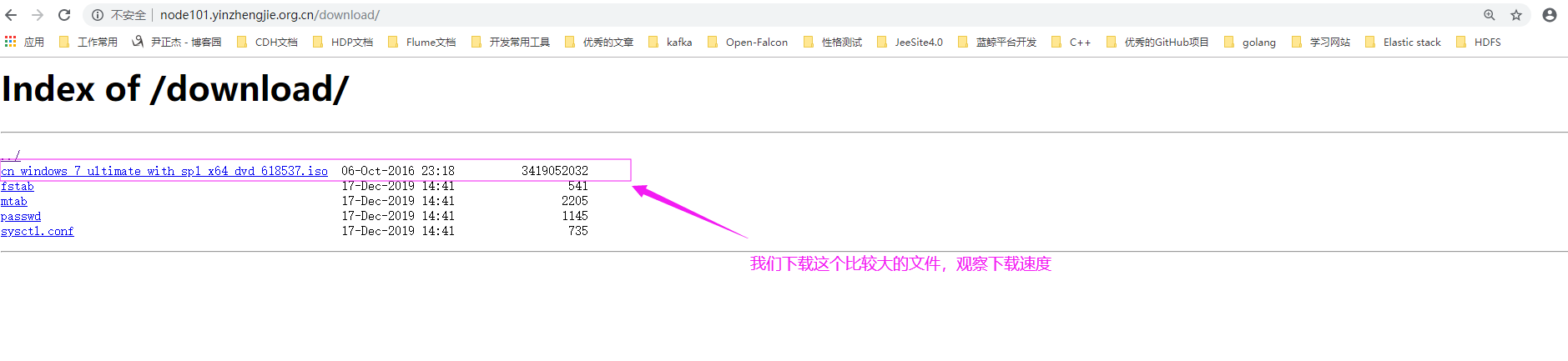
6>.下载一个大文件,并观察下载的网速
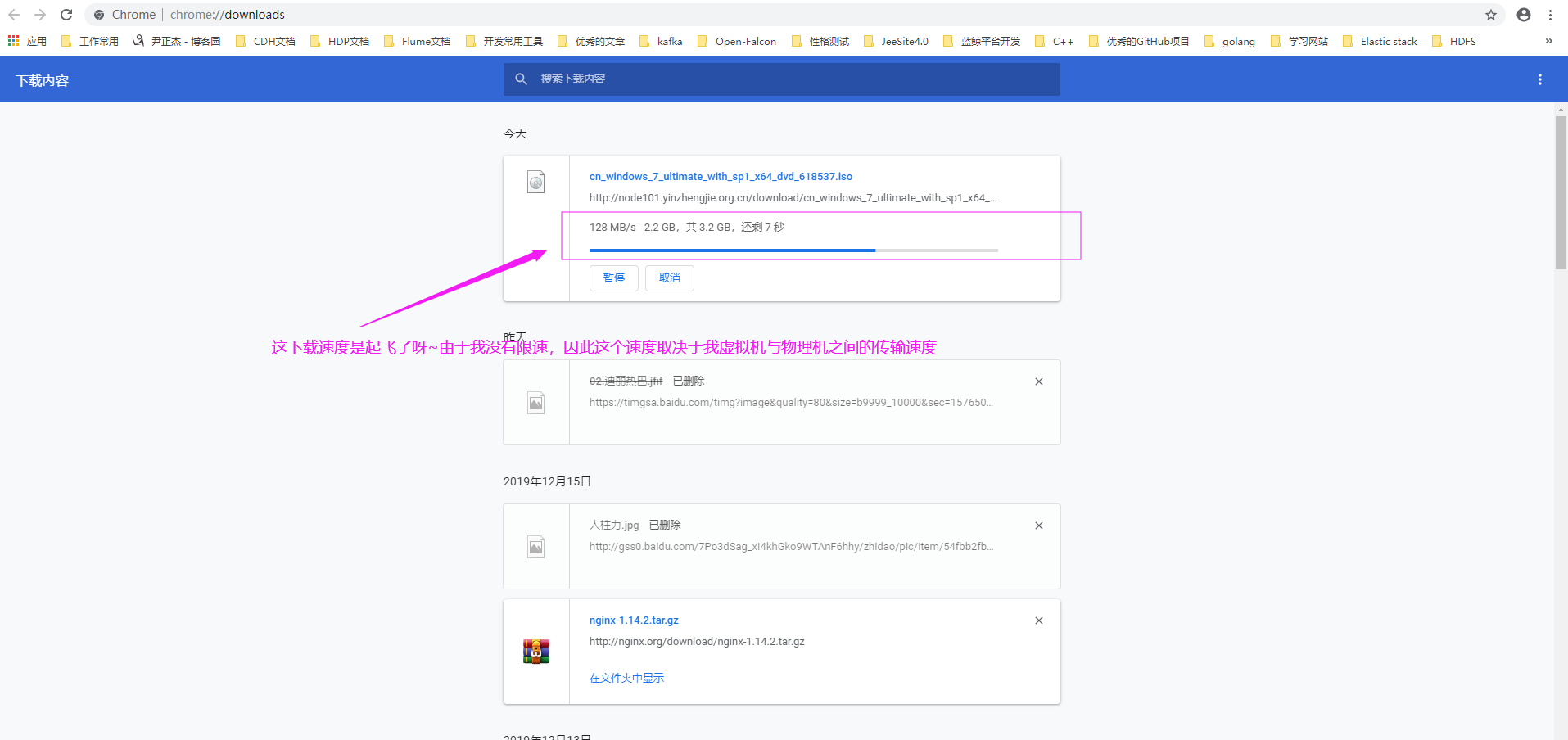
二.限速版本的下载服务器
1>.编辑子配置文件
[root@node101.yinzhengjie.org.cn ~]# vim /yinzhengjie/softwares/nginx/conf.d/share.conf

[root@node101.yinzhengjie.org.cn ~]#

[root@node101.yinzhengjie.org.cn ~]# cat /yinzhengjie/softwares/nginx/conf.d/share.conf

server {

    listen 80;

    server_name node101.yinzhengjie.org.cn;

    location / {

        root /yinzhengjie/data/web/nginx/static;

        index index.html;

    }

    location /download {

        root /yinzhengjie/data/web/nginx;

        autoindex on;

        autoindex_exact_size on;

        autoindex_localtime on;

        limit_rate 10k;

    }

}

[root@node101.yinzhengjie.org.cn ~]#

[root@node101.yinzhengjie.org.cn ~]# nginx -t

nginx: the configuration file /yinzhengjie/softwares/nginx/conf/nginx.conf syntax is ok

nginx: configuration file /yinzhengjie/softwares/nginx/conf/nginx.conf test is successful

[root@node101.yinzhengjie.org.cn ~]#
2>.重新加载配置文件
[root@node101.yinzhengjie.org.cn ~]# ps -ef | grep nginx | grep -v grep

root      2840     1  0 09:37 ?        00:00:00 nginx: master process nginx

nginx     4991  2840  0 14:42 ?        00:00:00 nginx: worker process

nginx     4992  2840  0 14:42 ?        00:00:00 nginx: worker process

nginx     4993  2840  0 14:42 ?        00:00:00 nginx: worker process

nginx     4994  2840  0 14:42 ?        00:00:00 nginx: worker process

[root@node101.yinzhengjie.org.cn ~]#

[root@node101.yinzhengjie.org.cn ~]# nginx -s reload

[root@node101.yinzhengjie.org.cn ~]#

[root@node101.yinzhengjie.org.cn ~]# ps -ef | grep nginx | grep -v grep

root      2840     1  0 09:37 ?        00:00:00 nginx: master process nginx

nginx     5023  2840 10 14:48 ?        00:00:00 nginx: worker process

nginx     5024  2840 10 14:48 ?        00:00:00 nginx: worker process

nginx     5025  2840 10 14:48 ?        00:00:00 nginx: worker process

nginx     5026  2840 10 14:48 ?        00:00:00 nginx: worker process

[root@node101.yinzhengjie.org.cn ~]#
3>.打开网页并下载上次的那个大文件,观察下载速度,如下图所示
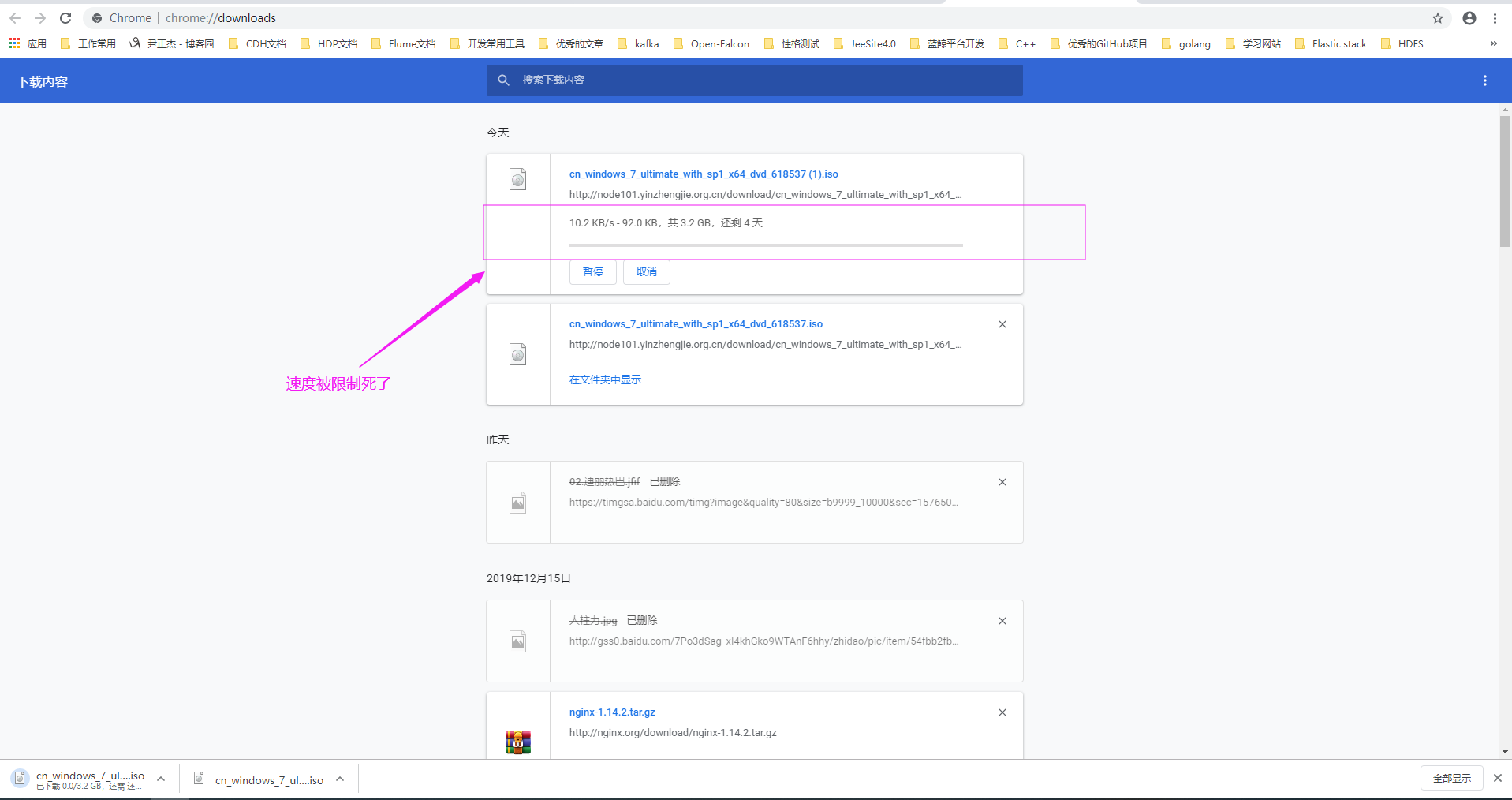
三.生产环境关于搭建下载网站的建议
1>.相关参数配置说明
autoindex on;

  自动索引功能,即在没有index.html文件的存在下,列出root目录下的所有文件,但不包括隐藏文件。、

autoindex_exact_size on;

  计算文件确切大小(单位bytes),off只显示大概大小(单位kb、mb、gb)

autoindex_localtime on;

  显示本机时间而非GMT(格林威治)时间

limit_rate rate;

  限制响应给客户端的传输速率,单位是bytes/second,默认值0表示无限制限速与不限速的对比:
2>.生产环境中限速和不限速的下载站点应用场景
不限速下载站点应用场景:

  一般是公司内部员工使用,下载速度是没有必要限制了,因为同一个公司应该很少存在别人攻击咱们的显现,不过话又说回来,害人之心不可有,防人之心不可无啊,若干有人要离职前搞点事情的我们运维还是得防着点的,比如某某写了脚本恶意下载导致公司内网交换机传输带宽上线,导致员工无法正常办公的情况,可以考虑使用上网行为管理等工具或者是在交换机每个端口限速,当然还得对网络情况进行监控,一旦有问题我们运维人员立马收到消息,可以很快就处理掉这种情况。

限速下载站点的应用场景:
  这种下载速度限制一般我们在公网上跑服务,害怕有人而已攻击咱们的下载站点,比如写个死循环开启N多个线程同时下载咱们下载站点的一个大文件,这样你会发现自己的带宽就这样被浪费啦~因此限速是有必要的。
Nginx 核心配置-作为下载服务器配置的更多相关文章
- Nginx 核心配置-作为上传服务器配置
Nginx 核心配置-作为上传服务器配置 作者:尹正杰 版权声明:原创作品,谢绝转载!否则将追究法律责任. 一.关键参数说明 client_max_body_size 1m: 设置允许客户端上传单 ...
- Nginx 核心配置-新建一个web站点
Nginx 核心配置-新建一个web站点 作者:尹正杰 版权声明:原创作品,谢绝转载!否则将追究法律责任. 一.Nginx基础配置常用参数说明 [root@node101.yinzhengjie.or ...
- Nginx 核心配置详解
目录 Nginx 核心配置详解 Nginx 四层访问控制: Nginx账户认证功能: 自定义错误页面: 自定义访问日志: 检测文件是否存在: 长连接配置: 作为下载服务器配置: 作为上传服务器: 其他 ...
- Nginx 核心配置-根目录root指令与别名alias指令实战案例
Nginx 核心配置-根目录root指令与别名alias指令实战案例 作者:尹正杰 版权声明:原创作品,谢绝转载!否则将追究法律责任. 一.试验环境说明 1>.虚拟机环境说明 [root@nod ...
- Nginx 核心配置-可优化配置参数
Nginx 核心配置-可优化配置参数 作者:尹正杰 版权声明:原创作品,谢绝转载!否则将追究法律责任. 一.nginx的官网查看指令帮助信息方法 1>.打开nginx的官网(https://ng ...
- Nginx 核心配置-长连接配置
Nginx 核心配置-长连接配置 作者:尹正杰 版权声明:原创作品,谢绝转载!否则将追究法律责任. 一.长连接配置参数说明 keepalive_timeout number; 设定保持连接超时时长,0 ...
- Nginx 核心配置-检测文件是否存在
Nginx 核心配置-检测文件是否存在 作者:尹正杰 版权声明:原创作品,谢绝转载!否则将追究法律责任. try_files会按顺序检查文件是否存在,返回第一个找到的文件或文件夹(结尾加斜线表示为文件 ...
- Nginx 核心配置-自定义日志路径及清空日志注意事项
Nginx 核心配置-自定义日志路径及清空日志注意事项 作者:尹正杰 版权声明:原创作品,谢绝转载!否则将追究法律责任. 一.关于日志清空注意事项 1>.nginx服务写访问日志是基于acces ...
- Nginx 核心配置-自定义错误页面
Nginx 核心配置-自定义错误页面 作者:尹正杰 版权声明:原创作品,谢绝转载!否则将追究法律责任. 生产环境中错误页面一般都是UI或开发工程师提供的,他们已经在软件中定义好了,我们这里就简单写个h ...
随机推荐
- 3.GO-项目结构、包访问权限、闭包和值传递引用传递
3.1.goland中项目结构 (1)在goland中创建标准Go项目 (2)goland配置 创建项目Learn-Go file-settings-go-GOPATH-添加 在项目目录下创建src目 ...
- Asp.Net Core 减少Controller获取重复注入对象
原文:Asp.Net Core 减少Controller获取重复注入对象 版权声明:本文为博主原创文章,未经博主允许不得转载. https://blog.csdn.net/u012770274/art ...
- PowerShell常用命令及美化(现代化的CMD)
PowerShell可谓现代终端,是微软用来替代古老的CMD的. PowerShell拥有面向对象的思想,非常方便. 常用命令 下载文件(此处以install.ps1文件为例) $client = n ...
- Windows 10 win 10 切换输入法的快捷键
Windows 10 win 10 切换输入法的快捷键 怎么切换输入法 中文 英文 切换 Windows键 + 空格键 切换输入法 Shift+Alt 切换中英文 Windows键形状如下 ...
- CentOS7 Harbor 安装
安装Harbor,首先要安装docker 和 docker-compose 1.安装docker (1)安装一些必要的系统工具 $ yum install -y yum-utils device- ...
- 在onclick事件中传递对象参数
1.传json对象 var obj = {id: 1, name: 'jimc', age: 20}; var jsonObj = '<a onclick="show(' + JSON ...
- oracle数据库表约束、视图、索引—该记录为本人以前微博的文章
一.Oracle 数据库常用操作续关于创建表时创建约束1.创建表的时候增加约束----约束是定义表中的数据应该遵循的规则或者满足的条件----约束是建立在列上的,让某一列或者某几列数据之间有约束--- ...
- 优先队列 + 模拟 - HDU 5437 Alisha’s Party
Alisha’s Party Problem's Link Mean: Alisha过生日,有k个朋友来参加聚会,由于空间有限,Alisha每次开门只能让p个人进来,而且带的礼物价值越高就越先进入. ...
- HMAC算法原理
HMAC算法是一种基于密钥的报文完整性的验证方法 ,其安全性是建立在Hash加密算法基础上的.它要求通信双方共享密钥.约定算法.对报文进行Hash运算,形成固定长度的认证码.通信双方通过认证码的校验来 ...
- Mysql序列(七)—— order by优化
前言 在mysql中满足order by的处理方式有两种: 让索引满足排序,即扫描有序索引然后再找到对应的行结果,这样结果即是有序: 使用索引查询出结果或者扫描表得到结果然后使用filesort排序: ...