
Httpd服务入门知识-使用mod_deflate模块压缩页面优化传输速度
Httpd服务入门知识-使用mod_deflate模块压缩页面优化传输速度
作者:尹正杰
版权声明:原创作品,谢绝转载!否则将追究法律责任。
一.mod_deflate模块概述
mod_deflate模块功能:

    压缩页面从而优化传输速度

mod_deflate模块适用场景:

  ()节约带宽,额外消耗CPU;同时,可能有些较老浏览器不支持

  ()压缩适于压缩的资源,例如文本文件

      LoadModule deflate_module modules/mod_deflate.so SetOutputFilter DEFLATE

      SetOutputFilter DEFLATE

      # Restrict compression to these MIME types

      AddOutputFilterByType DEFLATE text/plain

      AddOutputFilterByType DEFLATE text/html

      AddOutputFilterByType DEFLATE application/xhtml+xml

      AddOutputFilterByType DEFLATE text/xml

      AddOutputFilterByType DEFLATE application/xml

      AddOutputFilterByType DEFLATE application/x-javascript

      AddOutputFilterByType DEFLATE text/javascript

      AddOutputFilterByType DEFLATE text/css

  ()Level of compression (支持的压缩级别Highest  - Lowest )

      DeflateCompressionLevel

  ()排除特定旧版本的浏览器,不支持压缩

      Netscape .x 只压缩text/html

        BrowserMatch ^Mozilla/ gzip-only-text/html

      Netscape 4.06-08三个版本 不压缩

        BrowserMatch ^Mozilla/\.[] no-gzip

      Internet Explorer标识本身为"Mozilla / 4",但实际上是能够处理请求的压缩。如果用户代理首部匹配字符串“MSIE”(“B”为单词边界”),就关闭之前定义的限制

        BrowserMatch \bMSI[E] !no-gzip !gzip-only-text/html

博主推荐阅读:

  http://httpd.apache.org/docs/2.4/mod/mod_deflate.html

二.准备测试数据
1>.创建测试文件
[root@node101.yinzhengjie.org.cn ~]# ll -h /var/log/messages

-rw-r--r--  root root 119K Dec   : /var/log/messages

[root@node101.yinzhengjie.org.cn ~]#

[root@node101.yinzhengjie.org.cn ~]# touch /var/www/html/asite/log.txt

[root@node101.yinzhengjie.org.cn ~]#

[root@node101.yinzhengjie.org.cn ~]# ll -h /var/www/html/asite/log.txt

-rw-r--r--  root root  Dec   : /var/www/html/asite/log.txt

[root@node101.yinzhengjie.org.cn ~]#

[root@node101.yinzhengjie.org.cn ~]# for _ in  `seq `; do cat /var/log/messages >> /var/www/html/asite/log.txt;done      #我们将"/var/log/message"内容遍历100次写入到"/var/www/html/asite/log.txt"文件中

[root@node101.yinzhengjie.org.cn ~]#

[root@node101.yinzhengjie.org.cn ~]# ll -h /var/www/html/asite/log.txt     #很明显,文件相比"/var/log/message"要打了1000倍。

-rw-r--r--  root root 117M Dec   : /var/www/html/asite/log.txt

[root@node101.yinzhengjie.org.cn ~]#

[root@node101.yinzhengjie.org.cn ~]#
2>.编写httpd服务端的配置
[root@node101.yinzhengjie.org.cn ~]# egrep -v "^ *#|^$" /etc/httpd/conf/httpd.conf

ServerRoot "/etc/httpd"

Listen

Include conf.modules.d/*.conf

User apache

Group apache

ServerAdmin root@localhost

<Directory />

    AllowOverride none

    Require all denied

</Directory>

DocumentRoot "/var/www/html"

<Directory "/var/www">

    AllowOverride None

    Require all granted

</Directory>

<Directory "/var/www/html">

    Options Indexes FollowSymLinks

    AllowOverride None

    Require all granted

</Directory>

<IfModule dir_module>

    DirectoryIndex index.html

</IfModule>

<Files ".ht*">

    Require all denied

</Files>

ErrorLog "logs/error_log"

LogLevel warn

<IfModule log_config_module>

    LogFormat "%h %l %u %{%Y-%m-%d %H:%M:%S}t \"%r\" %>s %b \"%{Referer}i\" \"%{User-Agent}i\"" testlog

    LogFormat "%h %l %u %t \"%r\" %>s %b" common

    <IfModule logio_module>

      LogFormat "%h %l %u %t \"%r\" %>s %b \"%{Referer}i\" \"%{User-Agent}i\" %I %O" combinedio

    </IfModule>

    CustomLog "logs/access_log" testlog

</IfModule>

<IfModule alias_module>

    ScriptAlias /cgi-bin/ "/var/www/cgi-bin/"

</IfModule>

<Directory "/var/www/cgi-bin">

    AllowOverride None

    Options None

    Require all granted

</Directory>

<IfModule mime_module>

    TypesConfig /etc/mime.types

    AddType application/x-compress .Z

    AddType application/x-gzip .gz .tgz

    AddType text/html .shtml

    AddOutputFilter INCLUDES .shtml

</IfModule>

AddDefaultCharset UTF-8

<IfModule mime_magic_module>

    MIMEMagicFile conf/magic

</IfModule>

EnableSendfile on

IncludeOptional conf.d/*.conf

[root@node101.yinzhengjie.org.cn ~]#

[root@node101.yinzhengjie.org.cn ~]#
[root@node101.yinzhengjie.org.cn ~]# egrep -v "^ *#|^$" /etc/httpd/conf/httpd.conf #查看主配置文件内容
[root@node101.yinzhengjie.org.cn ~]# egrep -v "^ *#|^$" /etc/httpd/conf/httpd.conf  | grep ServerRoot

ServerRoot "/etc/httpd"

[root@node101.yinzhengjie.org.cn ~]#

[root@node101.yinzhengjie.org.cn ~]# egrep -v "^ *#|^$" /etc/httpd/conf/httpd.conf  | grep IncludeOptional

IncludeOptional conf.d/*.conf

[root@node101.yinzhengjie.org.cn ~]#

[root@node101.yinzhengjie.org.cn ~]# cat /etc/httpd/conf.d/virtualHost.conf

<VirtualHost "*:80">

    DocumentRoot "/var/www/html/asite"

    ServerName "www.a.com"        #别忘记在这里写上相应的虚拟主机的名称哟~以下配置类似修改即可。

    <Directory "/var/www/html/asite">

        Require all granted

    </Directory>

    CustomLog "/var/log/httpd/access_asite_log" testlog

</VirtualHost>

<VirtualHost "*:80">

    DocumentRoot "/var/www/html/bsite"

    ServerName "www.b.org"

    <Directory "/var/www/html/bsite">

        Require all granted

    </Directory>

    CustomLog "/var/log/httpd/access_bsite_log" testlog

</VirtualHost>

<VirtualHost "*:80">

    DocumentRoot "/var/www/html/csite"

    ServerName "www.c.net"

    <Directory "/var/www/html/csite">

        Require all granted

    </Directory>

    CustomLog "/var/log/httpd/access_csite_log" testlog

</VirtualHost>

[root@node101.yinzhengjie.org.cn ~]#

[root@node101.yinzhengjie.org.cn ~]# httpd -t

Syntax OK

[root@node101.yinzhengjie.org.cn ~]#

[root@node101.yinzhengjie.org.cn ~]# systemctl reload httpd

[root@node101.yinzhengjie.org.cn ~]#

[root@node101.yinzhengjie.org.cn ~]# ss -ntl

State       Recv-Q Send-Q             Local Address:Port                            Peer Address:Port

LISTEN      0      128                            *:80                                         *:*

LISTEN      0      128                            *:22                                         *:*

LISTEN      0      128                           :::22                                        :::*

[root@node101.yinzhengjie.org.cn ~]#
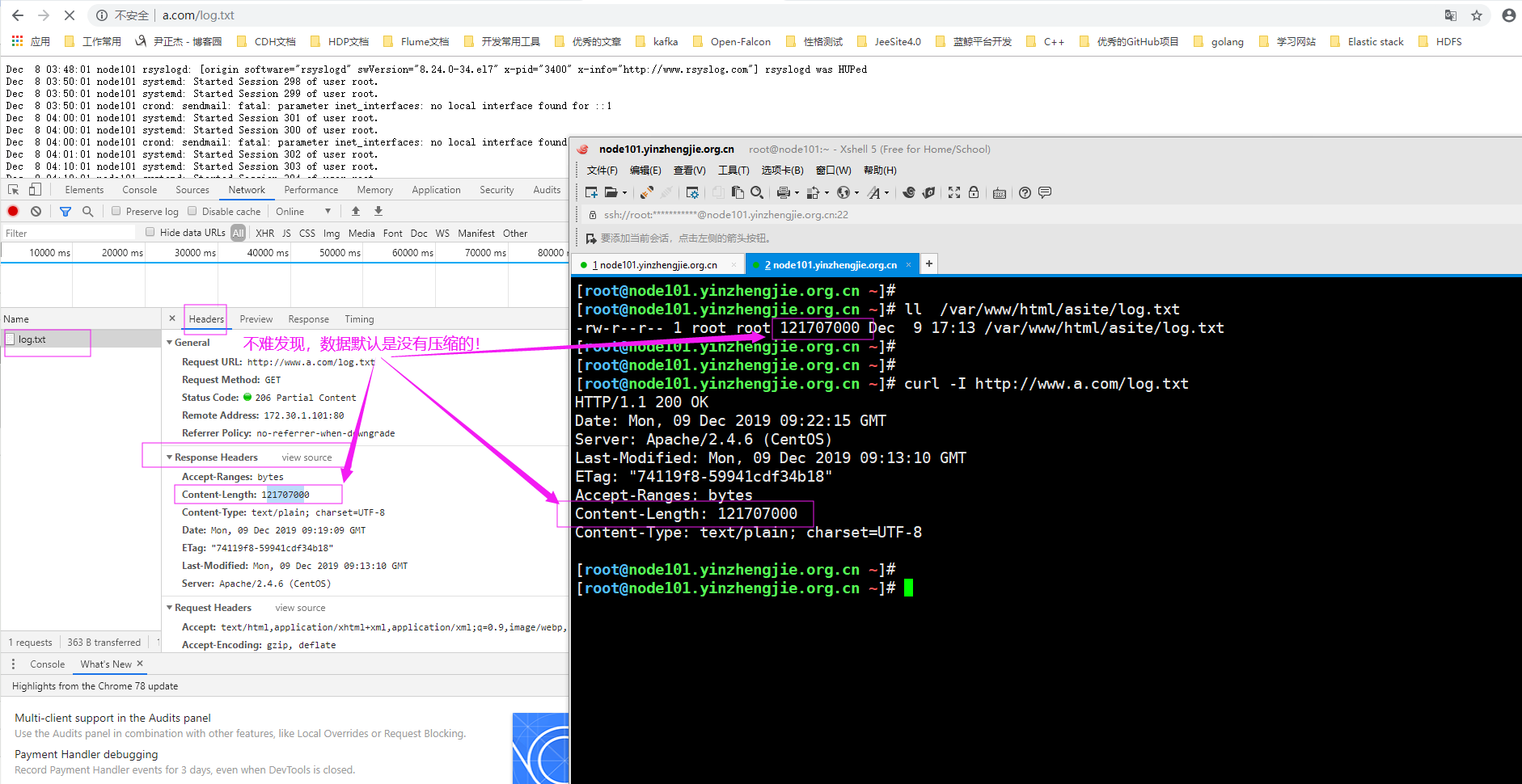
3>.验证客户端是否可以正常访问"log.txt"
三.配置虚拟主机压缩案例(生产环境中强烈推荐启用压缩功能,尤其是把大文件上传到CDN节点时,如果你不压缩文件,你就会浪费带宽,而这个带宽成本的浪费实际上是你们公司来买单!)
1>.编辑httpd服务器的配置文件
[root@node101.yinzhengjie.org.cn ~]# egrep -v "^ *#|^$" /etc/httpd/conf/httpd.conf

ServerRoot "/etc/httpd"

Listen

Include conf.modules.d/*.conf

User apache

Group apache

ServerAdmin root@localhost

<Directory />

    AllowOverride none

    Require all denied

</Directory>

DocumentRoot "/var/www/html"

<Directory "/var/www">

    AllowOverride None

    Require all granted

</Directory>

<Directory "/var/www/html">

    Options Indexes FollowSymLinks

    AllowOverride None

    Require all granted

</Directory>

<IfModule dir_module>

    DirectoryIndex index.html

</IfModule>

<Files ".ht*">

    Require all denied

</Files>

ErrorLog "logs/error_log"

LogLevel warn

<IfModule log_config_module>

    LogFormat "%h %l %u %{%Y-%m-%d %H:%M:%S}t \"%r\" %>s %b \"%{Referer}i\" \"%{User-Agent}i\"" testlog

    LogFormat "%h %l %u %t \"%r\" %>s %b" common

    <IfModule logio_module>

      LogFormat "%h %l %u %t \"%r\" %>s %b \"%{Referer}i\" \"%{User-Agent}i\" %I %O" combinedio

    </IfModule>

    CustomLog "logs/access_log" testlog

</IfModule>

<IfModule alias_module>

    ScriptAlias /cgi-bin/ "/var/www/cgi-bin/"

</IfModule>

<Directory "/var/www/cgi-bin">

    AllowOverride None

    Options None

    Require all granted

</Directory>

<IfModule mime_module>

    TypesConfig /etc/mime.types

    AddType application/x-compress .Z

    AddType application/x-gzip .gz .tgz

    AddType text/html .shtml

    AddOutputFilter INCLUDES .shtml

</IfModule>

AddDefaultCharset UTF-8

<IfModule mime_magic_module>

    MIMEMagicFile conf/magic

</IfModule>

EnableSendfile on

IncludeOptional conf.d/*.conf

[root@node101.yinzhengjie.org.cn ~]#

[root@node101.yinzhengjie.org.cn ~]#
[root@node101.yinzhengjie.org.cn ~]# egrep -v "^ *#|^$" /etc/httpd/conf/httpd.conf #查看主配置文件内容
[root@node101.yinzhengjie.org.cn ~]# egrep -v "^ *#|^$" /etc/httpd/conf/httpd.conf  | grep ServerRoot

ServerRoot "/etc/httpd"

[root@node101.yinzhengjie.org.cn ~]#

[root@node101.yinzhengjie.org.cn ~]# egrep -v "^ *#|^$" /etc/httpd/conf/httpd.conf  | grep IncludeOptional

IncludeOptional conf.d/*.conf

[root@node101.yinzhengjie.org.cn ~]#

[root@node101.yinzhengjie.org.cn ~]# cat /etc/httpd/conf.d/virtualHost.conf

<VirtualHost "*:80">

    DocumentRoot "/var/www/html/asite"

    ServerName "www.a.com"

    <Directory "/var/www/html/asite">

        Require all granted

    </Directory>

    CustomLog "/var/log/httpd/access_asite_log" testlog

    AddOutputFilterByType DEFLATE text/plain      #压缩文本文件(text),以"*.txt"结尾的文本文件,比如"log.txt"

    AddOutputFilterByType DEFLATE text/html       #压缩文本文件(text),以"*.html"结尾的超文本文件,比如"index.html"

    DeflateCompressionLevel 9

</VirtualHost>

<VirtualHost "*:80">

    DocumentRoot "/var/www/html/bsite"

    ServerName "www.b.org"

    <Directory "/var/www/html/bsite">

        Require all granted

    </Directory>

    CustomLog "/var/log/httpd/access_bsite_log" testlog

</VirtualHost>

<VirtualHost "*:80">

    DocumentRoot "/var/www/html/csite"

    ServerName "www.c.net"

    <Directory "/var/www/html/csite">

        Require all granted

    </Directory>

    CustomLog "/var/log/httpd/access_csite_log" testlog

</VirtualHost>

[root@node101.yinzhengjie.org.cn ~]#

[root@node101.yinzhengjie.org.cn ~]# httpd -t

Syntax OK

[root@node101.yinzhengjie.org.cn ~]#

[root@node101.yinzhengjie.org.cn ~]# systemctl reload httpd

[root@node101.yinzhengjie.org.cn ~]#
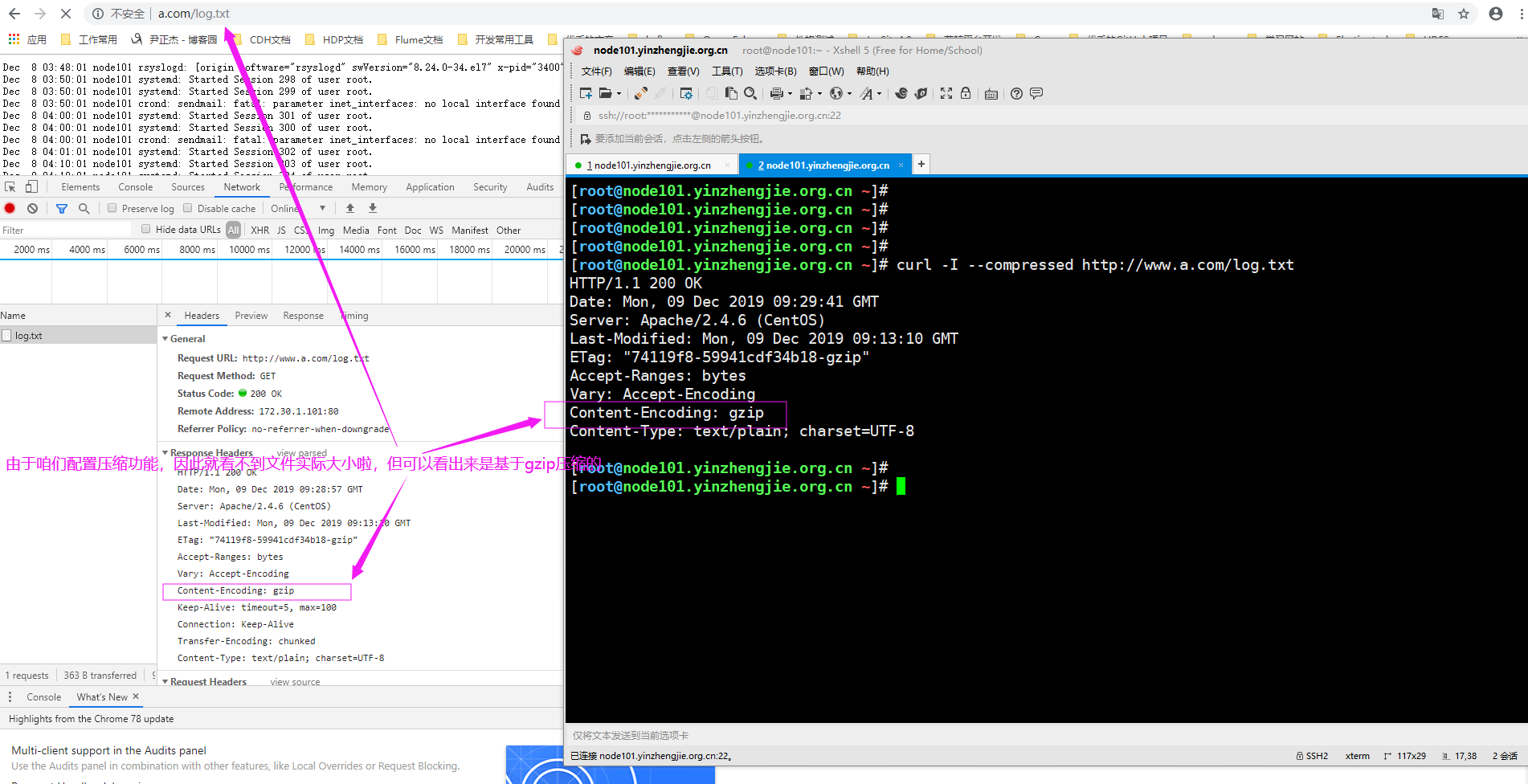
2>.验证客户端是否支持压缩了
Httpd服务入门知识-使用mod_deflate模块压缩页面优化传输速度的更多相关文章
- 使用mod_deflate模块压缩页面优化传输速度
在HTTPD主配置文件中添加如下,并确保deflate模块是启用的 #vim /etc/httpd/conf/httpd.conf SetOutputFilter DEFLATE//调用一个叫DEFL ...
- Apache使用mod_deflate模块压缩页面优化传输速度
可以写为一行,也可以写多行,默认为gzip SetOutputFilter DEFLATE # Restrict compression to these MIME types AddOutputFi ...
- Httpd服务入门知识-Httpd服务常见配置案例之MPM( Multi-Processing Module)多路处理模块
Httpd服务入门知识-Httpd服务常见配置案例之MPM( Multi-Processing Module)多路处理模块 作者:尹正杰 版权声明:原创作品,谢绝转载!否则将追究法律责任. 一.M ...
- Httpd服务入门知识-Httpd服务常见配置案例之DSO( Dynamic Shared Object)加载动态模块配置
Httpd服务入门知识-Httpd服务常见配置案例之DSO( Dynamic Shared Object)加载动态模块配置 作者:尹正杰 版权声明:原创作品,谢绝转载!否则将追究法律责任. 一.加载动 ...
- Httpd服务入门知识-Httpd服务安装
Httpd服务入门知识-Httpd服务安装 作者:尹正杰 版权声明:原创作品,谢绝转载!否则将追究法律责任. 一.Httpd概述 1>.Httpd介绍 20世纪90年代初,国家超级计算机应用中心 ...
- Httpd服务入门知识-https(http over ssl)安全配置
Httpd服务入门知识-https(http over ssl)安全配置 作者:尹正杰 版权声明:原创作品,谢绝转载!否则将追究法律责任. 一.SSL会话的简化过程 ()客户端发送可供选择的加密方式, ...
- Httpd服务入门知识-Httpd服务常见配置案例之Apache的工作做状态status页面
Httpd服务入门知识-Httpd服务常见配置案例之Apache的工作做状态status页面 作者:尹正杰 版权声明:原创作品,谢绝转载!否则将追究法律责任. 一.status功能概述 status页 ...
- Httpd服务入门知识-Httpd服务常见配置案例之实现用户家目录的http共享
Httpd服务入门知识-Httpd服务常见配置案例之实现用户家目录的http共享 作者:尹正杰 版权声明:原创作品,谢绝转载!否则将追究法律责任. 一.实现用户家目录的http共享前提 在配置家目录共 ...
- Httpd服务入门知识-Httpd服务常见配置案例之基于用户账号实现访问控制
Httpd服务入门知识-Httpd服务常见配置案例之基于用户账号实现访问控制 作者:尹正杰 版权声明:原创作品,谢绝转载!否则将追究法律责任. 一.基于用户的访问控制概述 认证质询: WWW-Auth ...
随机推荐
- TCP、UDP和HTTP区别详解
http:是用于www浏览的一个协议.tcp:是机器之间建立连接用的到的一个协议. 1.TCP/IP是个协议组,可分为三个层次:网络层.传输层和应用层.在网络层有IP协议.ICMP协议.ARP协议.R ...
- Spring AOP 代理类,BeanNameAutoProxyCreator cglib
BeanNameAutoProxyCreator支持拦截接口和类,但不支持已经被jdk代理过的类$Proxy8.使用cglib才能代理,如下 <!-- 通过bean的名字来匹配选择要代理的bea ...
- Shell脚本之一 Shell脚本简介
一.什么是shell? 我们平时所说的 Shell 可以理解为 Linux 系统提供给用户的使用界面.Shell 为用户提供了输入命令和参数并可得到命令执行结果的环境.当一个用户登录 Linux 之后 ...
- DB2 Error : SQLCODE=-802,SQLSTATE=22003 异常的原因
使用DB2时,报错为 DB2 Error : SQLCODE=-802,SQLSTATE=22003 主要原因: 是我们sql语句使用某个字段*86400后结果非常大,导致无法返回结果:因为某个字段* ...
- Linux内核kobject结构体分析
1.前言 Linux内核中有大量的驱动,而这些驱动往往具有类似的结构,根据面向对象的思想,可以将共同的部分提取为父类,而这个父类就是kobject,kobject结构体中包含了大量设备的必须信息,而三 ...
- TF-IDF算法简析
TF-IDF算法可用来提取文档的关键词,关键词在文本聚类.文本分类.文献检索.自动文摘等方面有着重要应用. 算法原理 TF:Term Frequency,词频 IDF:Inverse Document ...
- 所谓的SaaS服务到底是什么?
先从SaaS说起,SaaS是英文Soft as a Service(软件即服务)的简写.SaaS并不是指代一个行业或者一种技术,它是一种2B的专业型软件租赁使用模式. 什么是专业型软件? 就是为了解决 ...
- C语言交换两个指针所指位置的数值
交换指针变量x和y所指向的存储位置处存放的值,不需要第三个位置来存储临时变量.这种方式并没有性能上的优势. void replace(int *x, int *y) { *y = *x ^ *y; * ...
- 关于mysql的null相关查询的一些坑
我们先看一下效果,然后在解释,示例如下: mysql> create table test5 (a int not null,b int,c varchar(10)); Query OK, 0 ...
- Docker-Compose搭建单体SkyWalking 6.2
SkyWalking简介 SkyWalking是一款高效的分布式链路追踪框架,对于处理分布式的调用链路的问题定位上有很大帮助 有以下特点: 性能好 针对单实例5000tps的应用,在全量采集的情况下, ...