
android widgets控件
1.TextView
类似,C#里的lable,显示一段文本
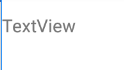
<TextView

        android:id="@+id/textView2"

        android:layout_width="wrap_content"

        android:layout_height="wrap_content"

        android:layout_weight="1"

        android:text="TextView" />
2.Button
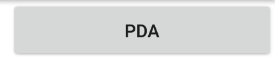
    <Button

        android:text="PDA"

        android:layout_width="wrap_content"

        android:layout_height="wrap_content"

        android:id="@+id/buttonPDA"

        android:layout_weight="1"

        />
3.ToggleButton
点击按钮 OFF ON切换
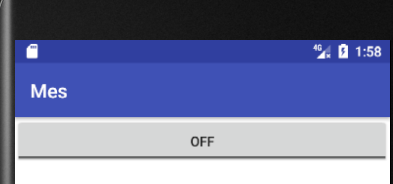
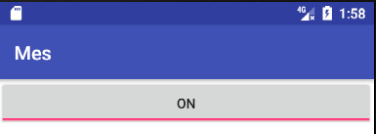
    <ToggleButton

        android:id="@+id/toggleButton"

        android:layout_width="wrap_content"

        android:layout_height="wrap_content"

        android:layout_weight="1"

        android:text="ToggleButton" />
4.CheckBox
复选框

    <CheckBox

        android:id="@+id/checkBox2"

        android:layout_width="wrap_content"

        android:layout_height="wrap_content"

        android:layout_weight="1"

        android:text="CheckBox" />
5.RadioButton
单选框
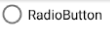
    <RadioButton

        android:id="@+id/radioButton2"

        android:layout_width="wrap_content"

        android:layout_height="wrap_content"

        android:layout_weight="1"

        android:text="RadioButton" />
6.CheckedTextView


    <CheckedTextView

    android:id="@+id/checkedTextView3"

    android:layout_width="wrap_content"

    android:layout_height="wrap_content"

    android:layout_weight="1"

    android:text="多选风格"

    android:checkMark="?android:attr/listChoiceIndicatorMultiple"

    />

    <CheckedTextView

        android:id="@+id/checkedTextView4"

        android:layout_width="wrap_content"

        android:layout_height="wrap_content"

        android:layout_weight="1"

        android:text="单选风格"

        android:checkMark="?android:attr/listChoiceIndicatorSingle"

        />
7.Spinner
下拉框
    <Spinner

        android:id="@+id/spinner"

        android:layout_width="match_parent"

        android:layout_height="wrap_content"

        android:layout_weight="1" />
8.ProgressBar
弧形进度条1

   <ProgressBar

        android:id="@+id/progressBar"

        style="?android:attr/progressBarStyle"

        android:layout_width="wrap_content"

        android:layout_height="wrap_content"

        android:layout_weight="1" />
线型进度条2

   <ProgressBar

        android:id="@+id/progressBar3"

        style="?android:attr/progressBarStyleHorizontal"

        android:layout_width="wrap_content"

        android:layout_height="wrap_content"

        android:layout_weight="1" />
9.SeekBar
滑动调节1

<SeekBar

    android:id="@+id/seekBar"

    android:layout_width="wrap_content"

    android:layout_height="wrap_content"

    android:layout_weight="1" />

滑动调节2
<SeekBar

    android:id="@+id/seekBar2"

    style="@style/Widget.AppCompat.SeekBar.Discrete"

    android:layout_width="wrap_content"

    android:layout_height="wrap_content"

    android:layout_weight="1"

    android:max="10"

    android:progress="3" />
10.QuickContactBadge
联系人
11.RatingBar
打分

    <RatingBar

        android:id="@+id/ratingBar"

        android:layout_width="wrap_content"

        android:layout_height="wrap_content"

        android:layout_weight="1" />
12.Switch
滑动开关

    <Switch

        android:id="@+id/switch1"

        android:layout_width="wrap_content"

        android:layout_height="wrap_content"

        android:layout_weight="1"

        android:text="Switch" />
13.Space
android widgets控件的更多相关文章
- Android 开源控件与常用开发框架开发工具类
Android的加载动画AVLoadingIndicatorView 项目地址: https://github.com/81813780/AVLoadingIndicatorView 首先,在 bui ...
- android 基础控件(EditView、SeekBar等)的属性及使用方法
android提供了大量的UI控件,本文将介绍TextView.ImageView.Button.EditView.ProgressBar.SeekBar.ScrollView.WebView ...
- Android基本控件之Menus
在我们的手机中有很多样式的菜单,比如:我们的短信界面,每条短信,我们长按都会出现一个菜单,还有很多的种类.那么现在,我们就来详细的讨论一下安卓中的菜单 Android的控件中就有这么一个,叫做Menu ...
- Android:控件布局(相对布局)RelativeLayout
RelativeLayout是相对布局控件:以控件之间相对位置或相对父容器位置进行排列. 相对布局常用属性: 子类控件相对子类控件:值是另外一个控件的id android:layout_above-- ...
- Android:控件布局(线性布局)LinearLayout
LinearLayout是线性布局控件:要么横向排布,要么竖向排布 决定性属性:必须有的! android:orientation:vertical (垂直方向) .horizontal(水平方向) ...
- 矩阵, 矩阵 , Android基础控件之ImageView
天下文章大家抄,以下所有内容,有来自copy,有来自查询,亦有自己的总结(目的是总结出自己的东西),所以说原创,不合适,说是转载也不恰当,所以我称之为笔记,可惜没有此分类选项,姑且不要脸一点,选择为原 ...
- Android给控件添加触摸回调
Android给控件添加触摸回调 脑补一个场景,一个页面点击某个按钮会弹出PopupWindow,然后点击PopupWindow以外的任意位置关闭 效果图 实现方法 可以在布局的最外层容器监听触摸事件 ...
- Android 基本控件相关知识整理
Android应用开发的一项重要内容就是界面开发.对于用户来说,不管APP包含的逻辑多么复杂,功能多么强大,如果没有提供友好的图形交互界面,将很难吸引最终用户.作为一个程序员如何才能开发出友好的图形界 ...
- Github上star数超1000的Android列表控件
Android开发中,列表估计是最最常使用到的控件之一了.列表相关的交互如下拉刷新,上拉更多,滑动菜单,拖动排序,滑动菜单,sticky header分组,FAB等等都是十分常见的体验.Github中 ...
随机推荐
- Linux文件的IO操作 一
系统调用 系统调用: 操作系统提供给用户程序调用的一组“特殊”接口,用户程序可以通过这组“特殊”接口来获得操作系统内核提供的服务 为什么用户程序不能直接访问系统内核提供的服务 为了更好地保护内核空间, ...
- 什么是二维数组?二维遍历?Java二维数组制作图片迷宫 使用如鹏游戏引擎制作窗口界面 附带压缩包下载,解压后双击start.bat启动
什么是二维数组? 数组当中放的还是数组 int [][] arr=new int[3][2]; 有3个小箱子,每个箱子2个格子. 看结果? int [][] arr=new int[3][2]; Sy ...
- iOS dateformatter设置GMT格式时间--iOS开发系列---项目中成长的知识四
今天在项目中开始接手客户端的签名这个模块,签名这个会在项目结束过后再单独写一下自己的心得! 今天讲讲在签名的过程中我们需要向服务器传送一个Date值,格式要求是格林威治时间,也就是GMT时间! 格式要 ...
- [SDOi2012]Longge的问题 (数论)
Luogu2303 [SDOi2012]Longge的问题 题目 题目背景 SDOi2012 题目描述 Longge的数学成绩非常好,并且他非常乐于挑战高难度的数学问题.现在问题来了:给定一个整数N, ...
- HDU-1312-Black and Red
这题其实和POJ的1979是同一道题,当时POJ使用cin写的,所以读入的时候,就很正确. 这次用scanf读入的时候,就出现了问题,我们在读完宽高之后,要用getchar吸收掉回车,然后每行末尾的回 ...
- (51)zabbix命令:zabbix_get获取item数据
zabbix_get是什么?有什么作用? 总有人在群里提问,为什么zabbix获取不到数据,为什么zabbix提示Not Support,怎么办?别老问,用zabbix_get试着获取数据即可.在za ...
- centos7系统root无法通过su切换到某个普通用户
[root@test ~]# su webappsu: failed to execute /bin/bash: Resource temporarily unavailable [root@test ...
- Ubuntu中安装配置 JDK与apache
一,前期准备: 1.下载apach网址:https://tomcat.apache.org/download-90.cgi 3.下载:jdk网址:http://www.oracle.com/techn ...
- 关于Python解释器
由于Python语言从规范到解释器都是开源的,所以理论上任何人都可以编写Python解释器来执行Python代码 目前存在以下几种主流的Python解释器 CPython CPython是官方版本的解 ...
- Day16模块
Day16 当做执行文件时 __name__ = "__main__" 当做模块被导入时 __name__ 等于文件名即模块名 ```python 循环导入(模块的名称空间已经建立 ...