
Linux下安装Redis5.0.2
1、下载redis 地址 http://download.redis.io/releases/redis-5.0.2.tar.gz
2、解压tar -zxf redis-5.0.2.tar.gz
3、make编译
3.1 缺少gcc环境需要yum install gcc
3.2 报错:
[root@lang redis-5.0.2]# make
cd src && make all
make[1]: Entering directory `/usr/local/redis-4.0.10/src'
CC adlist.o
In file included from adlist.c:34:
zmalloc.h:50:31: error: jemalloc/jemalloc.h: No such file or directory
zmalloc.h:55:2: error: #error "Newer version of jemalloc required"
make[1]: *** [adlist.o] Error 1
make[1]: Leaving directory `/usr/local/redis-4.0.10/src'
make: *** [all] Error 2
redis解压目录下有个README.md文件中有如下一段话:
Selecting a non-default memory allocator when building Redis is done by setting the `MALLOC` environment variable. Redis is compiled and linked against libc malloc by default, with the exception of jemalloc being the default on Linux systems. This default was picked because jemalloc has proven to have fewer fragmentation problems than libc malloc.
To force compiling against libc malloc, use:
% make MALLOC=libc
To compile against jemalloc on Mac OS X systems, use:
% make MALLOC=jemalloc
4、编译加上MALLOC=libc 即可
#make MALLOC=libc
5、运行redis
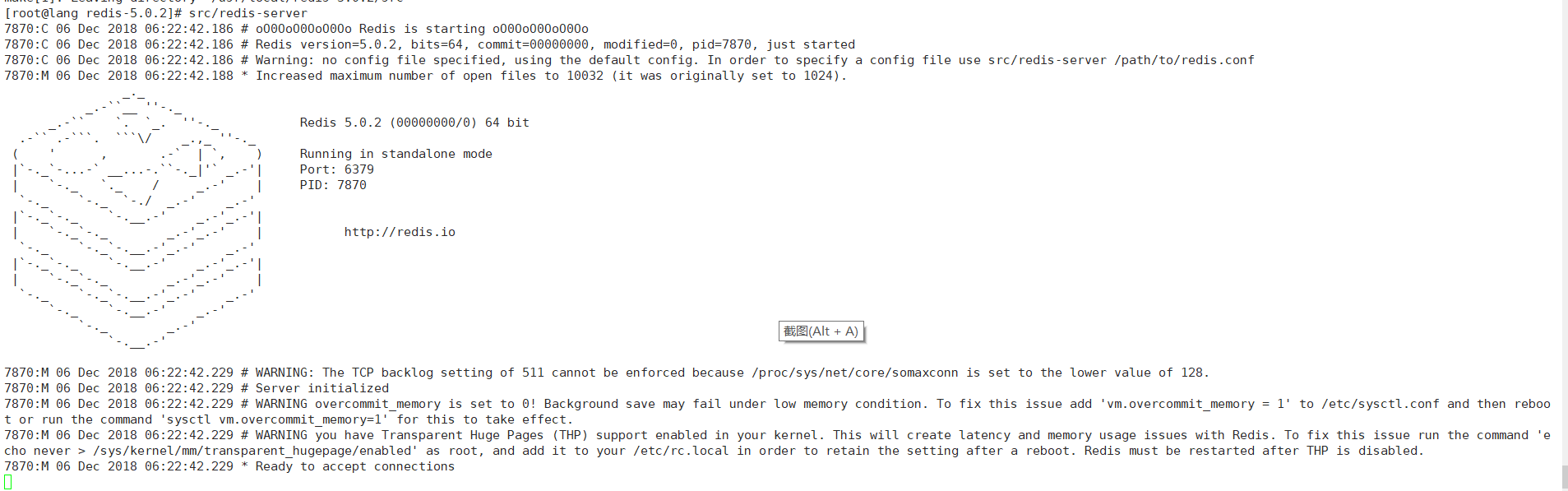
修改配置文件 redis.conf
daemonize no 改为 yes 后台运行:
protected-mode yes 改为no 可以不用输入密码登陆
bind 127.0.0.1 表示只可以本机访问,要是远程访问需要注释掉(前面加#号)
6、带配置文件后台启动
[root@lang redis-5.0.2]# src/redis-server redis.conf
7897:C 06 Dec 2018 06:25:57.484 # oO0OoO0OoO0Oo Redis is starting oO0OoO0OoO0Oo
7897:C 06 Dec 2018 06:25:57.484 # Redis version=5.0.2, bits=64, commit=00000000, modified=0, pid=7897, just started
7897:C 06 Dec 2018 06:25:57.484 # Configuration loaded
[root@lang redis-5.0.2]# ps -ef | grep redis
root 7898 1 4 06:25 ? 00:00:00 src/redis-server *:6379
root 7903 2880 0 06:25 pts/1 00:00:00 grep redis
[root@lang redis-5.0.2]#
Linux下安装Redis5.0.2的更多相关文章
- Linux 下安装 redis5.0
1.redis 安装 wget http://download.redis.io/rele... tar -zxvf redis-5.0.5.tar.gz cd redis-5.0.5.tar.gz ...
- CentOS7.6下安装Redis5.0.7
此次安装是在CentOS7下安装Redis5.0.7 一.首先准备Redis安装包 这里下载的是 redis-5.0.7.tar.gz 安装包,并将其直接放在了 root ⽬录下 压缩包下载地址:ht ...
- linux下安装opencv3.0
查版本gcc --version 需>4.8python 2.7+cmake --version numpy 以上是必须的 linux下安装opencv3.0<pre>https:/ ...
- Linux下安装3.0以上的python
Linux下自带的python2.7是不建议删除的,很多系统软件依赖python2.7,但是现在我们学习python一般需要python3.0,下面介绍安装python3.0. 1.进入python官 ...
- CentOS7下安装Redis5.0.2
1.下载redis 地址 http://download.redis.io/releases/redis-5.0.2.tar.gz 2.解压tar -zxf redis-5.0.2.tar.gz 3. ...
- Centos7.4下安装Redis5.0
一.下载Redis Redis下载地址:https://redis.io/download 二.安装依赖包 安装Redis之前需要安装c++命令 yum install gcc-c++ 三.上传并解压 ...
- Linux下安装Julia1.0.0
MIT正式发布编程语言Julia 1.0:Python.R.C++三合一! 由于官方文档提示中安装的不是最新的Julia版本,官方的0.7版本安装方法为: ...
- Linux下安装redis-4.0.10
1.下载redis-4.0.10 在redis官网(https://redis.io/download)下载redis-4.0.10 2.将安装包上传至Linux服务器 在Linux服务器根目录下创建 ...
- linux下安装mysql8.0.x步骤
1.下载mysql mysql官网:https://dev.mysql.com/downloads/mysql/ 将下载的mysql上传打linux 2.解压并重命名 [root@rsyncClien ...
随机推荐
- 一起学Android之Activity
概述 本文以一个简单的小例子,简述Android开发中Activity的相关知识,仅供学习分享使用. 什么是Activity? Activity是一个应用程序组件,通常显示为一个页面,用户可以通过Ac ...
- 一类 O(1) 算法的总结
这里要注意一下, 一部分 O(1) 算法是需要 \(O(n)\) 或者 \(O(\sqrt n)\) 预处理的... 1. O(1) 求 1~n 的异或和: inline int calc(R int ...
- the little schemer 笔记(10.1)
This work is licensed under a Creative Commons Attribution-NonCommercial-ShareAlike 2.5 China Mainla ...
- python之商品操作小程序
要求:写一个添加商品的程序,商品信息写入txt文件中,以二维字典形式比如:{‘小米’:{‘价格’:‘1999元’,‘数量’:10}} 1.添加商品 #商品名称 #价格 #数量 2.查看商品 3.删除商 ...
- 转 Oracle最新PSU大搜罗
Quick Reference to Patch Numbers for Database/GI PSU, SPU(CPU), Bundle Patches and Patchsets (文档 ID ...
- 使用callabestatement接口调用存储过程
- java容器章节总结
- CF989C A Mist of Florescence
思路: 有趣的构造题. 实现: #include <bits/stdc++.h> using namespace std; ][]; void fillin(int x, int y, c ...
- placeholder字体样式及兼容
样式修改css::-webkit-input-placeholder { /* WebKit browsers */ color: #fff!important;}:-moz-placeholder ...
- RHEL5.8上SAMBA源码修改打包安装流程
之前一直使用系统自带的SAMBA,近期需要对SAMBA代码做一些修改,然后还是打算用RPM包的方式来安装部署. 这个流程本身不复杂,在这里记录下来,免得在另外写说明文档. 关键词:RHEL5.8, s ...